Reflections on life at “De Witte Wand”…

  • What Lies Beneath

    As you may be aware, I’m not very happy with the current version of Windows Live Photo Gallery at the moment. I believe strongly that it has problems that desperately need to be fixed.

    There are other, less pressing, issues with WLPG 2011 as well. These include the fact that slideshow quality is degraded in comparison to earlier versions. Another is the fact that people are finding that their workflow performance has taken a nose-dive since upgrading to WLPG 2011.

    However, apart from all that, there are other things that niggle. These days most people are unaware of how much of their identity is available online. That almost certainly includes me, even though I think I’m being careful. Thus, here’s another example from WLPG 2011. It has automatic face recognition in it. People are probably happily tagging (identifying) their friends in photos using WLPG 2011, which in turn is squirreling away metadata containing this information into the photos. If these photos are subsequently uploaded to online sites where they can be viewed by anyone, then this metadata is often equally available to all.

    And what is this metadata? Well, it is at minimum, the names of the people in the photos. But if those people are also known to you as email contacts, or have a Windows Live identity, then this information is also included as metadata in the uploaded photos. True, the metadata will not spell out their email addresses for all to see – they are at least encrypted. However, after reading this comment, (from a Microsoft employee) I do wonder about the Windows Live ID:

    PersonLiveCID is the unique ID generated for everyone with a Windows Live ID, it might be possible to use this and I’ll be playing with some of the Azure Services sometime to see if you can resolve this to a contact. That could create some very interesting possibilities.

    That would be “interesting” in the Chinese sense, I think.

    10 responses to “What Lies Beneath”

    1. technogran1 Avatar

      A very interesting post Geoff. However, how does the ‘ordinary user’ access all of this ‘meta data’ that you are so concerned about which is available via a photo? I have certainly not seen it myself. And how does Picasa compare in this included meta data? Does it warrant the same caution? I will obviously give feeback to the Photo Gallery team about all of this as it concerns me as well seeing as I am a big user.

    2. Geoff Coupe Avatar

      Hi TG – I’ve just finished writing a reply to your similar question over at your blog 🙂 See: http://technograns.wordpress.com/2010/11/10/windows-live-essentials-2011-live-photo-gallery/

      If you want to see what metadata is included in any of your photos, then you can use utilities such as ExifToolGUI (http://u88.n24.queensu.ca/exiftool/forum/index.php/board,7.0.html) or Geosetter (http://www.geosetter.de/en/). Geosetter is really good, and free, although donations are welcome.

      1. technogran1 Avatar

        So in other words you have to use an external program or another program to see all of this meta data that you are so concerned about. Most users (me included) would not know anything about this, nor be interested in obtaining it either. I am far more concerned Geoff with sites such as Facebook and what they do to my credentials such as sharing all of my info (including that of my friends) with third party applications etc.

        1. Geoff Coupe Avatar

          TG, you say it yourself: “I am far more concerned with sites such as Facebook and what they do to my credentials such as sharing all of my info (including that of my friends) with third party applications etc.” Your info includes the metadata in your photos…

        2. JL Avatar

          It’s not actually rocket science. “Metadata” that seems such a big mysterious word, I suppose, can be read by Picasa, XnView and even Windows Explorer with little to no effort, just to mention a few.

    3. technogran1 Avatar

      Which sort of explains why I don’t put my photos on Facebook!

      1. Geoff Coupe Avatar

        …But you do put them on Flickr!

    4. technogran1 Avatar

      Yes Geoff but flickr doesn’t employ outside applications that it shares any of my details with does it? And Facebook doesn’t use flickr.

      1. JL Avatar

        TechnoGran #1, this is the Internet. The whole darn thing is the Internet. You can’t isolate yourself and the info you put out here into a little box and then close your eyes.

        1. JL Avatar

          P.S. It works like this: any data embedded in your photos, regardless of where you upload your photos to, is in your photos. If I was interested, all I’d have to do is download your photos to my computer and all your metadata is mine to see. Your GPS, your names, your addresses, whatever’s in there. Your photos, anyone’s photos.

    Leave a comment

  • Metadata Myths or Misconceptions

    David Riecks, over at the Controlled Vocabulary web site has put together a list of the top twelve myths of embedded photo metadata. Well worth checking out if you’re a keen photographer interested in learning more about just what else lurks inside your digital photos besides the images themselves…

    Leave a comment

  • “Treating People Like Pigeons Really Does Work”

    Adam Curtis has another fascinating blog entry. This time he takes as his cue the Behavioural Insights Unit recently set up by David Cameron to advise the UK Government. Curtis argues that this unit is built on the Operant Conditioning ideas of B. F. Skinner.

    It makes for fascinating, and somewhat unsettling, reading. Do check out the videoclips that Curtis includes, particularly the one of the two market researchers and the final comment from Lewis Mumford.

    Leave a comment

  • A Taxonomy of European Birds

    Looking through my photo collection, I see that I have taken over 1,300 photos that have a bird or birds as the subject. Up until now, I’ve catalogued these in a rather haphazard fashion, that’s to say that as I’ve photographed a new bird (for example a Green Woodpecker), I’ve added its common name to the list of keywords in my catalogue. As the list has grown, I’ve also tried to group the bird species a bit e.g. put the birds of prey together, or waterbirds together. So I’ve ended up with a rather messy taxonomy of birds.

    Then, a few days ago, I noticed that someone had posted a message in the Controlled Vocabulary group to say that he’d put together a list of keywords for Adobe’s Lightroom that followed the taxonomy of the list of Western Paleartic Birds produced by the Association of European Records and Rarities Committees, the AERC. As an aside, I note that whoever is responsible for the AERC web site needs to fix the missing or broken links that pepper it.

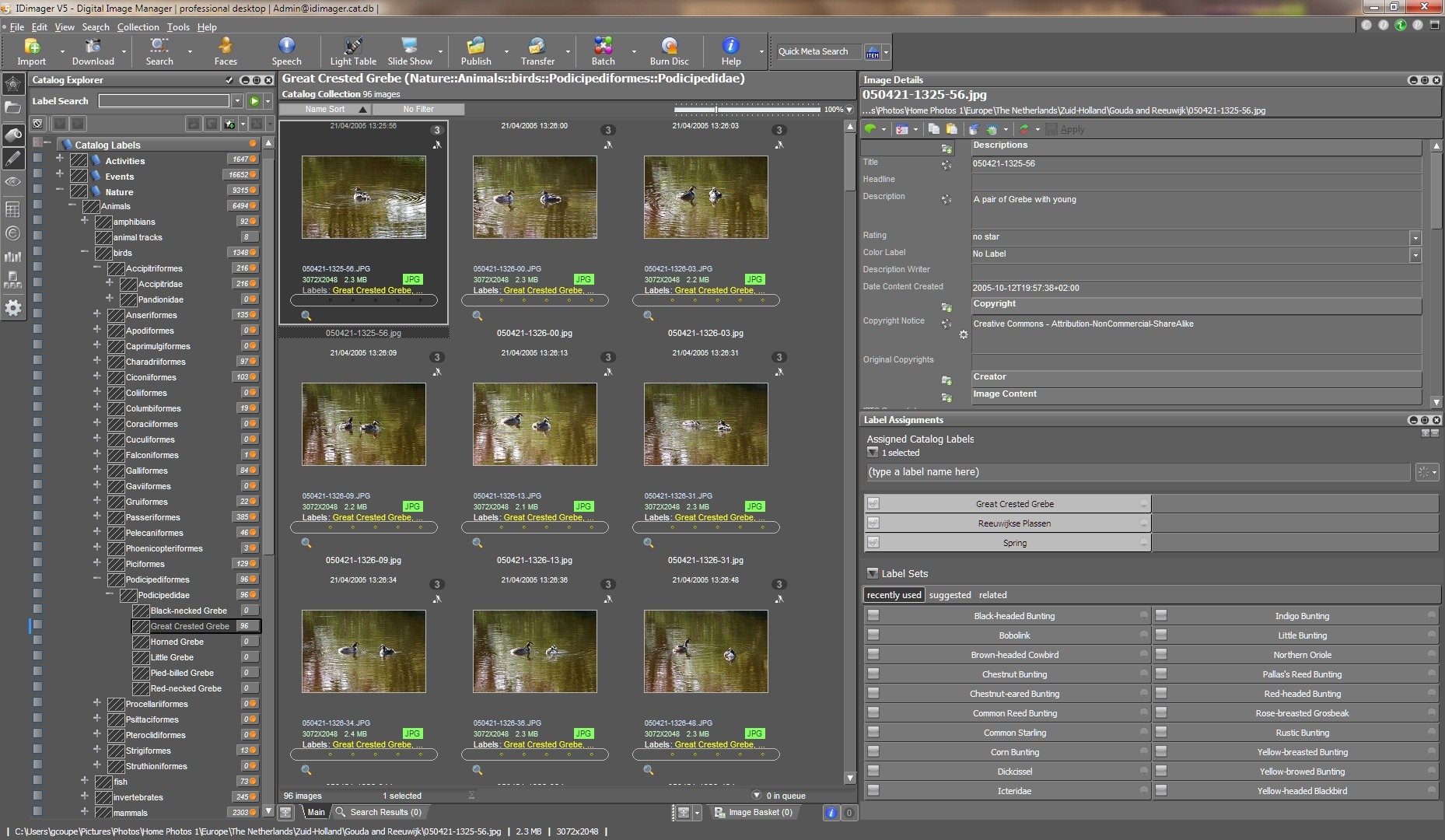
    Anyway, Rudi Theunis made his keywords list available to the members of the Controlled Vocabulary group, and I grabbed a copy to see if I could use it with IDimager, the program that I use to catalogue my photos. (Note: IDimager is no longer available. Its successor is Photo Supreme, which I am now using) It turns out that IDimager can easily import Lightroom keyword lists with one click, so I’ve now got a complete taxonomy of European Birds set up, with both common names and the scientific names as synonyms. See the following screenshot showing a partial view of the taxonomy (click on the image to see the full size screenshot in a new window).

    ID Birds Catalog

    I spent a few hours re-cataloguing my bird photos, and now they are all nicely fitted into the new taxonomy, thanks to Mr. Theunis.

    One response to “A Taxonomy of European Birds”

    Leave a comment

  • The Alternative Masterchef Final

    I rather like watching the Masterchef programmes on the BBC. The series for professional chefs has just ended. I rather like this spoof version of the finale:

    Hat tip to Andy Hayler for the link.

    Leave a comment

  • “The Story of Us, Then”

    BBC Two is currently running a series of programmes on History. Last night kicked off with the first episode of a series called Ancient Worlds, fronted by historian and archaeologist Richard Miles. I thought it was very good. Here’s a Guardian article about Miles and the programme.

    I was struck by Miles’ statement in the programme that this was not a story of long-dead civilisations, but that this was “the story of us, then” – his point being that despite living 6,000 years ago, the people were recognisably just like us. He illustrated this by reading a letter (incised on a clay tablet) from a merchant’s wife to her husband, who was working away from home in a city. She was bemoaning the fact that he never sent her enough money to cover her expenses in running the house, and their neighbour had just had a new house built for his wife; why wouldn’t he do that for her?

    As I’ve mentioned before, our operating system is still at Homo sapiens version 1.0, despite our strides in technology, so Miles has a point, I believe.

    In watching the programme and listening to Miles, I was also reminded of the atmosphere of Samuel R. Delany’s Return to Nevèrÿon series of books. Tales that seem to be set in an ancient civilisation (or possibly in the far future, where much of technology has been once again lost), yet which deal with human themes immediately recognisable to us today. I must reread them again.

    4 responses to ““The Story of Us, Then””

    1. technogran Avatar

      I’ll make a point of watching this program Geoff. Is it a series? If so I will set my recorder to record it. I always enjoy watching programs about our history. I find them fascinating despite the fact that when I was at school I wasn’t particularly interested in history at all.

    2. Geoff Coupe Avatar

      Hi, TG, yes, it is a series – there are six episodes in all. See http://www.bbc.co.uk/programmes/b00w0bl0

      I think the first episode is being repeated tonight at midnight on BBC HD, or (since you live in the UK), you can catch it on iPlayer…

    3. technogran1 Avatar

      No Geoff, I’ll record it on BBC HD. I have it on my 3View HD personal video recorder. Thanks for the heads up. Will set it up as a series link.

    4. […] “The Story of Us, Then” November 2010 3 comments and 1 Like on WordPress.com, 4 […]

    Leave a comment

  • The Answer Is No

    There’s an article in today’s Observer that asks: Has Strictly made a national treasure of Ann Widdecombe?

    For those of you unfamiliar with both British politics and the BBC TV entertainment show Strictly Come Dancing, I should perhaps point out that Ms. Widdecombe is a former British politician of the Conservative stripe, and Strictly is an entertainment program that partners professional dancers with “celebrities”.

    I confess that I have found it strange to understand the adulation heaped upon Ms. Widdicombe in the program. She clearly has no talent for dancing whatsoever. And while the British might like rooting for the underdog, I cannot let the memory of her politics go. Her views I find simply abhorrent.

    It’s rather as though I was watching a Geert Wilders or a Tariq Ramadan pirouetting in a celebrity dance contest. Forget what they have done and what they represent? Become blinded by the sequins and the feel-good factor? Nope, I don’t think so.

    Leave a comment

  • More Problems With Windows Live Photo Gallery 2011

    Yes, I know that I’ve said before that Windows Live Photo Gallery 2011 is a disaster, but more problems caused by using it just keep crawling out of the woodwork.

    The first problem I stumbled across was that if you are a photographer who uses IPTC metadata to record information about where your photos were taken, then WLPG 2011 will write false GPS data into your photos without telling you that it is doing so.

    I, and others, have reported this issue to Microsoft, and I understand that they are looking into ways of correcting it. Meanwhile, I’ve become aware of another issue with WLPG 2011. It also screws up the Exif section of the metadata in images.

    While trying to scrub my images clean of the false GPS data inserted by WLPG 2011, I noticed ExifTool was reporting that many of my images had problems with their Exif metadata. Often it was a simple warning that the Makernotes in the Exif section have been damaged. This is a warning from ExifTool that another utility has written to the Exif section and damaged the structure in some way.

    In many cases, however, ExifTool is reporting that more serious damage has occurred and some of the data written into the original Exif section by the camera that took the image has been corrupted.

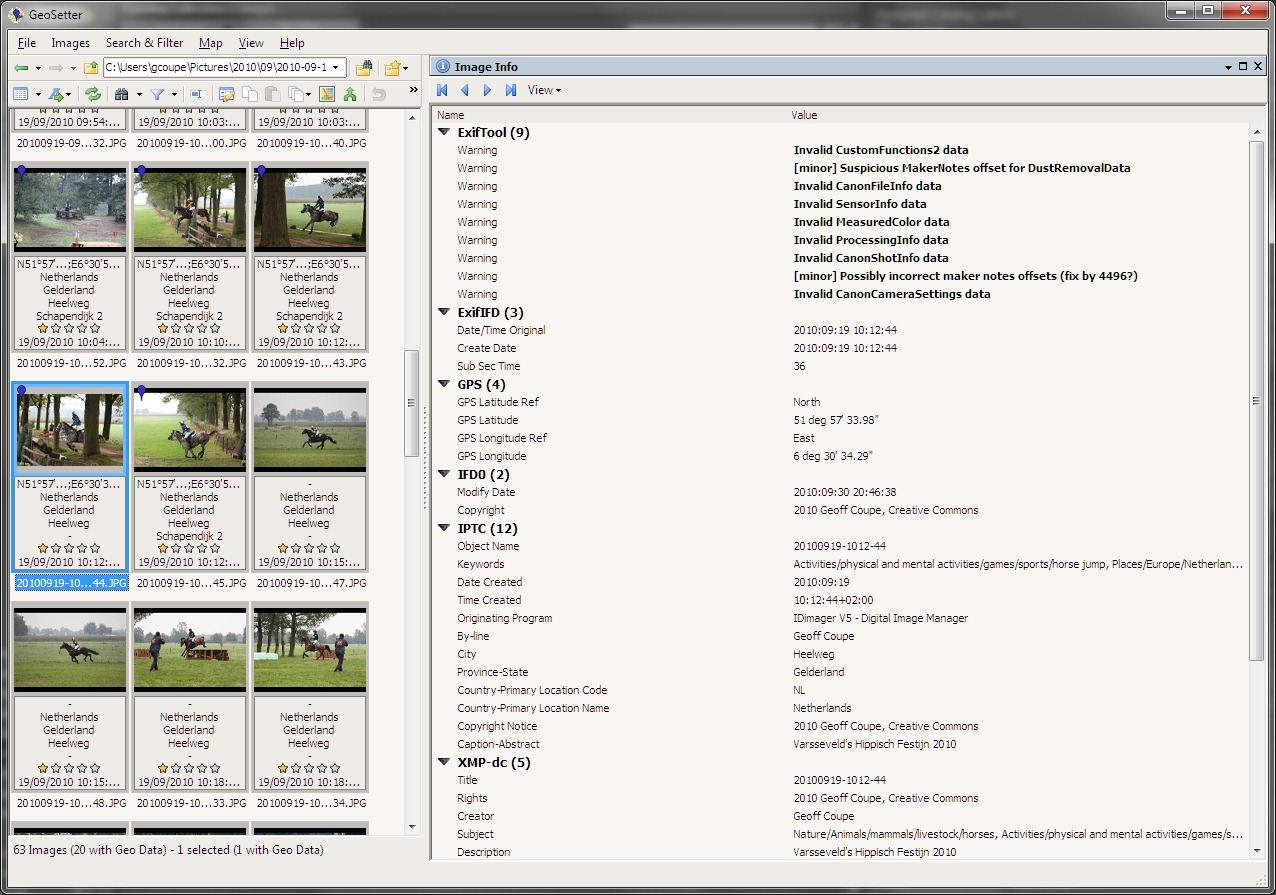
    Here’s a screenshot that shows an example of an image exhibiting both types of issue (warnings and corruption). The screenshot is of Geosetter, and the highlighted image shows errors being reported by ExifTool (Geosetter uses ExifTool under the covers to do all the heavy lifting). Click on the image to open it full sized in a new window.

    Exif errors 1

    You’ll notice that the thumbnail, and some of the others, have a dark blue marker pin in the top left corner. That indicates that the image contains GPS information. But the interesting thing is that, for that particular image, I did not supply GPS data; WLPG 2011 has inserted it by itself.

    Now here’s a screenshot of one of the other thumbnails that Geosetter is indicating have GPS information. For these thumbnails, I explicitly inserted GPS information myself, in other words, WLPG 2011 has not had cause to write anything out to the files. Notice that for this thumbnail, ExifTool is not reporting any errors or warnings. That’s the case for all the images where I have explicitly added GPS information.

    Exif errors 2

    By the way, even though these two shots were taken at the same place, the GPS inserted (without my knowledge) by WLPG 2011 is wrong, and is located 500 metres distant.

    I’m now going back through my images, and as far as I can see, all those which are being reported by ExifTool as having problems with their Exif metadata are ones that have had GPS information inserted by WLPG 2011.

    The really irritating thing about this discovery is that WLPG has a track record of not dealing correctly with Exif metadata. Previous versions of WLPG have been reported as corrupting the Makernotes (data written by the camera manufacturer) in Exif.

    It would appear that nothing has been done with WLPG 2011 to address this issue. So not only does it insert gratuitous, and false, GPS data into your images, it will also screw up their Exif metadata.

    I repeat, this is a disaster.

    24 Hours Later

    So, I’ve been looking into this a bit more, but the more I look, the more I think: OMFG. The damage that has been done appears to be quite extensive, and will take some time to repair.

    Today, for example, I decided to examine just one folder of photos and compare the contents with the contents of the same folder as it was in a backup taken on the 1st June 2010 – a date chosen because it was before any of the betas of WLPG 2011 had been released to the public. On that date, I would have had the previous version of WLPG installed and running. The first beta of WLPG 2011 wasn’t available to the public until the 24th June.

    I looked for a folder that had photos containing entries in the IPTC Extension “Location Created” metadata fields. These fields are used by WLPG 2011 to store textual information for a location (e.g. the street address, city, state and country) in the image files. I don’t use these fields; I use the older IPTC Core “Location” fields for this purpose. So if I find an image file that contains IPTC Extension “Location Created” metadata, then I know it has been touched by WLPG 2011.

    I chose a folder containing 24 photos that had been taken back in 2007, and which had IPTC Extension metadata present. I then got the same folder from the 1st June backup to compare the two side by side.

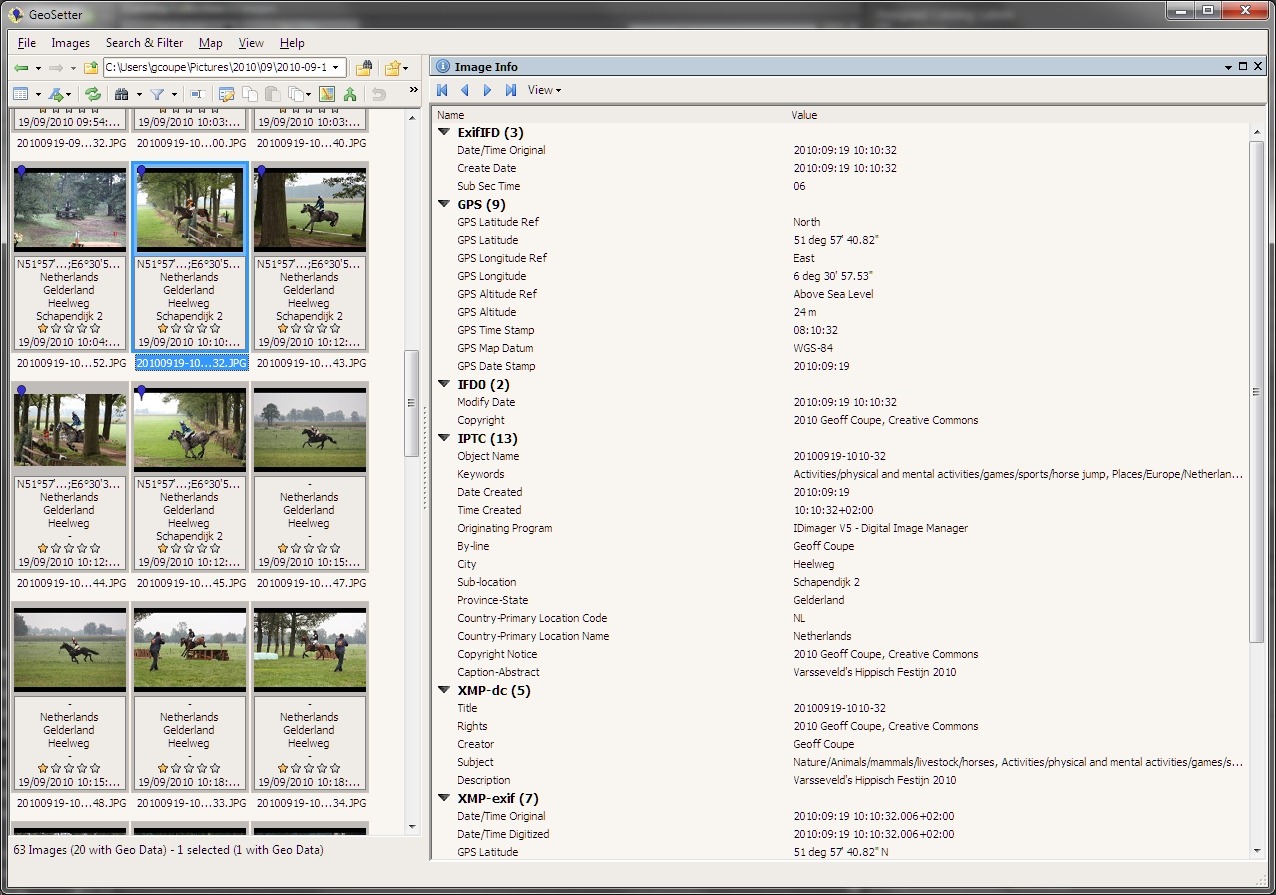
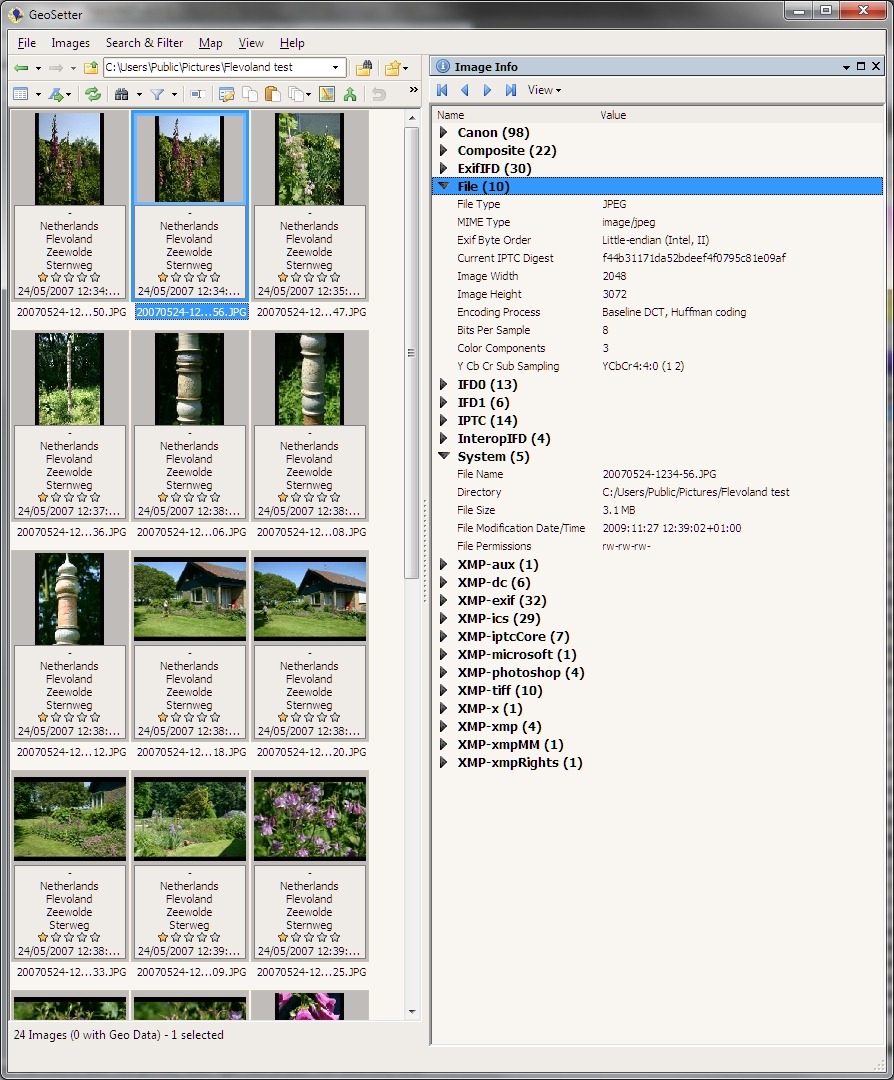
    Here’s a screenshot of the folder, as it was on the 1st June, being displayed in Geosetter, with the metadata of the selected photo being shown (click on the screenshot to see it full-size in a new window):

    Exif errors 7

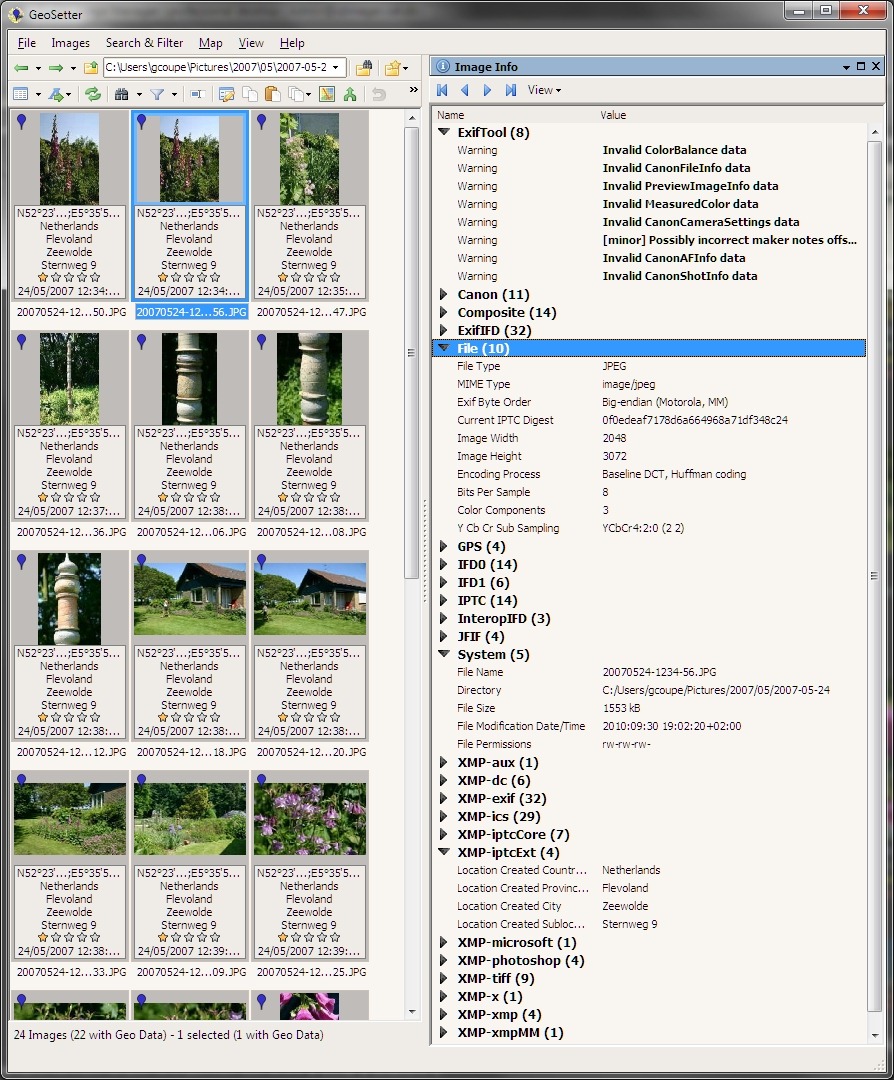
    Now here’s a screenshot of the same folder as it currently exists in my computer. The same image file has been selected to show its image metadata:

    Exif errors 6

    I’ve expanded some of the more interesting metadata sections. As you can see, the metadata has changed substantially. Let me list the ways:

    1. ExifTool is now listing a warning about a possibly incorrect Maker notes offset, together with three warnings about invalid camera data in the Exif section.
    2. While the original (backup) file had 98 elements of camera maker data in Exif, the current file has now only 11 left.
    3. The current file now has GPS metadata present in the Exif. This has been inserted by WLPG 2011, not by me. You will note from the other thumbnails in the second screenshot, that all the other files are also showing that they now have GPS data in them. None of the original files had GPS data. By the way, the GPS data is also incorrect by 300 metres.
    4. The original file had its Exif byte order in little-endian fashion; in the current file it is big-endian. According to the guidelines of the Metadata Working Group (of which Microsoft is a founding member), the “endianness” should be preserved, not reversed.
    5. The original file had a filesize of 3.1 MB; the current file has shrunk to a mere 1,553 KB.
    6. The current file now contains a JFIF block, which is not present in the original file. It also has changed YCbCr values, possibly as a result of this.
    7. The current file now contains an IPTC Extension metadata section, which lists textual information for the “Location Created”. This section is not present in the original file.
    8. The original file is showing that it was last modified on the 27th November 2009. The current file is showing that it was last modified on the 30th September 2010, which also happens to be the date of the final release of WLPG 2011. This is not a coincidence.

    There may be other, more subtle, differences between the original and current versions of the files, but I’m already disheartened enough by the above list, particularly by the Exif corruption and by the fact that my JPEGs have been compressed in size without my knowledge or permission.

    I suppose I can cut my losses by doing a full restore of the photo folders from the backup taken on the 1st June, but this will still not take account of new files that have been created since that time, or of older files that I have been working on.

    What a mess. Thanks, WLPG 2011.

    48 Hours Later

    Oh gawd, it just keeps getting worse… I had hoped that WLPG 2011 was only corrupting Exif metadata when it actually changed the metadata, for example when it added (false) GPS coordinates to the Exif section.

    After further examination of files today, I have discovered that WLPG 2011 will merrily corrupt Exif metadata even when it doesn’t need to change any of the Exif content.

    You see, one of the new features of WLPG 2011 is automatic face recognition. When it discovers what it thinks is a face in a photograph, it will ask the user to confirm the person’s name. Once it gets confirmation, it will then write XMP metadata into the image file. This XMP metadata is structured according to Microsoft’s People Tag. However, when WLPG 2011 writes this XMP metadata out to the file it will also (a) corrupt the Exif metadata section and (b ) compress the JPEG image.

    I’m afraid that I’ve been confirming face tags suggested by WLPG 2011. And now, every single one of those images that contain face tags has also had its Exif corrupted.

    What a f*cking mess. Thanks, WLPG 2011.

    Update 23 November 2010

    I thought that it would be worthwhile to report that Microsoft are listening to those of us who are reporting tales of woe caused by using WLPG 2011. Please see here for a status report on where I think we are…

    Update 2 December 2010

    There’s an update to WLPG 2011 that addresses the geotagging issue. See here for more information.

    96 responses to “More Problems With Windows Live Photo Gallery 2011”

    1. JL Avatar

      Geoff, is this only happening because of WLPG? or is it from Windows in general?

    2. Geoff Coupe Avatar

      JL – nope, this is being caused by WLPG alone. Remember, it’s only those images that have had their Exif touched by WLPG when it writes (false) GPS coordinates into them. Other images that have had their Exif touched by other tools are OK as far as I’ve found.

      1. JL Avatar

        I have photos backed up to Carbonite that go back all the way to December 2009. Some of them at least. They’re slack about deleting files over 30 days old as they say is their policy. It would take forever to download them all. Right now I have a 2GB folder restoring and the estimated time is 4 hours. My total is about 30GB I think so that’s 60 hours. Some of it has been overwritten in the meantime so I’d be picking through looking for anything ‘less-damaged’.

        There’s been so much change to my files even in the month before these other trials began it may be a thankless task anyway.

        At the time I first discovered the geotag problem I had just spent 3 days getting rid of the AFCP-IPTC junk from thousands of pictures and backing up the changes to two external hard-drives. So there’s nowhere to retrieve recent ‘clean’ data from. AFCP was a total shock to me. I thought my collection was in pretty good shape.

        The EXIF corruption is just the latest in a long series of problems. Is it reversible? Anything ExifTool can do to bring the right stuff back?

        1. Geoff Coupe Avatar

          JL – I’m not sure whether ExifTool can remove the corruption, I think it can only rewrite the Exif to remove suspicious offsets.

          However, I’m no expert with ExifTool – suggest you ask this in the ExifTool forums…

    3. Phil Harvey Avatar
      Phil Harvey

      Corruption of maker notes is a long-standing problem with both Windows software and Picasa. I don’t really think the software engineers care about this problem or it would have been fixed long ago. These two are the worst out there. Other software such as PhotoMechanic does a much better job of handling the maker notes.

      – Phil

    4. Geoff Coupe Avatar

      JL – I’ve added some more info to this blog entry – see the “24 Hours Later” section. Hope you have a stiff drink handy…

      1. JL Avatar

        There goes the wine cellar.

    5. Geoff Coupe Avatar

      Thanks, Phil. Oh, and a heap of thanks for ExifTool – a really brilliant utility…

    6. JL Avatar

      Here’s my theory, Phil. They (Microsoft and Picasa) think the ‘mainstream’ that they cater to won’t notice and, therefore, won’t care. And anyone else should be smart enough to stay away from their products.

    7. JL Avatar

      Sorry for the errant italics tag. I think you’re set for 3 levels deep on the replies so I’ll continue the saga here and we’ve written an encyclopedia already.

      -I have deleted multiple fields of AFCP-IPTC from thousands of photos except for a hundred or so that are so corrupted nothing will move them.
      -I reset all GPS co-ordinates to zero on 10,000 photos and rewrote the valid to about 5,000. Another hundred or so too corrupted to be re-saved.
      -I have removed reams of XP data one field at a time from untold thousands of pictures, except for a few dozen that won’t budge.
      -I have reset zero co-ordinates on 10,000 photos to null. Except for the hundred that won’t accept change and send up long error messages.
      -I have checked 10,000 photos for missing IPTC on 7 different fields. About 2,000 to go.

      I’m sure I’m missing something because that sounds like such a short list.

      Most of this was done before you dropped the EXIF bombshell. While your mind may have strayed only as far as the back garden, mine’s been all the way across town twice and impounded once.

      Microsoft/Picasa/whoever is building cities on toxic chemical dump sites. There should be a certification process for photographic software. Software has to be built to standards; it has to be upgraded to standards. Either you get certified or you don’t. But no-one gets to screw around with the public anymore. I’ve spent every waking hour for two weeks already cleaning up this mess and if there’s a light at the end of the tunnel I’m sure it’s a train coming.

      1. Geoff Coupe Avatar

        JL, I’ve noticed that many of my older photos have XP tags in them. However, I’ve got plenty of files with them where the Exif metadata is still OK, so I’ll probably not bother scrubbing them out. With the advent of Vista and Windows 7, the XP tags are no longer used anyway as far as I can see.

        What I have found is plenty of proof that earlier examples of WLPG were also screwing up Exif, and unfortunately I no longer have backups that predate the damage…

        1. JL Avatar

          If there’s an upside to be found anywhere, (and it does seem to be slim pickins’) a lot of my older photos were scanned. 125-year old portraits saved from the brink of total deterioration and many bags of photos sent to me by various people. These, of course, do not have makernotes. I’m not sure about anything else because I assume it would take a comparison, picture by picture, with “pre-damaged” versions.

          However, clearly, some of them give a warning of “Bad IPTC data tag” and all kinds of other error messages when I tried to re-save after deleting errant tags and GPS. Thankfully, some of them had no address so were not hit by the geotag disaster.

          I must say, if Microsoft thinks they can just apply a quick fix to ‘the geotag thing’ they may find themselves having to dig up the whole sewer. That could only be good.

          I have so many photos (12,000) spread across so many folders (125 folders at last count) so I don’t yet have a detailed assessment of the damage. My own pictures taken on a Canon seem unaffected by EXIF problems, and yet photos sent from a cousin’s Nikon are riddled with EXIF warnings.

    8. JL Avatar

      P.S. The camera model is curious. Most of my digital pictures have GPS co-ordinates. Strangely, the ones that don’t (but do have state/country addresses) seem to have been excluded from EXIF damage.

      My cousin’s pictures don’t have GPS but they do have addresses so that would have included them in the WLPG train-wreck.

      1. JL Avatar

        Nope, not curious. My mistake again. The ones that presently don’t have GPS had it when WLPG happened. I missed them when I was copying out the co-ords before mass-deletion. They’re on the U.S./Canada border and I didn’t look them up again yet.

        I’m going through folders one at a time (this is going to be long) using GeoSetter. Hex dump on one monitor and thumbnails on the other. Click through one at a time. When there’s an error message I use Win+A from the EverNote v.2 Univeral Clipper to send the note over to EverNote. First folder results: 49/478 images corrupted. No pattern to it that I can see.

        I suspect the cemeteries and the gravestones got hit the hardest because they’re digital, they have addresses and no GPS. There’s hundreds and hundreds of them. Going back undercover …

        1. JL Avatar

          Second folder, gravestones: 55/258. The percentage just doubled and a lot of them were scanned from photographs, so that makes it even worse. Fortunately, this batch is salvageable, assuming my cousin hasn’t upgraded her computer lately.

          There’s no way to get rid of the zero co-ordinates on 46 of them. Here’s an example of the output:

          Warning: Truncated PreviewIFD directory. IFD dropped. – C:/Users/JL/Documents/ANCESTORS/BEEKEN HISTORY/Photographs/Beeken Graves/0002 grave, beeken, hector.jpg
          Error: [minor] Bad PreviewIFD directory – C:/Users/JL/Documents/ANCESTORS/BEEKEN HISTORY/Photographs/Beeken Graves/0002 grave, beeken, hector.jpg
          Warning: Truncated PreviewIFD directory. IFD dropped. – C:/Users/JL/Documents/ANCESTORS/BEEKEN HISTORY/Photographs/Beeken Graves/0002 grave, beeken, hector.jpg
          Error: [minor] Bad PreviewIFD directory – C:/Users/JL/Documents/ANCESTORS/BEEKEN HISTORY/Photographs/Beeken Graves/0002 grave, beeken, hector.jpg

          1. JL Avatar

            First batch of ANCESTORS, one side of family. 269 corrupted, some of it IPTC problems, a lot of it EXIF. Two folders of digital camera pics (about 150) entirely EXIF-damaged. Miraculously, my Source Library was untouched, even the gravestone copies included.

            Going back into other side of family; the one with most of the photos. I dread this. I need some wino first. O dear, I drank the whole case yesterday.

            1. JL Avatar

              I’m at 1956 now and slowing down. The safe ones: the scanned batch with addresses & GPS or no addresses & no GPS.

              On some of the later digital ones it’s not as bad as I thought. I hadn’t gotten around to putting addresses on many of them yet. There’s something to be said for procrastination.

              1. JL Avatar

                I spoke too soon. The whole 1957 folder is corrupted.

    9. JL Avatar

      These are the folders affected:
      1950
      1957
      1961-1978
      1984-1993
      1997-2003

      I stopped marking individuals files because there’s too many of them. This seems to affect mostly pictures with addresses & GPS. If there’s neither it leaves them alone but not always. Many photos from the 1950’s have both and they’re fine.

      The most common errors are:
      Warning: [minor] Empty PhotoshopSettings data –
      Warning: IPTC pointer references previous IPTC directory –

      My digital camera starts in 2004, almost all pictures have addresses & GPS and the problems stop. Before then all photos were scanned.

      1. JL Avatar

        A titch of good news. I’m able to use GeoSetter to get rid of the warnings on the hex dump although it’s still giving me a warning in the Save Changes dialog:

        Warning: Duplicate PhotoshopSettings tag in IFD0

        Methodology – search pictures with, say, common GPS, then make a small change, such as adding Altitude, then Save Changes and the warnings go away.

        1. JL Avatar

          This is now the general survey of the damage.

          The DESCENDANTS cleaned up pretty well. On many hundreds of photos GeoSetter said it couldn’t save the changes but ExifToolGUI shows the warnings gone now.

          ANCESTORS did not fare so well. There are several folders with completely corrupted EXIF. The upside is that they can probably be replaced because they’re entire collections sent from cousins who (hopefully) still have them. One other can be replaced because I’m pretty sure I sent it on disc to a cousin for backup.

          There are many other photos that came from online for my non-public projects that I might be able to hunt down again.

          There are a dozens of others with a variety of error codes that GeoSetter doesn’t know what to do with.

    10. JL Avatar

      Posted 5 hour ago on “Windows at Home”:

      “Windows Live Photo Gallery is a free application and part of Windows Live Essentials. If you haven’t yet downloaded Windows Live Essentials, now’s the time! You can upload photos, albums, or slide shows for anyone to view or for just those people you want to share them with. You can post photos for others to comment on, tag photos, edit and organize your photos, and even create group albums or slide shows that you can publish to the Internet. Our article Create an online photo album is a great place to get tips and how-to instructions on setting up an online album.”

      http://www.microsoft.com/athome/email/keepintouch.aspx

      The Windows Live Essentials link goes to WLPG 2011. Do these people have a communication problem?

    11. JL Avatar

      I found your latest ’48 Hours Later’ segment. That’s just obscene. I go from shock to rage to heartbreak in a continual loop.

      At one point yesterday I was so distracted I let a pot of water boil dry on the stove and it melted two egg-poaching cups. I’d had those poaching cups for 20 years.

      Certainly the EXIF is the worst of the damage so far. The GPS was time-consuming but, at least, there was an eventual end to it.

      Except for the fifteen 14-hour days I’ve spent so far, it looks like I might come out of this surprisingly well. I ran everything through GeoSetter and now that I can see the list of the unfixables, I think most of them are retrievable, either from privately-held collections (where the EXIF damage is the worst) or from discs sent to my sisters within the past year or so. I didn’t remember I had those resources until I saw the list.

      If it was any of my personal photos over the past 35 years I’d be totally out of luck since there’s been no copies sent away, except for what might be found at Carbonite. If they’re not with me they’re nowhere.

      I’m not sure this signals light at the end of the tunnel for me (that really is light and not another freight-train hauling manure) since I’m working with a profound lack of technical knowledge in this area. What I’m hoping is that if GeoSetter doesn’t show errors that means there aren’t any of serious significance. Please tell me that’s how it works. Even if you have to lie.

      1. Geoff Coupe Avatar

        JL – sorry about your cups; collateral damage, as they say…

        As far as I know, Geosetter is just reporting what ExifTool is saying, so therefore if there are no errors or warnings being reported, then nothing’s been found by ExifTool itself.

        I’ve been asked by Carmen to provide some samples, so I’m just assembling a little collection of before and after images to illustrate insertion of false GPS, Exif corruptions caused by this and other operations of WLPG such as face recognition, cropping, colour adjustment, etc. The list goes on. Basically, if WLPG touches your file, it will screw up the Maker notes section in Exif.

        1. JL Avatar

          O, yeah … they need proof? How odd. This has been going on for how many years? Phil?

    12. JL Avatar

      It’s about noon, haven’t had breakfast yet (no egg-poaching cups) and this is the state of my world:

      -I was able to turn around dozens of stubborn ones by re-saving them in Adobe.
      -I lost two Nikon slides from 1977 but got them back from Carbonite, last backed up in early September. They were already corrupted and still are.
      -I found a couple more photos online. One was already corrupted.
      -I sent a long list to a cousin of jpg’s with EXIF damage. I anxiously await their return.
      -There’s 5 others with EXIF damage to retrieve from my mother.

      Except for the remaining 2,000 to recheck for missing IPTC I think I’m done. Basically what saved my butt is that the majority of my photos were scanned.

    13. JL Avatar

      I’m back in the queue of the walking wounded. More accurately, crawling on my knees.

      My scanned tiff’s have also been affected by the EXIF damage. Not only does WLPG compress jpg’s it also compresses tiff’s.

      I did not submit them to any of the functions within WLPG; tagging, face-tagging, color correction or anything else you mentioned have affected yours. They were simply exposed to WLPG by having their folder imported. WLPG was on my computer for one week before I uninstalled it. And only about a minute after I discovered the GPS damage.

      I always save my scanned files as uncompressed tiff’s. I’ve never done it any other way. These are photos that go back as far as the 1860’s. There will not be another opportunity to scan them. They were manually restored across thousands of hours of back-breaking work and the originals are gone. Some of them were so old they disintegrated on site. This was literally the only way to save them. I scanned them uncompressed and large enough to have the best quality for any future reproduction. Thousands of these ancestral photographs are now showing LZW compression.

      Some of them were available to restore from Carbonite Online Backup and here’s a sampling of file-size results:

      7.5 MB now 5.1
      6.2 MB now 3.2
      8.5 MB now 5.3
      11.8 MB now 6.8
      34.0 MB now 25.0
      7.4 MB now 2.4

      I have yet to print out complete profiles to see what else has gone awry. I couldn’t stand to look right now.

      1. Geoff Coupe Avatar

        Unfortunately, WLPG 2011 out of the box has file compression turned on. It can be turned off in the Options panel, but I suspect most people will miss this. I think the compression of your files would have occurred when WLPG was busily writing out the geotag information into them. My opinion is that to compress the image in the file while only metadata is being written out is sloppy design, but there you go…

        1. JL Avatar

          Well, the whole thing’s sloppy, isn’t it? Although I think ‘sloppy’ sounds like praise compared to what it actually is.

          And yes, it’s obvious the compression happened along with the geotagging. WLPG only had access to my photos for 3 days (of my computer-on hours) and in that time managed to add the trash GPS, rewrite the EXIF and compress 10,000 photos from one end to the other. I can see this from the modification dates; Oct 26th to Oct 28th. A few of the photos, bless their little hearts, got missed. It was so new to me, it wouldn’t have crossed my mind that early on that compression was even an option under Options.

          Well, now we know where we are. What do you think you’d like to do next?

          1. Geoff Coupe Avatar

            “What do you think you’d like to do next?”

            Plan for a better backup strategy, I suppose. I think I’ve got off rather lightly in comparison with you. I can at least repair most of the damage to my files, but your losses are far worse than anything I have…

      2. JL Avatar

        OK, I looked. Only because it’s 9 o’clock in the morning, I haven’t been to bed yet and I’m feeling a little goofy-brained. Except for the Maker notes, it’s everything you listed above. No grace whatsoever given to scanned tiff’s.

        I may be able to retrieve and restore some of it from old backup discs sent to other people. Those are 1-3 years old. As you’ve already mentioned there are huge shortcomings in that method. Besides the AFCP, a nightmare in its own right, I would be moving updated IPTC across about 10,000 photos. And that’s only one step in a multi-step process.

        99% of my photos between 1975 and 2003 have no backup that predates this damage. Right now I’m retrieving what I can (the 1%) from Carbonite.

    14. JL Avatar

      “I can at least repair most of the damage to my files …”

      Repair or replace? Do you have a magic formula for repairing compression?

      Being a novice to some of the detailed innards, I’m not clear on what the EXIF damage means.
      -I see that IPTCext adds extra data that’s unnecessary to anyone except Microsoft but is it hurting anything?
      -I’m suspicious that YCbCr values are connected to color contortion from what I saw on one photo. I didn’t look further because there’s only so much a person can take.
      -In a broad sense I know what Big-endian/little-endian is but does this affect photo quality?
      -etc with your list.

      The vastness of time required to replace what I can, magnified by that time being spent hunched over a monitor is more than I can fathom right now.

      1. JL Avatar

        Most everything has an address of some kind. So, at most recent count this morning, the ones affected by EXIF damage and compression are 8,766. Yahoo! Not quite 10,000.

        1. JL Avatar

          Over the past two weeks I got really tired of seeing, “IPTC pointer references previous AFCP IPTC directory.” Right now it’s the BEST thing I’ve ever seen. It means it’s my old uncompressed photos back from NeverLand. It looks like I’ll still be coming up a few thousand short but right now I’ll take anything I can get.

          I’m designing a process map for putting these through multiple necessary steps to eventually re-integrate them with the permanently damaged ones. If there’s no copies, there’s no copies.

      2. Geoff Coupe Avatar

        “Repair or Replace?” – Yep, you’re right; I repair the damage by replacing the file with a backup copy. This works for the damage caused by WLPG 2011 and its betas (the GPS and Face recognition stuff), but, alas, I no longer have backups for any damage caused by earlier incarnations of WLPG.

        “The Exif damage”: well now, that’s an interesting point. The damage that I have seen is solely to the Makernotes section in Exif. I asked the question over on David Riecks’ “Controlled Vocabulary” group whether makernotes corruption is a heinous sin, or could we just say the equivalent of a couple of hail marys and carry on regardless? I honestly don’t know the answer to this, so I welcomed feedback from the group.

        David has replied to say that, while preservation of makernotes is essential in RAW files, as for JPEG images, he ddidn’t think that makernotes were really of much use…. if they are even stored in them…

        So what I take away from his comments is that, so far as JPEGs are concerned, makernote corruption, while regrettable, is not a heinous sin.

        However, unwanted compression of the files certainly remains a heinous sin!

        “IPTCExt”? I was just pointing out that WLPG places this metadata in the files to hold the textual data for its geotags. Actually, I’m rather relieved that Microsoft have used these fields, because they are part of the latest IPTC standards, and not proprietary to Microsoft. It’s actually a good decision by Microsoft, in my opinion. It doesn’t hurt to use these fields, and is in fact the correct use of them, and forward-looking.

        “YCbCr”? – I don’t understand the significance of the change here myself, I’m afraid…

        “Endianness”? – This only applies to the Exif portion of the file, not to the image data itself, so far as I’m aware, so it has no impact on photo quality. I was just pointing out that Microsoft, despite being a founding member of the Metadata Working Group, weren’t in fact following their own guidelines, which I found ironic. Even more so, since I now discover that earlier versions of WLPG did not reverse the endianness of the Exif section; so earlier versions were following the guidelines…

        1. JL Avatar

          This has been such an education!

          I think I would put YCbCr under ‘heinous sins’. As far as I can see, this one actually corrupts the color. I’d take that with a huge grain of salt though, because I know nothing, I’m just saying. I was looking at a photo I know quite well. It’s actually three photos taken of myself and a friend and made into a collage. The colors were all quite strange. It’s a black and white so I wasn’t expecting to see smudges of other colors on it. And one quite large smudge. It looks like I’ll be getting back the original so I can compare. Maybe I don’t remember; it’s been so long.

          And what a roller-coaster ride! Yesterday morning I was thinking I might come out of this pretty well. By last night I was at the lowest point ever. A day later I’m back on top.

          The really good news is that my mind came out of panic mode and I found the un-damaged files on Carbonite. I even think I may have found ALL of them but I won’t know for sure until they’re back home again. The ANCESTORS folder I have some doubts about because the size isn’t quite what it should be. But, what confused me at first and might still be confusing me is that the files are split between two different backup drives. One from my computer that crashed in August and one from this new computer I got on October 15th. So I had to go through all the folders on both drives.

          Occasionally it would ask me if I wanted to replace this file that’s 3 MB with that file that’s 8 MB. O god Yes please.

          At the moment it’s telling me that the Restore will take another 28 hours. May I sell you a subscription to Carbonite?

          The most recent backup date on many of them is October 21st – 2 days before I met WLPG which means they’ll have the latest version of my efforts. A lot of other ones are mid-August before the old computer died. There are also backups as far away as May 2009. And to think I wrote to Carbonite a few months ago agitating about why they didn’t clean up their server more often! After your backup exceeds 200GB they slow the speed on it to snail’s pace. I shall never complain again.

          I will also be making backup discs twice a year and sending them to various places around the continent. In the meantime I’ve harassed everyone about sending me copies of what they have, no matter how old.

          I had 4 hours sleep sometime during the day today after being up all night thinking this must be another mid-to-late life crisis and wondering about the meaning of life and all that. Maybe it’s time to get out of this computer stuff and go back to gardening.

          I wrote to Carmen and he wrote about 5 words back. So I’ll just watch over here for how things go.

    15. JL Avatar

      There’s some hope here again. I have set for restore anything I could find on my old computer (before August 22nd) because I know those photos are OK. (Except for the AFCP, of course.) It’s taken 12 hours so far and is set for another 10.

      Since I’ve never had to restore photos from Carbonite before, I’m learning lots. If I go through the folders (now up to 74GB although not all photos thankfully) that are deemed ‘Pending Backup’ (and this has to be done one photo at a time) and click on “Restore Previous Versions” a little box pops up with older versions, prior to WLPG. I click on the date I want and it’s added to the list for restoration. I’m only starting this part of the process now. It’s going to be interesting trying to sort out this mess once it’s on back on my computer. It’s going to be interesting restoring 12,000 photos one at a time.

      When I could think logically it seemed those photos had to be somewhere. If they’re not on the old computer backup and the damaged ones are ‘pending backup’, where are the un-damaged ones? Must have fallen in a crack somewhere in between. I think I found it.

      Now, if Carbonite will just leave their server clean-up alone for awhile longer …
      I’m afraid to sleep. Time’s a-wastin’.

      1. JL Avatar

        This morning Carbonite is telling me the restore is going to take another 41 hours.

        The photos from the newer backup-drive are coming through under different names so all those will have to be changed. The older backups are coming through with the same names. I’ll probably end up clicking through one folder/one photo at a time comparing what I’ve got. I did a lot of change during the past two weeks’ of WLPG repair, prior to this stage and certainly since August where a lot of the files are coming from, or even earlier. Also because I don’t know if all the files are coming back or not. Some of the damaged ones may have been backed up overwriting the un-damaged ones. Backup files are wherever they were across 500 days of different ‘screenshots’ of my system so it’s a big mess.

        Virtually every file was affected by the AFCP so that repair has to be re-done.

        This is going to take months.

        1. JL Avatar

          Back in the cesspool.

          Any photos in the DESCENDANTS folder (4,420 photos without GPS) that live in the My Pictures folder, exposed to WLPG from the day I got Windows 7 on October 15th have irretrievable EXIF damage and file compression. I don’t have WLPG on my computer anymore, but I believe the My Pictures folder is included in the WLPG index by default. I didn’t even have to click a button to import it myself.

          About 1,500 of those can be replaced by backup discs from my family. The rest are toast. About 3,000.

          The only saving grace is that perhaps Carbonite was slow about overwriting the good ones with the damaged ones so it didn’t affect every single picture. Time will tell.

          1. JL Avatar

            What I meant to say was, “Any restored photos in the DESCENDANTS folder…”

          2. Geoff Coupe Avatar

            Gawd, JL, that’s a mess. Yep, you’re right that WLPG will include the My Pictures, and any folders that live beneath it, in the WLPG gallery by default.

            I thought that you could restore previous versions from Carbonite? Can’t you just go back to the day before you first started up WLPG?

            If you’re saying that October 15th was the day you first started up your new Windows 7 computer, then presumably, you must have first loaded it up with the data from your old computer? Is that data still not available? WLPG won’t actually do anything until you start it up (it doesn’t run as a background service all the time the computer is on), so there must have been a point where good data was sitting on your new computer up until you decided to start up WLPG to see what it was…

    16. JL Avatar

      My new computer is a replacement so the old one had to be sent back, including the hard-drive that was nuked before I sent it.

      According to when I posted on my blog about this, I had WLPG open from October 26-28. I was using the tag list to see old keywords that needed to be removed. I did not use WLPG for anything except viewing the tag list. On October 28 I realized the GPS damage and uninstalled it.

      Prior to that, starting October 19th, I was having a conversation with Phil at his forum about AFCP damage. I do see talk there about WLPG and the ‘bad tags’ I was seeing. So that would explain it. I had opened WLPG earlier. Carbonite had plenty of time to back up the files changed by WLPG between the 19th (or earlier) and the 28th. And, as we know, these were unsolicited changes.

      When I was choosing photos from Carbonite for restoration I saw many photos with October 20th or October 21st as the only ‘last backup date’. ALL of these photos have compression and EXIF damage.

      For a few photos I noticed there are earlier backups associated with the old computer paths as well as the new one. For most, it’s one or the other. I won’t know exactly what’s what until I get all the photos restored and go through and that will take months.

    17. JL Avatar

      It’s possible that the photos with backup dates of Oct 20-21 on the Windows 7 file-path also have earlier backups on the XP-drive path. I mean, they “should”. But it’s too much to determine exactly at this point. I’m downloading everything that’s there.

      The next step will be to rename the files with extensions to distinguish them from the damaged ones; -olddrive, -newdrive. And then throw them together in each folder. There are about 125 folders and the complete multi-step process will have to done on each of them. I’m glad I have some time to decide on the process so I don’t rush in on the wrong track.

      Probably, first, I’ll go through everything in Photo Mechanic copying and pasting the IPTC from the damaged photos (most recent version) to the backup files. This is insane to even think about. But, the thought of re-doing two year’s work on the IPTC is even more insane. Well, it’s a close call.

      Them sort each folder by Name/Size columns in Windows Explorer so I can see which ones to delete. Then delete 12,000-24,000 photos, depending how many backups there are.

      Rename 12,000 photos.

      Then use ExifTool to remove the AFCP again. This is multi-fielded and pretty much one photo at a time through every single one.

      Then run each folder through GeoSetter to clean out the bad tags.

      Then run 45 addresses on all photos through Photo Mechanic to update the GPS. Again.

      Meanwhile, make a list of anything without an undamaged backup so I can look for those on the old backup discs being sent to me. And start the whole process over again.

      That’s briefly what comes next.

      1. JL Avatar

        I’m still playing a guessing game here but maybe if I only merge the backups from the XP file-path that pre-date WLPG that’s all that’s required. It seems everything on the W7 backup would be corrupted by WLPG. So that cuts the process down a bit. It’s only 45% of the DESCENDANTS folder and 80% of the ANCESTORS.

        1. JL Avatar

          I’ve now seen photos from October 16th on the W7 file-path that are not damaged so I can’t assume everything I need back is on the XP-path.

          I made bulk GPS additions (but I don’t remember to which photos) before I realized that WLPG had already damaged the GPS, EXIF and compression on those, so I can’t sort by GPS/non-GPS either.

          I don’t see any cheap short-cuts here. I’m still going to have to go through every photo. And more than one time.

          1. JL Avatar

            Carbonite now says it’s finished with the restore, about 12 hours short of what I figured.

            The XP-path says it has 19.2 GB. I got back only 17.2.

            The W7-path says it has 13.1 GB. I got back only 12.6.

            I have to go out to an appointment so will start dealing with Carbonite when I get home.

    18. JL Avatar

      Nothing to be done with Carbonite. I wouldn’t know where to start. When I went back in to double-check the numbers they’d already changed to where the W7-drive was totally in sync on a file count with what I had restored. I don’t think that makes sense but never mind.

      Moving on …

      Tiptoeing into the massive restoration ahead – (I think for at least the next 8 months it could be called the MRA) – with 2010. My previous study told me it had no injury. Wrong again. But, it shouldn’t have because they all have GPS.

      The originals obviously got hit by WLPG because there’s IPTCext. It’s likely they were compressed but there’s no good backup to show me. The backups have no IPTC or XMP because they were last backed up before I added it? Maybe 2010 is not a typical example.

      Starting with photo 0146, the IPTC and XMP is suddenly present on the backups but no GPS. The originals have GPS and the byte order changes to Big-endian. File-sizes the same within 10K.

      OMG, this is hard work.

      Eventually my brain will compartmentalize to where I’m able to view 4 or 5 or 6 screens simultaneously without stress. When that happens I’ll send in my application to be an astronaut.

    19. BLANC René Avatar
      BLANC René

      Many thanks Geoff for your hard work !
      Following the message I’ve posted on WL Help center :

      As mentionned by other users (http://windowslivehelp.com/thread.aspx?threadid=95b5150f-a69b-4854-a67d-99afdd782817), I was very surprised to see some geotags appearing in my pictures without any action from me !!

      After 2 days investigation, I have concluded that WLPG 2011 (automatically arrived with the windows update KB2434419) did that without any information to the user !!

      Could any Microsoft’s staff confirmed that this action is automatic or not ?
      How is it possible to disable this function ? If it is impossible, I’ll uninstall Windows Live products from my PC !!

      I would like to say that this way to implement new functiuns in a software is not professionnal at all (I’m an IT manager…) !

      Many thanks for your answer !

      René (a disappointed french user)

    20. Geoff Coupe Avatar

      Welcome René. The bad news is that you can’t stop WLPG 2011 from writing false GPS information into your image files; it will do this automatically. The good news is that Microsoft are supposedly working on a solution to this. When it will appear, and what it will be, I don’t know.

      In the meantime, if you don’t want this to happen, you should:
      (a) Uninstall WLPG 2011 from your computer. This means that you will have to uninstall all of the Windows Live Essentials 2011 software from your PC.
      (b) Install Windows Live Essentials for XP on your computer. This will give you the previous versions of all the Windows Live Essentials programs. See:
      http://explore.live.com/windows-live-essentials-xp
      (c) Run Windows Update, and then use it to “Hide” the “Important Update” that will try and update this version of Windows Live Essentials to the 2011 version again. That way, you will continue to run the older version of WLPG that did not have these problems.

      1. René Avatar
        René

        Hi,

        Many thanks for your answer !

        You said : “The good news is that Microsoft are supposely working on a solution to this. When it will appear, and what it will be, I don’t know.”
        We’ll wait but does Microsoft inform of the correction…I’m not sure :-((

    21. JL Avatar

      Geoff – Your theory about ‘just’ going back to backups prior to WLPG was a good one. Unfortunately, that’s not how it works.

      In an ANCESTORS sub-folder of about 900 photos I found only 7 unaltered on the XP backup-path. After the files were altered by WLPG, they were brought forward to the Windows 7 backup-path to be Pending Backup and removed from the XP backup-path since the previous most recent backup dates were more than 30 days old. They do not give the option of “Restore previous versions.”

      These photos might have had backups remaining on the XP-path but I was without my computer for two months so the time factor was compromised.

      And so it goes throughout. Only photos that were unchanged offer previous versions and, of course, I don’t need those. At last broad calculation I had 9,000 photos damaged by WLPG, and I got back only 2,300 from Carbonite. And I suspect those are the ones that were unchanged and consequently not added to the backup queue.

      Welcome to our new visitor, René. Deep regrets for the circumstances under which we meet.

      1. JL Avatar

        Using WinMerge to view side-by-side text outputs of metadata of an undamaged photo and an XP-path backup, I’m able to see that even photos that were not ‘damaged’ by WLPG were still altered in some ways:

        -Modification Date, Original Date/Time, Date/Time Digitized, Date Created
        -Thumbnail Offset
        -Current IPTC Digest

        I think that’s pretty funny. WLPG even claims the right to the Date/Time Original.

        Right now I’m starting on the process of renaming the XP-path backups one folder at a time and adding the photos back in with the damaged or otherwise altered ones. So then I can move on to copying and pasting the newer version of the IPTC into the backup photos.

    22. JL Avatar

      Geoff – Do you know what it means when there are no maker notes? I’ve found an entire folder modified by WLPG as well as August 9th backups with no maker notes.

      For once, this looks to be not WLPG’s fault but I’d like to know whose it is.

      1. JL Avatar

        … and I quote:

        Photoshop is the biggest culprit when it comes to discarding maker notes.

        – Phil

        1. Geoff Coupe Avatar

          And also, I wouldn’t expect any scanned photos to have maker notes either…

          1. JL Avatar

            The ones I was referring to were all from my digital camera. 2004-2007. They say “Adobe” on them, so it must have been from the old days of trying to use Adobe Elements Organizer. Yuck.

            I got 2,434 photos restored to their rightful home today. Although I started on the easiest ones so I expect to bog down soon. I haven’t hit the AFCP yet. And that is so much fun.

            I just found out I can restore the older backups, at least some of them, from Carbonite but it involves opening each folder and clicking through each box for each photo and choosing the backup that precedes the WLPG damage. Click, click, click, click, click. The 48 hours spent downloading the main folders were mostly a waste of time because Carbonite chooses the most recent backup by default, assuming that’s the smart thing to do.

            Too many programmers lately thinking they know what the smart-thing-to-do is. They should consult us peons down in the trenches before they even think of getting up in the morning.

            1. JL Avatar

              Coopster, if this crisis is ever over, I’ll miss ya.

              1. Geoff Coupe Avatar

                Ha, well I’ll be here on the interwebs until I drop off the perch – so you’re welcome to drop by and wave if you want…

            2. Geoff Coupe Avatar

              Ah, yes, Photoshop Elements Organizer – we go way back https://gcoupe.wordpress.com/2005/03/05/managing-photo-libraries-part-2/

              I still hate it with a passion.

              1. JL Avatar

                The Organizer crashed all the time when I tried to use it. Totally disorganized with the IPTC. Backups I never could fathom. I hated it and then I hated it more and then I gave up trying.

                I also don’t like Picasa because most of my photos are tiff’s and they pretend they do IPTC on tiff’s but they don’t really. And a whole bunch of other reasons I’ve forgotten because it’s 2 o’clock in the morning. http://www.jgen.ws/jlog/tag/picasa/

                ‘Til the next time…

    23. Norm Avatar
      Norm

      Wow folks. I have to admit, I’m not very knowledgeable in this area, but I can see this is a real mess. I’ve been using Picasa to manage my photos but have used W7/WLPG to import from my memory card. I can only assume my files are just as corrupt as everyone elses.
      I guess my real question is – once fixed, what products do we use to import, edit and manage photos?
      Does anyone have a SAFE workflow that they can recommend?

      1. Geoff Coupe Avatar

        Norm, my main tool for my digital workflow is IDimager. Not free, but a great tool with good support and an enthusiastic user community in the forums.

        1. JL Avatar

          Norm, I tried IDimager and found it way over my head or just confusing. I use Photo Mechanic, also not free but really good. They both have free trials.

          Also, I’ve recently come to GeoSetter which IS free and excellent although I’m not sure if it’s what you’d call ‘workflow’ software. I’m too new to it.

          1. JL Avatar

            XnView is also a possibility and it’s free.

    24. Martin Avatar
      Martin

      Thanks for this information on WLPG 2011.

      Are there any known similar issues for Picasa (v3.8)?

      1. Geoff Coupe Avatar

        Martin, see here for what I found when I tried Picasa v3.8:

        Geotagging and Metadata in Picasa 3.8

        1. Martin Avatar
          Martin

          Thanks for your reply! I think Picasa fits my needs as I want to use it just to view and search images, all cataloging is done with IDimager.

          1. JL Avatar

            I’d look for out for Picasa. I had problems with it repeatedly taking out the IPTC State/Province field and replacing it with a duplicate of the sub-Location field. On thousands of photos and I was only using it for ‘viewing’. Try XnView. Also fine for viewing and searching and much safer.

    25. JL Avatar

      Geoff – How’s your restoration going? I’m aiming for 100 photos a day, although I think that will become too ambitious soon.

      1. Geoff Coupe Avatar

        JL – I think I’ve got as many as I can back now. There are some – around a window during September 2010 – that I don’t have backups for (the backup images have also got the damage/been compressed), and some of the earlier ones have already been damaged by an earlier version of WLPG that was writing Microsoft-specific XMP. However, the damage is makernote corruption on JPEGs, so I’m just going to have to write that off as a lesson learned.

        1. JL Avatar

          Your life is moving on it sounds like. How painful, though. I would say a lesson learned in how easy it is to get my stuff carelessly tossed about by something/anything online; about akin to a hurricane. And not something one would expect from an operating system.

          Going backwards from 2009 I’m as far as 1990, and I think I’m still in the easy years. I’ve started doing some batch work in GeoSetter, like co-ordinates, to try to get a jump on things. That’s a great piece of software!

          Theoretically, I’m committed to two hours a day, (times about 240 days I figure) so I can have a present-day life as well, although I find myself spending every spare minute while greatly stretching the meaning of ‘spare’, so it’s more like 10 hours or 12.

          I go in circles in my process between Windows Explorer, ExifToolGUI, Photo Mechanic and GeoSetter. Everything I’ve seen so far tells me that every single photo has damage of some kind. Even the ones that were not affected by the GPS auto-write had other metadata altered. And, of course, the compression is just incredibly ‘heinous’ (to quote you) … 3MB down to 650K or 7MB reduced to 3.2MB. It’s just sickening. They’re my photos; I want them back the way they were. You know, like Florida orange juice – “unfooled around with”.

          If I can get back to 1970 without finding any missing ones, the MIA damage may be less severe. The backup discs being sent back to me are quite old so my hope is tempered.

    26. […] you may be aware, I’m not very happy with the current version of Windows Live Photo Gallery at the moment. I believe strongly that it […]

    27. […] view of the issues I’ve been having with WLPG 2011, I thought that it would be worthwhile to report that Microsoft are listening to those of us who […]

    28. Anonymous Jason Avatar
      Anonymous Jason

      MakerNotes have always been overwritten by Picasa and WLPG. Picasa seems a little better about wiping them out – but there are certain file/save actions that will completely wipe out Makernotes, at least from my Canon. I’ve complained about the issue in both forums, but the answers from Picasa and WLPG diehards always lay the blame at the camera manufacturers’ doors – “MakerNotes? You can’t expect us to preserve MakerNotes….every camera outfit does them differently…that would be insane!” Frack.

      1. Geoff Coupe Avatar

        Hi Jason – I’ve at least had an acknowledgement from the Lead Project Manager of the WLPG team that the Makernotes issue is understood, so who knows, perhaps it will at last be addressed in a future release. Here’s hoping.

    29. Anonymous Jason Avatar
      Anonymous Jason

      Geoff,

      Thank you for your reply, and for all you do on behalf of our metadata. I suppose my real concern (after reading through this thread) is what (if anything) will be the end result of all this massaging and re-massaging of our digital assets? WLPG does such-and-such to our jpegs, then after a year or so, we use Picasa, and it overwrites our metadata again. Then, next year, maybe we try Photoshop, and it roots around in our XMP and EXIF. Theoretically, there should be no disturbance to our real treasure – the image contained in the jpeg….but do we know that? for certain?

      I’ve already experienced difficulties with XP being unable to open photos that were acted on by both Picasa and WLPG. Can we be sure that long term, we are not all going to experience digital rot of some sort or another? Personally, I’ve halted my efforts to tag my photos until I’m assured that nothing destructive can come of adding “Grandma – Xmas 2007” to a caption line.

      1. JL Avatar

        I have had similar thoughts having put my photos through the wringer with many different IPTC-annotating programs. I’m still recovering my photos from the WLPG disaster. Makernotes destroyed from brief passes through Adobe Elements Organizer, well, it’s too late for those.

        At this point, I’m down to ExifToolGUI and GeoSetter (that’s run by ExifTool) and Photo Mechanic which I believe is based on high standards and safe. For a browser I use XnView but I don’t use it for writing metadata. Everything else is off the board.

        I know people ‘love’ Windows Live Photo Gallery and Picasa because they’re free, and Adobe because they ‘seem’ to know what they’re doing. Well, ExifTool and GeoSetter are both free too and I’m way more confident from my recent and painful education that Phil Harvey knows what he’s doing

    30. […] More Problems With Windows Live Photo Gallery 2011 November 2010 77 comments 3 […]

    31. Stephanie Bradley Avatar
      Stephanie Bradley

      Please help me, I am so confused and not all that computer literate..suddenly, literally this morning after a year on Windows 7, everytime I try to rotate a picture the computer just deletes it. It is not in the “trash”…it is nowhere….it just disappears. And there is no option to “undo”. And, yes, I have been using Windows Live Photo Gallery. Thanks for any help or explanation.

      1. Geoff Coupe Avatar

        Stephanie, I think what’s happening is that the edited (or rotated) picture is having the “hidden” attribute accidently turned on. Are you using McAfee as your security program? I think that is what is probably going on.

        Please take a look at this post in the Photo Gallery Help forum:
        http://windowslivehelp.com/thread.aspx?threadid=be95d669-75b7-42ec-b93a-5513c1eb9158

        1. Stephanie Bradley Avatar
          Stephanie Bradley

          As a matter of fact that is exactly what I am using. I had just renewed the subscription recently and this problem presented on both mine and my grandaughter’s laptop. Thank you for this help…it worked like a charm. The question now is, will McAfee fix this or is everyone who uses it going to be pulling their hair out?

          1. Geoff Coupe Avatar

            According to the McAfee document referenced in the Photo Gallery Help forum, McAfee are working on a fix, so the problem should be temporary… There is a workaround given by McAfee in that document, but it involves diving into the innards of Windows – probably not a good idea unless you know what you are doing.

    32. Ivan Laycock Avatar
      Ivan Laycock

      Thanks Geoff for your solution to Stephanie’s problem. I experienced the same problem as Stephanie, i.e. edited photo in WLPG 2011 results in the photo being deleted.
      With your suggestions, I was able to locate my edited photo as a hidden file and recover the photos. But still cannot edit photos without getting the “hidden” attribute. Waiting for McAfee’s fix.
      Thanks again, Ivan

    33. cam greene Avatar
      cam greene

      The majority of photos in Windows live photo gallery has been some erased again–2nd time in a month–the various file folders in which the photos were stored are all still accessible but when opened there are no pitcures in the folders anymore.Fortunately I have backups.

      Can you tell me why this happens and how to avoid it in future.
      Thanks
      Cam

      1. Geoff Coupe Avatar

        Cam, I’m not sure what is going on in your particular case – I’ve not seen this problem. Sorry.

    34. Norm Avatar
      Norm

      Can someone tell me what the latest is with Picasa & WLPG? I was just wondering if the problems have been addressed and corrected yet.

      1. Geoff Coupe Avatar

        Norm, I can only speak for WLPG, I haven’t looked at Picasa since version 3.8 in September 2010, and while Picasa has had a couple of minor updates, it’s still at 3.8, and the geotag issue I reported has not been addressed according to Picasa’s release notes.

        Re WLPG, the geotag issue was addressed a year ago, but the Makernotes corruption is still there. Until that is cleared up, I will only ever use WLPG as a browser, I will not use it to edit metadata.

      2. Geoff Coupe Avatar

        Norm, I see that Picasa version 3.9 has just been released. I’m happy to say that this has corrected the issue of not displaying Geotags on the map correctly. It also doesn’t seem to corrupt Makernotes when it writes metadata back into image files. So I think Picasa has now pulled ahead of WLPG. I’ll be blogging about this soon, once I’ve had a chance to poke about a bit more.

    35. […] I was a frequent visitor to the Microsoft support forum for Windows Live Photo Gallery. There was a particularly bad bug in WLPG that I was bitten by, back in November 2010. Since that was fixed, I’ve been only an occasional […]

    36. Jud U Avatar
      Jud U

      Geoff, I use Win 7 and just since Monday 5/21/12 I now cannot open jpg pics sent in my email. I get Windows Live Photo Gallery encountered an error loading WLXPhotoviewer.dll and can’t start. Error code 0x8007007e.
      I have read and reread different ways to handle this. Please help before I lose patience. Thanks Jud

      1. Geoff Coupe Avatar

        Jud, I’m sorry, but I don’t have a quick and easy answer for you. Either you have installed some other software that has broken WLPG, or Windows Update has installed something that has had the same result.

        All I can suggest is that you post your issue on the Microsoft Answers forum:

        http://answers.microsoft.com/en-us/windowslive/forum/gallery

        I hope that someone there can help.

        1. Jud Avatar
          Jud

          Geoff, FYI – I went to
          For Windows 7 or for Windows Vista1.
          Start
          Control Panel.
          2.Under Programs, click Uninstall a program.
          3.In the Uninstall or change program list, click Windows Live Essentials. and then click Uninstall/Change.
          INSTEAD of removing and reinstalling, I choose Repair Windows Live
          AND IT WORKED. Just thought you’d like to know to pass on. Jud

          1. Geoff Coupe Avatar

            Great, glad that it worked.

    37. Tom Avatar
      Tom

      Boy, I was starting to think I was loosing my mind. For some reason just recently it seemed as if my photos were’nt loading correctly. I thought it was me taking underexposed shots. My Lcd screen on camera they would look ok but after uploading them with Windows Live they looked Horrible Absolutley Horrible. I had also noticed older pics in folders seemed to have changed . I was like what is happenning did I over-correct at one time. Did I take on too much editing on one of my late nite editing Binges. I guess now I Too have a bunch of DEstroyed Files> Unlike Geoff I Most likely will never be able to fix. Im pretty much at the mercy of my computer I do pretty much what it tells me . As for as fixing problems I’m a computer Dummy. So whats a Dummy like me suppose to Do??? I have !000’s of Images and dont know where to begin to change these files. I do use another Photo editing software, Photoscape and my Photos seem still to be fine in there. Its just a harder program to share with To Say like Flickr. So is there any recommendations for any other Photo Orginiser that is non destructive

      1. Geoff Coupe Avatar

        Tom, it sounds to me that there’s something else going on with your photos – possibly caused by something else in your Windows and PC configuration. I’ve never had problems with WLPG’s handling of images, just with the metadata. You might want to ask on the Microsoft Answers forum here: http://answers.microsoft.com/en-us/windowslive/forum/gallery

    38. […] that I have in mind (although it doesn’t handle masks), but I found out a long time ago that it corrupts image metadata. In particular, it destroys Canon’s Makernotes, which are stored in the Exif metadata of images […]

    Leave a comment

  • All Passports Are Equal…

    …Except when they’re not.

    We’re currently experiencing a local disturbance in the ether here in the Netherlands. After months of wrangling, we’ve finally got a new coalition government (I didn’t vote for any of them, but that’s by-the-by). However, it turns out that the new Junior Minister for Health, Marlies Veldhuizen van Zanten, holds dual nationalities, Swedish and Dutch. She was born in Gothenburg and her father is Swedish.

    Cue much breast-beating over whether government ministers can hold dual nationalities. Needless to say, Geert Wilders is agin it, what a surprise. But then it appears that this issue is giving ample rein to our new Prime Minister, Mark Rutte, to demonstrate his shortcomings. 

    He’s on record as stating that a minister in the last government should have given up her second nationality, but now he’s backtracking and saying that it is not a problem for van Zanten.

    And he’s now opened his mouth to change feet by saying that the reason is that a Swedish passport is not the same as a Turkish passport. Quite honestly, the man appears to be a hostage to fortune, No wonder that Wilders is loving every minute of it. By the way, I wonder if Wilders’ wife still holds her Hungarian passport?

    As someone who wants to continue to hold both Dutch and British nationalities, I obviously have some skin in the game, but frankly, the presumption that because someone holds dual nationalities that they are obviously suspect is beyond contempt.

    Leave a comment

  • Decision Time

    If you’ve been following my blog, you will know that I originally started it on Windows Live Spaces over five years ago. Then in June this year, Microsoft suddenly switched off some features in Windows Live Spaces without warning, and I decided to jump ship to another blogging platform.

    As far as I was concerned, there were two primary contenders for my future blogging platform: Blogger and WordPress. In the end, I decided to go with Blogger, primarily because there I could use a couple of widgets that I rather liked (the widgets use Javascript, which isn’t permitted on WordPress.com).

    Then a couple of months after I had made the decision, Microsoft eventually decided to come clean and announced that they would be pulling the plug on Windows Live Spaces. Fortunately, they also announced a migration path that would enable users to preserve their existing blog content by moving it over to the replacement blogging platform. Unfortunately, this replacement platform was WordPress, rather than Blogger.

    So I found myself in the situation where all my historical blog content was now sitting on the WordPress platform, while I was blogging new content on the Blogger platform. I also found myself duplicating many of the new entries on WordPress, In addition, in the past few months I have been able to compare the statistics features of both platforms directly, and, currently at least, WordPress is far superior to Blogger in this respect.

    This straddling of two platforms does not strike me as particularly elegant. So I have two options:

    1. Stop using Blogger, and continue to build my blog on WordPress
    2. Stop using WordPress, and manually migrate all my old posts over to Blogger.

    Option (1) means that I lose my dynamic LibraryThing widget that displays a rolling selection of books from my library (see image 1) and instead have a static, textual selection that only gets refreshed when the whole web page is refreshed (image 2). On the plus side, I get access to a better statistics feature that keeps me informed as to how my blog is being read.                               

    LibraryThing

    Image 1
    LibraryThing

    Image 2

    Option (2) means that I get to keep my LibraryThing eye-candy. But on the downside, the blog statistics are not very useful, and there will also be a large amount of work to migrate five years of past entries over to Blogger before I switch off the WordPress blog.

    After weighing up the pros and cons, I think, on balance, that the best way forward is to stop using Blogger, and concentrate on just using WordPress from this point on.

    So, what was called my “Old” Blog on WordPress now gets renamed to be just “Geoff Coupe’s Blog”; and what was my “New” blog on Blogger now gets frozen and will no longer be added to.

    You are now on the current blog where both the historical and current content is to be found…

    2 responses to “Decision Time”

    1. technogran1 Avatar

      Geoff, I think you have done the wisest thing, It’s also been hard for me as well. As you know, I and many of my friends on Live Spaces saw this coming and set up a blog on WordPress and Blogger as far back as Wave 3 when Spaces didn’t get updated and was pushed to the back burner in the Menu’s etc.
      I think that many of us felt so annoyed then that we wanted to ensure that our blogs were ‘somewhere else as well’ and thanks to the ability for Live Writer to post not just to one platform but also to another, I have been able to do the same posts to both WordPress and Blogger at the same time.
      I too would love to come to some conclusion about where to be permanently as its a pain keeping both of them going.
      It’s been compounded by the fact that some friends have moved to Blogger rather than WordPress since the announcement.

      I have subscribed to this blog so will now keep tabs on your posts on here.

    2. Geoff Coupe Avatar

      Hi, TG, thanks for your comments. It’s not been an easy decision. The important point, I felt, was to just continue with one, and, on balance, that’s WordPress. At least for me…

    Leave a comment

  • It Gets Better–Part II

    Here’s another video response to the rising wave of anti-gay sentiment towards American LGBT teens. This time it’s from Google employees who are themselves LGBT.

    I think that the testimony of “ordinary” people as opposed to “celebrities” makes a much more powerful message. And good for Google for standing behind this video.

    One response to “It Gets Better–Part II”

    1. […] been here before – but here’s a video from Rebecca Drysdale that rocks. I’ve never heard of her before, […]

    Leave a comment

  • NUI vs. GUI

    Here’s Bill Buxton, Principal Researcher at Microsoft Research giving a terrific presentation on Natural User Interfaces, and the fact that many of the “new” technologies have been around for many years. Well worth watching.

    He’s the same age as I am, and like him, I remember many of those technologies that appeared back in the 1970s and 1980s, but which have all but been forgotten by the younger generation of engineers and designers. Those who forget history are condemned to repeat it…

    One response to “NUI vs. GUI”

    1. […] An interview with a researcher who has passion and whose passion shines through to teach important lessons. And the basic lesson is that history is important. Those who forget their history are condemned to repeat it. […]

    Leave a comment

  • A Treasured Heritage

    As the trial of Geert Wilders goes on, I thought that it would be useful to link to a translation of a statement given to the court by a Dutch law student. It makes for sobering reading

    Leave a comment

  • Baggini’s Dog Whistle

    The phrase Dog Whistle Politics refers to a type of political campaigning or speechmaking which employs coded language that appears to mean one thing to the general population but has a different or more specific meaning for a targeted subgroup of the audience.

    It seems to me that something of this sort is increasingly on display in opinion pieces that suggest that militant or strident atheists should pipe down because their tactics are “not helping”.

    In today’s Guardian, for example, Julian Baggini has a piece on how Atheists and Believers can get along. At first blush, it appears to be a reasonable enough piece. Who, for example, could fail to disagree with Baggini when he writes:

    I see my allies as being the community of the reasonable, and my enemies as the community of blind faith and dogmatism. Any religion that is not unreasonable and not dogmatic should likewise recognise that it has a kinship with atheists who hold those same values. And it should realise that it has more to fear from other people of faith who deny those values than it does from reasonable atheists like myself.

    But hang on, who would Baggini then classify as “unreasonable” atheists? Tellingly, he doesn’t actually name names, but I don’t think it’s too much of a stretch to hear the “dog whistle” calling out names such as Christopher Hitchens and Richard Dawkins. Indeed, the very first comment following his piece says:

    Nice article Julian and I think you’ve made an important distinction between fair minded atheists like yourself and hateful bigotted [sic] “anti-theists” like Dawkins.

    Clearly, this person has heard a dog whistle loud and clear and responded with Pavlovian predictability.

    It’s all a bit depressing. We seem to be moving towards a situation where robust and overt debate of religious matters is being increasingly thought of as being “shrill” and “militant”. Ophelia is noticing the tendency as well. She suspects that, as an overt atheist, she would be lumped by Baggini into the class of “unreasonable” atheists, but since he, like others brandishing their dog whistles, doesn’t name names, it’s difficult to be definite. But the implication is clearly there. As Eric MacDonald points out in a comment:

    This is beginning to border on the absurd! First of all, where are Ruse and Baggini and Mooney, and the rest of the gang, getting the idea that the gnu atheists are hostile? There is actually very little hostility. Listen to some of the debates that Hitchens and Dawkins have taken part in. There’s no evident hatred or hostility. Instead, what you see is an incredible willingness to discuss, to debate, to answer questions, to give explanations, etc. etc. Where did the myth of hostility and stridency and shrillness come from?

    It’s all very strange.

    Leave a comment

  • Things Will Get Better…

    A speech from the heart of Joel Burns, councilman in Fort Worth, Texas. He made it to adulthood. It would seem that today, in 21st Century America, it is becoming even more difficult for gay teens to escape being bullied.

    (hat tip to PZ Myers)

    One response to “Things Will Get Better…”

    1. […] been here before – but here’s a video from Rebecca Drysdale that rocks. I’ve never heard of her before, but […]

    Leave a comment

  • RIP, Claire

    Damn, Claire Rayner has died. A wonderful woman. While I never had the privilege to know her personally, I spoke with her many years ago on one of her phone-ins. She was forthright, sensible, and I would have trusted her to the ends of the earth. She will be missed.

    And here’s another tribute to her from Roy Greenslade. I did enjoy the quote that he gave of her commenting on a far more powerful, yet by comparison an immeasurably poorer example of a human being than she was:

    “I have no language with which to adequately describe Joseph Alois Ratzinger, AKA the Pope. In all my years as a campaigner I have never felt such animus against any individual as I do against this creature. His views are so disgusting, so repellent and so hugely damaging to the rest of us, that the only thing to do is to get rid of him.”

    It also took this piece from Greenslade to cause some pieces to finally fall together in my increasingly addled brain. I simply hadn’t realised that Jay Rayner was the son of Claire. I leave you with his tweet:

    My dear old mum, Claire Rayner, died yesterday aged 79. I, like so many others, will miss her terribly.

    Amen.

    Leave a comment

  • A Bit Of (Photographic) Fun

    I am constantly amazed at the relentless march of consumer technology. in 1996, I was using a pocket camera (an early Canon Ixus) that was using the APS film format. Something of a step down in film quality as compared to 35mm, but a great little camera. For 35mm work, I had my trusty Olympus AZ-300.

    I made the move to digital in about 2000, again a Canon, this time an early Powershot. I switched back to the digital IXUS range in about 2004 with the Digital IXUS 400. That’s been our point-and-shoot camera until a few weeks ago when it was finally replaced by an IXUS 300 HS.

    In just six years, the IXUS range has evolved to a point where I can now shoot HD videos as well as take photos, and the camera has a range of digital effects built-in that I find somewhat overwhelming. For example, whereas a few years back, if I had wanted to take a tilt-shift shot of our house, I would have had to invest in an expensive lens built for the purpose for my Canon SLR camera. Now, I just have to select the “miniature model” effect from the IXUS 300 HS’s menu and I turn this:

    20100915-1254-22

    into this:

    20100915-1253-41

    Leave a comment

  • Photoshop Elements 9

    I see that Adobe has recently released Photoshop Elements 9. I last used Photoshop Elements when it was at version 4, and stopped using it because the Organizer part of the package had too many limitations for me. I did like the features of the Photoshop Editor, but I hated the Organizer with a passion.

    Still, time passes and now we’ve arrived at version 9, so I thought I’d just take it out for a test drive and downloaded the trial version.

    Since the Organizer was the weak point the last time around as far as I was concerned, I fired that up first to take a look at it. I imported a subset of photos taken this year and started kicking the tyres.

    The first thing I noticed was that the Organizer had successfully imported the IPTC Keyword metadata from the files and used this to create Keyword Tags. However, it did not, unlike Windows Live Photo Gallery, recognise that these were hierarchical tags and create the Keyword Tag hierarchy automatically. Take a look at this screenshot (click on the image to open a larger version in a new window):

    PE9 1

    You can see the imported Tags under the “Imported Keyword Tags” category, but notice how the Organizer has simply imported them all as a flat list – it has not grouped them into a hierarchy. Also notice how a Tag with multiple levels is too long to be displayed properly.

    Now, it is possible for the Organizer to have a Keyword Tag hierarchy, you can see the start of one in the screenshot above, with the first levels being “People”, “Places”, “Events”, “Other” and the “Imported Keyword Tags”. So, having imported all my tags as a flat list, I would have to manually, and laboriously, re-create my tag hierarchy in Organizer to match the hierarchy described in my files’ metadata. This would not be a quick job…

    The next question would be, having got a tag hierarchy created in Organizer, what happens when I write out Tags into files as metadata? Does it store them in a hierarchical manner?

    To test that, I created a simple hierarchy under People (People/Family/Test level 1/Test level 2/Family member 1) and assigned that tag to a test image in the Organizer:

    PE9 4

    Here is a screenshot of what the Organizer tells me about the IPTC metadata of this image before I applied the tag:

    PE9 3

    You can see that there are two hierarchical Keywords already present in the file’s metadata. Here’s what the file’s metadata becomes after I tell Organizer to write out the Tags to the file:

    PE9 5

    Not good. Although the Tag “Family member 1” is in a hierarchy in the Organizer, it’s just been written out as a flat, single level, tag to the IPTC metadata.

    From this I conclude that the Organizer does not support hierarchical tags in file metadata. That was the case back with version 4. It’s disappointing that it’s still this way.

    One other thing I looked at with the Organizer is how well it plays in a multi-tool workflow. Like many digital photographers, I have a number of different applications that I use for different purposes. It’s extremely important that these will all play together, and do it as transparently as possible, with little or no effort on my part.

    So, for example, what happens if the metadata of a file gets changed by another tool outside of Photoshop Elements 9?

    I tested this by first importing some image files into the Organizer. I then added a tag to a selection of the files using another tool (IDimager). Both Picasa and Windows Live Photo Gallery will pick this change up and update their Tag list to reflect the new one and the files that contain it. Not the Organizer, though. It just sat there and insisted that the tags associated with the files in question were as originally imported, and nothing had changed.

    I thought I’d try and reimport the files to see if Organizer would then realise that a new tag had been added. Not a bit of it – it simply insisted that it already knew about these files and did not realise that the metadata had changed:

    PE9 2

    As far as I’m concerned, this is a showstopper. The Organizer in Photoshop Elements 9 just doesn’t play at all well in a multi-tool digital workflow. It was the same back in the days of version 4. Plus ça change

    And just in case you think I’m being unnecessarily hard on the Organizer here, which is intended for ordinary mortals rather than professional photographers, just consider this… If you have a family and you have a number of computers in your household, then you had better make sure that just one computer is devoted to cataloguing your photo collection. These limitations of the Organizer mean that you can’t have Photoshop Elements installed on multiple computers, and expect the metadata and Keyword Tag hierarchies automatically synchronised between the family PCs. That is one of the plus points about Picasa and Windows Live Photo Gallery. I do all the heavy lifting of cataloguing and Keyword maintenance on my main computer using IDimager, and all the other computers in the household running Picasa or WLPG pick up the changes automatically. That will not be the case with Photoshop Elements. It may export the Tags as metadata, but it doesn’t export the tag hierarchy.

    Oh, one other disappointing thing about the Organizer: geotagging. It uses Yahoo Maps in the geotag interface. The satellite coverage of Yahoo maps in comparison to Google or Bing Maps is but a pale shadow. For the majority of my photographs, I get a plaintive “imagery not available” message if I try to place a geotag accurately.

    After all this, I haven’t had a chance to look at the editor in Photoshop Elements 9. I’m sure it will be powerful, but frankly, my dears, I don’t give a damn… On the odd occasion when I need more capability than my usual tools give, I can always fire up the editor from Photoshop Elements 4. I see no reason to upgrade to version 9.

    4 responses to “Photoshop Elements 9”

    1. Vince-f-95 Avatar
      Vince-f-95

      Hello,
      Excellent article !
      At least, I learnt that Adobe won’t be any help to bring back to IPTC my tags of an old Adobe Photo Album album, with many hierarchical tags (In fact, I try to get ride of Adobe, in order to use some more open soft like Digikam (Linux), seemingly good at writing / reading tags according to french Linux Pratique revue, n° 60 july 2010).
      Your article would prevent me from going to Photo Elements, whatever 4, 7 o 9 !
      I will have a look to IDimager, and will have another look at your nice blog and see if I can find a solution to my questions…
      Thanks !

      1. Geoff Coupe Avatar

        Vince, thanks for your comments. Hope you like what you find with IDimager. It’s still my main workhorse for my digital photo workflow.

    2. Jamie S Avatar
      Jamie S

      Hey Geoff,

      Thanks for your great article. I am a father of two young kids and a hobby photographer. Needless to say I have a signifigant archive of photos. I am trying to take very delibrate steps to organize this mess and have put a great deal of thought into developing a keyword hierarchy. I am now trying to implement this “master plan”. I have been pouring through websites and message boards and I have found surprisingly little information on the keywording capabilities of various software products. I want something that permits me to create my own hierarchy and writes it to JPEGs as a IPTC hierarchy. Do you have any recommendations? So far I have gotten “try product X” but when I start talking about hierarchies, most people don’t have an answer.

      Thanks for your time and your insighful article, I can now strike organizer off my potential list.

      Jamie

      1. Geoff Coupe Avatar

        Hi Jamie,

        A good place to start is probably David Rieck’s “Controlled Vocabulary” web site: http://www.controlledvocabulary.com/

        He’s got a set of guidelines there that will probably give you some ideas. I used them, plus some other tagging hierarchies to develop the one that I use for myself. See this post of mine for what I’ve done:

        Tagging Digital Photos – Part II

        Hope this helps.

    Leave a comment

  • One Step Forward, Two Steps Back…

    This is a bit of a rant. This is a bit of a rant about Microsoft software. This is a bit of a rant about Windows Live Essentials 2011.

    Windows Live Essentials (WLE) is a suite of utilities from Microsoft that began life back in 2006. WLE 2011 is the fourth major iteration of the suite, and was released in its final version on 30th September 2010. It now contains a number of utilities:

    Of these eight utilities, I really only made extensive use of four of them (Mail, Messenger, Photo Gallery and Writer). With the release of WLE 2011, and the acquisition of a camera that can shoot HD video in addition to photos, I had expected to start making use of Movie Maker.

    Instead, I’ve found that the 2011 versions of both Movie Maker and Photo Gallery have surprising limitations that represent a step backwards from earlier versions. Worse still, Windows Live Photo Gallery 2011 has a showstopper of an issue that means that I cannot use it until it is resolved in a satisfactory manner by Microsoft.

    Windows Live Movie Maker

    Windows Live Movie Maker (WLMM) is a complete re-write of an earlier effort by Microsoft: Windows Movie Maker (WMM). Unfortunately, in the rewrite, Microsoft’s desire to make easy-to-use software has resulted in the dumbing-down of the software to the point where functionality has been removed.

    Windows Movie Maker had both a “storyboard” view and a “timeline” view for editing and assembling videos. Windows Live Movie Maker 2011, on the other hand, has dropped the timeline view and only offers a storyboard view for editing. That’s a great pity, because having the timeline view makes some operations very easy to do, and they can only be done with difficulty, if at all, in the storyboard view. For example, in WMM’s timeline view, you could edit the audio of a video clip. You simply can’t do this in WLMM’s storyboard.

    Limitation number two is that, as far as Microsoft is concerned, we all live in either North America or a few other places. That’s because when you produce your finished video, WLMM will produce it in the NSTC standard. Much of the world (over 120 countries and territories) uses the PAL standard, but Microsoft does not support this in WLMM by default. You can cook up your own custom settings, but this is not always straightforward. Take a look at this discussion on the WLMM Help Forum to get an idea of some of the issues involved.

    One would think that since Microsoft is apparently trying to make easy-to-use software that they would offer a simple “NTSC or PAL” switch in WLMM, just as practically every other video editing software does, but no; for some reason they have concluded not to do it, leaving us to hunt for information as to how to set it up for ourselves. Two steps back…

    Windows Live Photo Gallery

    Windows Live Photo Gallery (WLPG) has had more functionality added to it in each of the major releases. WLPG 2011, for example, now has automatic face recognition, geotagging, and a “photo fuse” feature added to it over the features that were in WLPG 2010.

    However, there is at least one limitation that I’ve found in comparison with WLPG 2010, so it’s not just a simple move forward. WLPG 2010 had a slideshow function – select your photos, click on the Slideshow button, and you got an instant slideshow of your selected photos. WLPG 2011 seems to offer the same functionality, but when you click on its Slideshow button, what is actually happening is that it passes the job over to Windows Live Movie Maker 2011 to do the work of producing and running the slideshow. And here’s the limitation: the quality of the slideshow produced by WLMM 2011 is noticeably poorer than that which was produced by WLPG 2010.

    When I raised this issue in the WLPG Help Forum, the first response back from Microsoft was to deny that anything had changed between WLPG 2010 and WLPG 2011. They then conceded that things had in fact been changed and that “photo quality in slide shows in Windows Live Photo Gallery Beta is indeed a bit degraded when compared to the original file source”. The reason given was that “since videos have been incorporated to the feature, high definition photos in the slide show are forced to level with the resolution capacity of a video format”.

    While Microsoft may think that slideshow quality has been “a bit degraded”, I see it as noticeably degraded – to the point where I consider it unacceptable in quality, and a step backwards from what was available in WLPG 2010.

    And then we come to the showstopper in WLPG 2011: geotagging.

    Unlike every other application I’ve seen (IDimager, Picasa, PhotoShop Elements, Lightroom, Microsoft Pro Photo Tools, Geosetter) that offers geotagging either directly or via a plug-in, WLPG 2011 does not offer a map-based interface to position geotags. Instead, it uses a text-driven database to assign geotags. The problem with this, as I’ve pointed out here and here, is that this is very prone to errors of interpretation.  If Microsoft had left it at simply a textual description of a geotag, I could have lived with it. But no, they go a step further: they also write out GPS coordinates into the Exif metadata of the image. In effect, WLPG 2011 is guessing the GPS coordinates based on text contained in the contents of the IPTC metadata fields that deal with information about location. Microsoft are really doing geocoding, rather than geotagging. The problem is that very often, these guesses turn out to be wildly wrong. Even that I could live with, if WLPG 2011 had given me an option to stop it writing out these GPS coordinates into my images; but it doesn’t, and that is an unforgivable showstopper in my book. WLPG 2011 has entered false GPS data into thousands of my images.

    It’s really odd, the automatic face recognition feature of WLPG 2011 asks the user to confirm its guesses as to who the person in a photo is each and every time. Yet the geotagging feature is making guesses about GPS coordinates and writing these out to image metadata without even notifying the user that it is doing this.

    I, and others, have raised the issue in the WLPG Help Forum here and here. The worrying thing is that so far, while the issue has been acknowledged by Microsoft, the manner of their replies are, to my eyes at least, rather along the lines of “it’s not a bug, but a feature…” Sorry, Microsoft, it’s not a feature, it’s a disaster. One that could have easily been avoided if they had given us the option to turn off the writing of GPS coordinates into image metadata. And if they had given us a map-based interface, like any decent geotagging application, then users could have checked WLPG’s guesses, confirmed those that were correct, and rejected the false ones.

    WLPG 2011, despite the fact that it uses the term “geotag” in the application, is actually doing geocoding, rather than geotagging if you follow the strict definition of the terms. There’s probably a reason that everyone else does geotagging in their applications, and that is probably because it isn’t so prone to horrible errors as Microsoft’s geocoding approach has turned out to be.

    This issue makes WLPG 2011 not so much two steps back in comparison to WLPG 2010, but more of a step off the cliff…

    Update 2 December 2010

    There’s an update to WLPG 2011 that addresses the geotagging issue. See here for more information.

    One response to “One Step Forward, Two Steps Back…”

    1. […] I find myself increasingly griping about the directions that Microsoft is taking. If it’s not the shortcomings of Windows Live, it’s the idiocy of the Windows Marketplace, or it’s the brain-dead decision to remove Drive […]

    Leave a comment

  • RIP, Norman

    One of the great clowns has died: Norman Wisdom. You can read an official obituary here, but I would advise you to also go and read the personal vignette about Norman written by Stuart Hartill over at Clinging to a Rock. Like Stuart, Norman and I once lived on the Isle of Man. Now only Stuart remains.

    Leave a comment