Reflections on life at “De Witte Wand”…

  • Whither Next? A Media Center Journey

    Four and a half years ago, I built my first HTPC for our Home Cinema setup. It was leading edge technology then, but with the rate of change being what it is, support for many of the software and hardware components very soon became either dying or dead.

    The HTPC is currently running Windows 8.1 + Windows Media Center (WMC), which in turn is supplemented with MyMovies to provide the best experience with a library of films and recorded TV series. For Bluray films, I’ve been using Arcsoft’s TotalMedia Theatre to play both the discs themselves and ISO files that I’ve made from my discs.  This setup works well, but the writing is on the wall indicating that it can’t continue this way forever. For one thing, it’s abundantly clear that Microsoft want to wash their hands of Windows Media Center, and for another, Arcsoft suddenly pulled TotalMedia Theatre from its web site last month and it is no longer available.

    I need to prepare a contingency plan, so I’ve been looking at alternatives. A couple of years ago, I took a (quick) look at JRiver Media Center. I said at the time:

    This is a total solution, replacing Windows Media Center, TMT5 and MyMovies in their entirety. JRiver Media Center is capable of handling Blu-ray. I must admit, on my HTPC it appears to handle them flawlessly, a pleasant change to the current disaster of TMT5. But if I adopted JRiver Media Center, I would also be moving away from WMC and MyMovies, and I do like the user experience of that combination.

    JRiver Media Center has been around since 1998, and is currently on version 17 (!). It looks to be a very good product, well-supported, with an extremely enthusiastic user community of more than 26,000 members, some of whom are contributing plug-ins for the main application. However, I’m not sure that I want to move to it. It’s a personal thing, I know, but as I say, I feel very comfortable with WMC and MyMovies.

    JMC is now at version 20, but I still have the impression that it has so many bells and whistles that it is overly-complex for what it is. I might take another look at it to see if it strikes me as being more attractive, but I can’t help feeling that it will just have yet more features, knobs and switches bolted on that I would never want to use. Addendum: It does, and I don’t. It’s not for me.

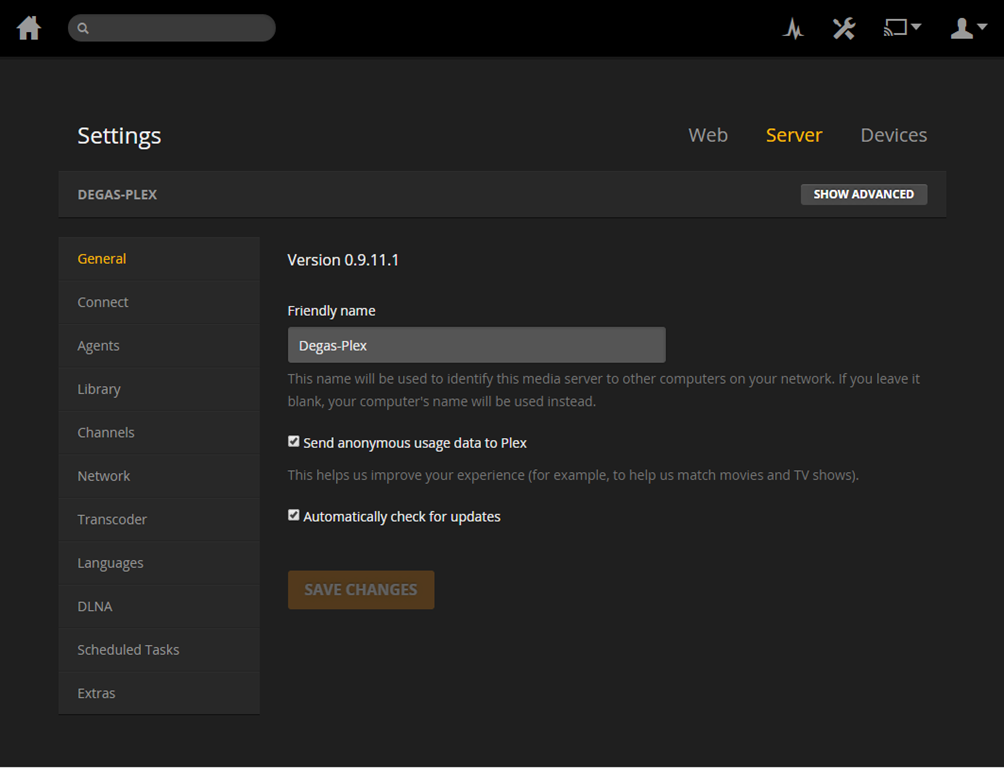
    I’ve been looking at a couple of other alternatives over the past few months:  MediaBrowser (now called Emby) and, more recently, Plex. They both have their strengths and weaknesses. A major strength of both of them (as far as I’m concerned) is that they both use a client/server architecture. That is, the core component of both is a media server to which a wide range of clients (TVs, HTPCs, PCs, tablets and smartphones) can connect and play the media. Since I hold all our media on a Windows Home Server 2011 system, that would be the logical place to install and run the media server. For both MediaBrowser and Plex, the media server can be administered on the WHS 2011 system via a web interface.
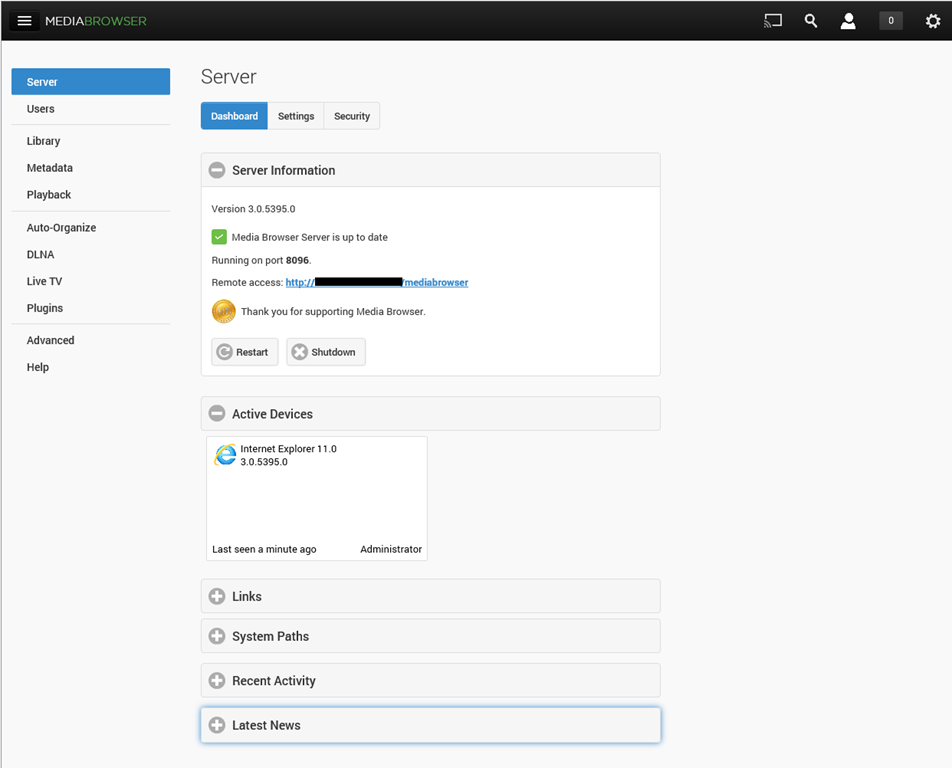
    MBS 01

    PMS 01

    The weaknesses differ between the two, but both MediaBrowser and Plex are fast evolving systems, so changes, bugs, and bug fixes are very much the order of the day. As far as I’m concerned, neither one offers me a complete replacement for our current WMC + MyMovies setup at the moment. Ideally, I would like a combination of the features of the two, because of their current shortcomings.

    For example, take the HTPC component of both: MediaBrowser Theater (MBT) and Plex Home Theater (PHT). MBT is still Alpha software; not even at Beta stage. While it is looking good, it clearly has a long way to go – it is very buggy and feature incomplete at the moment.
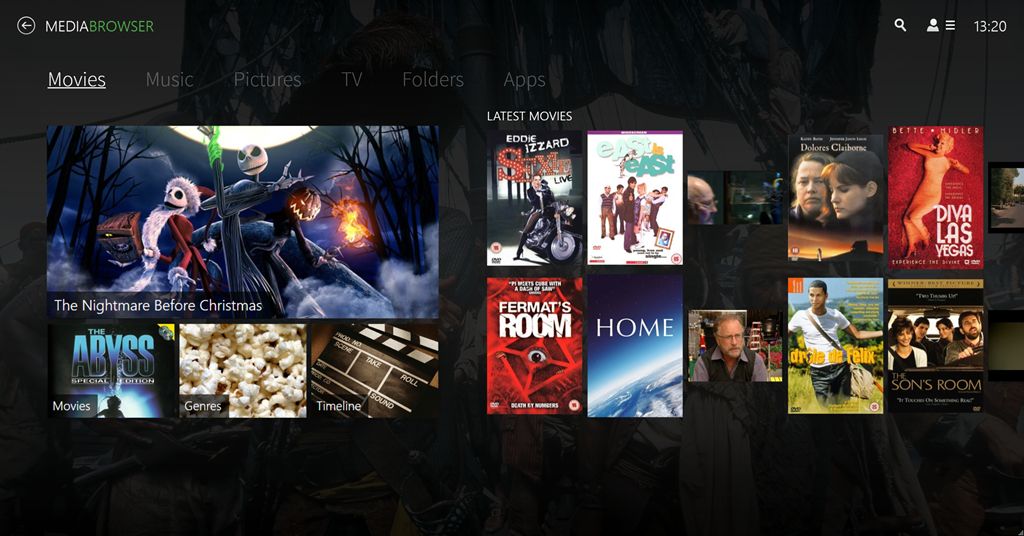
    MBT 01

    PHT, on the other hand, is much further down the development track. It looks good and seems fairly reliable on my HTPC.

    PHT 01

    Both MBT and PHT are so-called “10 foot interfaces” – they are designed for use on large screens, and to be driven by remote control. It would be really nice if PHT could use the remote I have for Windows Media Center, but for some reason best known to the designers, they have deliberately chosen not to stand upon the shoulders of giants, but to start from scratch with almost entirely a different set of commands.

    Both MediaBrowser and Plex have player clients for Windows 8.1 and Windows Phone 8.1. Here are the Windows 8.1 clients:

    MB W8.1 01

    Plex W8.1 01

    One major shortcoming of the Plex clients (as far as I’m concerned), is that neither of them have no other way of browsing our Music library other than by an Artist view:
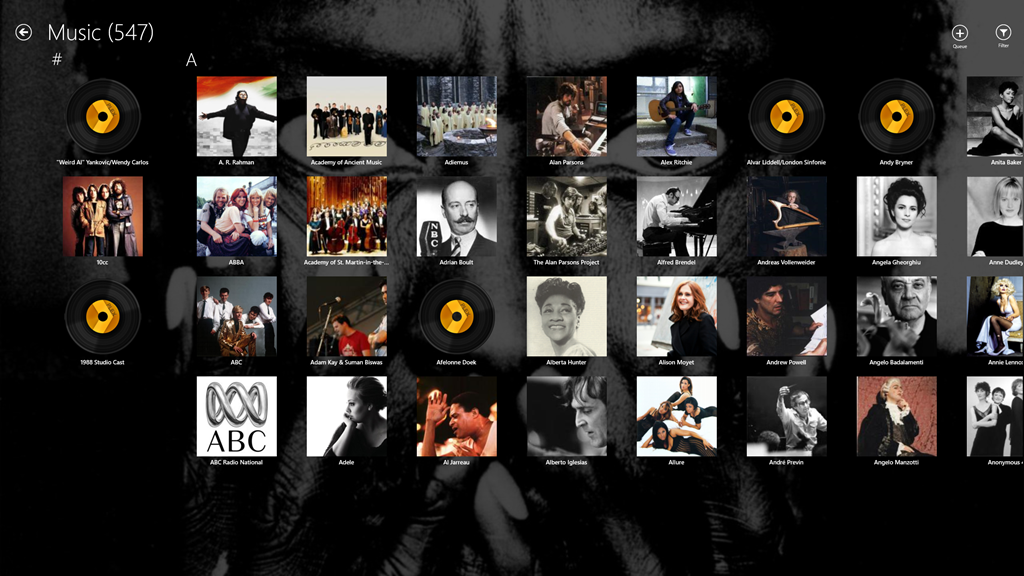
    Plex W8.1 02

    At least the MediaBrowser Windows 8.1 client offers a choice of being able to browse by Artist, Album or Genre, while the Windows Phone client adds the choice of being able to browse by song as well. However, this is nothing compared to Windows Media Center, which, since 2004 (ten years ago!), has offered a choice of being able to browse by Album, Artist (both per track and per Album), Genre, Song, Playlist, Composer, and Year:
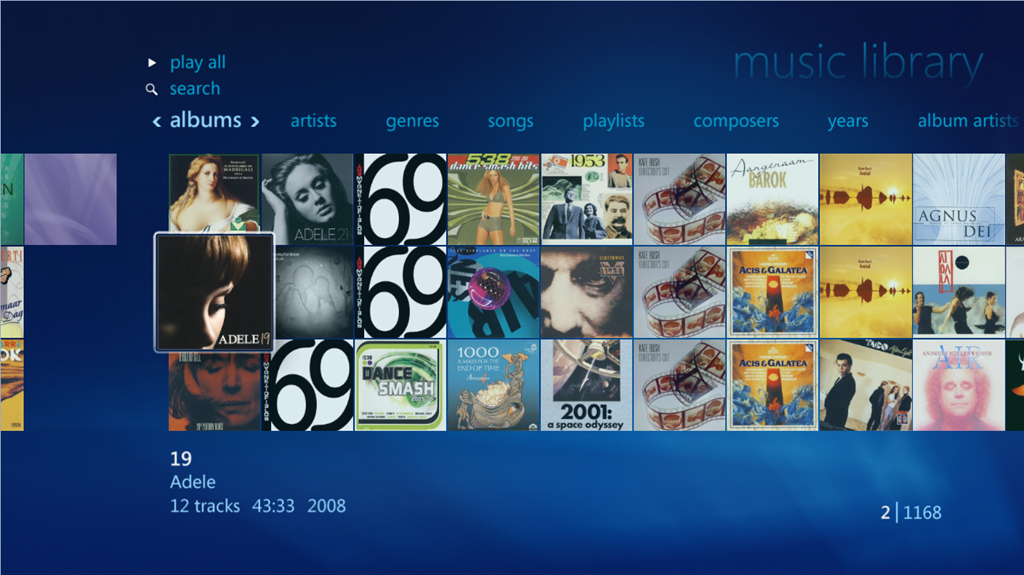
    WMC 01

    So as far as handling of a Music library is concerned then, both MediaBrowser and Plex have a very long way to go…

    [Addendum 30 October 2014: Plex have just released new versions of the client for Windows 8.1 and Windows Phone, and the good news is that at last it is now possible to browse the Music library by Album. Semantic Zoom is also supported when the Album list is sorted by name. However, Semantic Zoom doesn’t work (in Windows 8.1) or is missing altogether (in Windows Phone) when Albums are sorted by Artist. Apparently, this is caused by limitations in the current version of the Server. Hopefully it will get fixed, but at least we are now a little further forward than we were…]

    It’s a similar story when it comes to browsing Photo libraries. The MediaBrowser and Plex clients can only browse folders, while Windows Media Center can browse by Folder, Tags, Date taken, Ratings, Slide shows and Shared (browsing other media servers shared on the local network). The lack of support for browsing by Tags, I find particularly disappointing in the MediaBrowser and Plex clients. Still, support for these features may yet come. It’s clear, however, that both the MediaBrowser and the Plex developers view Movies and Video as where the action is. Music and Photo libraries are very much the poor relations.

    One area where MediaBrowser and Plex has surpassed Windows Media Center is that of being able to play content on other devices. WMC was designed as an all-in-one solution, whereas both MediaBrowser and Plex have been designed as an ecosystem of interconnected server and client devices. So it is possible to browse my movie library on my Windows Tablet, or my Windows Phone; pick a movie, and then start it playing on the HPTC, and continue controlling playback from the browser device.

    Plex can do this with its own player applications and selected Smart TVs. MediaBrowser has possibly a wider reach, because it should be able to work with any DLNA-certified device. However, the theory is not always borne out in practice; I have problems using my Denon AVR to play music sent to it by MediaBrowser.

    Another area where MediaBrowser and Plex go beyond Windows Media Center is that of being able to access and share media collections outside of the home network. This raises a lot of questions around security, and indeed, Plex seems to have some architectural issues that need to be addressed in this area, and I would not be surprised if MediaBrowser might have similar questions asked of it. However, as I have no desire to share our media collections outside of our home network, I do not use this capability and have closed off the servers from outside access. (Note: since this section was written, Plex has had a totally redesigned security architecture implemented, which seems to have addressed the security issues)

    In summary then, both MediaBrowser and Plex have promise, but I don’t feel that either of them have quite reached the stage where I will commit to one and drop my current Windows Media Center setup. Nonetheless, I’ll be continuing to monitor and try out both.  We are getting ever closer to the release of Windows 10, and Microsoft’s possible removal of Windows Media Center from that operating system. The clock is ticking.

    Addendum 6 August 2015: Well, Microsoft has just released Windows 10, and, as expected, Windows Media Center has been dropped from the operating system entirely. Since my last entry on this post, both Plex and Emby have improved. Plex, in particular, has considerably improved handling of Music collections. Still not as good as Windows Media Center, it has to be said, but not bad.

    I’m still running both Plex and Emby in parallel, trying to make up my mind between them. Plex is currently in the lead as far as I (and my requirements) am concerned, but I’m waiting to see what the forthcoming version of the Emby Home Theater client will offer before I make my decision.

    16 responses to “Whither Next? A Media Center Journey”

    1. Castius Avatar
      Castius

      I ran into most of the problems you did in exploring all the options out there.
      I went the other way though. I stuck with JRiver and i’ve never looked back.
      One of the things that won me over. Was the community they have established on there forum.
      It’s one of the best around.

      1. Geoff Coupe Avatar

        Good for you, Castius. Glad it’s worked out for you. I agree that having a strong community of users is an enormous help to any product. JMC is just not the product for me.

    2. Raldo Avatar
      Raldo

      Geoff,

      Thanks for the “survey”! It’s always interesting to see what’s out there.

      Here is a list of your main points in comparing MediaBrowser and Plex. I’ve added how I think JMC (JRiver Media Center) compares:
      o Server/Client: check. I have JMC Server installed on a Server Essentials 2012 Machine. I use Remote desktop for configuration issues .
      o MyMovies integration: Check. JMC imports MyMovies metadata files. I don’t use this since JMC has built in metadata retrieval.
      o well developed 10 foot interface: check
      o MCE remote support: Check. My Logitech harmony emulates one.
      o Win8.1 Client Player: Check. That’s what I use.
      o Configurable Views for Audio browsing: Check. That’s a major selling point for JMC but also something that makes it so complex. You can basically set up anything you like, in any kind of tree structure.
      o Windows Phone Client: NoCheck. Android and iPhone only as far as I understand.
      o Configurable views for Photo Browsing. Check. See audio.
      o DLNA Support: Check. The DLNA support of JMC is good. DLNA is complex with suppliers not following standards and adding their own stuff to the protocols. But (believe it or not) some users are actually analyzing the components around and JRiver actively changes SW to support new devices.
      o Share outside home network: Check. JRiver provides security keys and forwards connections.

      And then, to some features you didn’t discuss:
      o Music playback: JMC is probably the best player for offline content wrt. quality.
      o Video Playback: MC video handling is painless for the user. Forget codecs problems, Directshow priorities etc. There is a built in system which auto handles video.
      o Photo Support. MC reads several EXIF/IPTC tags (Places, Date, Lat/Lon,Caption, etc). It reads Picasa people tags and generates people lists which can be used for displaying on the 10 foot display. Changes to a file is detected and the people list is updated, even after import (Btw. I’ve recently diffed the outputs of exiftool before and after Picasa and I cannot see any issues 🙂

      If I feel that there is some support for Photo tags missing it is my opinion that NO OTHER APPLICATION can do what MC does with photos.

      1. Geoff Coupe Avatar

        Hi Raldo,

        Thanks for the comments (and for driving lots of JMC users along to the blog!). You make some good points, but also I think I’m not making myself clear in what I’m looking for. For example, I don’t think I would classify the JMC design as “true” client/server architecture. It’s an all-in-one design that happens to expose itself as a media server as well.

        I’d prefer not to have to use Remote Desktop for communicating with my headless server – a web interface (or integration with the WHS dashboard) seems to me a better, longer term, way to go. It will only be a matter of time before I will have to withdraw my WHS 2011 system from service (Microsoft will not be supporting it), and then I might well step over to a NAS. The Plex media server is available for NAS systems in addition to Windows, Mac and Linux. I can’t justify the cost of a Windows Server Essentials licence to the Financial Controller…

        I’m not wed to the MyMovies metadata, it’s just that I like the functionality that MyMovies gives. An alternate client that allows browsing/management of movies and recorded TV shows that matches the functionality of MyMovies is fine by me.

        The JMC Home Theater view looks promising, but I need to spend some more time with it. Similarly, I need to make sure that my simple (non-programmable and cheap) MCE Remote will work with the minimum of fuss.

        What do you mean by “Windows 8.1 Client Player”? Do you mean the JMC runs on Windows 8.1? I’m looking for a Modern UI player (touch/keyboard/mouse driven) that integrates with my media server in a way that there is a recognisable “house style” with the Home Theater interface, and which I can use to browse media and then hand off to other player clients (e.g. the Home Theater) for playback, while choosing to retain control. Similarly for the Windows Phone client. With Plex and Media browser, I can use the phone to choose my media and then hand over playing to their respective Home Theaters (or smart TVs), and continue to use the phone as a control point. Similarly for the Modern UI clients running on my tablet.

        “Configurable views for Audio Browsing” – yes I think I know what you mean, but then this is a tree structure displayed in a traditional Windows Desktop, is it not? That’s not what I’m looking for. I want clean and simple. That’s why I like the old WMC interface, they actually got a lot of things right in that 10 foot interface ten years ago. Similarly for Photo browsing (although it’s more limited than I would like).

        I’ll take another look at what the Home Theater view of JMC can do with photos. Someone else wrote the following use case in a private forum:

        “With 50k photos you just can’t browse folders, you’ll go insane before finding the right photos. Browsing by keywords represented by virtual folders is good, but browsing by ONE keyword/tag/metadata just doesn’t cut it.

        What is needed is support of multiple level of keywords, at the very least two levels.

        As far as I’m concerned a dynamic two-level virtual folder structure based on keywords would be far better than one. Let’s say you open the virtual folder for the keyword “Birthday”, then you would be presented with virtual folders for all the keywords that coexist with “Birthday” for any image thus filtering the result further for every step.”

        That’s the sort of functionality I am looking for in both a 10ft interface client and a Modern UI client.

        As an aside, if you’re not seeing any diffs before and after using Picasa, then you’re probably not using Canon cameras. I’m still seeing that Picasa 3.9 will remove Canon Makernotes from my photos.

        Thanks again for your comments. Cheers.

    3. Raldo Avatar
      Raldo

      My media used to reside on a WHS box back then and I actually considered the NAS route when the WHS OS crashed for the second time.

      There were two reasons I did not choose a NAS: First, raid cards on NAS boxes typically force the disk to have a proprietary file system. So a failed NAS raid card might make your disks useless if the card is out of production. Second, JMC did not run on Linux. But that has recently changed.

      I did get a free Essentials license through my job. Server Essentials (SE) has proven to be a lot easier to use than I feared and I’m less a sysadmin now than when using WHS. WHS had one major disadvantage: It was really hard to recover from system disk failures. I had two of those and I spent a long time recovering my data. SE is significantly more robust in this respect. I even tested system restore from a backup disk before going all the SE way.

      You’re asking: ” then this is a tree structure displayed in a traditional Windows Desktop, is it not?” You can set up your audio, video and photos views anyway you want in JMC’s 10 foot display mode (Theater View). That’s actually what a lot of the “bells and whistles” of MC is about.

      Let me give you an example: Due to your blogpost a long time ago (https://gcoupe.wordpress.com/2007/11/09/managing-photo-libraries-part-5/) I adopted the principle of storing metadata in the file. There were some JMC discussions on this topic at that time: (http://yabb.jriver.com/interact/index.php?topic=53434.0) .

      Now, JMC supports reading/writing iptc/Exif Keywords, People. And reading iptc/exif Date, Lat/lon, caption, places, etc. It even detects changes in Picasa facetags and imports these. So I have the following views on my theater view display:
      o New Media. Two monitored dropbox folders. Implemented by using viewscheme filters on folders
      o Events/Year
      o People/Events/Year
      o Places/Events
      o Year/Events
      o Year/Month/events

      These views mix home videos and photos. For photos, all the above tags are stored in the files. For videos I plan to start using .xml sidecar files since few video formats support metadata. Captions are displayed at the picture within the schemes.

      The “Events” tag is handled as follows: Since the iptc/exif “Events” tag is not universally supported, I chose to implement events using the universally adopted keywords tag. Picasa and WLPG display keywords. WLPG can even display nested keywords in a nice manner. So I use nested keywords to store events. A particular event keyword may look as follows: “!Events\Geocaching on Maccu Piccu” or “!Events\Maynard James Keenan’s birthday”. A “smart tag” called Events then extracts events from keywords (using regular expressions). The events tag can then be used in view schemes.

      I don’t expect anyone but me or Marko (from the JMC forums) to be even remotely interested in spending time setting up their media center in such a convoluted way.

      But I do think that JMC would benefit from implementing a “Smart Workflow” feature which would hide such “bells and whistles”

      1. Geoff Coupe Avatar

        Raldo, thanks again for your comments. Interesting stuff, but the thing that jumps out at me is this bit:

        “I don’t expect anyone but me or Marko (from the JMC forums) to be even remotely interested in spending time setting up their media center in such a convoluted way.”

        That’s where the potential Achilles Heel is. It’s all very well having the capability in JMC to do this stuff, but if it’s too complex for the average joe to do it, then very few of us will do it. The one saving grace is that a sufficiently functional and popular platform gets a thriving third-party add-on market, which offers pre-built skins/widgets/whatever to open the functionality to be used by us average joes. That’s what I see in the competitor products, and I suspect that the same is true for JMC, but I’ll be learning more about that over the next few months…

        1. Raldo Avatar
          Raldo

          I agree that for new users, JMC appears “Over Engineered”. But then again, I don’t think any other application can deliver that kind of flexibility with tags. Other apps have hardcoded the tradeoff between flexibility and usability and then one soon hits a brick wall.

          Though, It seems as if the ball has started to roll for JMC wrt. automatic configuration and a more smooth initial experience.

      2. Geoff Coupe Avatar

        One additional point of clarification: I take it you were using WHS v1? That did have the issue of not being able to make server backups. I’m using WHS 2011, which does have that capability. It’s limited (automated backups cannot be greater than 2TB, because it doesn’t support VXHD format, only legacy VHD), and Microsoft removed Drive Extender, but other than that I’ve been pretty satisfied with it, despite my occasional rant at some of Microsoft’s design decisions in it. At one point it was possible to pick up a license for $40, which is incredible value for what it gives. Alas, it seems as though Microsoft has now withdrawn WHS 2011 from the market.

      3. Geoff Coupe Avatar

        Raldo, I was intrigued by your new Views within the theatre home display for photos. So I tried to find out how I could do something similar. First of all, a search for “View scheme” within the JMC “User manual” (I really don’t like Wikis as a User Manual, but that’s another discussion) takes me to a View Scheme page that starts off by declaring “This content has been deprecated as of MC14 and may no longer be valid. Please refer to Interact for additional details”.

        I find this so irritating. It seems every time I try and find out more about the bells and whistles in JMC I run into a dead end of deprecated content or follow a tortuous trail of links in an attempt to achieve clarity, and rarely achieve any understanding of what I’m supposed to be doing.

        Life is too short!

        1. Raldo Avatar
          Raldo

          I agree. But try to post a question in the JRiver forums on what you’re trying to achieve. You’ll get answers really fast. I’m at work right now but I’ll take a look at your post later this evening.

          I’ll encourage you to “test” your views in using “Standard View” first. Just go ahead and play around there: right click the toplevel image view and then “create new” or something. Then you can edit the view by right clicking. Note that “Import” in MC really means “Indexing”. When the views look good, you can import them in Theater View.

        2. Raldo Avatar
          Raldo

          The JMC wiki is, as you pointed out, not very well maintained. I think that JRiver’s intention (hope) was that the community would maintain the Wiki.

          Some areas in the Wiki are good but I tend to use the forum when I’m stuck.

    4. Raldo Avatar
      Raldo

      Btw: You’re saying: “What is needed is support of multiple level of keywords, at the very least two levels”. Check. Any level of nested keywords is supported.

    5. […] and MKV media container formats. Both of these are important to me for the future of my music and home cinema systems. However, what Microsoft gives with one hand, it taketh away with the other. The “Play to” […]

    6. […] and fiddle about, still I was happy doing that. Fast forward to October 2014, and it was clear that major changes would be necessary in the media application software of the HTPC. Microsoft would be dropping support for Windows […]

    7. […] the next few years the setup evolved further, but in 2014 it became clear that I would need to change the player software used in the HTPC. I looked at two alternatives, Plex and Emby. I used both, but over time came to […]

    Leave a comment

  • Particle Fever

    I watched Particle Fever last night. It’s a documentary about the Large Hadron Collider and the search for the Higgs Boson.

    It’s staggeringly good.

    Equally staggering is the scale of the physics experiment that the LHC embodies. It’s probably the largest experiment ever constructed by humans; built with a budget of 7.5 billion euros by over 10,000 scientists and engineers from more than 100 countries. The documentary easily delivers a sense of awe at the scale of the endeavour, but, more importantly by following six physicists over six years, also gives an insight into the purpose of the project and the passion of the people for the physics behind it.

    Physicists fall into two camps: the theorists and the experimentalists, and both were represented in the documentary. Whilst all the featured physicists were interesting and engaging, I was particularly struck by two of them: experimentalist Monica Dunford (who came across as being exactly like Dr. Ellie Arroway, the character played by Jodie Foster, in the film Contact) and the theorist Nima Arkani-Hamed. His explanations, together with those of David Kaplan, another physicist and producer of the film, managed to make the physics clear to me, and pointed out the struggle of theories going on – supersymmetry versus multiverse – that the LHC experiments aim to resolve through discovering and understanding the Higgs Boson.

    What I find fascinating is the way in which supersymmetry almost implies support for the strong Anthropic principle (the suspicion that someone/something is twiddling the knobs of the universe to fine-tune physical laws and constants so that the universe as we know it can actually exist). The Multiverse theory, on the other hand, removes the need for all this knob-twiddling, since it posits that our universe, with its particular knob settings, is just one possibility out of a myriad of alternative universes that might exist.
    It was hoped that, if the Higgs Boson were to be discovered by the LHC experiments, then this would go some way to favouring one of the above opposing theories. Unfortunately, like some cosmic joke, the data that the LHC has given us about the nature of the Higgs Boson is almost exactly sitting on the fence, with neither theory being able to be declared the outright winner. This is like ascending a mountain, only to discover when you’re at the peak, that it is merely a foothill of some larger chain. If you have passion, as these physicists clearly demonstrate, this will simply act as the spur to drive you on further.

    At a time when both religion and politics are increasingly demonstrating their most baleful influences on humanity, it warmed the cockles of my misanthropic old heart to see a scientific endeavour on the scale of the LHC uniting thousands in a common search for knowledge.

    Leave a comment

  • Windows 10 Technical Preview

    Naturally, I couldn’t resist taking a look at Microsoft’s Technical Preview of Windows 10. I signed up to the Windows Insider Program and downloaded a copy of the Windows 10 Technical Preview.

    I’ve installed it on my Desktop PC (homebuild) in a Dual Boot configuration. Dual Boot seems the safest option at this stage; Windows 10 is nowhere near complete, and you can’t revert back to Windows 8.1 without doing a complete fresh reinstall of Windows. While I could have run Windows 10  in a Virtual Machine, I prefer to see what happens when running on actual hardware. With the Dual Boot configuration, I can choose to start up either the Windows 10 Technical Preview or the tried and trusted Windows 8.1 operating system. (Addendum: if you’d like to install the Technical Preview in a Virtual Machine, then Ludwig Keck has a “How-to” post over at his This ‘n That blog.)

    The main thing to bear in mind is that at this stage, it’s very early days; the focus of the Technical Preview is on Enterprise users (who are probably still running Windows 7 on their PCs) and therefore using the traditional Desktop interface with mouse and keyboard. Touch devices are not the focus of this first Technical Preview. I’m already reading in forums of people who have installed it on touch-enabled devices (e.g. the Microsoft Surface Pro range) and who are reporting that the touch experience is in fact degraded…

    For this and other reasons, there is no way that I would install the Technical Preview on my ThinkPad Tablet 2 at this stage. Knowing my luck I’d end up with a useless brick.

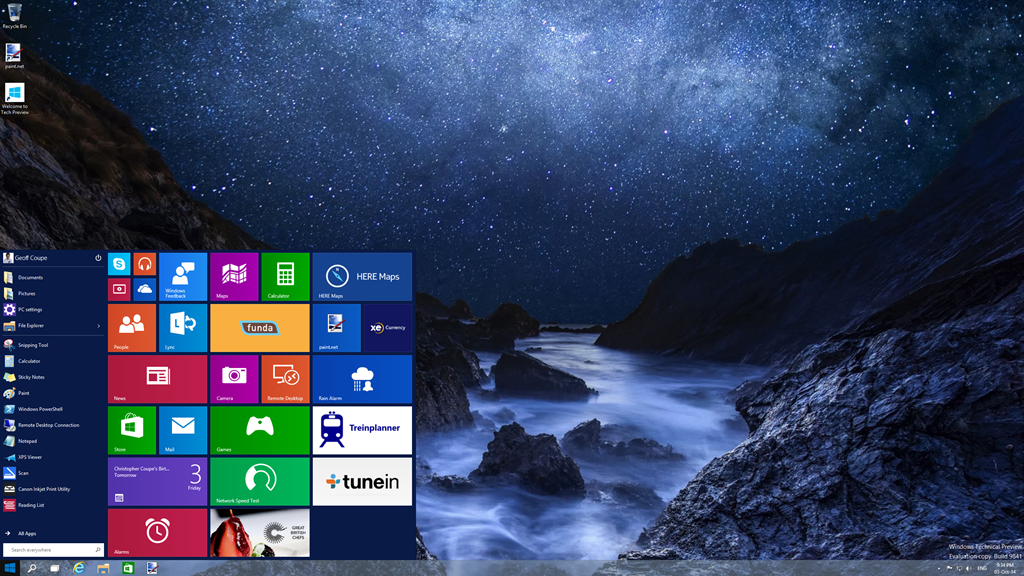
    I suppose the big news of this Technical Preview is that the Start Menu (familiar to Windows 7 users) is back. This being Windows 10, the Start Menu also has elements of the Windows 8.1 Start Screen tacked onto it in the form of App Tiles:

    W10 003

    It’s possible to customise this Start Menu (Start Panel?) in a variety of ways (resizing the panel, resizing and shuffling the Tiles) to arrive at your desired configuration. This could be a pure Windows 7-style of Start Menu, or a combination of Menu and Panel:

    W10 006

    I have to say that, frankly, for me, this all seems like a step back into the past. I’ve got very comfortable with the Start Screen on all my devices (PCs and Tablets), and going back to the damn Start Menu doesn’t thrill me at all. Clearly, there are many for whom the Start Menu is a good thing, but I’m not one of them. I just hope that Microsoft don’t remove the option of having a Start Screen even when Windows 10 is running in Desktop mode.

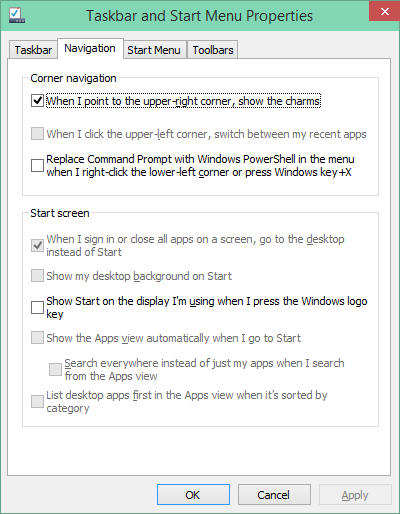
    What I also quickly noticed is that, in this Technical Preview, the Charms Bar has been removed from the Desktop as well. My muscle memory kept expecting to bring out the Charms bar, and I found it irritating that it was not there. This may be an issue with the Technical Preview build, because there’s a Control Panel setting that seems to imply that it should be possible to have the Charms Bar present, even in Desktop mode:

    W10 002

    However, in this build of the Technical Preview, that checkbox doesn’t work.

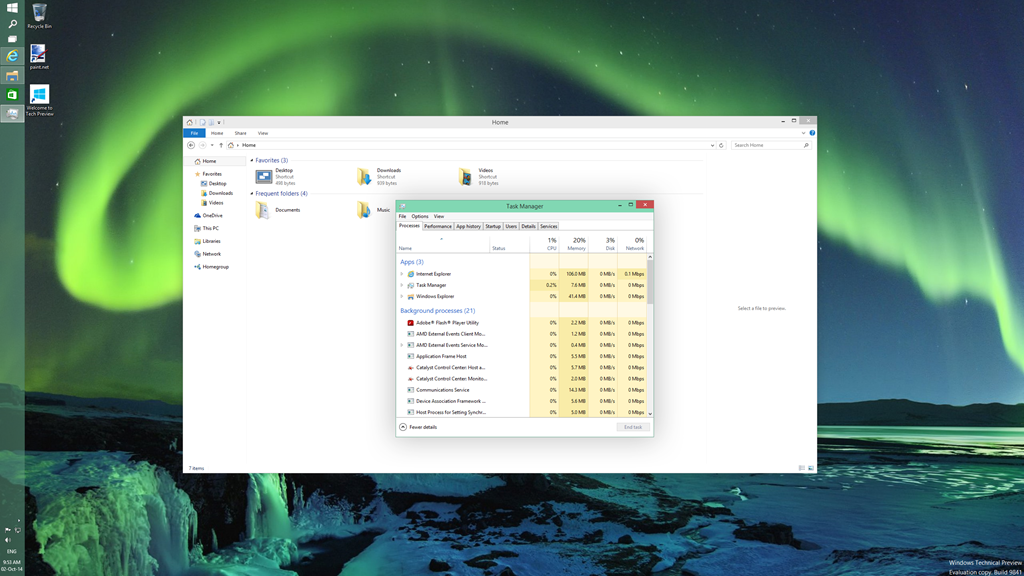
    One thing I do rather like is that Desktop Windows are now almost borderless, with just a faint shadow effect on underlying Windows:

    W10 001

    This seems to be a nod to the “flat” design language of the Modern UI. As I say, I rather like it, but I see from the forums that Desktop traditionalists hate it.

    If you fire up a Modern UI app, then it displays almost fullscreen (by default, the Taskbar and a Title Bar still show):

    W10 004

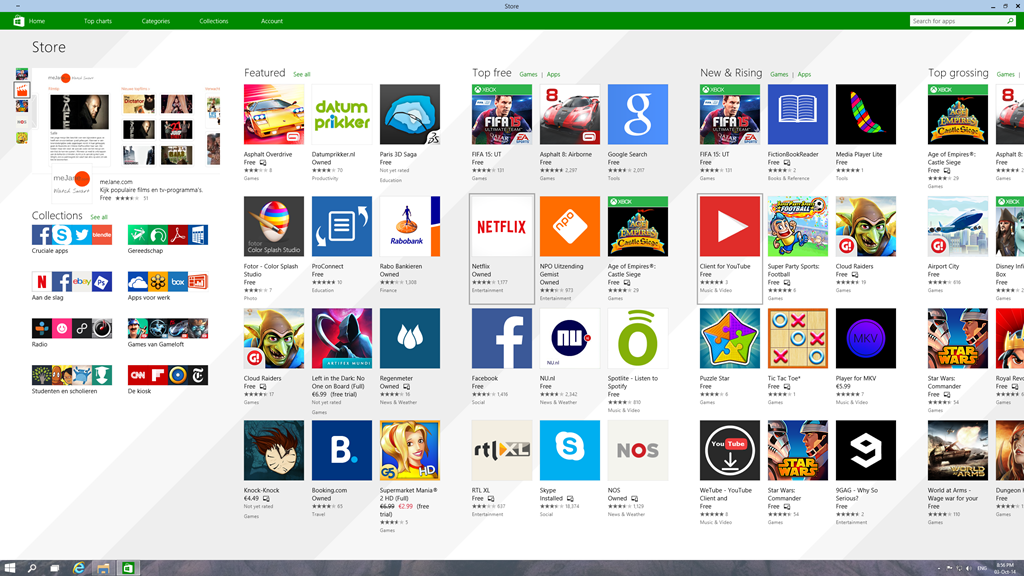
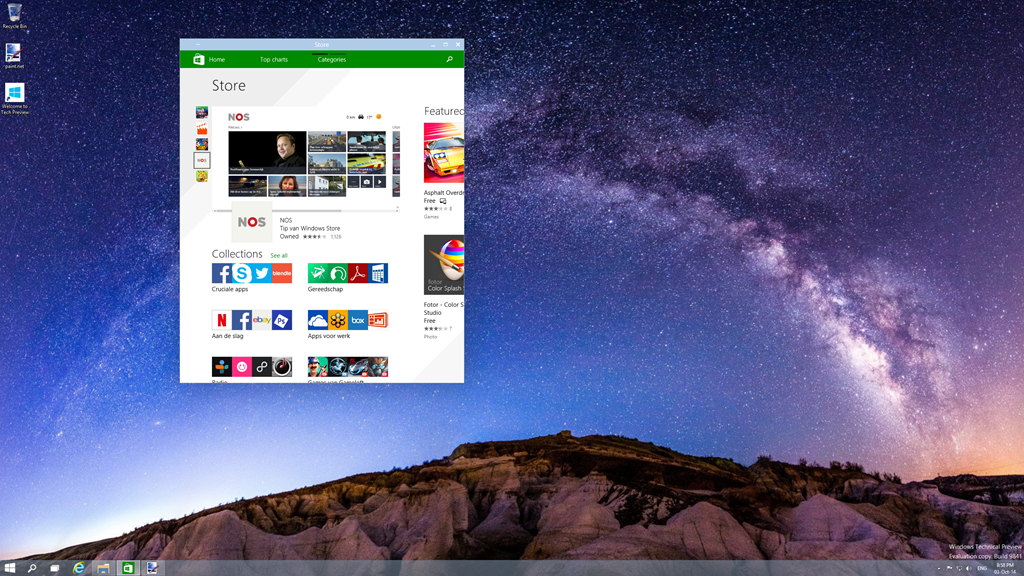
    The big news here is that it is possible to resize the Window of the app. The trouble is, that the content doesn’t resize. It may get reshuffled a bit (but not always, as the Store app shown here illustrates), but fonts and graphics remain at their original size:

    W10 005

    I don’t really think this works. The Mail app, for example, is really designed for a tablet-sized screen in fullscreen mode. Resizing it on a large desktop, and it looks overblown, even when in a smaller window. When in Desktop mode, I tend to stick to the traditional Windows Live Mail, which is a traditional Desktop application. That’s comfortable. When I’m using my tablet, I use the Mail app. That’s equally comfortable.

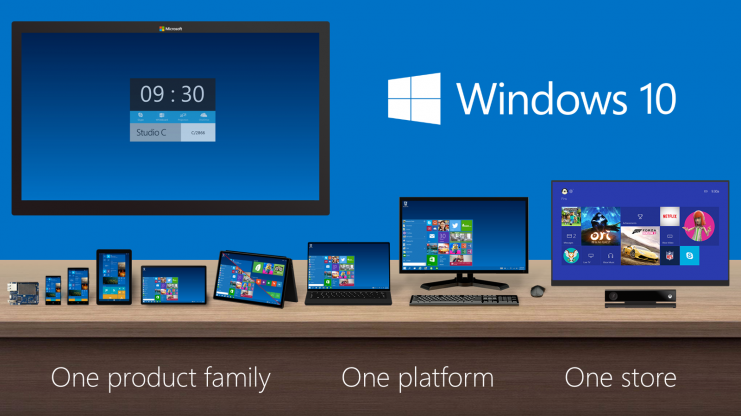
    Microsoft are making a play that Windows 10 will be one platform that supports a tailored experience for a range of device form factors:

    Windows_Product_Family_9-30-Event-741x416

    However, at this stage, it is clear that the experience is not tailored, it’s procrustean – at least as far as the current generation of Modern UI apps are concerned. This has to improve.

    I’ll be following the developments with interest, but this first Technical Preview is addressing an area that I personally have moved beyond.

    9 responses to “Windows 10 Technical Preview”

    1. Ludwig Avatar

      Thanks Geoff for a very nice overview. I will link to your post in a comment on my posts as your views should be viewed by my readers too.

      1. Geoff Coupe Avatar

        Thanks, Ludwig. This is the first post in what is likely to be a small series appearing over the course of the next few months as Microsoft push out successive builds of the Previews…

        1. Ludwig Avatar

          Mine too is a small series. My next posts take Windows 10 up from a photo-enthusiasts point of view.

    2. Matt Healy Avatar
      Matt Healy

      You are correct that many Enterprise users are still running Windows Seven; my wife’s company and my company both migrated from Windows XP to Windows Seven during 2013. In both cases, I believe it was the imminent end of support for XP in 2014 that prompted the migration.

      1. Geoff Coupe Avatar

        Large enterprises are like supertankers – they turn very slowly…

    3. Matt Healy Avatar
      Matt Healy

      As for the Procrustean issue with Modern Apps, I think there is a severe mismatch with programs that are accustomed to having all of a tablet screen — as opposed to Desktop programs that have always been required to handle resize events. Maybe the best approach would be to have a configuration option where the user could specify the preferred window size for all Modern Apps. Then when an app is launched, the OS would give that App a simulated tablet screen of that size.

      1. Geoff Coupe Avatar

        Either that, or have it possible for Apps to work in the same way as the Modern UE IE11 – support font/graphic resizing on the fly…

        1. Matt Healy Avatar
          Matt Healy

          Getting resizing to work right with Modern Apps may depend more on authors of individual Apps than on the OS itself. Windows Desktop program have always needed to handle WM_RESIZE events, but under Windows 8 the only on-the-fly layout change a Modern App will see is when the user switches between Portrait and Landscape orientation. I dunno anything about the Modern API equivalent of WM_RESIZE because my world is still the Desktop. But I expect a typical Modern App is not currently prepared to handle changes in window size while it is running, and I don’t see how the OS can do that for the App.

          1. Geoff Coupe Avatar

            Yes, I agree it’s mainly down to the design of the App. That’s what I meant by my comment that this generation of Modern UI apps don’t fit with the new Universal paradigm of Windows 10…

    Leave a comment

  • A Comparison of ThinkPad Tablets

    In January 2013, I bought a Lenovo ThinkPad Tablet 2 for myself. Since I’m firmly in the Windows ecosystem camp, I didn’t want to get either an iPad or an Android tablet, and the TPT2 was the first Windows tablet that started to tick all the boxes I had in my list. Being a tablet with a second generation Intel Atom processor at its heart, it was no powerhouse, but it suited me very well.

    Fast forward to now, and there are tablets available with the next generation of Intel’s Atom, and new low-power versions of the Atom’s big brothers, the Core processor range, are also starting to appear in devices. For the past few months I’ve been comparing my trusty TPT2 to Lenovo’s new ThinkPad 10 tablet, and to Microsoft’s Surface Pro 3, wondering whether to make a move to a newer device. I finally came to the decision, after much vacillation, to sit this round out, hang on to my TPT2,  and wait for up to a year before purchasing a replacement device.

    However, yesterday a small box was delivered, courtesy of Lenovo, which contained a ThinkPad 10. I’ve been fairly active in a couple of online forums trying to help people with TPT2s, and Lenovo have sent me a TP10 on long-term loan so that I can move into helping with TP10 issues. Very nice of them, I must say, but I’m not going to let that sway my judgement.

    I thought that one way to get started would be to compare the TP10 with its predecessor, the TPT2. It should be an improvement over the earlier product, but is that true in every respect? Let’s take a look…

    First of all, here’s the comparison of the basic specifications of the particular models of the tablets I currently have:

    ThinkPad Tablet 2 ThinkPad 10
    Processor Intel Atom Z2760 (2 cores, 1.80GHz, 1MB cache) Intel Atom Z3795 (4 cores, burst 2.40GHz, 2MB cache)
    Display 1366 x 768 (16:9) 1920 x 1200 (16:10)
    Memory 2GB / 800MHz LPDDR2 4GB / 1067MHz LPDDR3
    Storage 64GB eMMC
    + MicroSD up to 32GB
    128 GB eMMC
    + MicroSD up to 64GB
    O.S. Windows 8.1 Pro* 32bit Windows 8.1 Pro 64bit
    Digitizer Pen Yes Yes
    WLAN 11a/b/g/n 11a/b/g/n
    WWAN GPRS / WCDMA / HSPA / HSPA+ No
    Bluetooth 4.0 4.0
    GNSS Yes Yes
    NFC Yes No

    *The TPT2 originally came with Windows 8 installed. I upgraded it to Windows 8.1 when that became available.

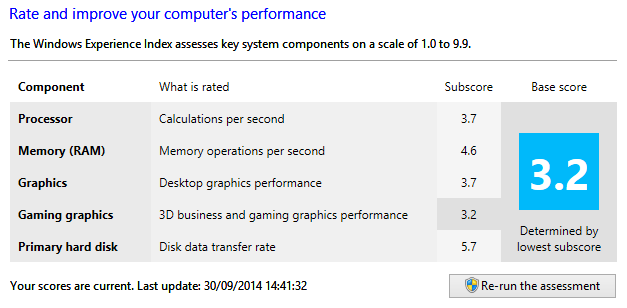
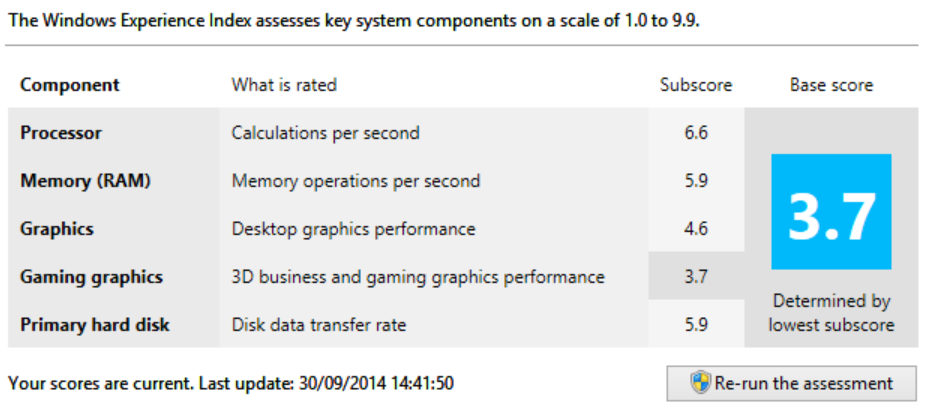
    You’ll notice that the TP10 that I have on loan does not have WWAN or NFC fitted. These are available as options for some models of the TP10 line. Other than that, it is clear from the table that most of the important elements have performance improvements over the TPT2 equivalents.  This is also borne out in benchmarks. Here, for example are the Windows Experience Index scores:

    TPT2:

    TPT Comparison 02

    TP10:

    TPT Comparison 01

    Whilst the gaming graphics and hard disk subscores are only slightly improved for the TP10 over the TPT2, the other measures show substantial improvement. That translates in practice into a snappier feel for the TP10 over my TPT2. Office programs start up much faster, for example.

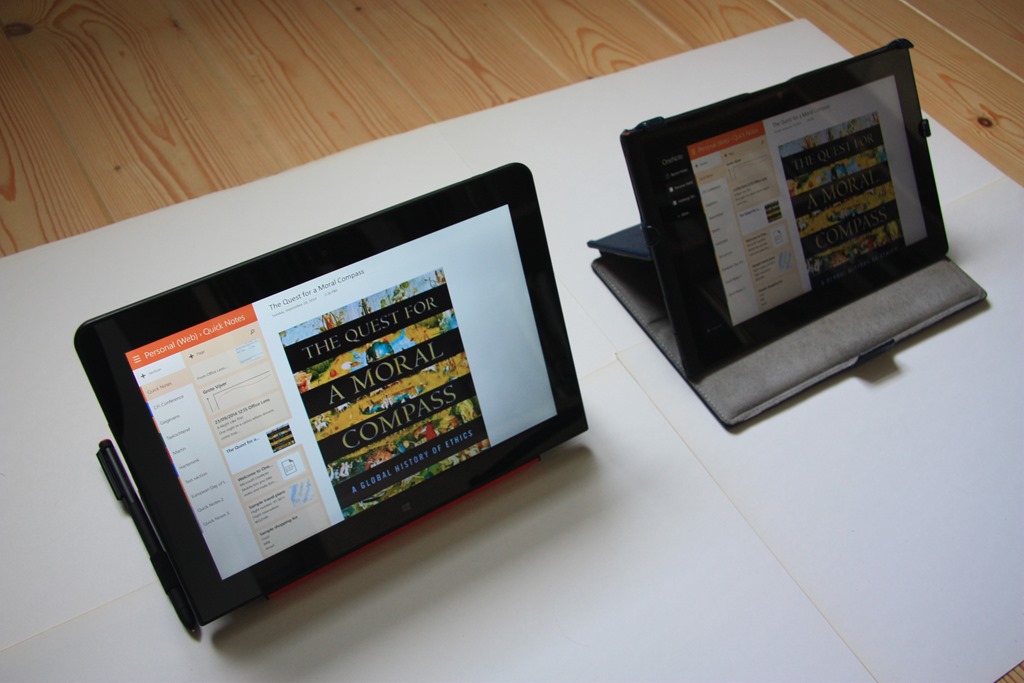
    Physically, the two tablets are close in size, the TP10 (on the left) being slightly taller and narrower than the TPT2:

    20140930-1247-21

    Also shown in this photo is the Lenovo Quickshot cover fitted to the TP10, with an Armour Dog cover from Lente Designs fitted to my TPT2 on the right. The Armour Dog cover wraps around the TPT2, and is very stable when used as a stand, but it does add thickness to the tablet when closed. The Quickshot cover is thinner, and only covers the screen (it can be completely folded back under the TP10 in use). It can also act as a stand, but it is less stable, and with less angles to choose from.

    20140930-1252-35

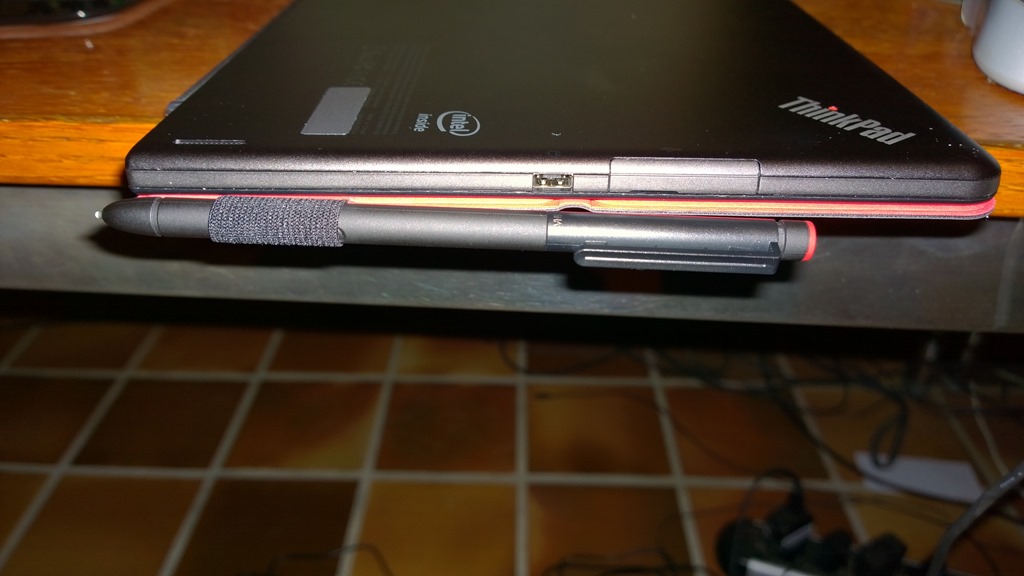
    You’ll notice that it also has a loop to hold the TP10’s pen. Since the TP10 is slightly thinner than the TPT2, it is not possible to store even a small stylus in the tablet itself, as was done for the TPT2, so Lenovo has delivered a normal sized pen.

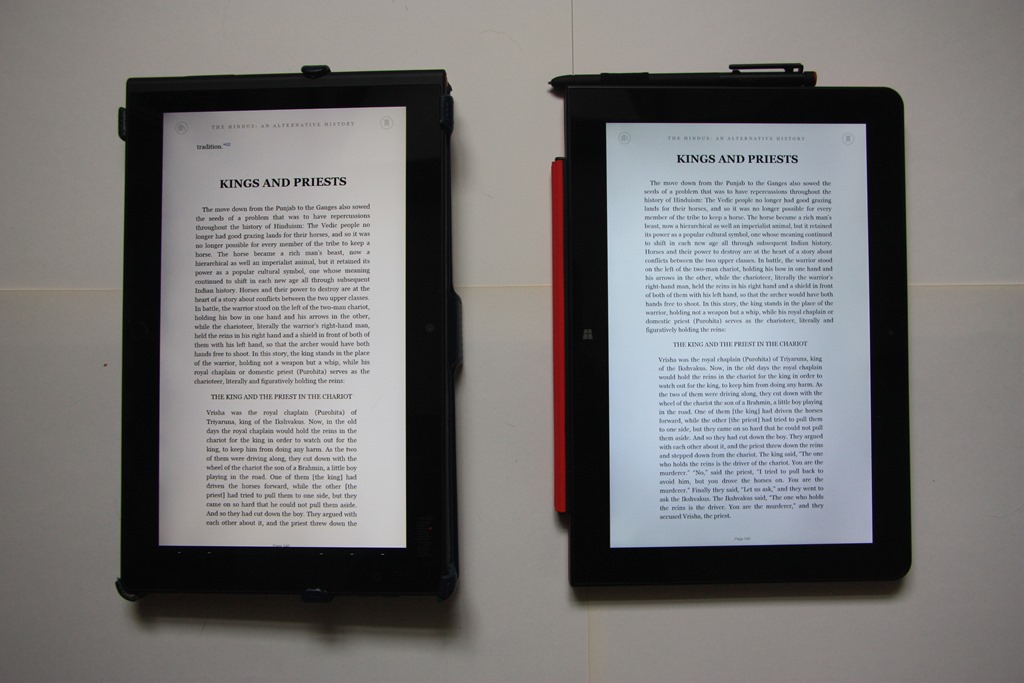
    The TP10 has a larger display and a higher resolution than the TPT2, and I like the 16:10 aspect ratio of the TP10 over the 16:9 ratio of the TPT2. When I’m reading books, for example, I prefer the TP10 experience (on the right) over the slightly longer and narrower page rendered on the TPT2:

    20140930-1314-11

    The difference in aspect ratio also means that I get five rows of Tiles on the Start screen with the TP10 versus four on the TPT2:

    TPT Comparison 04

    TPT Comparison 03

    The TP10 is certainly sleeker than the TPT2, but there are aspects about the case that I find less ergonomic than the TPT2. For example, the TP10’s buttons are flush with the case, rather than being slightly raised as with the TPT2. Finding and using buttons (e.g. the volume controls) on the TP10 is an exercise in frustration for me.

    On both the TP10 and the TPT2, the USB socket has a cover. It may be just me, but the cover on the TP10 seems much more fiddly to pop off and to put back in place than the one on the TPT2. Here’s a photo of the cover on the TP10, and next to it, the power charging socket:

    20140930-1939-53

    The power charging socket on the TP10 is proprietary to Lenovo; on the TPT2 it was a micro-USB. This means that you can’t use a micro-USB phone charger with the TP10 in an emergency. Some people might view that as a drawback. I’ve noticed one other concern about the design and position of this socket. Here’s a photo of the TP10 being charged while being used flat on a desk:

    20140930-1942-46

    Notice how I have folded the Quickshot cover back under the tablet, as I think most people would tend to do. For one thing, it now protects the smooth metal back of the tablet from getting scratched. However, if the pen is stowed in its loop, then it pushes up on the charging plug and raises the tablet slightly on that side. I just wonder what the long term effects and stresses will be as a result.

    The TP10 comes with a lot of software applications and apps pre-installed. This is stuff such as:

    • Lenovo Companion
    • Lenovo Support
    • Lenovo Tap to Share (QuickCast)
    • AccuWeather
    • Evernote
    • Norton Studio
    • Skype
    • Zinio
    • 1-Year Office 365 Personal subscription (Trial only on Win8.1 Pro)
    • Norton Internet Security 2014 with 30 days of virus protection
    • Nitro Pro 8
    • Lenovo Solution Center
    • ThinkVantage System Update
    • Lenovo Reach
    • Hightail –metro (cloud storage)
    • Maxthon Browser
    • Lenovo Photo Editor (by CyberLink)
    • Lenovo Video Editor (by CyberLink)

    Frankly, most of this I view as Bloatware. The first thing I did was remove all but a couple of packages from the TP10. I then left the TP10 to update itself with Windows and Lenovo driver updates. A few hours, and 60+ updates later, it was ready to use.

    I uninstalled Office 2013 Home & Student from my TPT2 and installed it on to the TP10. I needed to activate it via the telephone, rather than the painless internet route, but after punching in reams of numbers into my phone and into the TP10, Microsoft was happy and activated Office. After another round of software updates, this time for Office 2013, I think the TP10 is now finally ready to be put to work.

    I’ll report back over the coming months on how I’m getting on.

    Addendum: I do rather wish that manufacturers would strive for consistency with accessories across generations. For example:

    • The TPT2 has a mini-HDMI port; the TP10 has a micro-HDMI port. So I have to buy yet another HDMI cable for the TP10…
    • The Docking connectors are different, so I have to buy a new TP10 Dock, I can’t re-use the TPT2 Dock.
    • The TPT2 has a VGA Adaptor that fits into the Docking connector on the tablet. I use that to connect my TPT2 to a VGA projector in meetings. There is no equivalent adaptor available for the TP10. In fact, apparently the only way to connect a TP10 to a VGA projector is to use the Lenovo USB 3.0 to DVI/VGA Adaptor. Note that is a USB 3.0 connector. The TP10 only has USB 2.0 on the tablet; do I have to get the TP10 Dock to provide a USB 3.0 connection for the adaptor?…

    Sigh.

    7 responses to “A Comparison of ThinkPad Tablets”

    1. Matt Healy Avatar
      Matt Healy

      I notice you mention HSPA+ WWAN; what sort of typical real-world speeds do you get with HSPA+ WWAN? Here in the US I sometimes get a around 3 megabit/second download and around 1 megabit/second upload with Sprint LTE and fairly commonly get around 1 megabit/second download speeds (as measured with several speed testing websites). Better than 3G, but of course slower and more variable than my home and office Internet connections.

      1. Geoff Coupe Avatar

        Ah, well, the hardware is capable of HSPA+, but round here, the mobile operators don’t break into more than a slow walk. Just looked at my network connection, and if I get 48 Kbps, I’m lucky…

    2. Jimmie Avatar
      Jimmie

      For the money is it worth buying the TPT 2 for 309.00 US or spend the extra for the TPT 10 for 589.00

      1. Geoff Coupe Avatar

        That’s really down to you, and what you want to use the tablets for. Personally, the faster speed, and the higher display resolution with the 16:10 screen ratio make the TP10 the better tablet for my requirements. If you’re in the US, then I would keep an eye on Lenovo’s eBay and Outlet online stores. They sometimes have very good deals for the TP10.

        1. Jimmie Avatar
          Jimmie

          Thank you, I am a student in College and just need to find a great tablet for the money. Instead of carrying around my laptop all the time. I am open to some suggestions. I have spent days searching for reviews on this matter for a widow OS based tablet that could run MS office, and be worth investing in.

    3. […] me remind you that last September, I received a ThinkPad 10 tablet on long-term loan from Lenovo. I blogged about my first impressions of it in a post that compared it to my ThinkPad Tablet 2, which I had purchased myself back in January […]

    4. […] date, I’ve had an HP TX2000 convertible, a Lenovo ThinkPad Tablet 2, and currently I have a Lenovo ThinkPad 10 and a Lenovo Yoga 3 Pro convertible. I’ve long ruled […]

    Leave a comment

  • Listen

    A wonderful episode on Doctor Who last night: Listen. Right up there with Blink in terms of plot dovetailing and hide-behind-the-sofa factor. Clara is developing into a nicely-rounded character, and the restaurant scenes between her and Danny Pink were very good in their toe-curling embarrassments, and reminiscent of Moffat’s earlier work in Coupling.

    I thought it was interesting that the central idea in Blink was that you must not look away from a Weeping Angel, but that in Listen, you must never look at a Listener; polar opposites, but both equally capable of racheting up the fear factor. And the reveals of the boy in the barn and the barn itself at the end – well, I gasped at the audacity of it.

    I liked the way that the central idea of there being listeners hiding under every bed was never entirely resolved one way or the other. Is it all in our imaginations or not?

    Classic Doctor Who.

    2 responses to “Listen”

    1. Mark Avatar
      Mark

      a lot of empty holes in the episode. So we are to assume he fell asleep at the beginning and wrote “listen” on the chalkboard, then woke back up in the same spot? and that a kid was hiding under the bedcovers and after all of that quietly walked away when their back was turned.. as you say, lots of unanswered questions!

      1. Geoff Coupe Avatar

        We don’t know that the Doctor didn’t write on the chalkboard himself (or even that he wasn’t aware of writing it himself – we are led to believe that is the case, but it ain’t necessarily so). That there was someone/something on the bed is undeniable, but it could have been a kid – we see the dressing gown on the door swinging to show that someone/something left the room, quietly or not.

        The thing is that it’s a Schrödinger’s Cat episode – both possibilities are equally likely, and perhaps even both at the same time. It may be all in the Doctor’s imagination or not, and it may be that Listeners are real, or not. The episode resolutely refuses to resolve itself for us. The cat stays inside the box.

        Moffat being Moffat, he may resolve it later in the story arc of this or even next season, but my feeling is that he will leave the cat in the box.

        Over in the Guardian, there’s a raging debate going on as to whether the boy in the barn was the young Doctor or the Master. Personally, I think it’s much more satisfactory from a story point of view to have it be the Doctor. Then we have the pleasing symmetry and chicken-and-egg situation over who originates the “fear is a superpower” speech…

    Leave a comment

  • Pride

    There’s a new film coming out (if you’ll pardon the pun): Pride. It tells the true story of a group of lesbians and gay men from London who went deep into the Welsh valleys to support the miners during the dark days of the miners’ strike in the mid-1980s.

    It looks as though it’s wonderful, and will take me back to remembering those times. There’s a good interview with actor Bill Nighy and writer Stephen Beresford here.

    Addendum: Mark Simpson has a terrific post about the film and his recollections of being involved with the LGSM group. Shake that bucket!

    4 responses to “Pride”

    1. Matt Healy Avatar
      Matt Healy

      I grew up in Wisconsin so didn’t learn much about coal mining growing up. But my wife’s family came from Appalachia so I have heard a lot about the industrial history of coal mining from her father, who was born not far from when the events described in this article happened:
      http://en.wikipedia.org/wiki/Battle_of_Blair_Mountain

      1. Geoff Coupe Avatar

        Matt, thanks for that reference – a piece of history that I didn’t know about.

        1. Matt Healy Avatar
          Matt Healy

          Very few Americans know about it either — I learned it from my father-in-law. My own father, a retired HISTORY PROFESSOR, had not known this story until I told him (he had of course been aware generally that labor relations in the Appalachian coal mines in the 20th century were not exactly sweetness and light).

    2. Matt Healy Avatar
      Matt Healy

      PS: I highly recommend the film Matewan, about this history. One of the best lines is delivered by James Earl Jones in the role of a black miner. Referring to a certain racial epithet he allows as how he is accustomed to white folks using that word, “but DON’T call me a SCAB!”

    Leave a comment

  • A Romp With Robin

    Just finished watching the Doctor Who episode: Robot of Sherwood. My, that was fun! Mark Gatiss writing at the top of his form, with lots of jokes and a serious question of what it means to be a hero. Peter Capaldi, Jenna Coleman. Tom Riley, et al, delivered in spades. A terrific episode, despite the hasty re-editing to remove a beheading.

    Loved it, from beginning to end. Capaldi is going to be one of the great Doctors, mark my words.

    One response to “A Romp With Robin”

    1. Mark Avatar
      Mark

      agghhhh. here in the states I have to wait a couple more hours.. cannot wait!

    Leave a comment

  • Nailed?

    Regular readers of this blog will know that I’ve been looking at the specifications of the Lenovo ThinkPad 10 (the TP10) and the Microsoft Surface Pro 3 (the SP3) tablets, and trying to decide which of them is the best fit with my needs and usage. It’s been a bit of a saga, beginning back in May, with the announcement of the SP3 by Microsoft. I thought that the specifications of the SP3, whilst impressive in some respects, had some surprising omissions. I concluded that I would probably give the SP3 a miss.

    I revisited the topic in June, once TP10 models were becoming available, and pricing details were known. At that point, despite the SP3’s negatives, the SP3 model that I was most interested in (with the Intel Core i3 processor) was only slightly more expensive  (€15) than the closest equivalent TP10 available at that time, with its smaller display and less powerful processor. However, my decision was still not clear-cut, so I returned once more to the topic in July when I compared both the TP10 and the SP3 to my current tablet, the Lenovo Thinkpad Tablet 2 (the TPT2).

    I’ve had the TPT2 since January 2013, and it has served me very well. Things were becoming clearer by July 2014, as a result of both the TP10 and the SP3 getting in the hands of customers, and them posting their experiences and issues in community forums. In recent weeks, the TP10 has started appearing in Lenovo’s online web stores around the world. Interestingly, the models offered include versions with Windows 8.1 with Bing, a lower-priced alternative to those offered with Windows 8.1 Pro (which have, up until now, been the only versions available here in the Netherlands). I don’t need the additional features of Windows 8.1 Pro in my tablet, so that gives me an immediate saving of €130.

    That means that a TP10 with 4GB RAM, 64GB storage and no WWAN (i.e. the closest equivalent to the Core i3 version of the SP3) is €620 versus the SP3’s €819. I have to say that while the SP3 is an impressive engineering feat by Microsoft, the design has just too many compromises for me:

    • The rear camera is a low-resolution, fixed-focus device, which can’t be used for scanning documents, and which does not support the Panorama feature in Microsoft’s Camera App (despite Microsoft’s SP3 User Guide falsely claiming that it can). Addendum: The Panorama feature is now working, thanks to a software update released in September 2014. However, no software update will be able to compensate for the fixed-focus camera…
    • There are too many complaints that the WiFi capability does not work properly. Microsoft has admitted that there is an issue, and is working on a fix, but that is not yet available, with no estimate on when it will arrive.
    • In addition to the WiFi connectivity issue, there is also evidence that WiFi performance is poor under certain circumstances.
    • There is no GPS chip in the SP3. Personally, I think that every tablet should have one by default. Location via WiFi triangulation is not sufficient outside of built-up areas.
    • The SP3 is very difficult to repair (that IFIXIT teardown is hilarious, and well worth reading). If something goes wrong, the SP3 really needs to be thrown away and replaced. That doesn’t help my hankering to improve my green credentials.
    • And the big one: the SP3 is not fanless. It uses the Haswell generation of Intel’s Core processors, and their thermal output requires fan-assisted cooling for the most part.

    On that last point, it is true that Intel has now managed to produce a version of the Haswell chip that can be used in fanless tablet designs, but it’s clear that the SP3 was designed around the mainstream Haswell chips, and that means a fan is a necessity. All eyes are now turning to Intel’s next generation of chips, code-named Broadwell, and now becoming available under the moniker of Core M. These really do promise to deliver a full x86 platform as well as the performance beyond that of a smartphone or an Intel Atom-powered tablet (e.g. the TP10) in fanless designs. The first Core M-based fanless tablets/convertibles have already been announced by Lenovo (a new Helix model) and HP. They are both larger than the 10.1” form factor of the TP10 (possibly because the Core M chips are physically larger than the current Intel Atom chips?), so it’s quite possible that smaller tablets will continue with Atom-based designs. However, it seems almost a certainty that Microsoft must be at least thinking about a fanless SP4 having the same form factor and size as the current SP3, and such a design would be based around Core M.

    To sum up. Now that a wider range of TP10 models are available here in the Netherlands, I could get a TP10 (faster, with a better display, and twice the RAM) to replace my existing TPT2 for €620. I definitely won’t be going for the SP3 (at €819) – too many compromises and issues for me. I could also equally continue using my TPT2 quite happily and wait to see what an SP4 has to offer. There’s no rush.

    Addendum: I have a TP10 on loan!

    4 responses to “Nailed?”

    1. Mike Tremoulet (@coffeemike) Avatar

      Thanks for narrating the whole journey; I’ve enjoyed and benefitted from it.

      It’s interesting, as I’m looking as to what will replace my current MacBook Air. The form factor of the SP3 is attractive, but I need to look harder at the other OEMs, especially as new lineups have been announced.

      Horsepower remains one of my key concerns, as through the magic of desktop virtualization, my work desktop is now a virtual machine on my MacBook. (I’ll let that sink in for a moment.) That makes RAM in particular a key concern – 4 GB isn’t enough breathing room. I’m very comfortable with Win 8.1, so I’m keen to try a tablet/convertible form with a good digitizer pen.

      All of that to say: Please keep writing about your experiences. Still learning from you. 🙂

      1. Geoff Coupe Avatar

        Hi Mike, good to hear from you, glad you find my ramblings of some interest! It always seems as though the tech that we want is just around the corner and six months down the road… I think that the Core M generation will be a success, but I’m already seeing grumblings from some artists that the chips won’t have the power that they need in their drawing/painting applications…

    2. […] reached a decision (of sorts) on the 6th September 2014, and wrote a post on it. The bottom […]

    3. […] and to Microsoft’s Surface Pro 3, wondering whether to make a move to a newer device. I finally came to the decision, after much vacillation, to sit this round out, hang on to my TPT2,  and wait for up to a year […]

    Leave a comment

  • Praise Indeed

    David Mitchell’s new book The Bone Clocks is published today. I was knocked out by his Cloud Atlas and by The Thousand Autumns of Jacob de Zoet, so I’m looking forward to reading the new book with great anticipation. I went down to the local village bookshop last week and ordered my copy.

    Today’s Guardian has a review of the book by another writer whom I admire without reservation and trust absolutely – Ursula le Guin. She likes it, so I’m sure I will too.

    Leave a comment

  • Photo Metadata – Software for Rights Test

    The standards organisation IPTC has just published the results of a test of commonly available software to find out how effective different tools are in writing, editing and reading rights data in an image.

    I’m pleased to see that Photo Supreme, the software I use for managing my photos, has come out well.

    4 responses to “Photo Metadata – Software for Rights Test”

    1. JL Beeken Avatar

      I’m surprised to see GeoSetter only got a yellow. And Photoshop Elements that’s an absolute pain to use (I guess they weren’t counting that part) got a green+.

      1. Geoff Coupe Avatar

        Yes, I thought that Geosetter handled all the Rights fields, at least in Core (it doesn’t handle the Plus and Extension standards)… Hmm. And I agree about PE being a pain to use. But the IPTC is only considering whether the tools handle their fields…

      2. Geoff Coupe Avatar

        I *think* that Geosetter is missing the “Usage terms” field, which is why it only gets a yellow light…

        1. JL Beeken Avatar

          I do most of my work with Photo Mechanic and that got high marks too. For my purposes, anyway, GeoSetter is more than sufficient.

    Leave a comment

  • Step Away, Professor Dawkins, Step Away…

    One of the reasons why I refuse to use Twitter is because it is impossible to have nuanced conversation and argument in a straitjacket of 140 characters. However, as the saying goes, fools rush in, where angels fear to tread

    And so it is with Richard Dawkins, who in response to someone who tweeted:

    I honestly don’t know what I would do if I were pregnant with a kid with Down Syndrome. Real ethical dilemma.

    responded with

    Abort it and try again. It would be immoral to bring it into the world if you have the choice.

    Oh god; *facepalm*. Talk about a hostage to fortune. Ophelia references a discussion between Michael Bérubé (whose son, Jamie, has Down Syndrome) and the moral philosopher Peter Singer. It’s worth reading.  Dawkins, it should be noted is a scientist, not an ethicist or moral philosopher.

    Professor Dawkins has a history of opening his mouth to change feet when he uses Twitter. Personally, I think he should stop using it. It’s an embarrassment to all concerned.

    Leave a comment

  • “ISIS is a Zionist Plot”

    There’s a small disturbance in the Force here in the Netherlands at the moment. A civil servant, working for the Ministry of Security and Justice as a Project Leader for the National Cyber Security Centre, just so happened to tweet (and I paraphrase) that

    “the terror group ISIS does not exist and it is all a Zionist plot to defame Islam”.

    Yasmina Haifa, for it was she, has since deleted the tweet, claiming that she belatedly realised the political sensitivity in relation to her work (no, really?), but apparently stands by what she says, claiming, in a radio interview that

    “Apparently freedom of speech in the Netherlands applies to particular groups and not to others”.

    Not surprisingly, she has been sacked suspended from her job. However, she claims to have had no idea that her comments would cause such a fuss, saying in the radio interview that she

    “…assumed I was living in a democratic country”.

    Yes, Ms. Haifi, you are living in a democratic country. And freedom of speech does not absolve you from freedom from responsibility.

    She appears to be either disingenuous or ignorant. Either way, she does not seem fit to hold the position of Project Leader at the National Cyber Security Centre.

    Leave a comment

  • I Wish…

    …that the upcoming Disney version of Stephen Sondheim’s Into the Woods will do justice to the material.

    The first teaser trailer for the film of Into the Woods has been released, and it’s notable that there ain’t no singing in it, even though it’s a Sondheim Musical. Apparently the filmmakers have also taken out a couple of the songs and changed the plot. All of which leaves me hoping that they haven’t wrecked one of Sondheim’s best works. At least I saw the stage production of Into the Woods when it played in London back in 1990, and I have the DVD of the American Playhouse production of the work to remind me of how good it could be.

    3 responses to “I Wish…”

    1. TomT Avatar
      TomT

      It’s my understanding that Disney is downplaying the fact that it’s a musical in these early ads to avoid prematurely turning off anyone who might immediately dismiss the possibility of seeing it on that basis alone (hard as it is to believe such people exist…)

      That also explains why Sondheim’s name is not more prominently featured.

      Personally I’m more concerned about plot changes. I heard a rumor that the baker’s wife lives…

      1. Geoff Coupe Avatar

        “I heard a rumor that the baker’s wife lives…”
        Next up, Disney’s Romeo and Juliet, where we get to see them raising a family… Aaarrgh!

    2. […] over a year ago, I blogged about the forthcoming film version of Into the Woods, the musical by Stephen Sondheim, which would be produced by Disney. I was a bit […]

    Leave a comment

  • This Land is Mine Redux

    A couple of years back, I blogged about Nina Paley’s short animation: This Land is Mine. Two years on, and nothing seems to have changed in that part of the world. The only winner, as Nina pointed out, is the Angel of Death.

    Leave a comment

  • MH17 & Dutch Pragmatism

    It’s shocking news about the loss of flight MH17. All the more so because 298 civilians appear to have been killed in a conflict that has nothing whatsoever to do with them. And all because some trigger-happy Ukrainian rebels, armed by the Russians with surface-to-air missiles, appear to have mistaken a passenger airliner, flying above 32,000 feet on an established route over Ukrainian air-space, for a Ukrainian military transport plane.

    It’s a route and flight that was well-known to me during my last years working for Shell. We were setting up a data centre in Kuala Lumpur, and many of my colleagues, of many nationalities, would be travelling back and forth between Shell’s head office in The Hague and KL. I myself flew that route on a couple of occasions. It would not surprise me in the least to learn that at least one Shell employee, working in IT, was on that flight.

    This article in today’s Guardian points up the phenomenon of Dutch pragmatism. Dutch passengers checking in at Schiphol today seem to be of the opinion that the downing of flight MH17 was an isolated incident, and unlikely to happen ever again. They are right, but that’s probably of little comfort to those who have lost family, friends or colleagues in this tragic event.

    6 responses to “MH17 & Dutch Pragmatism”

    1. Matt Healy Avatar
      Matt Healy

      This awful tragedy hit my world — Virology research — particularly hard because some of those on that jet were on their way to a major AIDS conference in Australia.

      Click to access 0_IAS_Malaysian_Airlines_flight_17_Update_16_45.pdf

      I’m not sure whether anybody I personally know was among them; the US researchers I know who are going to that meeting would probably not be going there via Amsterdam. My wife’s take: “whoever did this is responsible not only for the hundreds on the airplane but also for the lives that might have been saved by the AIDS experts who have been lost.”

      1. Geoff Coupe Avatar

        Matt, your wife’s comment is a true and sobering observation. We’ve lost leading Dutch researchers.

    2. Matt Healy Avatar
      Matt Healy

      PS: if I happened to be going to KL next week, I’d not hesitate to take a Malaysian Airlines jet if they happened to offer the fare and schedule that best met my needs. I flew Аэрофлот back when there was a Soviet Union; surely an MH flight today would be a lot safer than those Аэрофлот planes — to say nothing of taxicabs in KL…

    3. Matt Healy Avatar
      Matt Healy

      A journalist finds pieces of evidence not found by the official investigators:
      http://www.bbc.com/news/world-europe-32283378

      1. Geoff Coupe Avatar

        Yes, this story came out a month ago here in the Netherlands. It seems pretty damning when coupled with photos showing the rocket’s contrail, and audio recordings between the separatists and their Russian minders that first congratulate themselves over the downing of a Ukranian military transport plane, and then when it dawns on them that it wasn’t military, scrambling to get the BUK launcher back across the border into Russia.

        1. Matt Healy Avatar
          Matt Healy

          A few hours before the shooting, Associated Press reporters in rebel-held territory not far from where that plane came down were prevented from photographing a missile launcher by a guy speaking with a distinct Russian accent.

    Leave a comment

  • Horse Driving Trials

    The local horse and carriage club held its annual horse driving trials (samengestelde menwenstrijd in Dutch) last weekend. On the Sunday, the Marathon was held, and I went along to take photographs at one of the sets of obstacles near our house. The full set of my photos is up on Flickr, but here’s a taster:

    20140713-1135-13

    20140713-1304-12(001)

    20140713-1513-27

    20140713-1353-39(001)

    20140713-1205-30

    One response to “Horse Driving Trials”

    1. Ludwig Avatar

      Nice photos! But that first one is just fantastic!

    Leave a comment

  • Taking The Kids For A Spin

    I’m not sure whether it’s the same duck, but a mallard attempts to nest in the shrubs by our pond every year. It’s mostly unsuccessful – last year the nest was abandoned, and earlier this year, something (a marauding crow?) took the eggs. However, this year, the mallard had a second attempt and has hatched six ducklings. The first we were aware of this was a couple of days ago, when she took them out for a spin on the pond.  Until then, we hadn’t realised that she had returned to the nest and had been brooding a second batch of eggs. She and the ducklings now seem to spend most of the time in the nest hidden in the shrub. Just as well, otherwise our dog Watson would be disturbing them.

    20140703-1106-35

    20140703-1106-09(001)

    20140703-1106-12

    20140703-1106-53

    One response to “Taking The Kids For A Spin”

    1. Matt Healy Avatar
      Matt Healy

      On the lake in Northern Wisconsin where I spent many childhood summers, we always had a family of loons. The call of a loon is impossible to describe, a sort of wild ululation.

    Leave a comment

  • Noctilucent Clouds

    When I took the dogs out last night at 11pm, I noticed that there were noctilucent clouds showing up above the Northern horizon. I dashed back and grabbed the camera for a couple of shots before they faded from view:

    20140703-2340-24

    20140703-2341-12

    20140703-2340-57 Stitch

    These are time exposures of ten seconds, so the sky appears brighter than in fact it was (you can also see some stars). This is the first time that I’ve ever been aware that I was looking at this particular meteorological phenomenon. 

    One response to “Noctilucent Clouds”

    1. Matt Healy Avatar
      Matt Healy

      Stunning!

    Leave a comment

  • Still Trying To Nail It

    For the past three weeks, I’ve been trying to nail what my next Windows Tablet will be. And I still can’t decide between the Lenovo ThinkPad 10 (TP10) or the Microsoft Surface Pro 3 (the Core i3 model). I keep going back and forth trying to look at the pros and cons of both tablets in an effort to choose. To be honest, it’s a bit of a Luxury Problem, because my current tablet – a Lenovo ThinkPad Tablet 2 (TPT2) – is still serving me well after 18 months of use. Overall, I’ve been very pleased with the TPT2, but the siren call of new technology is singing to me, and I’m finding it difficult to resist. So I thought I’d use this post to compare all three tablets with each other, and see if that helps sharpen up the pros and cons as I see them.

    Dimensions

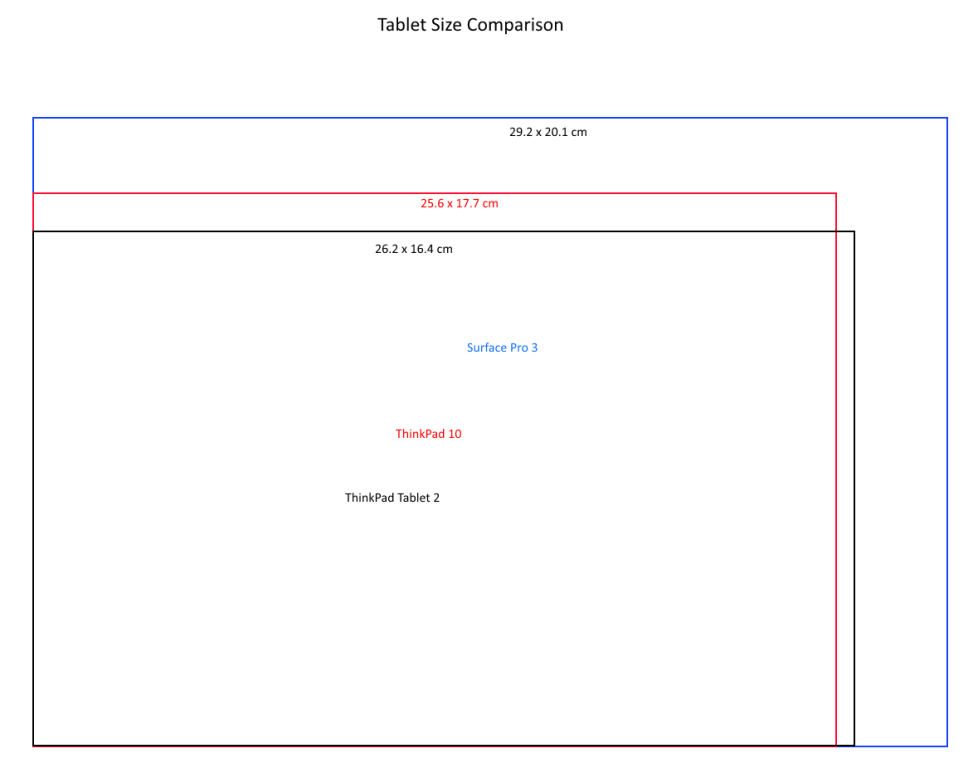
    Tablet Size Comparison The Surface Pro 3 (SP3) is the biggest and heaviest (at 800 gm.) tablet of the three. The TP10 is roughly the same size and weight (610 – 600 gm., depending on whether it has WWAN or not) as my TPT2 (610 gm.), but has a slightly different aspect ratio. Whilst I haven’t had an opportunity to compare all three side by side in real life (and won’t until September, here in the Netherlands); reading the forums where these are discussed, I worry a little that the SP3 may be just a little too big and unwieldy as a tablet. The TP10, particularly with that changed aspect ratio, may be, as Goldilocks found, “just right”.

    Screen Resolution and Aspect Ratio

    The changed physical aspect ratio of the TP10 reflects the fact that the display screen ratio has also been changed: from 16:9 of the TPT2 to 16:10 of the TP10. It’s not just the ratio that has been changed, but also the resolution. The TPT2 has a screen resolution of just 1366 x 768 pixels, whereas the TP10 has 1920 x 1200. Now, I say “just”for the TPT2, but quite honestly, for the size of the device, the resolution is perfectly adequate. Nonetheless, the higher resolution of the TP10 is clearly an improvement, and the 16:10 aspect ratio even more so, as far as I’m concerned. So how does this compare with the SP3? It has to be said that the SP3 has the upper hand. Not only does it have a resolution of 2160 x 1440, this also gives it the best aspect ratio of 3:2. For reading books and documents in portrait mode, this is pretty close to what I want. The 16:10 ratio of the TP10 is in second place (with my trusty TPT2 coming in at third place with 16:9). However, if one compares reading quality, as expressed by pixel density, then in fact the TP10 comes first: it has a pixel density of  224.17 pixels per inch, while the SP3 has 216.33 pixels per inch. Obviously, the TPT2 comes third with 155.16 ppi. In summary, for me, the SP3 display is the front runner, but the TP10 is close behind.

    Performance

    On paper, there is no contest; the Core i3-based SP3 wipes the floor with both of the Atom-based ThinkPad tablets. Looking at the CPU Passmark benchmarks, then we have:

    • SP3: 2,278
    • TP10: 1,970
    • TPT2: 679

    The SP3 is over three times as fast as my TPT2. However, for my usage (Word, Excel, OneNote, Mail, Windows Live Writer, web browsing, playing media, Metro Apps), the TPT2 has proved perfectly adequate. Yes, extra power would be welcome on occasion; but essential? Not for what I use my tablet for. I understand that, for many people, more power is what they need. That’s not the case for me – at least not with my current usage patterns and scenarios. In summary then, the TP10 would give me a boost in power over the TPT2. The SP3 would give me a further boost in power over the TP10, but whether I really need it is a moot point. More likely, this would be gilding the lily.

    Fan Or No Fan?

    The biggest stumbling block for me is the fact that because the SP3 has more performance than the TP10, it requires a cooling fan. The TP10, like the TPT2 before it, is fanless. Personally, having experienced a tablet that is fanless (my TPT2), I really do not want to replace it with a tablet that has a fan. That would seem to be a huge step backwards as far as I’m concerned. Now I know that Microsoft claim that the fan in the SP3 is silent; but reading the forums, it’s clear that it is not. It’s true that at the moment all the real world experience is coming from people who have SP3 models that are fitted with the more powerful Core i5 processor. The Core i3 models (which should run cooler) won’t be available until next month. Nevertheless, it’s a concern. An additional point is that the SP3 is one of the first examples of an Intel Core-based tablet that uses InstantGo (formerly known as Connected Standby). Reading the forums, it is apparent that the bugs have not been fully ironed out. There are examples of people finding that their SP3 has turned itself on in their shoulder bags, with subsequent overheating. As a result, some people are posting ways to turn off InstantGo, which seems to me a pretty drastic course of action. My TPT2 has InstantGo, and, after some initial teething issues, solved by software updates, it now performs faultlessly, and I would not want to lose it. A fanless tablet, even if it did turn itself on in your shoulder bag, would only run the risk of unwanted battery drain, not meltdown. In summary, therefore, the fanless TP10 easily wins this round over the SP3.

    Pen Support

    All three devices (the TPT2, TP10 and the SP3) support active pens for accuracy and pressure sensitivity. The ThinkPads use Wacom technology, whereas the SP3 now uses N-Trig technology (earlier Surface Pro models also used Wacom). There are many heated discussions over which technology is superior, particularly amongst artists. However, since my purpose for wanting to have a pen is for simple notetaking and scribbled drawings, I will be happy with either. Both are far superior to the capacitive pens sold as accessories for iPads. The TPT2 came with a very thin pen that can be stored in the tablet itself. However, I tend to use a normal-sized Wacom pen when writing long screeds. The pens supplied with the TP10 and SP3 are of normal dimensions, which unfortunately means that they are too big to be stored in the thinner tablets. In this category, therefore there is nothing to choose between the TP10 and the SP3, as far as I am concerned.

    Cameras

    I was very surprised to discover recently that the rear camera in the SP3 was a fixed-focus device, rather than auto-focus. A fixed-focus camera is very limited in what it can do. Photographing documents, and similar close-up work, will be difficult, if not impossible. When this was raised in forums, lots of people jumped in to say that they would never use their tablet for making photos anyway, but always rely on their smartphones. While this is true (and my Nokia Lumia 1020 will knock the socks off any tablet camera), it does rather seem to miss a fundamental point. Microsoft are presenting the SP3 as a premium device for professionals. If Microsoft want the SP3 to be bought in large numbers by organisations, then it has to be a serious platform for Line-of-Business applications. Many such applications, these days, will want to include photos captured by the platform. For example, when the contractors arrived at our house to install and commission the solar panels and electric inverter, the team leader had an iPad with a LoB application. It contained the work order details. Once the installation was commissioned, he used the iPad camera to photograph the serial number barcode of the inverter, and the serial number was used to activate the monitoring system in the cloud. He also photographed my paper copy of the work order, now complete with my signature, and the electronic copy was added into the business process application. The iPad has an auto-focus camera, and can be used in these sorts of applications. The SP3’s fixed focus camera can’t. Here’s an example (taken from a post on the Microsoft Surface forum) of the same document photographed by an iPad (auto-focus) and the SP3 (fixed-focus) cameras: iPad and SP3 Camera Comparison I’m sorry, but Microsoft should be ashamed of this. A common use of tablets in the field is with insurance adjusters. They will inspect a loss, taking a number of photographs along the way, notate the damage on them with a pen by circling the damage and email the pictures to the claims handler with their recommendations. The Adjusters need to take long shots and close ups (hat-tip to Bronsky for this example). The SP3 cannot be used in this scenario. My old TPT2, and the TP10, can. They both have auto-focus lenses capable of taking close-ups and wide-angle shots. Once again, Microsoft snatches defeat from the jaws of victory. As I said, most of the time I will use my Nokia 1020 for taking photos, but in practice, both my TPT2 and the TP10 cameras will far surpass the toy camera that Microsoft has put in the SP3. So, while I could live with the camera that the SP3 has, it certainly tarnishes the “premium” moniker that Microsoft would have us believe that the SP3 carries.

    Sensors

    Smartphones and tablets are equipped with a range of sensors these days, whilst laptops are not. The TPT2, TP10 and the SP3 all have a gyroscope, accelerometer, magnetometer and an ambient light sensor. In addition, however, the TPT2 has a GNSS sensor, which can provide GPS positioning data to the Windows 8.1 Location Service. At this point, it’s not clear whether the TP10 includes the same sensor. Lenovo’s documentation implies that all models of the TP10 have it, yet Lisa Gade found in her review of the TP10 that the model under test did not include GNSS capability. I’ve asked Lenovo if they can clarify the issue. One thing is clear, though, the SP3 does not have a GNSS sensor. And again, I find this strange, given that the SP3 is supposed to be a premium device for professionals. Microsoft state in the SP3 specifications that it has a “digital compass” for its Location Service. Do they take us for fools? A compass is not sufficient to provide accurate position data. In this category, therefore, the TPT2 is currently out in front, but if it is confirmed that the TP10 also has a GNSS sensor, then it will join the TPT2, and the SP3 will be in third place. [Addendum: Lenovo has confirmed to me that all models of the TP10 have a Broadcom 4752 GPS chip in them to provide GNSS data] Is a GNSS sensor essential for me? Honestly, no, but it is very nice to have. A number of the apps that I use require accurate position data (e.g. mapping, navigation and astronomy apps), and while I could provide this via a bluetooth GPS device to the SP3 (and the TP10, if necessary), it’s very convenient to have this built into the tablet directly.

    Networking

    All three devices support WiFi and Bluetooth 4.0 networks. The SP3 also supports the newest, fastest variant of WiFi: 802.11 ac in addition to the 802.11 a/b/g/n specifications. This puts the SP3 in front of the TPT2 and the TP10 in this respect. However, there are currently no models of the SP3 that are equipped with WWAN capability, whereas both the TPT2 and the TP10 have models equipped for mobile networking. Once again, just as for the camera quality, this could be an important differentiator for Business users. Is this a showstopper for me? No, it isn’t. Although my current TPT2 is equipped with WWAN, I very rarely use it, and on the occasions that I do, I could just as easily pair it with my Nokia 1020 to provide internet access to my tablet. The SP3 also does not have NFC, whilst some models of both the TPT2 and the TP10 do. This feature is more commonly found in Smartphones, but it could just take off in tablets as well. This is another “nice-to-have” feature as far as I’m concerned. Its absence is not a showstopper. Overall, therefore, given that I could live without WWAN capability, NFC, and do not need 802.11 ac speeds (or indeed have them in our home network), then there is nothing to choose between the SP3 or TP10 in this category.

    Summing Up

    I’ve tried to sum up using the table shown below. I haven’t assigned weightings to the categories, but if I did, then the dimensions/weight, display and noise categories would be the most important to me. You’ll notice that I have not got a battery life category. I’m assuming that both the SP3 and the TP10 would be sufficient for me.

    Category Front-runner
    Dimensions/Weight TP10
    Display SP3
    Performance TP10 (sufficient)
    Noise (fan) TP10 (fanless)
    Pen Support SP3 = TP10
    Cameras TP10
    Sensors SP3 = TP10
    Networking SP3 = TP10

    The one area where the SP3 clearly comes out on top is in the display category, because of its superior resolution and 3:2 aspect ratio. Whilst, on paper, the SP3 clearly wins in the performance category, the TP10 has sufficient performance for me, so I’ve put that first. The SP3’s superior performance also comes at a cost for me: that damn fan. In fact, I’m beginning to think that the whole case one way or another, balances around the question of the fan. If the Core i3 model of the SP3 can really minimise the use of the fan, and the problems with InstantGo resolved, then it becomes more attractive. Then the attention shifts to the dimensions and weight category. So it looks as though, at this point in the technology cycle, while the TP10 is a better fit with what I am looking for in a tablet, I must resist the temptation to pull the trigger until after some reports of the Core i3 model of the SP3 have been published, and I’ve had a chance to see, and heft, both the TP10 and SP3 in the flesh…

    Addendum

    I reached a decision (of sorts) on the 6th September 2014, and wrote a post on it. The bottom line:

    Now that a wider range of TP10 models are available here in the Netherlands, I could get a TP10 (faster, with a better display, and twice the RAM) to replace my existing TPT2 for €620. I definitely won’t be going for the SP3 (at €819) – too many compromises and issues for me. I could also equally continue using my TPT2 quite happily and wait to see what an SP4 has to offer. There’s no rush.

    20 responses to “Still Trying To Nail It”

    1. Ludwig Avatar

      Thank you Geoff for sharing your thoughts. I too have been “thinking tablet”, but not nearly as carefully as you have. The Surface Pro 3, with the more powerful CPU, seemed to be the front runner until you mentioned the fixed-focus camera. To me that is an absolute deal breaker. Not even as a kid did I own a fix-focus camera, those are toys at best. So I’ll wait for SP4 or look around some more. Thanks again.

      1. Geoff Coupe Avatar

        Ludwig, you’re welcome. I found it astonishing that Microsoft chose to put a fixed-focus camera in there in this day and age.

      2. Geoff Coupe Avatar

        Ludwig, there’s a new version of the SP3 User Guide posted. Page 89:

        “Record video with either camera in 1080p HD, with a 16:9 aspect ratio (widescreen). Both cameras are fixed focus, so you don’t need to worry about focusing. A privacy light appears when either camera is on, so there are no surprises.”

        Apart, that is, from the rather nasty surprise that the SP3 is indeed fitted with a toy camera. Microsoft sends its apologies to you, and to Insurance Adjusters everywhere, and suggests that you buy an alternative tablet for your work.

    2. jonathanprice384 Avatar
      jonathanprice384

      I’m surprised so many people put so much emphasis on the camera, but then again, I’d be purchasing a Surface (any model) as a drawing tool first and foremost. I couldn’t care less about the fixed focus camera but I was intrigued that the Thinkpad uses Wacom technology. That’s what made me fall in love with my SP1 and I was highly disappointed to learn that MS switched to another pen maker. I literally use my Surface for drawing every day so a battery-operated stylus is a deal breaker for me. Now I’m curious about that Thinkpad.

      1. Geoff Coupe Avatar

        Jonathan, you are an artist, so naturally your emphasis would be on the pen. Photographers would naturally be thinking about the camera. But besides that, there are many potential business applications that would involve being able to photograph documents for capture in a business process. I find it incredibly dumb of Microsoft not to at least make the SP3 capable of competing in that market. They position the SP3 as a device for professionals, but then they deliberately cripple it so that it is useless in certain business scenarios.

        BTW, the ThinkPad, as an Atom-based device, would also probably not meet the demands of an artist. Most professional drawing applications are very processor-intensive.

    3. Joost Verhoeks Avatar
      Joost Verhoeks

      Hi Geoff,
      I love reading your remarks and thoughts. I also have a TPT2, which I think is a bit too slow for me. I have looked at the Thinkpad 8, but it seems to small for me (readability is getting difficult sometimes).
      I am therefore looking for reviews of the Thinkpad 10, but have not seen a good review on the real speed difference with the TPT2, Thinkpad 8 and the Thinkpad 10. Would you know a good source here ?
      The SP3 looks like a less interesting choice for me due to the larger screen, heavier weight, FAN, thicker pen, no WWAN, no NFC, no GNSS, … and maybe price.

      A point in your review on the thickness of the pen for the Thinkpad 10: I am already thinking of using my TPT2 pen when I would buy the Thinkpad 10, for to have a smaller/thinner pen….Since the use of the Wacom technology for both this should be possible

      1. Joost Verhoeks Avatar
        Joost Verhoeks

        I am not reading on the availability of HDMI. I use my tablet with my Grandmother to show the (holidays) photo’s on the TV screen via the hdmi cable. This one seems not to be available on the SP3

        1. Geoff Coupe Avatar

          Joost, the SP3 has a Mini-DisplayPort connector. That means that you need a mini-DP to HDMI adaptor to connect with a TV that has HDMI connections. These adaptors are readily available.

      2. Geoff Coupe Avatar

        Joost, I’ve not seen a review that specifically compares the performance of the TPT2, TP8 and TP10. The best starting point is probably to look at the Passmark scores of the CPUs used in them. So then we would get:

        TPT2 – Atom Z2760 – Passmark 679
        TP8 – Atom Z3770 – Passmark 1282
        TP10 – Atom Z3795 – Passmark 1970

        Both the TP8 and the TP10 have the same screen resolution (1920 x 1200), so that should mean the TP10 should seem faster than the TP8, and certainly a lot faster than the TPT2.
        And yes, the TPT2 pen will work with the TP10.

    4. osm Avatar
      osm

      Nice write-up. I’m looking around for a Windows tablet and have already decided I want Atom, mainly for the silent, fanless aspect. I’ve also decided I want a 10″ screen and one of my decisions now is whether to get a 16:10 or 16:9 aspect ratio. However, because screen ratio is generally not a configuration option on any given tablet, if I restrict my choice to 16:10 tablets, I will be excluding other tablets which have certain features I like.

      From your post, it’s clear that you favour a lower W/H ratio, where W is the screen’s long axis. But I wonder if you feel there are any scenarios/use-cases where a higher W/H ratio would be preferable on a 10″ screen?

      The only tablet I’ve used for any length of time is an iPad. Whilst I’m happy with its 4:3 ratio, it’s a bit hard for me to judge if I would dislike 16:9.

      1. Geoff Coupe Avatar

        Well, the 16:9 ratio is best for viewing modern films, so if your prime motivator for tablet use is film/tv viewing, then that’s the best ratio. It’s not my prime motivator – I tend to use the tablet for reading or office documents mostly, where I prefer a ratio that is closer to A4. I can certainly get by with 16:9 (I’ve had my TPT2 for 18 months now, and been very happy with it), but I want my next tablet to be different.

        Re the fanless aspect. That’s an important consideration for me too. With fanless Broadwell-based designs just around the corner (well, within six months or so), I’m beginning to wonder whether I should just sit tight and wait to see what the SP4 or the next Lenovo tablet have to offer…

        1. osm Avatar
          osm

          Thanks.

          Yeah, hybrid Windows tablets seem to be evolving pretty rapidly at the moment. I feel it will be a couple of years before I’ve decided what specifications and design I favour.

    5. Philip Avatar
      Philip

      Hi Geoff,

      I too am going through the comparison using an indepth approach like yours. However a crucial part that we need to compare is the accessories. In this day and age the accessories make the tablet more productive and as such it is crucial to compare the TPT10 ultrabook keyboard vs the . Surface pro 3 keyboard cover. On price they are similar, but the TPT 10 keyboard is significantly thicker and heavier but is also better to type on and is more sturdy.

      Furthermore another aspect you should discuss is the kickstand, as the variability in viewing angles is a clear advantage to SP3.

      Finally i think picking SP3 vs TPT10 goes to how you use it in terms of time. If the majority of the time you will use it as a pure tablet (sans keyboard) then portability and TPT10 is the way to go. If the majority of the time you will be using the device as a productivity focused laptop, then the SP3 is the way to go as the screen is bigger and you’ll put it on a table and the weight is less of a concern. Even if you are 50/50 i think the default will be TPT10 given the weight and portability for holding 1 handed.

      Overall i’m going for the TPT10.

      1. Geoff Coupe Avatar

        Hi Philip, thanks for the comments. Good points, though for me, the keyboard accessory is not important. That’s because I already have the small Microsoft Arc keyboard, which I use occasionally with my TPT2. I didn’t mention the kickstand in this post, but I had mentioned it as a plus point in an earlier post. I think your last point about usage is particularly relevant. I use my device as a tablet, not a laptop for the majority of the time…

    6. Thiri Avatar
      Thiri

      Hi Geoff, thanks for this post. I’ve also been going back and forth since the announcement of both the SP3 and the TPT10. Some days I’m completely in one camp and other days, completely in the other. I guess Phillip makes a good point – usage. What do you think I should go for if my use is mainly tablet-esque, with occasional need for productivity (MS Office, emails) that requires a really good keyboard? Essentially, I am a heavy tablet user (I take it EVERYWHERE with me), using my Xperia Z for pretty much everything – watching movies, reading books, browsing, comics, games, short emails – with the occasional need for a laptop. My ideal would be something extremely portable (TPT10) that can read an external hard drive (SP3) and/or have 500 gigs of space (SP3 i7)! What do you think?

      1. Geoff Coupe Avatar

        External hard drives might be an issue with both the TP10 and the SP3. I think that both of them have USB ports that are strict about the amount of power they provide. That means that some external HDDs and DVD drives don’t work. You would need to use a powered USB hub or USB Y-cable.

    7. Thiri Avatar
      Thiri

      Sorry Geoff for the double post, but I also wanted to ask what you thought about the availability of aps in Windows? Will I be able to replace most of my Android aps (most important being book and comic book readers) do you think?

      1. Geoff Coupe Avatar

        I only use the Kindle App; but there are other book apps available. Not having personal experience of them, I couldn’t say whether they are any good. Same goes for comic book readers…

    8. […] my decision was still not clear-cut, so I returned once more to the topic where I compared both the TP10 and the SP3 to my current tablet, the Lenovo Thinkpad Tablet 2 (the […]

    9. […] To date, I’ve had an HP TX2000 convertible, a Lenovo ThinkPad Tablet 2, and currently I have a Lenovo ThinkPad 10 and a Lenovo Yoga 3 Pro convertible. I’ve long ruled out Apple’s iPads and the myriad of Android tablets, since I use the Windows ecosystem, and up until now, Microsoft’s Surface range of products have never ticked enough of my boxes. While I had initially high hopes for the Surface Pro 3, it came with a poor fixed-focus rear camera, no GNSS capability, and a fan (I really want a fanless tablet). For more detail, see my “trying to nail it”post. […]

    Leave a comment

  • Seeing the Future

    I was pulled up short today by the caption under the photo in this Guardian piece:

    “Xeno, an interactive monster with pullout snot, farting capability and 40 different expressions”.

    God, that will be me in not more than 20 years…

    And with that name, won’t the Church of Scientology be seriously thinking of reaching for their lawsuits?

    Leave a comment