Reflections on life at “De Witte Wand”…

  • A Cataclysm Down Memory Lane…

    Back in the early 1980s, I got to know William Clark, who was almost a father figure to my partner at the time. We would be frequent weekend visitors at William’s country retreat, a converted mill in the Oxfordshire village of Cuxham.

    The Mill

    Summer or winter, the house had charm and was filled with William’s memorabilia from his years in public service, the Observer newspaper, the BBC and the World Bank.

    The Mill

    Sunday lunches often had guests from the worlds in which William lived, and I found it a fascinating experience to be able to eavesdrop on their conversations.

    In 1982-3, William was engaged in writing a novel – Cataclysm – a fictional scenario in which an international debt crisis in 1987 escalates into an all-out conflict between the developed and underdeveloped worlds. A minor plot point was the use of what today would be called cybercrime, but the word, and the internet as we know it, simply didn’t exist at the time. William, knowing that I worked in IT, asked me to read the drafts and comment on the technical aspects. I did that to the best of my ability, but I suspect that my crystal ball was even cloudier than his.

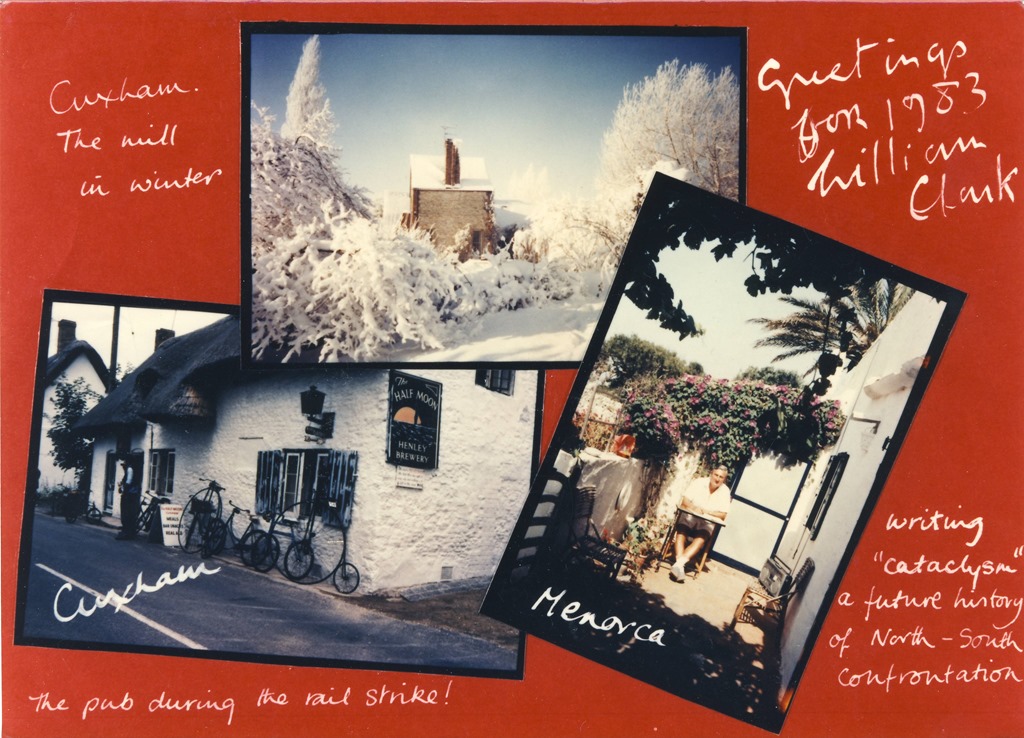
    His Christmas card of 1982 referenced both his writing of the novel and the photo I had taken of the mill in winter.

    Scan10014

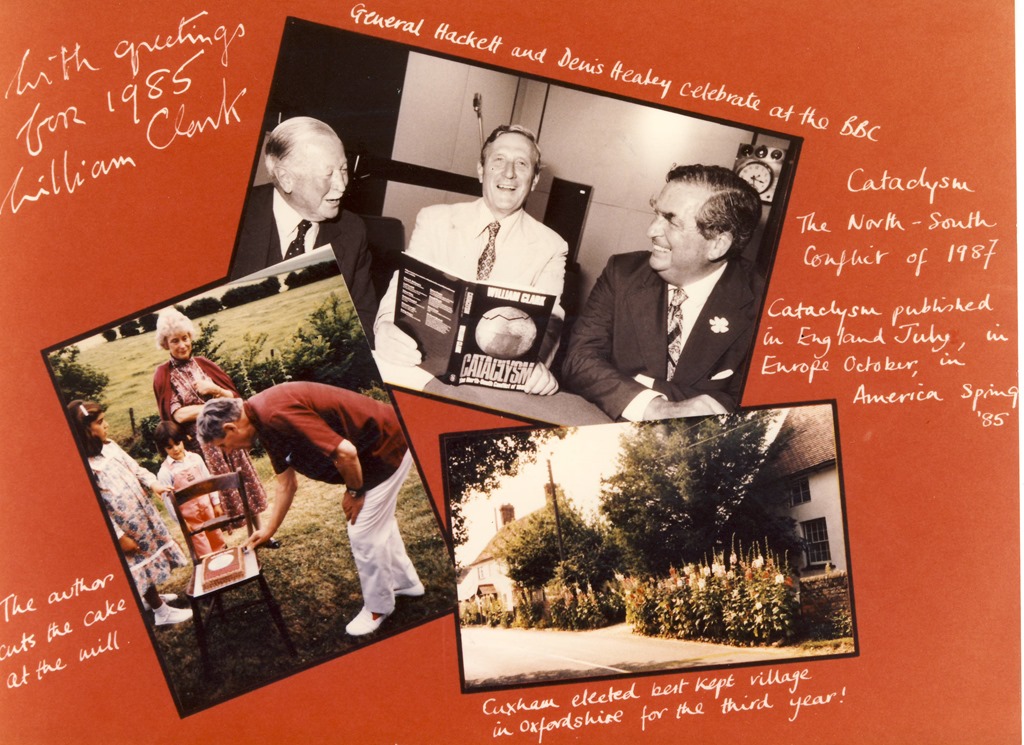
    Cataclysm was published in 1984, as that year’s Christmas card illustrates:

    1984-12-01

    I had a rather acrimonious breakup with my partner at around this time, so I’m afraid I lost touch with William, and he died, of liver cancer, in June 1985.

    I’ve often wondered how I would view the technical aspects of Cataclysm with the benefit of hindsight, so a couple of weeks ago, I went on to the Abebooks web site to track it down. I found a copy, which also apparently contained a letter signed by William, held by an Oxfordshire bookshop. I snapped it up, and it arrived yesterday.

    Cataclysm

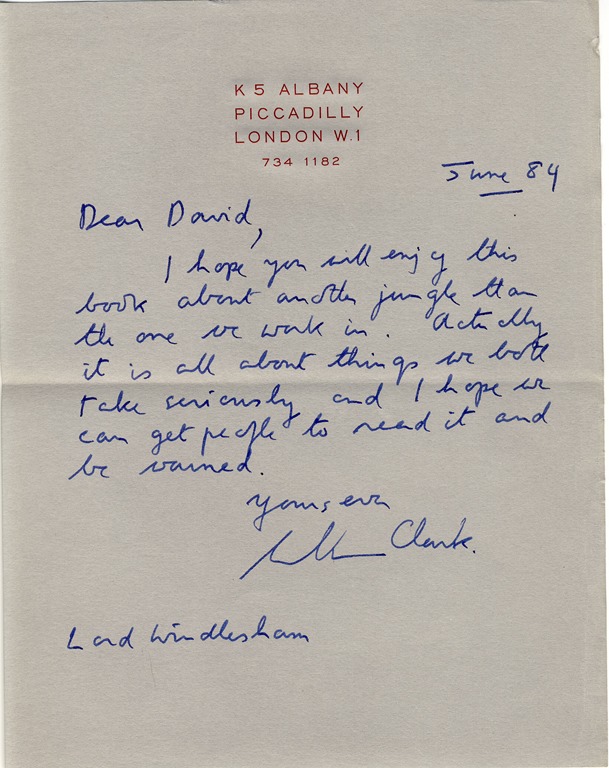
    I look forward (with a modicum of trepidation) to re-reading it. And, as promised, there was also a signed letter from William.

    William Clark

    It is written on William’s notepaper, with the heading of William’s London flat in Albany, and addressed, I believe, to David Hennessey, 3rd Baron Windlesham.

    A little piece of history.

    I recall William with much fondness. The house and garden at Cuxham would often echo to his cry of “For God’s Sake…” – with a prolonged emphasis on the second word. For all the exasperation that he was able to inject into the phrase, we all knew that there was a wink as well.

    The book, and the letter, will now reside in my library until they move on to the next owner.

    One response to “A Cataclysm Down Memory Lane…”

    1. TomT Avatar
      TomT

      Sounds like an interesting read. Please do post a review once you’ve finished it!

      Cuxham looks lovely.

    Leave a comment

  • Trying to Nail It

    A few weeks ago I wrote a piece on the newly-announced Surface Pro 3 from Microsoft: For the Want of a Nail. In summary, while I thought that the device was impressive, it seemed to me to miss a few things that I would be looking for in my next tablet.

    First, the positives of the SP3 (from my perspective):

    • The form factor is both a tablet and a notebook.
    • Build quality is high.
    • Beautiful engineering – particularly on the adjustable kickstand.
    • Thinner and lighter than the 13 inch Macbook Air laptop.
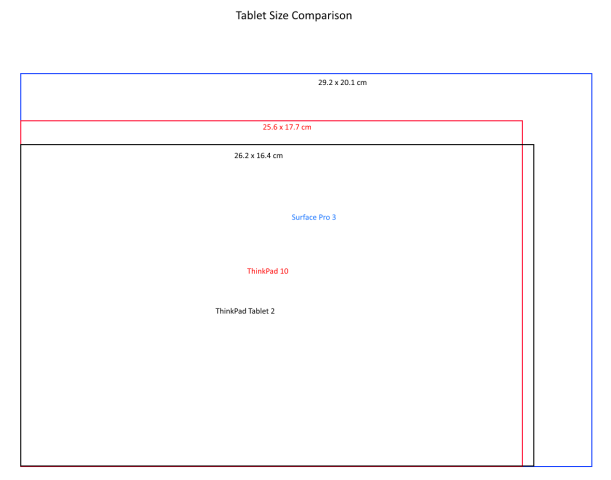
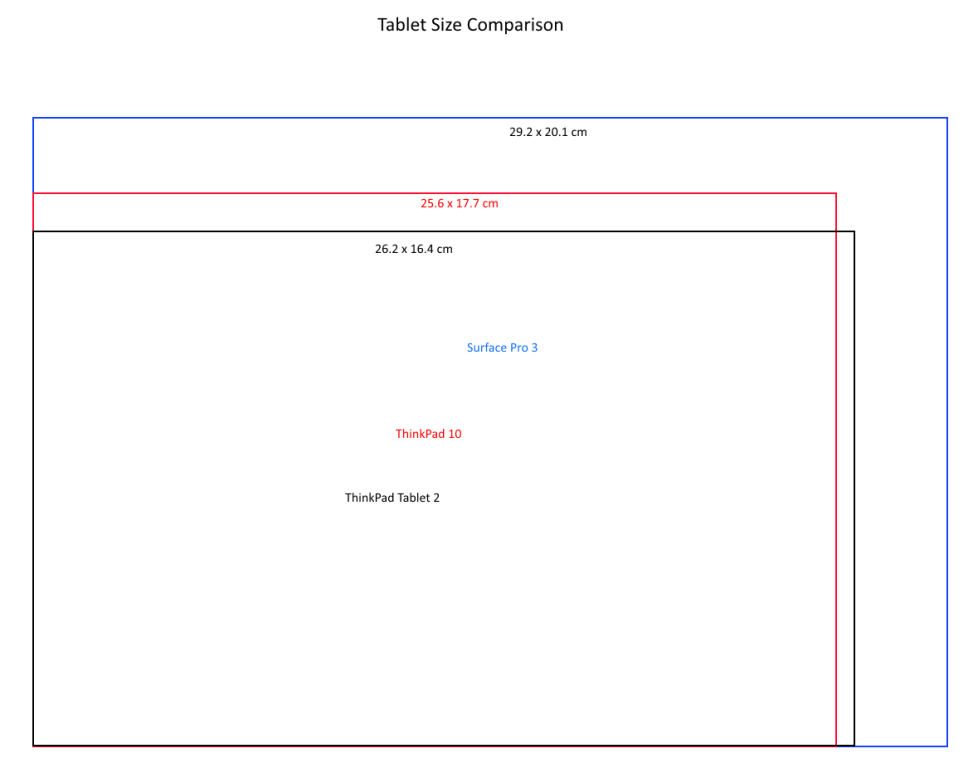
    • The 12 inch display (2160×1440 pixels) has a more comfortable 3:2 aspect ratio with a high pixel density (216.33 pixels per inch), and is both pen and touch-enabled.
    • The pen feels and behaves like a proper pen, not a pointy stick.
    • There will be a range of models available, running from devices fitted with the Intel Core i3 processor, through ones with the Intel Core i5, up to the most powerful, fitted with the Intel Core i7.

    And the negatives:

    • It’s got a fan – I really want my tablet to be fanless.
    • All the currently announced models are WiFi only – no WWAN.
    • No models have GNSS included, so the Location services in Windows 8.1 won’t work without carrying around an external GPS device and using a software shim such as GPSDirect.
    • No models have NFC included
    • It appears as though the rear camera is fixed-focus, and not auto-focus.

    The Surface Pro 3 models are also premium-priced, but that’s no different to Apple’s pricing strategy. Actually, I think you can argue that Microsoft gives you more value for money than Apple, because no MacBook is currently touch-enabled or equipped with a pen.

    Reading, and watching, the reviews of the Surface Pro 3 that have been published in the Media, it is depressing to me how many reviewers seem unable to grasp that Microsoft are attempting to change the game here with a totally new form factor. These reviewers seem to be, to a man (or woman), technical journalists who use their Macbooks to type out their articles with their laptops balanced on their knees. The pinnacle of silliness in this respect are the animated images of this reviewer crossing her legs while typing. As Hal Berenson writes:

    Microsoft is going for a unique form factor with the Surface Pro 3, one that says we compromised the tablet a little and we compromise the notebook a little and have this one device that can be both at the same time.  Detachables are a device class that let you have a notebook or a tablet, but not at the same time.

    Still, as I wrote a few weeks ago, my primary usage case for this type of device would be as a tablet. I don’t own a laptop or a notebook. And in that case, I thought:

    If I were to look at the SP3 models for simply a replacement for my TPT2 as a companion tablet, then I would go for the Core i3 model of the SP3. However, for roughly the same price as what I paid for my TPT2 eighteen months ago, I would be losing GNSS, NFC, and WWAN with the SP3. I really don’t see the point.

    And I concluded then:

    Frankly, I think I’ll give the SP3 a miss. I don’t see that I could justify it. It’s more likely that I will be replacing my 18 month old ThinkPad Tablet 2 with a new ThinkPad Tablet 10.

    However, I’ve been thinking about this some more, while waiting for Lenovo to release models and pricing details of their new ThinkPad 10 tablet. Now that those details are beginning to trickle out, I’m really wondering whether the decision is quite as clear cut as I first thought.

    At the moment, as I wrote here, of the 17 different configurations that Lenovo list for their “TopSeller” ThinkPad 10 20C1 model, only three are currently being listed by Dutch retailers. Those are the:

    • 20C1001DMH – 64GB, 2GB RAM, Wi-Fi only
    • 20C10024MH – 128GB, 4GB RAM, Wi-Fi, WWAN (LTE), NFC
    • 20C10026MH – 64GB. 4GB RAM, Wi-Fi, WWAN (LTE), NFC

    All of those models are equipped with a touchscreen, digitiser and pen, Bluetooth, and GNSS. They run Windows 8.1 Pro (32 bits for the 2GB 20C1001DMH, and 64bits for the 4GB models).

    Indicative prices are:

    • 20C1001DMH – €685
    • 20C10024MH – €880
    • 20C10026MH – €806

    Now the interesting thing is if I look at the Core i3 model of the SP3. Like the Lenovo 20C10026MH model of the ThinkPad 10, this model of the SP3 has 64GB, 4GB RAM, touchscreen, pen, Bluetooth and Wi-Fi. It also runs the 64bits version of Windows 8.1 Pro. However, it has no WWAN, GNSS, or NFC.

    On the other hand, it has a bigger screen (12 inches diagonal, 2160×1440 pixels, versus the 10.1 inches and 1920×1200 pixels of the ThinkPad 10). Being a Core i3 machine, it is also faster than the Atom-based ThinkPad 10. And the price?

    • €819

    That’s right, less than €15 more expensive than the 20C10026MH model of the ThinkPad 10.  OK, so I’d need to provide WWAN capability via my smartphone, use my bluetooth GPS tracker with the SP3 to provide real-time GPS data, and forego NFC. But would that really be such a major hurdle? Even if I went with the cheapest ThinkPad 10, the WiFi-only 20C1001DMH, the Core i3 is only €134 more expensive, and I’d be getting more storage, more screen and more performance for my money.

    Ah, you say, but you’ve forgotten to include the cost of the Type Cover in the cost of your SP3 – that adds in a further €130. Well, I respond, it’s true that I will need a cover for the SP3; but I don’t need a Type Cover, just a plain cover will do. Even a swish leather case such as the Manvex will only set me back about €40.

    Really, the only sticking point for me now is the fact that the SP3 has a fan. I really have appreciated the fact that my trusty ThinkPad Tablet 2 is fanless. Do I really want to take a step back and go with a device that has a mechanical fan in it?

    Well, here in the Netherlands, there won’t be any models of the SP3 available anyway until the 31st August, so I have a while to watch and wait. There’s no rush. My ThinkPad Tablet 2 is serving me well.

    10 responses to “Trying to Nail It”

    1. Matt Healy Avatar
      Matt Healy

      At present, I still prefer a regular laptop for serious content creation and analysis — with an external LCD panel to give more screen real estate — and this Android tablet for portable use. Right now I am lying on my living room carpet typing on the touchscreen. For light content creation such as email or meeting notes, I use a Bluetooth keyboard with this Android device. At present, I think I get better value for the money with separate gadgets.

      As for WWAN and GPS, my 4G LTE hotspot also has GPS built in, and the Google Maps Android App knows how to use it. However, after one recent road trip on which I used Google Maps for navigation, I decided for in car use I’ll resume using my Garmin GPS-only device. I found that in order to check directions on the tablet I had to get off the highway because using the touchscreen while driving was just too distracting. My Garmin GPS has a small number of buttons which I find much less distracting to use while operating a motor vehicle at highway speeds (where taking eyes off the road for 15 seconds could be rather dangerous). So for road navigation the simplicity of a dedicated gadget turns out to be a major advantage.

      1. Geoff Coupe Avatar

        For my use cases, I don’t need a laptop in addition to my Desktop PC and tablet, but that’s my situation. It won’t apply to everyone, as you make clear.

        I agree that using a tablet for car navigation is definitely dangerous. I don’t do it, but will continue to use my ancient TomTom until it dies. But for out rambling, a small tablet has its uses as a paper notebook replacement and navigation device. Whether I would feel quite the same way lugging around an SP3, I don’t know.

    2. Greg Avatar
      Greg

      Hi,

      Read your post about the SP3 compared to your ThinkPad Tablet 2 with interest. I’m a teacher in the US who uses iPads in my classroom, but I’ve always wanted a better inking/pen experience than the iPad provides for marking up PDFs, correcting student work, etc. I just purchased a TPT2 (for a very good price) but so far it’s a mess. I can’t get all the (99!) updates from Microsoft to install. Any suggestions?

      Thanks.

      Greg

      1. Geoff Coupe Avatar

        Greg, I’m assuming that your TPT2 came with the factory-install of Windows 8. That will likely be from a few months, or even over a year ago, so it’s only to be expected that Windows Update will want to install many updates. This can take a while, and what I do in this situation is to adjust the Power settings so that when the tablet is plugged in, it won’t go to sleep (when in sleep, installation slows right down, so it will take forever). It may well be that the first time round, some updates fail to install. I just repeat the “check for updates”, and go round again. Eventually, you should get all the necessary updates installed. At this point, you’ll be able to download and install the update from Windows 8 to Windows 8.1 from the Windows Store. Once that’s done, there will be a raft of updates for Windows 8.1 to install. It’s a slow process, and a pain, so patience is a virtue. Look on the bright side, once the tablet is up to date, Windows will keep itself up to date in the background, and you shouldn’t notice it.

        You should also run the Lenovo System Update utility – this will check that all the Lenovo-specific drivers and BIOS releases are present and up to date.

        1. Greg Avatar
          Greg

          Thanks for your reply, Geoff. The problem is that every time I try to install the Windows Updates, they download and try to install but eventually a “Failure configuring Windows updates” message appears and the device locks up on the “Reverting Changes” screen. I then have to reset the TPT2 and start all over again. I can’t get the update process to complete. From what I’ve seen online, this tablet (with OneNote) will do just what I need it to do, but if I can’t get the updates, followed by 8.1, installed, I’m going to have to return it.

          1. Geoff Coupe Avatar

            Greg, sorry to hear about the problems you’re having with the TPT2. Have you tried the steps given by Microsoft here: http://support.microsoft.com/kb/949358/en-us ?

    3. Greg Avatar
      Greg

      Finally got the updates to go through by doing 10 or 12 at a time. Took forever (all day), but wow, 8.1 makes a huge difference. Much smoother performance, and the pen (so far) works great in OneNote. Thanks so much for your help!

      1. Geoff Coupe Avatar

        Good to hear that it’s now working!

    4. […] the past three weeks, I’ve been trying to nail what my next Windows Tablet will be. And I still can’t decide between the Lenovo ThinkPad 10 […]

    5. […] I revisited the topic in June, once models of the TP10 were becoming available, and pricing details were known. At that point, despite the SP3’s negatives, the model of the SP3 that I was most interested in (with the Intel Core i3 processor) was only slightly more expensive  (€15) than the closest equivalent TP10 available at that time, with its smaller display and less powerful processor. […]

    Leave a comment

  • Lenovo Marketing 101

    Lenovo’s new ThinkPad 10 tablet is supposedly available in a variety of hardware and software configurations. The Product Specifications Reference documents for Western Europe list a total of 17 different configurations for the ThinkPad 10 20C1 – TopSeller model.

    Basically these are arrived at by twiddling five main factors:

    • Memory size: 2GB or 4GB RAM
    • Storage: 64GB or 128GB
    • Connectivity: WiFi-only, or WiFi and WWAN
    • Touch-only, or Pen- and Touch-enabled
    • Windows 8.1 Pro or Windows 8.1 SST

    For that last factor, operating system, I would say that Windows 8.1 Pro is relevant for business users (it includes features designed for IT management in a corporate environment), while Windows 8.1 SST is aimed at the consumer (it’s cheaper, and it also includes a one-year subscription to Office 365 Personal).

    With that in mind, I began looking around at Dutch online retailers who are promising to make the ThinkPad 10 available when it is released this month. Without exception, they are all listing models running Windows 8.1 Pro.

    Now, it’s true that all Lenovo’s marketing for the ThinkPad 10 is aimed at business use, but if they are listing models with Windows 8.1 SST one would think that they have at least half an eye on the consumer market as well. These models would also be cheaper than those with Windows 8.1 Pro.

    So I decided I would ask one of the retailers whether they would be making these models available as well. Back came the answer that unless I was prepared to buy more than 20, then I could forget about it. I’m not sure whether that’s Lenovo or the retailer being reluctant to deal in small quantities, but the end result is the same: the very models that are attractive to the consumer aren’t easily available for purchase here in the Netherlands.

    A so-called TopSeller model that isn’t actually available? Someone, somewhere needs to take a long hard look at their marketing skills. I’m beginning to feel myself pushed back to considering the Microsoft Surface Pro 3 for my next tablet.

    One response to “Lenovo Marketing 101”

    1. […] ← Lenovo Marketing 101 […]

    Leave a comment

  • Bird Feeder

    Seated, as I frequently am, in front of the computer; I also have a view through the window to the garden, and to the bird feeders strategically positioned in direct view. That’s so I can catch views of the locals…

    20140529-1138-45

    20140531-0708-34

    One response to “Bird Feeder”

    1. […] on from the shots of a Coal Tit taken the other day, here’s a couple of a Tree […]

    Leave a comment

  • Feed the Birds…

    We’ve got a large cherry tree in our front garden. Every year it gives a wonderful display of cherry blossom, followed by a large crop of cherries. Unfortunately, as soon as they are ripe, an equally large flock of starlings appears from nowhere and proceeds to strip the tree of fruit in very short order. This year I managed to get there just before them and pick enough fruit to make six pots of cherry jam. The starlings got the rest…

    060424-1402-31

    20070407-1437-35

    20090602-1725-07

    20140601-1652-20(001)

    Leave a comment

  • Chuck, Vlad, and Godwin’s Law

    Heaven knows, I don’t have much time for Prince Charles. His views, particularly on the subject of alternative medicine, strike me as being not only misguided, but downright dangerous because of his position of influence. Still, just as a stopped clock is right twice a day, he is capable of saying something close to sensible sometimes. Except on this last occasion he appears to have broken the media’s version of Godwin’s law by comparing Vladimir Putin to Hitler. Naturally, our Vlad doesn’t like it.

    While it’s easy to laugh at both Charles’ continuing ability to open his mouth to change feet, and at Putin’s reaction, it’s probably better to consider the comparison between Putin and Hitler more soberly. Stephen Liddell has done just that, and it makes for interesting, and rather worrying, reading.

    Addendum: I have just read David Mitchell’s article on the same topic, and notice that he also uses the “stopped clock is right twice a day” line. Pure coincidence, I assure you – I definitely didn’t plagiarise Mitchell’s article…

    Leave a comment

  • For the Want of a Nail…

    Last Tuesday, Microsoft announced the latest device in their Surface range: the Surface Pro 3. Everyone expected that Microsoft would be announcing a different, smaller, model – the so-called Surface Mini, but somewhere between announcing the launch event, and the event itself, someone in Microsoft apparently got cold feet – but that’s another story.

    The Surface Pro 3 is being pitched by Microsoft as a true laptop replacement. It is not seen as being just a tablet, such as the iPad. At the launch event, Microsoft’s Panos Panay claimed that 96% of people who own an iPad also own a laptop, since the traditional tablet is “designed for you to sit back and watch movies, read books, made for browsing the web, snacking on apps…”, whilst “Laptops aren’t designed that way at all, they are designed to get stuff done”.

    The result of the design process for the Surface Pro 3 is a device that is as powerful as a laptop, whilst being lighter than the 13-inch MacBook Air.

    There will be a range of models available, running from devices fitted with the Intel Core i3 processor, through ones with the Intel Core i5, up to the most powerful, fitted with the Intel Core i7. All will have a new form factor ratio (3:2) for the screen, which is both touch and pen-enabled.

    I have to say that the SP3 models are tempting. But I want to be rational about this. My current devices are a full Desktop PC (home build) and a companion tablet (Lenovo ThinkPad 2, with GNSS, NFC and WWAN). I don’t have a laptop.

    Microsoft, for some reason known only to themselves, have not included any of these capabilities (GNSS, NFC and WWAN) in what is clearly positioned as their flagship model (the SP3 web site trumpets: “best of a laptop, best of a tablet”). I agree that NFC is, at this stage of the game, more of a “nice-to-have” feature in a tablet than a necessity. It is further advanced in the smartphone world, and is already being exploited in applications such as those for mobile payments. And many people argue that WWAN is unnecessary in a tablet, since most tablet owners will have a smartphone, and the tablet can access the internet through the smartphone when WiFi is not available. This is true, but it’s not as convenient as having WWAN directly available in the tablet, and it also drains the phone’s battery faster. Still, at a pinch, it’s a way of achieving internet access.

    However, I am really surprised that Microsoft has still not seen fit to include GNSS capability in any of their Surface products (other than their Surface 2 LTE device, where GNSS comes riding on the back of the WWAN chip). A dedicated GNSS chip (such as the Broadcomm BCM47521) consumes little in the way of real estate or power. Location services are part of the Windows 8.1 operating system, and many Apps (e.g. maps, weather, astronomy, photography) make use of them.

    All models of the Lenovo ThinkPad Tablet 2 come with GNSS as standard (as do the newly announced successor, the ThinkPad Tablet 10). Having used Apps that exploit GNSS on my TPT2, I really don’t want to go backwards and lose this capability in my next tablet. It seems to me that Microsoft has missed an opportunity here to provide leadership. As far as I’m concerned, it takes the edge off the claim that the SP3 is the “best of a laptop, best of a tablet” product.

    If I were to look at the SP3 models for simply a replacement for my TPT2 as a companion tablet, then I would go for the Core i3 model of the SP3. However, for roughly the same price as what I paid for my TPT2 eighteen months ago, I would be losing GNSS, NFC, and WWAN with the SP3. I really don’t see the point.

    It seems to me that the only option worth considering (for my case) would be the “origami computing” option – going for the i7 SP3 + docking station + type cover to replace both the Desktop AND the tablet. Expensive, yes (extremely!), so I certainly couldn’t justify it on economic terms, but it would be rather a statement of where I want to get to. And I’d still be losing the GNSS, NFC, and WWAN capabilities.

    Frankly, I think I’ll give the SP3 a miss. I don’t see that I could justify it. It’s more likely that I will be replacing my 18 month old ThinkPad Tablet 2 with a new ThinkPad Tablet 10.

    6 responses to “For the Want of a Nail…”

    1. aarondr Avatar

      I’m no Surface fan, in fact I don’t really get the Surface Pro 3 personally. How big does a tablet need to be before it’s a pain to lug around. I have a Lenovo Yoga 2 Pro and absolutely love it’s ability to transform into a tablet when needed… How many times I’ve done that probably number in the single digits so far, but I’m a power user/dev so keyboards are how I work and play.

      However, I’d argue that GNSS, NFC, and WWAN are dead technologies as far as tablets go. I say that since NFC barely makes sense in a phone – no one uses it, and those that do half the time it doesn’t work. It was nearly impossible for me to use my GWallet credit 2 years ago, and I’d venture that things aren’t too much better today. The size of the target sensor requires you to know a very small area of the device where it will read properly – and it’s awkward at best finding that on a large phone, let alone a tablet. WWAN is a nice to have, but until the advent (in the US) of shared data plans it was another excuse to have $30 a month tacked on your cell bill. US carriers effectively killed the connected non-phone device. A lot like SUVs – the phablet was born. Now I’m bringing the perspective of an individual in the US market here – and I’ll even argue that WWAN can still be a big deal here in the US, but most people use tablets at coffee shops, malls, airports, and their homes – where free wifi abounds. When WWAN adds about a $100 to the price tag of a device plus the ongoing expense of a data plan, it become much less palatable to the majority of consumers. Even the $10 a month to add a tablet to my shared AT&T plan seems like too much ($15 adds a cellular device with unlimited talk/text – why should a device that can do neither cost only $5 a month less? If the Surface Pro 3 was classified as a ‘laptop’ device, they’d charge me $20 a month!). Apple gets away with WWAN due to volume, chipset, and carrier relationships – something MS doesn’t have. On the Intel side Apple still doesn’t have a device with any of those features – even though an Air is ripe for it.

      Now GNSS – I agree that adding a simple GPS chip isn’t much of an investment. However, let’s consider the lack of WWAN means your using it on WiFi. WiFi location data all but kills the necessity of GNSS. The usage scenarios for a WiFi tablet mean that your not moving around a lot, so pinpoint accurate positioning is of little value.

      I’m not saying your wrong – in fact I’d say a device with all those features is much more palatable to ‘Pro’sumers which you’d think the Surface Pro 3 is targeted toward. In reality though, this device seems more targeted to the every-man, where these features don’t pay off.

      1. Geoff Coupe Avatar

        Thanks very much for the comments. You make some good points, but I don’t think it’s all as cut and dried as you say. I think NFC is an emerging technology, rather than a dead one. Here in Europe, and also in Japan, it’s being used for contactless payments and transportation checkin/checkout. Early days, and small steps, but it may grow. However, I suspect that it will remain confined to smartphones, so in that sense, you’re right.

        I’ve never understood the rationale for having a data plan for devices that only need WWAN occasionally. You’re right, WiFi hotspots are everywhere in built-up areas (and on trains) here in Western Europe as well, so for most of the time, I can use WiFi. For the occasions when I need WWAN, I have a prepaid SIM card, so I only pay for what I need. No data plans for me – a complete waste of money, for my case.

        Why do you think that you need to have WiFi/WWAN when using GNSS? You don’t. For example, using the HERE Maps App on my TPT2, with its downloadable maps, means that I have a complete working navigational solution when completely off the grid, and out in the wilds.

        1. aarondr Avatar

          Your welcome! Oh it’s more fun to be cut and dry :-).

          NFC is nice for simplifying pairing of bluetooth devices, and I always wanted to get writable NFC tags to change settings back when I first got my Galaxy Nexus (using a Lumia 520 nowadays). The problem, it’s a geeky solution and requires physical manipulation of a device that needs a user to interact with software via the screen, which might be at an oblique angle and hard to use. Payments, want me to enter a pin, sharing a URL wants me to touch the screen. I just haven’t had a great experience with it. But I’m willing to concede (especially in the first use case I mentioned) it has the potential to be a useful technology if implemented properly.

          Ah, a world where carriers don’t suck – at least I’m able to get a plan these days that doens’t make me pay a premium for my services because they think I”m going to buy their crappy carrier locked phones.

          You don’t need Wifi – but really on a 64GB device (entry level Surface 3) your not going to want to download large offline maps. Many people have satnavs, and those that don’t probably rely on either a dedicated device or most likely their phones – again. A tablet usually means consumption, so I’m much more likely to want to not only navigate, but also find a restaurant, read reviews, look at the menu – something you can’t do without data access. If you include WWAN – then I think it’d be a bonehead move not to include a GNSS – but if you’re WiFi only most average users will never miss it.

          1. Geoff Coupe Avatar

            I have a 64GB TPT2, and I’m happily using downloadable HERE Maps for my corner of Western Europe, with very little impact on storage. My old TomTom Satnav came with a 2GB harddisk – and that held maps for Western Europe as well.

            I agree that data access capability will certainly enhance the App experience, and in many cases would be required for an App, but I would still argue that GNSS by itself is an important capability that should not be dismissed so easily. Your average user probably will never miss it because they’ve never had it. Now that I’ve experienced it, I don’t want to lose it in my next tablet.

            For Line of Business Apps for employees out in the field, it seems to me that accurate Location services would be very useful to have. That’s probably why Lenovo have included it by default in their business range of tablets.

    2. […] few weeks ago I wrote a piece on the newly-announced Surface Pro 3 from Microsoft: For the Want of a Nail. In summary, while I thought that the device was impressive, it seemed to me to miss a few things […]

    3. […] by Microsoft. I thought that the specifications of the SP3, whilst impressive in some respects, had some surprising omissions. I concluded that I would probably give the SP3 a […]

    Leave a comment

  • Rise Like a Phoenix…

    Well, of course, as soon as I read of the controversy surrounding Conchita Wurst, I couldn’t help but cheer her on in the Eurovision Song Festival. A drag queen, with a beard? It brings back fond memories of the Sisters of Perpetual Indulgence

    And then when I saw her in the second semi-final, I was even more pleased to realise that not only had she a damn good belter of a song with strong lyrics – Rise Like a Phoenix – but she could deliver it with style and panache.

    And now she’s won Eurovision 2014. Well done her!

    Martin and I watched the final last Saturday – Eurovision is a guilty pleasure. It is so over-the-top and almost the definition of camp. Every year it has more than its fair share of cringeworthy moments. This year, the French entry scored highly, and I’m still trying to get the image of the butter-churning Polish lady out of my mind.

    But there were some good songs. The Dutch entry, although I didn’t much care for it, did far better than we all hoped, coming second. If it hadn’t have been for the phenomenon of Conchita, it would have swept the board.

    I see that the UK public displayed their usual good taste by awarding the Polish girls the full douze points. It was only the UK jury voting them down that balanced it out. We Dutch were almost as bad – the public put them in 2nd place, while the jury put them in 25th place.

    At least we redeemed ourselves over Conchita – both public and jury placed her in 1st place.

    Also, while the Russian jury followed the party line and put Austria in 11th place, the Russian public actually ranked Conchita in 3rd place… We live in interesting times.

    Leave a comment

  • OneDrive – Still No Proper Support For Tags

    Update 23 January 2015: OneDrive now searches Tags – at last! So please treat what follows as a historical post illustrating the situation as it was up until January 2015…

    Update 8 October 2015: And now Tags added to photos via OneDrive online will get added to the photos’ metadata, and thus also be synced back down to the photos held in OneDrive on your PCs.

    Update 5 October 2024: And now Microsoft has removed the ability to search tags in photos stored in OneDrive. They have rendered OneDrive useless for managing photos.

    Microsoft has recently added some new features to OneDrive, listed in the OneDrive Blog: Updating OneDrive: Five New Features You Asked For.

    Unfortunately, the five do not include one that I (and others) have been requesting for the past three years: proper support for tags in photo metadata.

    Interestingly, one thing has changed, there is now a “Tags” heading displayed along with the “People tags” heading in the information pane for a photo. This returns a feature that was removed in June 2011. However, this does not yet seem to be fully working. Let me try and illustrate this.

    First, here’s the new view of a folder of photos on OneDrive; it has larger thumbnails than the previous version:

    Onedrive 01

    Now let’s look at an individual photo using OneDrive, and show the metadata stored in the photo displayed in the information panel on the right:

    Onedrive 02

    Notice how OneDrive claims there are no descriptive tags in this photo, by the fact that under the “Tags” heading, there is only the link to add a tag.

    However, this photo (like all the photos I have on OneDrive) has been tagged. I can show this by downloading a copy of this photo to my PC (by clicking on the “Download” link shown at the top of the OneDrive window), and then using Microsoft’s Photo Gallery to display the metadata in its information panel:

    Onedrive 03

    You can see that there are both Descriptive tags (clouds, lake, Reeuwijkse Plassen) and Location metadata (Reeuwijk, Zuid Holland – what Microsoft wrongly calls geotags; they are in fact more properly called geocodes) in this photo, and they were not being displayed in OneDrive.

    And then I discovered something really interesting. When I went back to displaying this photo in OneDrive, suddenly the Descriptive tags were showing up:

    Onedrive 05

    I can only conclude that the act of downloading the file has triggered a process in OneDrive to start displaying the tags in this file. All the other photos in the folder did not have any tags being displayed. As a further test, I downloaded another photo in the folder, and then went back to look at the photo in OneDrive. Lo and behold, that photo now had its descriptive tags displayed:

    Onedrive 06

    This is clearly a step forward, but it’s still a broken experience. We should not have to download every file in order to get the descriptive tags to display.

    And descriptive tags are still not being searched in OneDrive. That first sample photo has a descriptive tag “clouds” in it (to be strictly correct, it has a hierarchical tag Objects/built environment/settlements and landscapes/skyscapes/clouds), but doing a search for it in OneDrive produces no results:

    Onedrive 04

    According to Microsoft’s Omar Shahine: “this work just ranks lower on the priority list than some other things we are doing right now”.

    I just hope that the work remains on the list of things to do, and that this broken experience doesn’t last for too long.

    Addendum: A word of warning. Do not use the “Add tag” feature in OneDrive, if you want your photo metadata to remain consistent. Any tags added to photos using OneDrive do not get added to the metadata of the photos. You end up with a tag list displayed by OneDrive that does not reflect the tag list contained in the photo metadata.

    As of October 2015, this has now seems to have been fixed. Tags added in OneDrive will now get synced back to your photo metadata.

    51 responses to “OneDrive – Still No Proper Support For Tags”

    1. […] 10 May 2014: The support for tags in the OneDrive service itself is still pretty much broken. Microsoft seem to have forgotten their one-time goal that “the truth is in the […]

    2. […] Update 10th May 2014: Microsoft has introduced some new features into OneDrive, but unfortunately, the support for Tags is still very much broken. […]

    3. Ludwig Avatar

      It can’t possibly be that difficult to complete what they have started. Showing the tags is a fine step, but if they lead nowhere why on earth would you enable the links? Oh, Microsoft, why must you wander in the wilderness!?

    4. Rob Halligan (@RobHalligan) Avatar

      Thanks for your work on this issue. I went in deep for photo tags in Windows Live Photo Gallery and feel abandoned. My additional frustration is that the OneDrive and Photos apps in Windows Phone and Windows 8 (last I looked) don’t support tags. My scenario on Windows goes: show me “Black and White” photos of my grandmother taken in San Diego, California. That scenario doesn’t work in Window Phone so I can’t readily find what I’m looking for.

      1. Geoff Coupe Avatar

        Rob, you’re right, neither the Windows 8.1 nor the Windows Phone 8 Photo Apps are able to search embedded tag metadata. The Apps are dumbed-down to the point of imbecility, unfortunately. At least the Windows 8.1 Search function does search the photo tags, but you can’t do complex searches of the form that you mention using the built-in Search function.

    5. Jose Avatar

      I started organizing my photos with Microsoft Digital Image Suite and for quite some time I rely on Windows Photo Gallery to manage more than 100,000 photos. I really would like to see a day in which the metadata could seamlessly sync. I really like Windows Photo Gallery’s feature in which photos uploaded to Facebook and tagged faces would sync back to the original photo on the PC. I was hopeful Skydrive (err Onedrive) would do the same, so that I would be able to allow my close friends and family to help out in adding face tag metadata to my photos, but this inconsistent experience with regards to the captions, descriptive tags, people tags and geotags across WPG and Onedrive is horrible.

      1. Geoff Coupe Avatar

        José, I suspect a lot of the issues are because of the fact that Microsoft still has many fiefdoms, and that teams simply do not talk to each other. I believe that it is better than it once was, but clearly there’s a long way to go.

    6. Rod Avatar

      Would it solve problems if Microsoft included photo gallery as one of its online apps just like Word and Excel, etc.

      1. Geoff Coupe Avatar

        I’m not sure. Perhaps it would, but I think the real solution is to have a search service in OneDrive that indexes metadata, not just filenames as at present.

    7. Rod Avatar

      Just been trying different things and not sure if this would work for all situations, but forget about tags and change the name of the picture. It then is searchable in Onedrive and after you download it to Photo Gallery it is still searchable by the same name.

      1. Geoff Coupe Avatar

        That’s a pretty drastic workaround, and one that rapidly becomes unworkable for me. At present, all my photos use a single naming convention – the date/timestamp – in the form yyyymmdd-hhmmssnn, which is automatically created. If I were to rename my files with keywords, then (a) it’s a manual process and (b) becomes very unwieldy, considering that many photos have up to ten keywords, all of which are hierarchical with up to nine levels.

        Actually, you don’t have to do this. If you have a OneDrive folder hierarchy on your PC (which you get by default in Windows 8/8.1), then all the placeholder files now include metadata, including photo metadata. Microsoft added that after we complained that it was missing. So all your keywords are searchable locally in Windows File Explorer and in Photo Gallery. However, because the photos are NOT searchable in OneDrive itself, it means that people, to whom you have given access to your folders (e.g. friends and relations), cannot search your photos using keywords/tags.

    8. jmoliver Avatar

      Microsoft opened a Uservoice page for taking suggestions for Windows 10 improvements. You can vote, add suggestions and comment existing ones on
      https://windows.uservoice.com/forums/265757-windows-feature-suggestions/category/87207-music-photos-and-video

      There is also a Uservoice page for OneDrive:
      https://onedrive.uservoice.com/forums/262982-general

      1. Geoff Coupe Avatar

        Thanks José, I hadn’t realized that there was a Uservoice page for OneDrive. I’ll go and take a look, and probably make some comments…

    9. […] spotlight of scorn is back on the OneDrive team, again. After generating lots of goodwill over the recent announcement that Office365 subscribers will get […]

    10. Jiyong Yi Avatar

      Geoff, I read your comment in WinSupersite.com.

      There’s a possibility that WPG has an independent database for file metadata. You know, if a user adds some tags to a photo using Windows Explorer, they go to the photo’s data stream without a doubt. However, tags added using WPG could go to WPG’s own database. Have you ever check this?

      Anyway, thanks to you, I found unlimited storage itself is not enough to solve my or our storage problem. Have a nice day!

      1. Geoff Coupe Avatar

        WPG does indeed have an independent database for the file metadata. It uses this local database for performance reasons. However, it also ensures that for image formats that can store metadata (e.g. JPEG files), that metadata is also written out to the images as well. That includes Descriptive tags, People tags (using a Microsoft-defined XMP schema, rather than the Metadata Working Group schema used by Picasa), captions, ratings and geotags. These will all be stored as metadata in the files themselves, so that information travels with the files.

        However, if your photos are in RAW format, then WPG will NOT store any of this information as metadata in the files, but only in its local database on the computer where you added the tags and/or captions.

        WPG also has the ability to mark photos with “Flags”. These Flags are never stored as metadata in any image files, but only in the local database.

    11. James Smith Avatar
      James Smith

      Geoff, thanks for this article, which answered all my questions about tag searching on OneDrive. I thought I was doing something wrong, but the answer is that OneDrive is broken for tags! Unfortunately the main competitors (Google Drive and Amazon Cloud Photos) are worse, and do not display tag information at all. PictureLife displays tags, but you can do nothing with them using the iPhone app. I am a patient man and will try again in 3 months time. I am sure that eventually I will be able to use my iPhone to search and tag photos on a cloud drive!

    12. Julie Avatar
      Julie

      Awesome article! Question: if I cannot use the “Add tag” feature in OneDrive, is there any way to update the metadata without downloading, updating metadata, and re-uploading all of the files?

      1. Geoff Coupe Avatar

        Unfortunately, there doesn’t seem to be a foolproof way at the moment. If you’re running Windows 8.1, with your OneDrive folders synced to your PC, there’s a workaround, but it doesn’t seem to be 100% foolproof.

        What you do is ensure that the files that you want to tag are marked as “Available off-line” in the File Explorer. Then tag them using either the File Explorer, or Windows Photo Gallery, or a third-party application for tagging. These will then be automatically synced back to OneDrive.

        I’ve found that, for existing files, this often works, and the tags start showing up in OneDrive online. But some of my older files refuse to have new tags displayed in OneDrive online. New files being added to OneDrive seem to work much more reliably.

        The OneDrive experience is still broken in many ways, and I’m not convinced that it will be fixed by Windows 10 either

    13. theorichel Avatar
      theorichel

      Thank you for an informative piece. There is clearly nothing on the horizon for OneDrive, but how about OneDrive For Business? This is an entirely different beast and one gets it together with Office365. There are different plans – affordable imho -, and the plan my family (6 people) uses includes 1 TB op disk space. Office365 offers Sharepoint in which one can install third party programs (‘web parts’). On the web one can find several web parts to support picture libraries (mostly paid afaics). Whether these do support tags I do not know yet, but I am going to find out since there is no alternative.

      1. Geoff Coupe Avatar

        I’m afraid I don’t use OneDrive For Business or Office365, so I can’t comment on whether tag searching is supported or not.

      1. Geoff Coupe Avatar

        This looks promising, but it doesn’t make clear if the tags are implemented using a proprietary mechanism, or using standard XMP metadata, such as IPTC Core (used in Windows itself and by many third-party tools).

    14. […] they had made improvements to the OneDrive service, but proper support for Tags (in photo metadata) still wasn’t there. So searching for a Tag (for example: “Clouds”) in all the photos I have stored in OneDrive […]

    15. Greg Edmiston Avatar
      Greg Edmiston

      https://blog.onedrive.com/introducing-an-all-new-way-to-view-manage-and-share-your-photos-in-onedrive/

      🙂
      Check photos.onedrive.com in about 6 hours; you should be able to play with the new features.

      1. Geoff Coupe Avatar

        Greg, I may be missing something, but I really don’t find it easy to create an Album under your current system. For me, the most obvious way to create an Album is to search on a tag and add the results into an Album. I can’t see how to do this under your current scheme.

      2. José Oliver-Didier Avatar

        This is a very nice update which can improve my photography workflow!

        I did a quick test in adding a Caption to a Photo and can confirm that the Caption sync’ed back to my PC! However, I added some tags, but they did not sync back to the file. Is this “by design”? Also, although I find the automatically added tags cool, I am concerned they may add erroneous metadata to my files.

        Also, I do wish OneDrive would allow users to edit the photo placemark and edit “Geotags” in the same fashion as Windows Photo Gallery, which allows edits to the Location, City, State/Province and Country fields.

        1. Greg Edmiston Avatar
          Greg Edmiston

          We’re still working on tag sync-back (“metadata demotion” in OneDrive-speak – writing EXIF changes). That should be enabled for users in the next 1-4 weeks. Note that we will never sync our automatic tags to image file metadata, only tags that you manually add.

          Thanks for the feedback about geotags. We’re looking at our geotag story overall and looking at ways to improve geotag browsing/editing. For editing, what specifically are you trying to do? Add geotags to a photo that doesn’t have any? Edit inaccurate geotags to make them more accurate?

          1. Geoff Coupe Avatar

            Greg, thanks for the clarification on tag sync-back. I agree with the design decision not to sync automatic tags, only tags added by the user. As for geotagging in general, speaking for myself, I both add geotags to some of my photos that do not have them and also edit geotags that are inaccurate.

            One thing though, I think it’s important to distinguish between geotags and geocodes. In accepted parlance, a geotag is coordinate (Lat/Long) data, while a geocode is textual data (e.g. an address). Unfortunately, Microsoft uses the same term for both, which leads to some confusion, I feel. See https://gcoupe.wordpress.com/2011/12/10/picasa-versus-windows-live-photo-gallery/

          2. José Oliver-Didier Avatar

            Thanks Greg! I agree with Geoff, tag sync-back seems like a good design decision.

            With regards to geotagging- I like to add as much information as possible to my photos consistent with the Metadata Working Group guidelines. I used to carry around a handheld GPS, now I use an iOS app called GeotagPhotos which continuously logs my location when I shoot with my DSLR which I later use to sync location.

            On my PC, I use a freeware app called GeoSetter to add or edit the lat/long, altitude, IPTC Country, IPTC State/Province, IPTC City and IPTC Sublocation values. Among other things which I like about GeoSetter is that you can save “Favorite” locations and it can quickly add the metadata to the photos taken in those locations (Useful for locations I often take photos). When traveling, I also use my Swarm/Foursquare checkins for Geotagging (I wrote a post on this on my blog last year – https://jmoliver.wordpress.com/2014/07/31/geotagging-photos-with-foursquare-swarm-check-ins/)

            Photos taken with devices which automatically add lat/long data (ex. my iPhone, Nkon AW100 with GPS), quite often may have the low degree of accuracy. So I find myself correcting the geolocation using GeoSetter.

            I recognize that most people may not go into such depths with “geotagging” as I do. I do like how Windows Photo Gallery “reverse geocodes” location names using existing lat/long data, but does not write the information back to the file until the user edits the Geotag. The iOS Photo App often matches placenames, however it is a shame that the iOS Photo App does not allow editing of this information like you can do in Windows Photo Gallery.

            As for browsing or visualizing geotagged photos. Windows Photo Gallery’s feature in which you can Group by “Geotag” is quite useful and intuitive. A “map view” which can display all the photos like Flickr is ok, but I would not go to say that it is a “must need feature”.

            What I do find as an area of opportunity in WPG and Onedrive are placenames (IPTC Sublocation / Location in WPG). Placenames only appear in Windows Photo Gallery if you mouse over the Geotag on the “Tag and Caption Pane”. Onedrive ignores the locations field (IPTC Sublocation). Sure, the city name is okay, but when I wish to find that cool photo I took with my friends and a restaurant or photos taken with my family at a nearby park I would like to search for photos taken at that “place”. I find that Instagram does a good job with this leveraging Facebook’s Places data.

            Geotags could also enhance automatic tagging – Example: You add a location for “Magic Kingdom” and you could infer tags such as “Park”, “Walt Disney World”, etc. Another scenario could tie a photo’s location+timestamp. Say you tag photos at a particular sporting venue – automatic tags could appear indicating the type of sport, event, teams.

            Overall, I like where OneDrive is going with facilitating organizing and managing photo metadata. Keep it up!

            1. José Oliver-Didier Avatar

              Just a quick correction:

              Photos taken with devices which automatically add lat/long data (ex. my iPhone, Nikon AW100 with GPS), may have some degree of inaccuracy. So I find myself correcting the geolocation using GeoSetter.

              *Smartphones with GPS and WiFi Geo-location are quite accurate. My Nikon AW100 camera is a bit less accurate because it takes some time to acquire the GPS signal.

    16. José Avatar

      Uh oh… Tags and Captions have ceased to sync from Onedrive web and mobile clients to the photo files on my PC. Is this happening to someone else or is it just me? Did something break?

      1. Geoff Coupe Avatar

        José, I’ve just done a very quick test here, and it seems OK. On my desktop PC (running Windows 8.1), I used Photo Supreme V3 to add a couple of tags to a test image that already existed in OneDrive. The metadata got synced to the OneDrive web version (and I saw the tags there via a web browser). That file then got synced to the OneDrive folder sitting on my Surface 3, and I saw the tags appear on the local file when I used File Explorer to look at it.

        1. José Oliver-Didier Avatar

          Geoff, Have you tried adding a caption and tags using the OneDrive web version and checking with Windows File Explorer if that information gets “demoted” back to the file on the PC?

          1. Greg Edmiston Avatar
            Greg Edmiston

            It doesn’t work in the other direction yet. That feature (tag demotion) very recently hit internal beta, and we’re going to release it to production soon. Sorry that it’s taking longer than anticipated.

            1. José Avatar

              Thanks Greg. I am looking forward to trying it out!

              Also, would like to mention that automatic tags are quire impressive. It would be interesting also if a way could be provided to “review and confirm” the automatic tags, so that they be written back to the file metadata.

              1. Greg Edmiston Avatar
                Greg Edmiston

                At least for right now, we have no plans to write the *automatic tags* to the file metadata – only user-added tags. OneDrive tries to preserve the integrity of your uploads, bit for bit, unless you explicitly ask us to change a file; writing tags automatically would break that trust. Even if we asked you to confirm every automatic tag before writing to the file (sounds tedious!), there are some localization problems with writing our automatic tags. OneDrive supports 100+ languages, and automatic tags are translated into all of those languages. If we wrote automatic tags into the files, the file would contain the tag in your *current language*. If you ever change languages, all of the existing tags would get broken. So, we might revisit that in the future, but we’re currently focusing on file sync support for manual tags only.

                1. Geoff Coupe Avatar

                  Greg, thanks for taking the time to contribute to the discussion here. I’m glad that Microsoft are sticking to the “the truth is in the file” mantra – I believe in it strongly. Please don’t write the automatic tags to the file metadata!

    17. theorichel Avatar
      theorichel

      Let me know if I am the only one, but in my version of OneDrive the peoples tags are not available, contrary to what one sees in screenshots here and elsewhere. Creating new tags (as an alternative for the thousands of people tags I’d created in Photo Gallery) seems simple, but has no effect and the same goes for the creation of albums. Very disappointing.

      1. Geoff Coupe Avatar

        Theo, you’re right – the current version of OneDrive no longer displays the People Tag option; it only displays Descriptive Tags. I think that has been the case since January 2015, when the new version was first introduced.

        And, as I wrote in the blog post above, if you add new tags to a photo in OneDrive, these do not get added into the photo metadata. It’s still a broken experience.

        Even the experience of adding tags is broken. a) it takes a long time to load the list of existing tags (too long), and b) the tags are ordered, not alphabetically, which would make sense, but by frequency of use. Good luck in finding the tag you want in a long list.

        1. José Avatar

          Oh no! Geotags are ignored and now People Tags!? I have devoted quite some time in organizing my photos using Windows Photo Gallery. WPG has been abandoned.

          1. José Avatar

            People tags is something which is displayed on Windows Explorer properties. I only hope the functionality will come back better in OneDrive (cautious optimism).

            1. theorichel Avatar

              Well I wouldnt hold my breath.
              I was thinking: People tags are nothing but fields, its a database isnt it? Couldnt one merge the people tag field with the descriptive tag field (and the ‘geo-fields’for that matter)? Wit other databases I know how to do that, but I do not know about the format here. The EXIF-tool comes to mind.It is supposed to edit metadata, but I have no experience with it.

              1. José Avatar

                People Tags and Geo Tags are saved as XMP Metadata (within the file), which is great since the data travels with the photo. People Tags use a Microsoft defined schema (https://msdn.microsoft.com/en-us/library/windows/desktop/ee719905%28v=vs.85%29.aspx?f=255&MSPPError=-2147217396#_schema_mp). EXIF tool is a great tool for reading and manipulating data.

                1. Geoff Coupe Avatar

                  Yeah – it’s a Microsoft-proprietary schema used for defining face regions in an image. It’s a pity that Microsoft still hasn’t adopted the Metadata Working Group’s schema for face regions. That’s already been adopted by Google’s Picasa, Adobe’s Lightroom and Photo Supreme. The latter will even read in Microsoft People Tags and use them to add the MWG equivalents into the metadata, as well as add the IPTC Extension “Person in Image” tags…

          2. Geoff Coupe Avatar

            José, geotags aren’t ignored in OneDrive – if an image has them, then OneDrive will show the coordinates on a map. But OneDrive doesn’t have the means to edit and manipulate them.

            I suspect you are right that WPG has been abandoned. Our only hope is to use the Feedback mechanism in OneDrive to voice our requirements.

    18. José Oliver-Didier Avatar

      A OneDrive UserVoice post on tags was updated indicating that tags and captions added by the user in OneDrive are now synced back to the file. I gave it a quick try and it worked.

      http://onedrive.uservoice.com/forums/262982-onedrive/suggestions/7554963-sync-pictures-metadata-tags-and-titles-both-ways?tracking_code=d693673a2ab1d259d681d376cf977482

      1. Geoff Coupe Avatar

        Thanks for letting us know, José…

    19. Ted Avatar
      Ted

      Now some half year later, I tried to keep the geotags from my smartphone in the automatic upload to Onedrive. No problem there. Then, I backupped the pictures to my harddrive (so, actually an active version of the Onedrive app). Gone are all the Geotags! Editing reverses this in some cases, as Geoff said: geotags sometimes became visible again.
      No consistency however…. Photogallery used for editing info.

    20. David Avatar

      Helpful article. Thank you. This explains the awkward behaviour I’m experiencing.

      Specifically: On my local computer’s hard drive, I have tagged a bunch of photos. I expect those tags to sync and show up at OneDrive.com but they do not. It appears that updating tags (which I thought was like ‘modifying a file’) does not trigger a sync action. But should.

      1. Geoff Coupe Avatar

        Hi David – are you storing those photos in the OneDrive folders held on your computer, and which will be synced to the OneDrive folders in the cloud? Those should indeed then be synced automatically to the cloud. Check that tagging a photo does indeed change the date/timestamp of the photo file. If this is occurring, then the photo should be synced to the online copy.

    Leave a comment

  • The UN Goes Bollywood

    The UN Human Rights Office has made the first ever Bollywood music video for gay rights as part of their Free & Equal initiative:

    With my Indian ancestry, I thought it rather charming and sweet…

    Leave a comment

  • Note To Self…

    …wait until after the 7th September 2014 before visiting the Rijksmuseum. Why? Because until then, my least-favourite philosopher, Alain de Botton, has apparently filled the Rijksmuseum with giant Post-it notes of his own. It doesn’t sound promising:

    De Botton’s evangelising and his huckster’s sincerity make him the least congenial gallery guide imaginable. He has no eye, and no ear for language. With their smarmy sermons and symptomology of human failings, their aphorisms about art leading us to better parts of ourselves, De Botton’s texts feel like being doorstepped.

    Pity, I still haven’t managed to get back to visit the Rijksmuseum since its grand reopening following a ten-year refurbishment. I want to see L’Amour Menaçant by Etienne-Maurice Falconet again. However, I really don’t want to wade through de Botton’s golden shower of musings during my visit.

    Addendum: whilst I don’t like to kick a man while he’s down, this piece of invective from the Spectator contains some choice morsels:

    All this would be easy to ignore, except that his latest book Art as Therapy, co-written with art historian John Armstrong, now has a wretched afterlife in a museum. And it’s not just any old provincial museum, but the Rijksmuseum. This important and scholarly institution should frankly be embarrassed. From April to September this year we’ll be able to visit its world-class collection of medieval art, Dutch Golden Age paintings and 20th-century artefacts and find de Botton’s anodyne thoughts, in their utterly uninsightful, depressingly reductionist therapeutic guise, accompanying not only the works on display, but items in the shop, the café, the cloakroom and the entrance.

    Well, quite.

    Leave a comment

  • Microsoft’s Keyboard for Giants

    Microsoft have been in the hardware business since 1982. The majority of their hardware designs are for mice and keyboards, and I’ve owned a few over the years. The last set that I bought was the Arc Keyboard and Arc Mouse for our HTPC. I liked the minimalist design and small dimensions of the Arc Keyboard, and the Arc Mouse is neat, but I need to put the mouse down onto a flat surface to use it.

    Now, Microsoft has announced a new All-in-One Media keyboard. It combines a keyboard and an integrated multi-touch trackpad in one, with dedicated keys for Windows 8.1 and media controls. Sounds like an ideal device as an upgrade for our HTPC. I’m already often using the Arc Keyboard with my ThinkPad Tablet 2 when I want to type long documents.

    I’m just a bit surprised that the A-i-O Media Keyboard is not backlit. I would have thought that this would be a natural design feature for a keyboard intended to be used with HPTCs in a darkened room.

    I also notice that Microsoft have apparently built this keyboard for giants. According to the current product page, the keyboard is huge: 30.56 inches wide by 10.98 inches deep. This must be an error; the metric measurements are a much more reasonable 36.68 cms. by 13.18 cms.

    Keyboard 01

    Addendum 6 June 2014: The keyboard is now available here in the Netherlands. I purchase one a couple of weeks back for use with our HTPC. The all-in-one design is much more convenient than having to juggle a keyboard and mouse. Thumbs-up.

    6 responses to “Microsoft’s Keyboard for Giants”

    1. Ludwig Avatar

      When I share my old laptop with a friend, maybe to typing in a response or an address, I usually get laughed at because the printed key identifications have been worn off on most of the keys. I am a rotten typist and need such help, so for my desktop use I switched to back-lit keyboards long ago. Not only can I find the keys in the dark, but the double-molding makes the legends permanent. I won’t buy amy other kind, no matter the other features.

      1. Geoff Coupe Avatar

        The Logitech K830, which does have backlighting, seems to be a close equivalent to the Microsoft A-I-O. However, it’s more than twice the price of the Microsoft keyboard, and the touchpad seems to be simply a mouse replacement – it doesn’t seem to support multitouch gestures such as pinch-zoom…

        1. Geoff Coupe Avatar

          Ian Dixon now has a review of the Logitech keyboard up on his site, and it appears as though the trackpad does support gestures. So that’s good…

    2. Matt Healy Avatar
      Matt Healy

      I like Logitech keyboards and trackballs myself. For my Android tablet, I use a Naztech N1000 Universal Bluetooth Keyboard, which is pretty good — somewhat small for extended typing, but a bigger keyboard would negate the portability advantage of the tablet! The Naztech keyboard has a nifty adjustable slot for the tablet device, and a sort of outrigger that folds out to prevent the weight of the tablet device tipping it backwards.

      Very handy for taking notes at meetings and the like.

    3. Matt Healy Avatar
      Matt Healy

      PS: Microsoft has apparently fixed the error in the dimensions; when I looked at the product page just now it says 14.4″/367mm x 5.20″/132mm.

      1. Geoff Coupe Avatar

        Yes, someone clearly kicked the web/marketing team awake… Microsoft sometimes drop the ball, but they are far better than Lenovo – new stuff on their web site is often riddled with errors. Often they seem to just cut and paste from older collateral and introduce errors that way.

    Leave a comment

  • Music and Windows Phone

    Back in the days of Windows Phone 7, Microsoft’s Zune application was used to copy or synchronise media (music, photos, videos and podcasts) between your PC’s media libraries and your Windows Phone. When I had a Nokia Lumia 800 (which used Windows Phone 7.8), it was wonderfully easy to transfer music and podcasts from my libraries to my phone and to manage them on my phone with it.

    Then I upgraded to a Nokia Lumia 1020, which uses Windows Phone 8, and found that I’d need to change the media management software, because Zune doesn’t work with Windows Phone 8. Microsoft has released a new generation of media management software for use with Windows Phone 8.

    Microsoft make two versions of this media management software for Windows, a desktop application and a Modern UI App.

    I have tried both of them, and I’m here to tell you that they are both absolutely abysmal. Microsoft should really be embarrassed at how bad they are.

    Here’s a screenshot of Zune displaying some of my music albums. To copy an album across to the phone, I simply drag and drop the albums onto the icon of the phone:

    Zune 04

    Here’s the equivalent screen of the new desktop application:

    Zune 06

    For a start, there’s no way of displaying albums; only a list of genres and artists. Secondly, there’s no display of Album Art, which I find gives me useful visual cues. Thirdly, if I select a genre, then the list displayed under Artists does not change to display only those items (songs) that are tagged with the relevant genre, so I have no way of knowing the specifics of what I am about to sync. Also, I have no way of knowing how much space will be required on my phone.

    If you think this is bad, here’s the equivalent opening screenshot of the Modern UI App when adding music to your phone:

    Zune 07

    The problem is that Microsoft has focused on its subscription-based cloud service for music – Xbox Music – and forgotten about those of us who have our own music collections or have no interest in paying a monthly subscription fee. If you are a subscriber to the Xbox Music service, then you can download music from the service directly to your Windows Phone 8 device. But if you are not a subscriber, Microsoft will point you in the direction of one of their media management software applications to transfer music to your phone, and using them is a horribly painful process.

    Fortunately, I have discovered that there is another alternative; and that is Microsoft’s good old Windows Media Player. It knows about Windows Phone 8 devices, and can sync to them with ease. I can display my music collection by Album, Artist, Genre, Rating, even by Composer (none of the other Microsoft applications can do this), and sync my selection to my phone with ease.

    Zune 08

    You can also use it to browse the content of your Windows Phone and manage your media on the phone if you so wish. Here’s the Album view:

    Zune 09

    And here’s the photos on my phone:

    Zune 11

    By way of contrast, here’s what you see when you use Microsoft’s brand spanking new desktop application for Windows Phone to browse your photos:

    Zune 12

    Yup, it can’t even display thumbnails of your photos… As I say, Microsoft should be thoroughly ashamed of this rubbish.

    I’ll be sticking to Windows Media Player for managing the music media on my phone from now on.

    There’s a sting in the tail I’m afraid for those of you who are using a Windows device running Windows RT, such as the Surface 2. Windows Media Player isn’t available for Windows RT. I’m afraid you are stuck with Microsoft’s abysmal Windows Phone App.

    4 responses to “Music and Windows Phone”

    1. boma23 Avatar

      Thanks for the tip on WMP being of use!
      I was momentarily excited to see that Zune had a replacement, but now a little deflated – I don’t think I’ll even try the new app looking at that. I’ve been using Windows Explorer since moving to WP8, which itself appears infinitely better than the new utility looking at this…

      1. Geoff Coupe Avatar

        Yes, I still use the Windows Explorer for management of my photos. It exposes the high-resolution DNG files on my Nokia 1020, which WMP does not. However, for management of music media, WMP is streets ahead…

    2. gargamel Avatar
      gargamel

      A naive question: why do you use WP? Is it only because of the Nokia HW or am I missing something?

      1. Geoff Coupe Avatar

        Two reasons why I use Windows Phone. First, because I use Windows on other devices, and the Microsoft ecosystem is developing nicely, across a range of form factors and devices, all connected by cloud services. It meets my needs. And second, because my current Windows Phone is a Nokia 1020, which I invested in precisely because of the camera.

    Leave a comment

  • First Day Out

    Our neighbour has a herd of dairy cattle. During the winter, they are kept indoors, but come the spring, they are let out to graze in his fields. Today was the first time they were let out this year, and you can see from the videos that they are pleased to be out in the fields. In the second video, near the start, if you watch it fullscreen, you can just see a couple of hares running to avoid getting trampled on by a cow weighing 500 kg.

    WP_20140330_11_14_53_Raw__highres 

    WP_20140330_11_04_17_Raw__highres

    Leave a comment

  • Welcome, England and Wales…

    …you finally made it. At midnight on Saturday 29 March 2014, same-sex couples in England and Wales will be able to legally tie the knot. It’s been a long, hard battle for them to get equality, but the day has finally come. England and Wales join the other fifteen countries that recognise same-sex marriage.

    It’s also refreshing to see that the Church of England has thrown in the towel, and that the current Archbishop of Canterbury has publicly signalled the end of the Church of England’s resistance to same-sex marriage. Mind you, the global Anglican Church still has plenty of spleen and venom to vent on the issue, so now the fight moves elsewhere.

    In the meantime, congratulations to those who are preparing to get married. Sandi Toksvig has an excellent article on what it means to her.

    Leave a comment

  • Sleeping Beauty and Maleficent

    Back in 1959, when I was ten years old, I went to our local cinema and saw Walt Disney’s Sleeping Beauty. I was utterly mesmerised by it. Two things gripped me, and never let me go: the look of the film, and the music. Well, the music was by Tchaikovsky, after all, and it merely confirmed to me that classical music was worth listening to.

    The look of the film was extraordinary. The backgrounds were styled after the illustrations in medieval Books of Hours. For Sleeping Beauty, although Disney’s regular production designer was in charge of the film’s overall look, the film’s colour stylist and chief background designer was Eyvind Earle. His work was detailed, heavily stylised, and brought a real sense of landscape into the film.

    Sleeping Beauty 01

    There was a terrific villainess as well – the bad fairy, and in Disney’s version, she had a name: Maleficent. And now, she’s back – there’s a new Disney live-action film coming out in May this year, with Angelina Jolie as the eponymous villainess. I must admit that the film’s trailer looks as though it may actually give the old film a run for its money.

    3 responses to “Sleeping Beauty and Maleficent”

    1. TomT Avatar
      TomT

      It does look rather promising!

    2. Matt Healy Avatar
      Matt Healy

      Also looks like its visual style has been influenced by the LOTR & Hobbit films.

    3. […] Sleeping Beauty and Maleficent from Geoff Coupe’s Blog […]

    Leave a comment

  • Geert and Gedogen

    Gedogen is one of those (many?) Dutch words that is somewhat difficult to translate. On the face of it, it means to tolerate, permit, suffer and allow. However, there is something lurking behind those straightforward definitions; an additional layer of meaning that indicates that the tolerance, the permission and so forth are granted, well, perhaps not grudgingly per se, but perhaps almost in spite of the thing that is being tolerated. There’s a sense of turning a blind eye to behaviour that, strictly speaking, is illegal, or should not be condoned, but which one tolerates out of a sense of liberalism and of a sense of “live and let live”.

    Someone who has been the beneficiary of much gedogen is the Dutch populist politician Geert Wilders. He, on the other hand, exhibits near zero gedogen for his targets: immigrants, Muslims and Moroccans.

    We’ve just had elections here in the Netherlands for the town councils (the Gemeenten), and Wilders’ party fielded candidates in just two places: The Hague and Almere. During the campaign, Wilders went on record as saying that voters in The Hague should vote for a city with lower taxes and, if possible, fewer Moroccans. As a result, one Labour candidate (Fouad Sidhali) tweeted a comparison of Wilders to Hitler, a statement he later withdrew after criticism from senior Labour officials, saying the comparison had been unjustified.

    I found it fascinating to observe the media and politicians exhibiting gedogen towards Wilders by focusing on Sidhali’s tweet, rather than the initial remark by Wilders. It was as though Wilders was the injured party, rather than Sidhali, who had probably responded with understandable exasperation over yet more of Wilders’ xenophobic rhetoric.

    Wilders then (oh so predictably) responded by saying Fouad Sidali’s rethink was sensible but that ‘it would have been more sensible to leave for Morocco’.

    And so it goes. Geert grins under the grace of gedogen.

    But perhaps a line has now been crossed. During last night’s after-election celebrations in the Hague, Wilder asked his supporters ‘and do you want more or fewer Moroccans in your city and in the Netherlands?’ To which the crowd chanted ‘fewer, fewer, fewer’. ‘ We’ll arrange that,’ Wilders said with a faint smile (or was it a smirk?) when the chanting died down.

    I would like to think that people are beginning to think that enough is enough, and that the emperor has no clothes, other than rags of xenophobia and racism. We will see what happens during the European elections in May.

    Leave a comment

  • RIP, Clarissa

    Clarissa Dickson Wright has died. The phrases: “larger than life” and “a true British eccentric” fitted her like gloves. It was almost 20 years ago that she, together with Jennifer Paterson (also, alas, dead) roared onto British TV with an unlikely cookery programme called Two Fat Ladies. It was an instant hit, and I have all their cookery books lined up on the shelf in the kitchen for occasional reference.

    Dickson Wright had an appalling childhood caused by an alcoholic and violent father. Her full name, as befitting the larger than life moniker, was Clarissa Theresa Philomena Aileen Mary Josephine Agnes Elsie Trilby Louise Esmerelda Dickson Wright.

    Whilst I did not agree with her on certain issues, she was undoubtedly a formidable woman, and life will be duller without her.

    Leave a comment

  • Lawrence of Arabia

    David Lean’s film Lawrence of Arabia was first released in 1962. Until a few days ago, I had never seen it, but last week I bought the Bluray version of the restored and remastered 50th Anniversary Edition. I watched it on Saturday evening, and it was a revelation. Made in the days long before CGI, the spectacles created by Lean and his crew are simply breathtaking.

    The first entrance of Sherif Ali, riding out of a mirage on his camel, is stunningly done; while the subsequent brief exchange between him and Lawrence encapsulates the vast cultural difference between the Arab and the Englishman.

    LoA 01

    The actors, without exception, are excellent, and Peter O’Toole creates a believable portrait of T. E. Lawrence. How accurate it is, I cannot say, but his character is fully realised.

    The film, of course, totally fails the Bechdel Test. Indeed, there is not a single speaking role for a woman in the whole film, which runs to 216 minutes. The only women we ever glimpse are veiled (or dead).

    LoA 04

    It clearly is a story about the deeds of men, in politics and war, and it’s not a pretty story, despite the stunning backdrops. It is, however, a very great film. I will be watching it again.

    Leave a comment

  • RIP, Tony

    Tony Benn has died. One of the few politicians, it seems to me, who combined honesty, integrity and compassion. I never met him, but news of his death has saddened me as much as the loss of a good friend. Of the many tributes gathered here, the one that stands out for me is from Shami Chakrabati, director of Liberty, in particular her final summation:

    In an age of spin, he was solid, a signpost and not a weather-vane.

    Leave a comment