Reflections on life at “De Witte Wand”…

  • My Head Hurts

    The saga of trying to get Microsoft’s Customer Support to fix an issue with Martin’s Microsoft Account rolls on. It’s been over three weeks now, and it still hasn’t got sorted. It’s not helped by the fact that the “Advocacy Specialist”  assigned to the case apparently doesn’t bother to read his emails or respond to voicemails. He’s now claiming that the issue has been fixed, when it hasn’t, and so far I’m unable to reach him to disabuse him of his notion.

    I’m thinking that the next step will be a formal letter of complaint plea for help to Rob Warwick in the Xbox EMEA Senior Advocacy Team. At least he managed to get a similar issue with my Microsoft Account sorted.

    Leave a comment

  • Out With A Bang

    The third series of Sherlock closed with a thundering good episode last night. Lucy Mangan’s review says it much better than I ever could, so go and read that. I’ll wait until you get back.

    The cliffhanger this time around is the revelation in the closing seconds that apparently suggests that Moriarty faked his own death, and is back to take his revenge. Personally, I rather doubt it. I’m more inclined to go along with the theory that because Sherlock knew that being sent undercover would result in his own death within six months, he has engineered the apparent resurrection of Moriarty in order to bring himself back to London and out of the undercover mission.

    Leave a comment

  • A Camera With A Phone Attached

    I dabble in photography, but I’d hesitate to call myself a photographer. Nevertheless, I invested in a Canon EOS 300D back in 2005, and replaced it with a Canon EOS 450D in 2008. Along with the cameras came investment in four lenses to cover a range of situations. I’ve been very satisfied with the equipment, despite having to spend 145 euros on a repair to the electronics in one of the lenses that failed during a shoot.

    However, having to lug the camera bag with a selection of lenses around means that I have to make a deliberate decision whether to take the camera with me if I’m going somewhere. That’s the advantage of point-and-shoot cameras; they are portable enough to slip into a pocket and be available at all times. Of course, the quality is not comparable with a DSLR. Martin has a Canon IXUS 300 HS, and I sometimes find that I borrow that rather than have the hassle of lugging around the Canon EOS and lenses.

    Meanwhile, smartphones have been in a race to improve the quality of the photos they made. I entered the race two years ago when I bought a Nokia Lumia 800. The quality and resolution of the Lumia was not quite up to that of the IXUS, but at least I had it with me at all times. Then, last July, Nokia introduced the Lumia 1020, which has a staggering 41 Megapixel image sensor.  To be fair, Nokia had also introduced the Nokia PureView 808 smartphone 18 months previously, which had a similar specification. However that smartphone runs the Symbian operating system, and represents an ecosystem that I have no interest in. The imaging technology that had been introduced in the PureView 808 was further tweaked for the Lumia 1020 to produce image quality that far outstrips any other smartphone. So the Lumia 1020 was the flagship phone at the time of introduction, and it commanded a flagship price – too rich for me. But six months is a long time in the smartphone market, the prices started to fall to the point where I became tempted. In the dying days of 2013, I purchased my own Lumia 1020.

    The Nokia Lumia 1020, like the Lumia 800 before it, is a Windows Phone, so I was able to move all my information and applications across without issue. The prime differentiator for me is the camera. It’s clearly not at DSLR quality, but it’s good enough for me for most occasions. If you want a comparison, then this article: Smartphones versus DSLRs versus film: A look at how far we’ve come, is highly recommended. A few choice quotes:

    When I first saw the images from the Nokia Lumia 1020, I did a double take. Clear and crisp, lots of detail and super strong colors that you’ll either love or wince at. I loved them. And did I mention the detail? After years of seeing bigger cameras perform better, I couldn’t believe that a tiny plastic and glass Zeiss lens could resolve so much from the center to the edge of the image. It was close to the Nikon D800. I was stunned. I’ll list the shortcomings of the Nokia below, but first, some more stand-out results.

    How many years are smartphones behind the best $2,000 DSLRs? Comparing detail resolved, I’ll say the iPhone 5S currently sits 8-9 years behind the DLSRs in bright light, while the Nokia trails by less than 6 years — probably nearer to 3. This is even when you allow the DSLRs the luxury of a $1,700 lens, and shooting in raw. In bright light, the Nokia came close to competing with the detail from the best DLSR yet made.

    The Nokia 1020 has redefined what I thought possible from a phone. I used to think of smartphones as a separate branch of ‘wannabe’ cameras, doomed to forever play catch-up with real cameras. I used to think like Takafumi Hongo, a Canon spokesperson who told the Wall Street Journal “Taking photos with smartphones and editing them with apps is like cooking with cheap ingredients and a lot of artificial flavoring. Using interchangeable [lens] cameras is like slow food cooked with natural, genuine ingredients.” He has a point. With a smartphone you’ll miss a lot of the joy of learning to cook traditionally. But in photography, the important ingredients come from you. Smartphones are now good enough not to need artificial flavoring from apps.

    I look forward to wielding my new camera that happens to have a phone attached to it. It will always be in my pocket, ready to hand.

    One response to “A Camera With A Phone Attached”

    1. […] I, on the other hand, think that Nokia Lumia phones are the bees knees. I had a Nokia 6310i for 10 years before I bought my first smartphone – a Nokia Lumia 800. Now that I have a Nokia Lumia 1020, I intend to keep it for as long as possible. […]

    Leave a comment

  • Head, Meet Brick Wall…

    Customer Support, the phrase that all too often seems to take on oxymoronic overtones.

    Once again, I’m currently battling Microsoft’s Customer Support services in an attempt to fix an issue on Martin’s Windows Phone.

    I’ve recently invested in a Nokia Lumia 1020 (of which more in another post), and passed on my old Nokia Lumia 800 phone to Martin. It’s been reset, and is now installed with the Dutch Language and has its region set to the Netherlands. I added Martin’s Microsoft Account details to it, and all seemed well. The phone started displaying his emails, his contacts and his calendar correctly. But there was a snake in the grass.

    We attempted to install a couple of Apps from the Marketplace onto the phone, and discovered that the phone was displaying the contents of the US Marketplace, not the Dutch one. Any attempt to purchase an App was met with the message that a payment method needed to be set up, which I found a bit odd, since that has already been done for Martin’s Microsoft Account. Further investigation revealed that his Microsoft Account has got two billing accounts associated with it: a Dutch account (which has the payment options set up) and a “ghost” US account, which has no payment accounts associated with it.
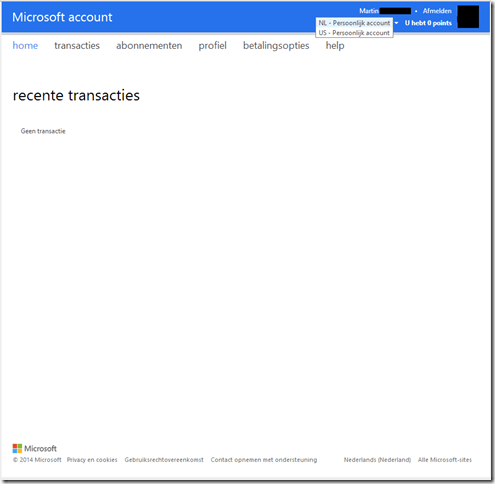
    Xbox Account 01

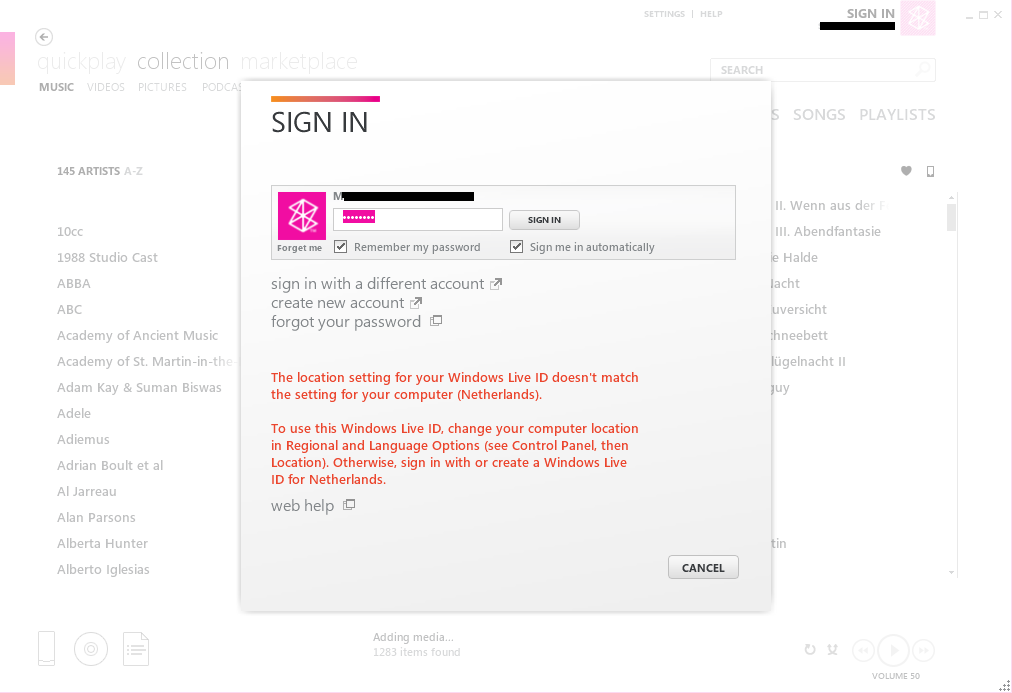
    This ghost account probably got created years ago when Martin first created his Windows Live ID (which subsequently became known as the Microsoft Account). It’s lain unnoticed until now, when Martin’s Windows Phone has decided that it will use it instead of the Dutch account. The phone uses Microsoft’s Zune software on the PC to synchronise content between the PC and the phone, and this also showed that it was attempting to use the US account instead of the Dutch one.
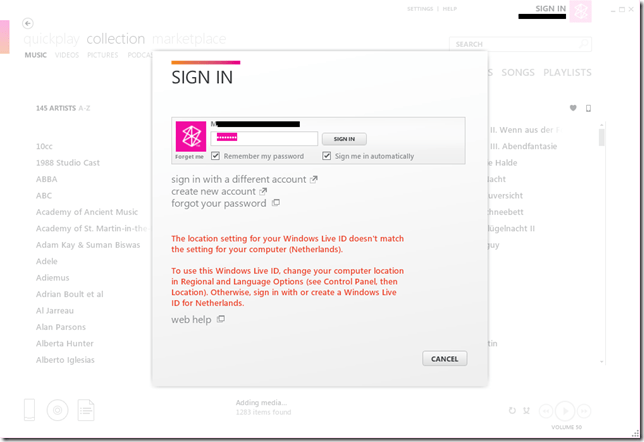
    Zune 01

    It was with a sinking heart that I saw all this, because I had exactly the same issue with my Windows Live ID – a US billing account was created some years ago, even though I live in the Netherlands. That took eighteen months of battling Microsoft to get it resolved. Things have moved on, so perhaps it would not take so much effort this time around?

    I posted a request to have the issue resolved on the Windows Phone Customer Support site. The first response from a Support representative understood the issue and believed the resolution to be “relatively  simple and painless”.

    Cue hollow laughter.

    I could see the logic behind his suggestion (changing the region of the Xbox Live account), but when we tried it, we found that it wouldn’t work for our situation. The reason was that Martin’s Xbox Live account is already set to the Netherlands region. So, back to Customer Support. He suggested several alternative support routes, with as a final resort, a live chat with Windows Phone Support. Needless to say, we rapidly ended up trying the final resort.

    I started a live chat via the Netherlands page of Windows Phone support and ended up chatting with a support rep in the US (or at least somewhere where they don’t understand Dutch). She directed me to call Microsoft Support here in the Netherlands, who were worse than useless – the Dutch support rep insisted I would have to take up the issue with Nokia Support. Fortunately, the US rep was waiting until I had called the Netherlands number, and since I had got nowhere, I asked for the issue to be escalated. She agreed, and said I would receive an email from Microsoft within 3 working days.

    It arrived yesterday – head, meet brick wall. It said:

    The senior team could not find any reason for this behaviour other than the account region. So we kindly ask you to refer to the Account support to clean and fix any relation of your account with other countries.

    Account support link:

    https://support.microsoft.com/oas/default.aspx?gprid=15834&st=1&wfxredirect=1&sd=gn

    Global Customer Service phone numbers
    http://support.microsoft.com/gp/customer-service-phone-numbers/en-gb

    The Account Support link merely asks me a couple of questions, and then unceremoniously dumps me in the Office forum of Microsoft Answers, where I know this issue cannot be resolved.

    The Global Customer Service numbers just gives me the Netherlands support number, and as I learned, they cannot help us. The support person I spoke to insisted that I should take the issue up with Nokia, even though this is clearly a Microsoft Account and billing issue.

    I know that the problem is caused by the account region – it’s the fact that there is a US billing account associated with Martin’s account alongside his NL account. We need to get that US account deleted, or merged with the NL account. I cannot use the Xbox Live migration technique, because Martin’s Xbox Live account is already in the Netherlands.

    This resolution can only be done by someone in Microsoft.

    I have replied to that email with these points, but somehow I get the feeling that I’m shouting in deaf ears.

    Customer Support? Gone missing in action in this case.

    Update 9 January 2014: I decided to go into battle with Microsoft’s Customer Support again today, since I had heard nothing back from my last contact. Today, I got bounced around four completely different departments in a combination of Live Chats and telephone calls. I journeyed through Windows Phone Support, Microsoft Account Support, Office Billing Support and Xbox Live Support.

    The telephone call was with Office 365 Billing Support, and the person I spoke with expressed surprise that I had been referred to them. Me too, since we don’t use Office 365. I had said as much to the person in Microsoft Account Support, but she assured me that it was the correct department.

    No, it wasn’t.

    The last person I was in contact with in Xbox Live Support has escalated the issue once again, this time to yet another team – the Advocacy Team, so cross fingers, it might have a better outcome than the last attempt to get this resolved.

    Update 10 January 2014: Another day, another failed attempt at getting a resolution. We had an email reply from the Advocacy Team yesterday, but it failed to resolve anything. None of the suggested steps were either relevant or helped to attack the issue. The whole point is that nothing that either Martin or I can do with his account settings will delete the false US account. That can only be done by someone in Microsoft.

    So, back once more to Customer Support Live Chat. Today’s representative, Vincent, promised to pass the message back to the Advocacy Team that we had not got the issue resolved. He also suggested that I reply to the Team’s email with a complaint. He claimed to be certain that someone would read it. However, I doubt it. It’s never worked before, and I note that at the bottom of the email it says:

    This email is sent from an unattended address.  Please contact Xbox Support directly if you have any questions or concerns.

    I hold out but faint hope that anything will get done…

    Update 13th January 2014: This evening I had an email from a member of the Customer Advocacy and Exceptions team at Microsoft, who is looking into the issue. Cross fingers, we may be getting somewhere…

    Update 17th January 2014: This evening I was called by the team member. He said that the ghost account should get removed sometime during the next few days. It’s looking good…

    Update 24th January 2014: I suppose I should have learned by now that these things never go smoothly. Here we are, a week later, and still no sign that the issue has been resolved. Emails and telephone calls to the team member supposed to be responsible for the issue go unanswered…

    Update 29th January 2014: This is beginning to get truly annoying. I noticed on Monday that the US billing account had been removed. However, the Windows Phone and Zune were still locking onto it. I even tried resetting Martin’s phone to its factory settings, but that made no difference whatsoever. I sent an email stating this to Robert L., the “Advocacy Specialist” assigned to the case. Today, two days later, I get an email from him saying:

    It appears our Team was able to remove the US account from your partner’s account. You may need to restore the phone to factory settings before the issue is completely disappeared, but they have reported that your account should be fixed.

    Let me know if your issues persist.

    Well, yes, they do and I had told him this, so it would appear that Robert L. does not read his emails. I tried calling him (again). Once again he was not available, and his voice mailbox is full, so I can’t leave him a message. Just as well I suppose, or I would have given him an earful.

    Update 30th January 2014: I thought I would try restoring Martin’s phone back to the Factory Settings one last time to see if the issue has been fixed. Nope. It is still there. Interestingly, for the first minute or two, I saw the Dutch Marketplace on Martin’s phone, but then it was once again replaced with the US version. See this photo of my phone (the Nokia 1020 on the left) and Martin’s phone (the Nokia 800 on the right). They are both displaying the entry screen for the Marketplace. My phone is showing the Dutch Marketplace (called the Store), while Martin’s phone is showing the US Marketplace (with the extra US-only entry of Podcasts). Ironically, it’s showing the US Marketplace in Dutch…
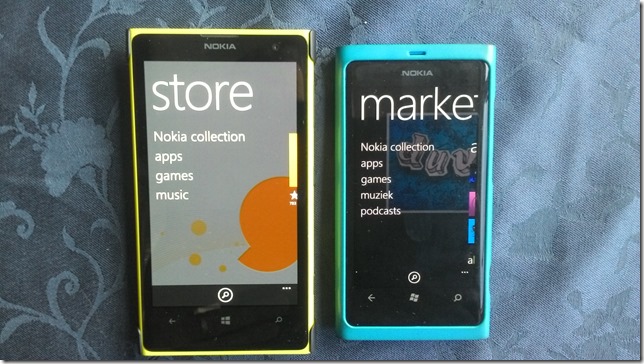
    WIN_20140130_164053

    There is something in Microsoft’s services infrastructure that the Windows Phone (and the Zune software) is locking onto which is saying that Martin’s account is in the US when it is not… Robert L’s voice mailbox is still full, and he never seems to answer his phone or emails, so there seems little hope that he will resolve the issue. Next step: a plea for help to Rob Warwick, head of the Xbox EMEA Senior Advocacy Team, I suppose.

    Update 7th February 2014: We’re no further forward. The problem is still there, Robert L. doesn’t respond to emails, never seems to be in the office, and still has a full voice mailbox. I’m posting the plea for help tomorrow. It’s my last resort.

    Update 12th February 2014: Perhaps it’s coincidence, but I received an email from Robert L. yesterday evening. He wrote:

    It appears that a service or software Martin is using is or was set to a US Region, which is automatically generating a US Billing account for his Microsoft Account (MSA). I was informed that this can happen from the Zune software, Surface, Windows 8 marketplace, and Xbox Marketplace.

    E.g. Using a US region Surface, and accessing Windows 8 Marketplace will generate a US Region account on the MSA.

    Per our support page: http://support.microsoft.com/kb/2692008

    “2. If the Microsoft account used for signing in was previously used for Xbox LIVE, Zune, or a premium service, the account locale will default to the locale of the service.”

    In regards to the issue with, particularly, your region of the Windows Phone marketplace, if we are not able to determine the root source of the auto-generation, and then change its Region, it may be in Martin’s best interest to create an MSA intended just for accessing the Windows Phone marketplace that is separate from the MSA in question. He can then set up the account in question as his secondary account.

    As far as we are aware, Martin has never previously used Xbox Live, Zune, or a premium service, yet his Microsoft Account is clearly set to the US locale. I suspect it is simply because his Windows Live ID was set up years ago when only the US locale existed as far as Microsoft was concerned, and so the associated service account has a US locale.

    Be that as it may, the suggestion that Martin now create a new Microsoft Account solely for his Windows Phone is also not acceptable for the following reasons:

    1. Martin would end up with multiple online identities (the MSAs), and multiple service accounts – one of which would still be holding incorrect data.
    2. It also seems to us that Microsoft would also be contravening EU law on Data Protection, by not correcting false data that they hold on Martin.

    If Microsoft cannot change the locale of the service account, then surely they can follow the procedure that was done for my MSA, which I had already outlined in an email to Robert L. on the 20th January: Microsoft simply creates a new temporary email address that would be attached to Martin’s old service account, thus freeing up his existing MSA to create a new service account (with the correct data). The old service account, and the temporary email address, would then be deleted by Microsoft.

    I’ve replied with these points to Robert L.’s email, we’ll see whether I get any response.

    Update 18th February 2014: No response from Robert L. to my last email; just like all the other null responses. However, yesterday I noticed that Martin’s Phone was now accessing the Dutch Marketplace. So, at long last, a result! Strangely enough, the Marketplace entry page is still showing the US-only “Podcasts” menu item, but Martin is now able to browse, and purchase, Apps from the Dutch Marketplace, so we consider the issue resolved. I sent him an email to this effect.

    Update 20th February 2014: Today I received an email from Bella D., who apparently works in the Xbox Global Escalations Executive Team – yet another department. She wrote:

    I am taking over some of Robert’s case [load] and I will be working with you with the problem that you have been experiencing.

    I read your last email and Robert’s notes. It seems like the issue has been resolved on your end. Would you please confirm if that is still the case?

    That would seem to imply that all my former emails had indeed been received, but never responded to. An acknowledgement would have been at least something. I replied to Bella:

    I think we can say that the issue has been resolved. There is just the oddity that the Marketplace App on Martin’s phone is also displaying the US-only Podcast list alongside the Dutch Apps list. However, the main thing is that he can now browse the Dutch Marketplace and purchase Apps from it – which is what we’ve been asking for. So long as that continues to be the case, then the issue has been resolved.

    Hopefully, we can now close this saga. It’s taken six weeks, but that’s a blink of the eye compared to the eighteen months it took the last time we went through this…


    2 responses to “Head, Meet Brick Wall…”

    1. […] It has a US billing account associated with it, despite the fact that we live in the Netherlands. Trying to get Microsoft to resolve the issue is proving frustrating, to say the […]

    2. […] to get Microsoft’s Customer Support to fix an issue with Martin’s Microsoft Account rolls on. It’s been over three weeks now, and it still hasn’t got sorted. It’s not helped by the fact that the “Advocacy […]

    Leave a comment

  • So That’s How He Did It – Maybe…

    Sherlock returned to the TV screen last night with an episode containing the solution as to how he faked his own death at the end of the last series. Well, to be more accurate, the episode contained at least three possible solutions. However, two of them were explanations provided by secondary characters, which I think can be discounted – particularly the one involving a gay romance between Moriarty and Holmes.

    No, the one that is most probably true was the one recounted by Holmes himself. Of course, part of the reason why I want that to be the real story was because it was the theory that I came up with when I first saw The Reichenbach Fall a year ago. When Holmes confirmed all the points I had listed I punched the air with a loud shout of Yes!

    I thoroughly enjoyed the whole episode, which was a real cracker.

    Leave a comment

  • Lenovo Mobile Access – Deactivated

    I have a Lenovo ThinkPad Tablet 2, which I bought with the 3G capability, and it came with a Lenovo SIM card linked to Lenovo’s Mobile Access Service.

    For the majority of the time, the Tablet is connected to the Internet via WiFi, but occasionally, I use the Lenovo Mobile Access service and buy internet access when travelling outside of WiFi hotspots.

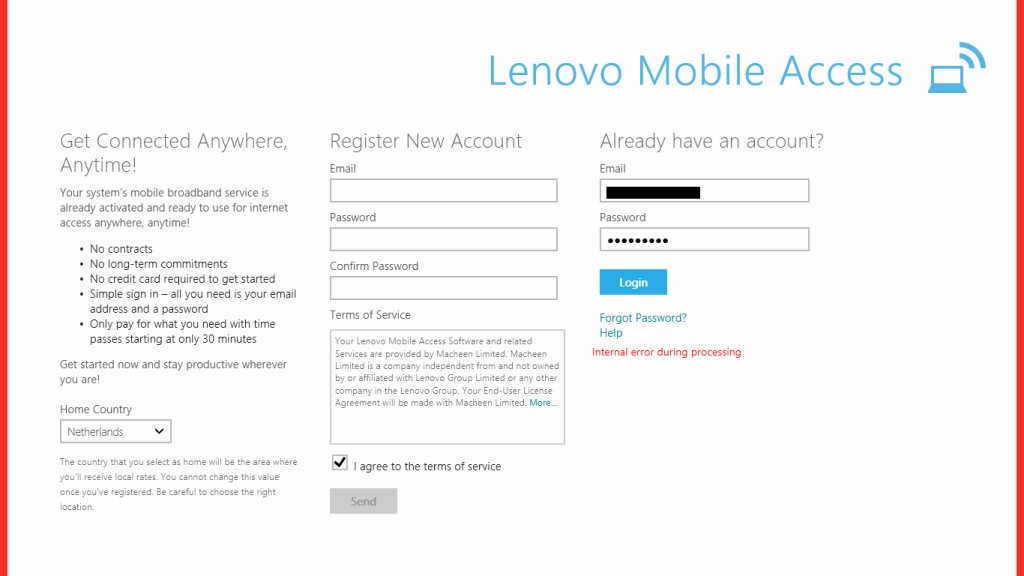
    As a trip is coming up, I tried to connect via LMA a few days ago to check that everything was working. However, the connection failed – see the screenshot with the “internal error during processing” message.

    TPT2 Network 04

    I put in a support request via email, and was astonished to receive a reply today telling me that since I had not used the service during the last six months, my SIM card had been deactivated and I would need to buy a new one.

    I don’t recall seeing anything about this time limit in the documentation I received with my tablet, and there is nothing about it on the LMA web site that I can see. Indeed, the web site says, and I quote:

    There are no contracts and no long-term commitments.

    They seem to have overlooked the salient fact that there is a long-term commitment – you need to use the service at least once every six months to avoid having your SIM card deactivated.

    Needless to say, I am not impressed. I will NOT be buying a new SIM card, since it costs more than purchasing a pre-paid SIM card from, for example, Vodafone NL – and their SIM cards do not deactivate themselves after six months.

    I won’t be using the LMA service again.

    One response to “Lenovo Mobile Access – Deactivated”

    1. […] 30 December 2013: Ah, not so excellent. Lenovo/Macheen have deactivated my SIM card because I hadn’t used it for six months, and expect me to buy a new one to continue using their service. Sorry, guys, you’ve just […]

    Leave a comment

  • This Royal Pardon Is Wrong

    The British Queen has granted a posthumous royal pardon to Alan Turing. I can’t help feeling that this is not right; it is sending entirely the wrong message.

    I agreed wholeheartedly with the petition raised a few years ago for him to receive a posthumous formal apology from the British Government. And I was delighted when the apology was made.

    However, a Royal Pardon is quite a different thing. It is saying, in effect, that the Queen and country forgives Turing for the crime of being homosexual because he was such a brilliant man and for his contribution to the war effort. Well, I’m sorry, so he gets his pardon while thousands of other men convicted for the same “crime” do not, simply because they don’t happen to be geniuses or their contributions to the war effort is somehow deemed insufficient? Some of these men are still alive. I wonder how they must be feeling at the moment, with their criminal records still intact?

    If Turing is going to get a Royal Pardon, then it should be simply because he did nothing wrong, and the same pardon should be granted to an estimated 75,000 other men whose lives were wrecked by the insidious legislation that existed at the time.

    As Ally Fogg writes:

    It is shocking to realise that there are still people alive today who were unjustly criminalised in their youth, and who have carried the stain of a criminal record, as a sex offender, through almost their entire adult lives. In 2012 the Protection of Freedoms Act was passed, which allows those who were convicted of homosexuality offences to apply to have their entire criminal records removed if the facts of the case would no longer count as a crime.

    As the legal commentator David Allen Green has pointed out, there is no reason why this provision could not be extended to cover all those convicted, whether living or dead, without the requirement for a personal application. With a little bit of political marketing, it could become known as the Turing law, recorded as such in the history books for generations to come. Now that really would be a fitting tribute to a national hero.

    I agree.

    Leave a comment

  • Season’s Greetings

    20131129-1702-14a (2) (693x1024)

    We’re nearing the end of another year here in the Witte Wand farmhouse. For the most part, it’s been a good year, with happy memories; however, there have been a couple of bumps along the way. We lost a member of the family at far too young an age, and in June, Martin suffered a slight stroke. I’m happy to report that he has made an amazing recovery, and is practically back to his normal self.

    We hope that you and yours have a peaceful Yule, and that 2014 will be a good year.

    5 responses to “Season’s Greetings”

    1. Ludwig Avatar

      With wishes for a Merry Christmas and a great and Happy New Year! All the best!
      Ludwig

    2. Mark Avatar
      Mark

      Merry Christmas to you and your family. I was sorry to hear about Martin, but I am really glad he is feeling better. I hope 2014 is a great one for you both

    3. Matt Healy Avatar
      Matt Healy

      I hope Martin continues to do well, and that 2014 brings only good medical news!

    4. George Shilling Avatar

      Happy Christmas and New Year! Sorry we’re so useless at sending cards…!!
      Much love from George, Fionna and the Girls xxxx

      1. Geoff Coupe Avatar

        George – not to worry; Fe sent us a Jacqui Lawson E-card!

    Leave a comment

  • “I Am Officially Illegal”

    That was the tweet from Dr. Frank Mugisha today at the news that the Ugandan Parliament has passed the Anti-Homosexuality Bill. The bill apparently:

    • bans the ‘promotion of homosexuality’ with a maximum of 7 years imprisonment.
    • punishes same-sex marriage with life imprisonment

    It’s not clear what the final wording and provisions of the bill are, the original bill contained some wide-ranging powers to drive the LGBT community underground, both literally and figuratively, as well as have consequences for human rights defenders active in the LGBT field.

    I cannot imagine what it must be like for LGBT people in Uganda at the moment.  One thing is for certain, if Martin and I were living in Uganda instead of here, we would both be looking at life imprisonment.

    3 responses to ““I Am Officially Illegal””

    1. Ludwig Avatar

      It is sad that there are still so many people who, for one reason or another, have to put others down to attempt to show themselves are powerful. I would pity them, but they do so much harm. Here is hope that a little glimmer of sense will come to some of these. May the new year be good to you!

    2. Matt Healy Avatar
      Matt Healy

      I attended the HIV2014 Symposium in NYC today. Meeting jointly sponsored by NY Academy of Sciences and UNAIDS. My expertise is in virology, immunology, genomics, and drug discovery, but this meeting was mostly about other areas such as epidemiology, public policy, and how to reach vulnerable populations — sex workers, undocumented immigrants, prisoners, IV drug users, and LGBT people — with state-of-the-art treatment and prevention methods.

      While the overall rate of new infections has stopped increasing in most places, and is decreasing in many countries, the rate of new infections among these particular groups is rising. Unfortunately, in a number of countries the political climate is becoming more hostile to LGBT people. For instance the only clinic in Moscow where people could get anonymous testing has had to shut down, as have some prevention research projects in Uganda. And Ukraine’s recent success in cutting new infections is threatened by the current conflict there.

      1. Geoff Coupe Avatar

        Matt, thanks for the comment and the news about the symposium. My dearest friend Len Curran was responsible for early work in setting up policies for HIV prisoners, and policies for the armed forces (including Russia!). It’s depressing that we are still fighting the same battles many years on, and that in some cases the situation is worsening.

    Leave a comment

  • Manx Wallpapers

    The background of the Desktop screen on my Windows PCs is generally set to display landscape themes. There’s a whole range of them, and other themes, available to download and use.

    Today, I noticed from a Microsoft blog, that there is now a landscape theme devoted to pictures from my birthplace, the Isle of Man. Taken by Mark Wallace, there are some suitably moody shots of Peel Castle, the ruins of St. Trinian’s church, the Calf of Man and more.

    They’ve been installed and serve as a reminder of my original home.

    4 responses to “Manx Wallpapers”

    1. Ludwig Avatar

      It is a beautiful place to call home!

      1. Geoff Coupe Avatar

        Some of my photos of the island (taken over a period of 50 years) are in this Flickr set:

        040704-1333-20
    2. Matt Healy Avatar
      Matt Healy

      Never been there, but the pictures certainly are beautiful. Is there a Manx cat (or any other breed) in your house 🙂

      1. Geoff Coupe Avatar

        I’m afraid we’re dog people – we have two Labradors, and receive only occasional visits from the cats from the farms around us. No Manxies, though.

    Leave a comment

  • Abraham And Sarah

    Here in the Netherlands, there’s a tradition that when someone reaches the age of 50, they are said to be an Abraham (if they’re a man) or a Sarah (if they’re a woman).

    And in this part of the Netherlands, that is often marked by friends and neighbours installing an appropriately (or inappropriately) dressed mannequin outside the celebrant’s house.

    Last Wednesday, one of our neighbours reached his 50th, so late on Tuesday night his garden was invaded by a series of groups each installing their own version of an Abraham and accompanying signs and decorations. This was the scene the following morning…

    20131120-1018-24

    Leave a comment

  • The Bankers Do It Again

    There’s a small village, Bredevoort, that lies about 7 kilometres distant from us. It’s a pretty little village of about 1,500 inhabitants, and it also has a disproportionate number of antiquarian bookshops in it. That’s because, since 1993, it has become known as a Boekenstad (book-town). Apart from the 20 or so bookshops, there are also regular antiquarian bookmarkets, with market stalls placed in and around the central market square.

    I often go along to the bookmarkets, and when I do, one of the things I invariably see is a queue of people waiting to get cash from Bredevoort’s one and only cash machine.

    Today, I read in the Volkskrant that the Rabobank, the bank responsible for the cash machine, intends to remove it from the village. According to Nicole Olde Meule, the person responsible for the bank’s consumer clients in this area, the number of transactions has fallen by 9% over the past year to 25,000 per year. And that, she thinks, is justification enough to remove the service.

    She clearly needs her head examined. At a time when the Rabobank has had its image severely dented by being fined €774m for its part in the Libor scandal, she thinks its OK to heap further hardship on the village, tourists and booklovers.

    She knows the cost of everything and the value of nothing.

    Leave a comment

  • Xbox Music App – Metadata Madness

    I’m doing the old one-step-forwards-two-steps-back shuffle with Microsoft again. This time it’s the latest version of the Xbox Music App that is raising my frustration levels.

    Windows 8.1 has arrived with a new version of the Xbox Music App (version 2.2.177.0). While it has improved in certain respects from earlier versions of the App, in one respect it seems to have got a whole lot worse: it does not handle Album Art well at all.

    By default, when you add your collection of music albums and tracks to the App, it will query Microsoft’s online metadata service and fill in metadata such as the album name, artists and the cover art of the album (the Album Art) for display within the App. The first thing I had to do when installing the App was to change this default and prevent it from downloading any metadata and writing it into my music collection. I have learned, from bitter experience, that Microsoft’s music metadata is, to put it bluntly, utter crap for the music I listen to. I have spent many hours correcting the errors that Microsoft has injected into my music metadata from earlier incarnations of their music applications. Windows Media Player, Windows Media Center, Zune, Windows Home Server, they’ve all stomped all over my carefully prepared music metadata in their jackboots without so much as a by-your-leave. So when you tell a Microsoft music application that it must not, under any circumstances, use the online service to supply metadata when importing audio tracks and folders into its library, then what it should do is to look at the tracks and folders themselves to see if there is any metadata that it can use.

    As I say, I have spent many hours using Media Monkey to provide accurate metadata and high-resolution Album Art (at least 500×500 pixels) in every audio track (over 14,000) and Album folder in my collection and Windows Media Player, Windows Media Center and Zune will all read this metadata and use it properly.

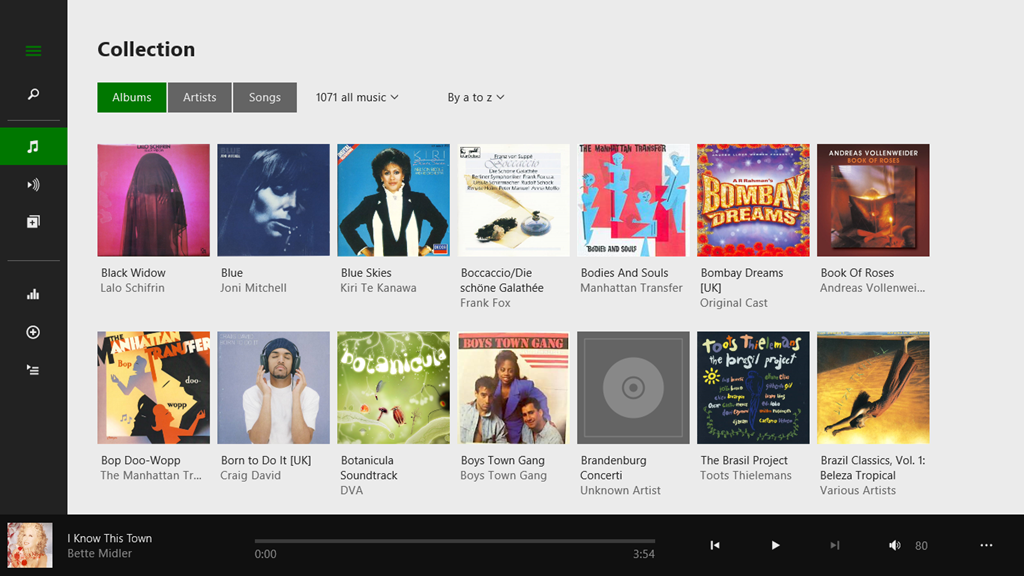
    The Xbox Music App on my Desktop PC does not. It fails to read the metadata quite spectacularly. Let me illustrate this.

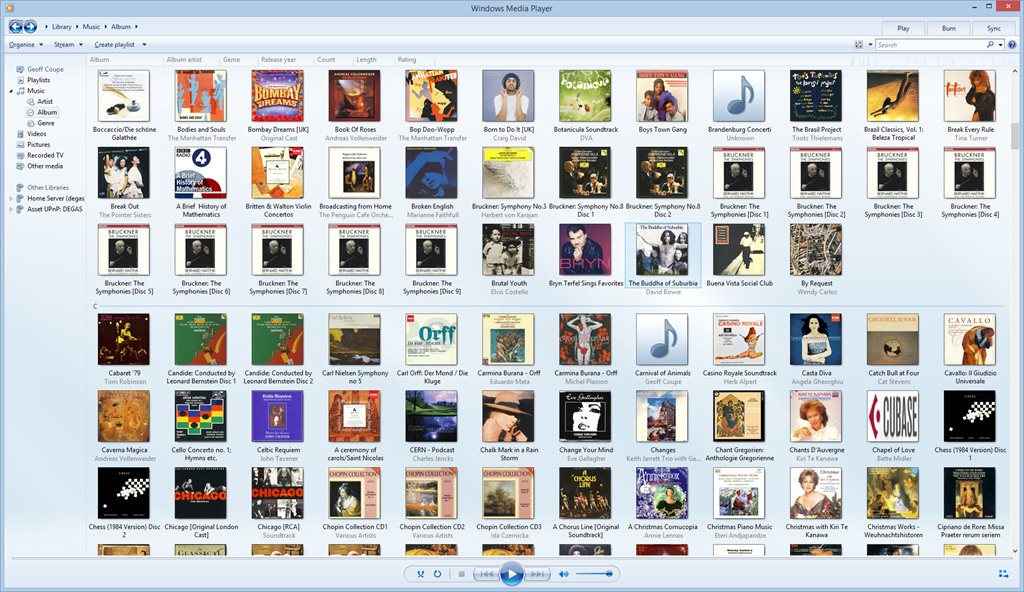
    Here’s a snapshot of part of my music collection being displayed in Windows Media Player:

    Xbox Music issue 11

    WMP has picked up the album art metadata and displays it (there are two albums shown with the default “music note” icon – but that is also correct, the tracks in these two folders do not have any album art metadata).

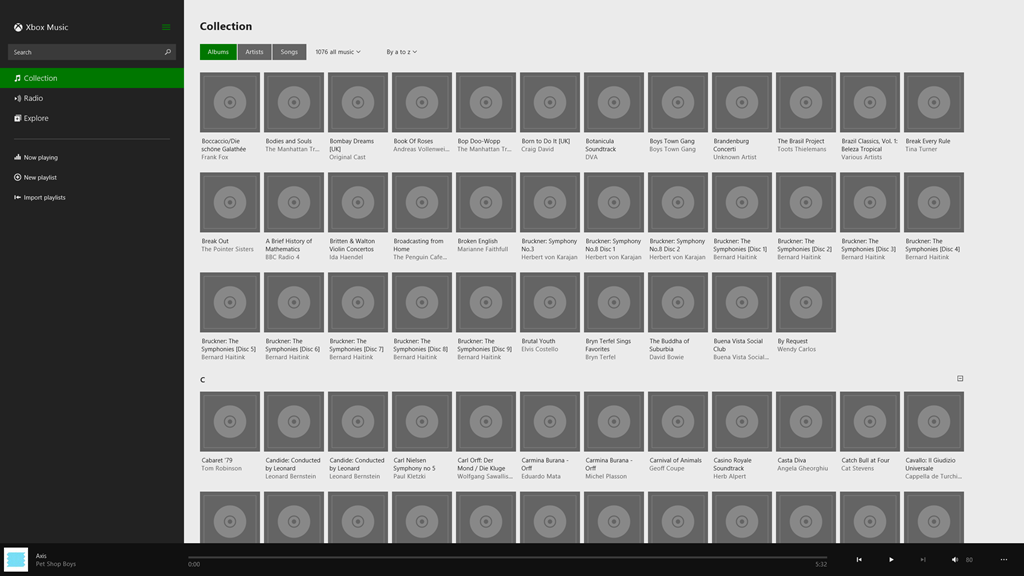
    And here’s the same part of the same music collection being displayed by the Xbox Music App running on the same Windows 8.1 PC:

    Xbox Music issue 10

    Er, hello? Is this supposed to be a good user experience?

    Interestingly, if I use the same version of the Xbox Music App running on my Windows 8.1 tablet, then that manages to do a slightly better job:

    Xbox Music issue 12

    There are fewer albums shown, because the App is running on a device with a lower-resolution screen. But the point is, here, the Xbox Music App does appear to be reading my Album Art metadata, whereas on the Desktop PC, the same App fails miserably.

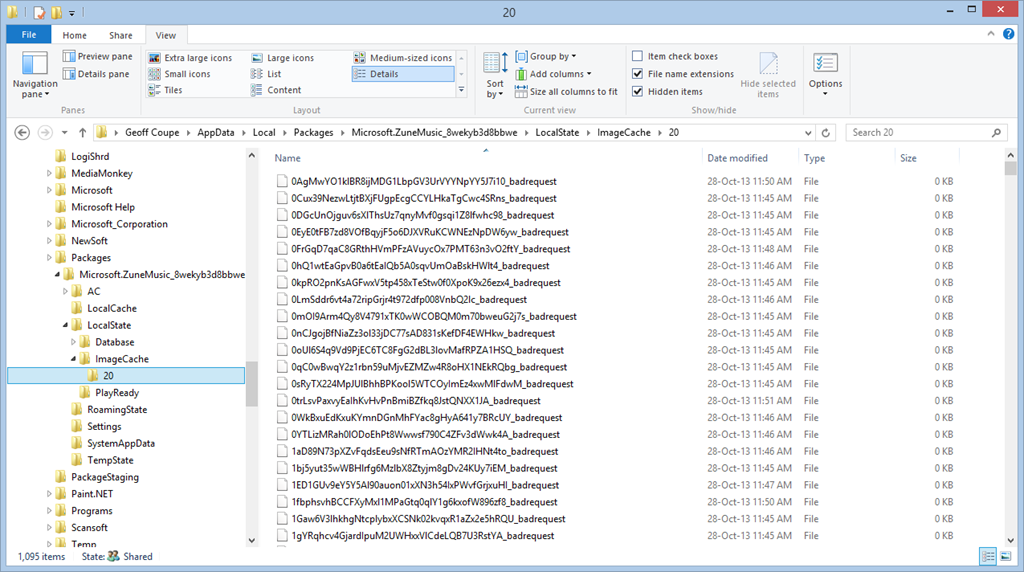
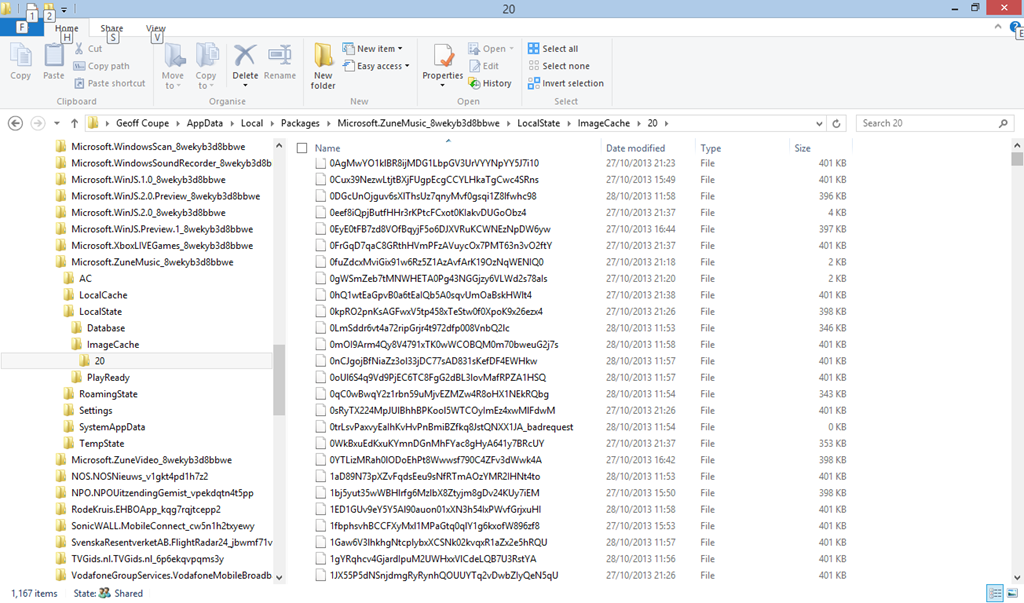
    I’ve found where the Xbox Music App caches the Album Art images that it uses for display. It’s in the folder:

    C:\Users\Username\AppData\Local\Packages\Microsoft.ZuneMusic_8wekyb3d8bbwe\
    LocalState\ImageCache\20.

    On my Desktop PC, that folder is filled almost entirely with files of the form <some long string>_badrequest:

    Xbox Music issue 13

    Whereas on the tablet, that same folder is filled almost entirely with files having the same form and names, but without the “_badrequest” suffix. These are, in fact Album Art images:

    Xbox Music issue 14

    So the question is, why is the Xbox Music App running on the tablet able to succeed, while the same App running on the Desktop PC can not? Both Apps are working against the same music collection, which is held on a Windows Home Server 2011.

    The only thing that occurs to me is that there is possibly a race condition in the software that causes the App to fail on the much faster Desktop PC. Whatever the cause, I would like to think that Microsoft will fix it. We shall see.

    Update 17 December 2013: well, another new version has arrived from Microsoft (version 2.2.339.0) and been installed on my computers. Alas, it’s made no difference to this issue – the bug is still there; great swathes of non-existent Album Art.

    Update 23 January 2014: another day, another update of the Xbox Music App, this time to version 2.2.444.0. Still doesn’t fix the metadata bug though…

    Update 11 February 2014: another day, another update of the Xbox Music App, this time to version 2.2.550.0. Still no fix for the metadata bug though…

    Update 11 March 2014: This issue of disappearing Album art doesn’t seem to have started until I upgraded to Windows 8.1 on the Desktop PC.

    So I decided to implement a scorched earth policy: I did a fresh install of Windows 7 Home Premium, applied the 250+ updates that were required; installed Windows 8 Pro plus the 100+ updates that it required, and finally upgraded to Windows 8.1 Pro via the Store (and applied its updates…).

    Now, finally, Xbox Music is showing my album covers correctly for my music collection held on the WHS 2011.

    I’m still in the process of reinstalling all my applications and Apps – this will take a day or two to complete – but at the moment, Xbox Music appears to be working as it should.

    So, whatever the problem was, it does appear as though it was caused by something not being right in the previous installation of Windows 8.1, and now we’ll never know what it was…

    Update 17 April 2014: It’s very likely that this problem was caused by an obscure interaction between the Xbox Music App and another desktop application that integrates with the Windows Shell to add additional menu options in the Windows Explorer. In my old installation of Windows 8.1, I had the dBpoweramp Music Converter installed. Someone else had the same Xbox Music issue of no Album Art being displayed, and tracked it down to the Shell integration feature.

    10 responses to “Xbox Music App – Metadata Madness”

    1. […] ← RIP, Norm Xbox Music App – Metadata Madness → […]

    2. […] Update 17th October 2013: I’ve just installed the final release of Windows 8.1 on my tablet, and the Music Library is now being accessed correctly by the Xbox Music App, so it looks as though the issue is now resolved. However, when one issue is resolved, another pops up. […]

    3. Paul Schwab Avatar

      The last time I ran into this problem, I had to rebuild the index on the Home Server for it to fix this weirdness. The problem I run into now is, I have a bazillion music files on my homer server and they show up on my Surface Pro (8.1). If I take the tablet some where and now it can’t reach the share, all of my music disappears and I have to resync it again when I get back home. No sure how to get around this issue.

      1. Geoff Coupe Avatar

        Paul, thanks for the suggestion. I have tried that, and it didn’t seem to make any difference. It’s odd to me that things are OK on one device (the tablet), but not on another (the Desktop PC).

        That issue about the XBM App emptying its collection when it can’t access the files is, I’m afraid, the way it’s been designed.

        I wish that the Xbox team would adopt the technique used in the SkyDrive folders in Windows 8.1. There are placeholders to ensure that the folders don’t suddenly get emptied (and disappear themselves) when the device is offline.

    4. salam Avatar
      salam

      Solved

      First close Xbox Music Player then go to :

      C:\Users\USERNAME\AppData\Local\Packages\Microsoft.ZuneMusic_8wekyb3d8bbwe\LocalState\Database\anonymous

      and

      C:\Users\USERNAME\AppData\Local\Packages\Microsoft.ZuneMusic_8wekyb3d8bbwe\LocalState\ImageCache\20

      Delete All Files in Those Folders

      Run Xbox Music Again

      you will see all available Album art >>

      I try It and worked for me

      thanks

      1. Geoff Coupe Avatar

        Salam,
        Nope – doesn’t work for me. I’ve tried that several times in the past, and each time the cache rebuilds with “bad request” files again. Don’t know what’s going on on my system…

    5. Borislav Avatar
      Borislav

      Hello, guys. In Collection and when I play a song the artwork works properly , but when I go in Now Playing -> Full screen, the song’s artwork is empty(its black with gray CD). I tried everything in this post, but I cant to solve the problem. Do you have any idea, cause I want to listening music in Full Screen mode as background sound. 🙂
      Thanks.
      P.S. Sorry for my english.

      1. varad Avatar
        varad

        any solution found?

    6. Andrew Knight Avatar
      Andrew Knight

      Hi, Whatever version of Xbox Music app I have on my Windows 8.1 laptop does seem to handle metadata and album art ok but it simply will not discover new music I add to the music library. Have reindexed, etc. etc. but to no avail. WMP, however, has no issue. So, will no longer waste my time with cobbled-together Windows ‘Apps’ and will just use WMP instead. Windows 8.x – what a disaster and now we have Windows 10 coming along. Can’t wait! (That was sarcasm by the way.)

    7. varad Avatar
      varad

      i’m facing the same problem, some screenshots are attached below…xbox music player is showing the artwork at first…but it disappears in ‘now playing’ wiindow..please help!


    Leave a comment

  • “Play to” and Windows 8.1

    Back in the distant days of 2009, Microsoft introduced a feature called “Play to” into its new operating system, Windows 7. Play to, so Microsoft claimed:

    makes it easy to stream music, video, and photos from your computer to other PCs, TVs, or stereos on your home network. You can stream music from your PC to your home entertainment system or stream slide shows and videos to another computer or to your TV. Just right-click the tracks you want to enjoy, or add them to your Windows Media Player 12 playlist, and click Play To. Now you’re hearing—or watching—what you want, where you want it.

    In those early days, it was something of a rocky road to negotiate; there were many bumps along the way. Nevertheless, I was happy with the end result. It worked for what I wanted.

    Then along came Windows 8. Once again, in the pre-release versions of Windows 8, there were issues, but these were fixed in the final version of Windows 8. However, while the operating system and the venerable Windows Media Player (unchanged from Windows 7) were working, the (brand-spanking-new-supposedly-fancy-but-really-very limited) Xbox Music App from Microsoft still had a number of shortcomings.

    Windows 8 also introduced a new wrinkle into Play to. I discovered that my ancient (5 years old) Denon AVR-3808 was being reported as a “not Windows Certified” device. Whilst I could continue to use it with Windows Media Player, I could not use it at all with any of the new Modern UI Apps, such as Xbox Music. Fortunately, digital mediaphile Barb Bowman came to the rescue and discovered a Registry fix, which allowed non-Windows Certified devices to be used in Modern UI Apps. Subsequent to that, Microsoft’s Gabe Frost supplied a simpler Registry fix to accomplish the same thing.

    I used Gabe’s fix, and all seemed fine.

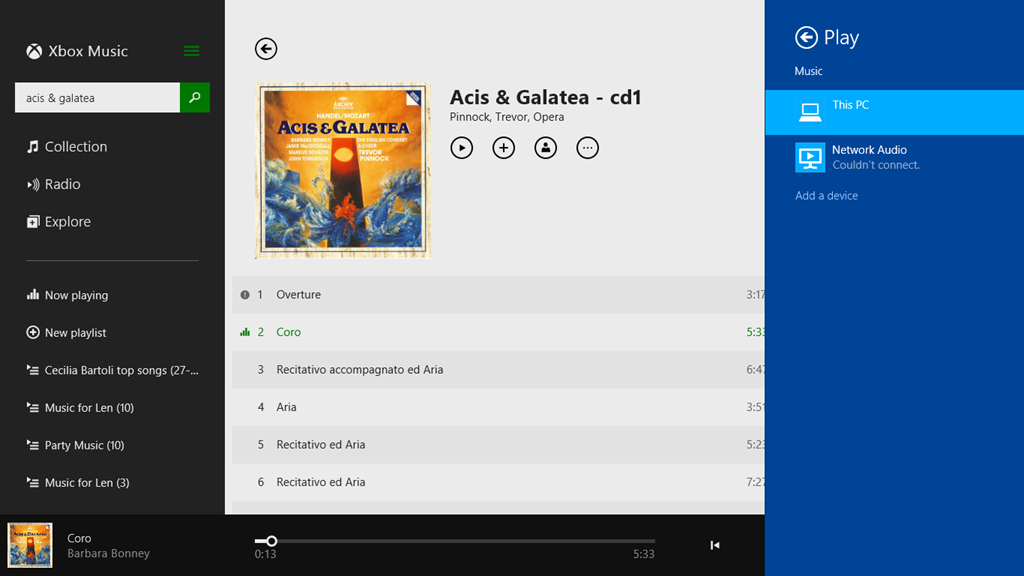
    Now we have Windows 8.1 and a much-improved Xbox Music App, and once again I seem to be taking a step back. While Windows Media Player continues to work as usual, Xbox Music is behaving very strangely when I attempt to use the Play to function. Here’s a screenshot of an attempt to use the Denon as a Play to device in Xbox Music (the Denon shows up with the name Network Audio in Windows):

    PlayTo 03

    Here, I’ve attempted to stream the first track to the Denon. That has failed, and Windows is telling me that it couldn’t connect to the Network Audio (the Denon), but in fact the second track is actually playing through the Denon. In addition, there’s a small information icon by the first track, click on it and you get:

    PlayTo 04

    which is a very odd message, since these tracks are not DRM-protected.

    I tried another Modern UI App, Media Monkey, and this seemed to behave much better. Occasionally it would refuse to Play to the Denon when first starting up, but once it got going, it seemed to be much more solid.

    So, what’s going on here?

    I raised the issue in a thread on one of Microsoft’s Answers forums. Gabe Frost himself responded:

    We have not seen this, and do not have this specific Denon model to test with, so would like to get further information from you.

    I provided the information he asked for, and very quickly the answer came back, and it’s very interesting.

    From the traces, we can see you’re trying to stream a WMA file from the Music app. Since Denon does not support WMA, the file has to be transcoded real-time into LPCM. When a file is transcoded in real-time, no system can know the resulting number of bytes, so in order to support seek, it has to be time-based (we do know the duration). However, Denon also does not support time-based seeking. In Windows 8.1, we introduced a feature that emulates time-based seeking for devices that do not support it. This is really nice in that users can seek their music or videos when they previously could not.

    In your case, since the Music app was already playing the song locally for a bit, we are doing “Seek Emulation” to seek the stream to the same position the Music app was last playing at. This involves sending some additional SetAVTransportURI requests to the Denon DMR. We see the Denon DMR reporting an error, “TransportStatus = ERROR_OCCURRED”.  Probably this is the result of the additional SetAVTransportURI requests that we send.

    That would explain why the bug does not happen when using WMP as the media controller (DMC) in Desktop. With the Desktop controller, we don’t try to seek immediately after starting to play.

    Looking at our code, we see that careful tuning was required to work with Denon because they often tend (incorrectly) to report an error when they are no longer in an error state. Denon tends to forget to set TransportStatus back to “OK” when it has received a new URL to play. While we tested with a wide range of devices (including some newer Denon devices) It appears that your Denon device is incompatible with this seek emulation because of the device bugs.

    We are investigating potential workarounds and will get back to you via this thread. A fix will take longer, unfortunately.

    One slight correction to what Gabe has written; the Denon (and all Denon AVR models, as far as I’m aware) does not support the WMA Lossless format, but they all support standard WMA format. My Denon even came with a Microsoft “PlaysForSure” sticker on it – so it was certified by Microsoft as being able to play standard WMA format!

    The issue I’m stuck with is that I have deliberately chosen to store my music collection in WMA Lossless format because it delivers higher-quality playback than standard WMA format. Lossless formats (e.g. WMA Lossless, FLAC) are better than formats that use lossy compression, such as WMA and MP3. The Denon supports FLAC, WMA and MP3, so in an ideal world, I would have chosen FLAC as my archival storage format.

    Unfortunately, Microsoft don’t support FLAC. While I can get a third-party FLAC add-on for Windows Media Player, there appears no way to use a third-party add-on for the Xbox Music App. And while I can use Media Monkey to play back FLAC files, in addition to WMA, WMA Lossless and MP3, the Xbox Music App is linked into a music store for purchasing downloads.

    I am going to have to think about the way forward for a while…

    Addendum: The Xbox Music App has other problems of its own. See Xbox Music App – Metadata Madness

    Addendum 2: As of April 8, 2014, Microsoft has released an Update to Windows 8.1 that makes it unnecessary to perform any registry edits to enable a DLNA Digital Media Renderer (DMR) to work with Modern Apps on the Start Screen. Devices will no longer appear as “uncertified” when Play is selected within an individual app (but if not certified will appear as such in the PC and Devices menu).

    Addendum 3: Native support for the FLAC format will apparently be coming in Windows 10. Good news, as far as I’m concerned.

    Addendum 4: Things will change yet again for Windows 10. First, the “Play to” function has been renamed to “Cast to”. Second, and more importantly, this function will have fundamental changes.  It appears as though Microsoft has removed DLNA DMR devices from system-level control (e.g. the Devices item in the Win 8.1 Charms bar), and demoted that function to needing to be controlled on an app-by-app basis.

    That’s all very well if app developers actually take account of it. I note that neither of Microsoft’s Music apps (Music or Music Preview) do this, and I also note that the Microsoft spokesperson uses the qualifier “eventually” in the context of support by the Microsoft app. That could mean it will be available on July 29 or it could mean in five years time. That does not give me a warm feeling.

    So, in summary, the “Play to” user experience is likely to take a step backwards in Windows 10 as compared to Windows 8/8.1. That’s a tad disappointing.

    Addendum 5: Well, Windows 10 has been released (on the 29th July 2015), and as expected Microsoft’s Music app (now called “Groove”) still does not have the “Cast to” function implemented. Sigh.

    11 responses to ““Play to” and Windows 8.1”

    1. […] Update 24 October 2013: I posted the Windows 8.1 issue in a Microsoft forum, and got some useful feedback from Gabe Frost. The issue is not resolved, but at least we now know what’s going on. See https://gcoupe.wordpress.com/2013/10/23/play-to-and-windows-8-1/ […]

    2. […] Update 24 October 2013: I posted the Windows 8.1 issue in a Microsoft forum, and got some useful feedback from Gabe Frost. The issue is not resolved, but at least we now know what’s going on. See https://gcoupe.wordpress.com/2013/10/23/play-to-and-windows-8-1/ […]

    3. […] Update 24 October 2013: With the release of Windows 8.1, I was getting problems with “Play to” again. I posted the Windows 8.1 issue in a Microsoft forum, and got some useful feedback from Microsoft’s Gabe Frost. The issue is not resolved, but at least we now know what’s going on. See https://gcoupe.wordpress.com/2013/10/23/play-to-and-windows-8-1/ […]

    4. […] Update 24 October 2013: With the release of Windows 8.1, I found another issue with “Play to”. I posted it in a Microsoft forum, and got some useful feedback from Microsoft’s Gabe Frost. The issue is not resolved, but at least we now know what’s going on. See https://gcoupe.wordpress.com/2013/10/23/play-to-and-windows-8-1/ […]

    5. Daniel Harris (@danieltharris) Avatar

      It’s a shame they can’t seem to get this right and then keep it working consistently.

      I use both Windows (PC, Lumia 1020, Surface RT) and Mac (Macbook Pro) products and although it has it’s flaws, the Apple TV really does work well, even from Windows using Air Parrot. The only devices it doesn’t work with are RT computers and my phone.

      The latest update lets you use the TV as a second monitor as well (from OS X), rather than just allowing you to mirror content which is a nice addition too.

      I’d love to be able to use Xbox Music Pass and Xbox Video content and play it to a range of devices, there’s just no easy way to do this. With Xbox Music Pass you can’t actually push the downloaded songs to other devices, you can only trigger an Xbox 360 to start streaming the content from the web.

      I’d really want a way to have true freedom with my content, even if I had to have a device attached to various displays around my home, if it all worked seamlessly then i’d be willing to pay for a number of receivers.

      I had hopes for Miracast but it already seems to be struggling to gain traction. Microsoft aren’t even releasing the necessary drivers for the original Surface RT to make use of it.

      1. Geoff Coupe Avatar

        Daniel, it all seems a bit of a mess from Microsoft at the moment. That applies down at the infrastructure level (e.g. the Play to feature), as well as at the application level (e.g. Xbox Music App).

        I can have some sympathy with Microsoft for the infrastructure issues, since they are trying to work with the DLNA specs. The problem is that they don’t control these, and every manufacturer interprets them differently in their implementations. By contrast, Apple writes the rulebook for its products and services, and doesn’t have to herd cats.

        Nonetheless, my sympathy runs out when it comes to Microsoft’s applications. The Xbox Music App does not handle metadata properly and the Photos App continues to be a disaster.

    6. John Avatar
      John

      Hi
      Interesting article about Play To. I have an Onkyo 2 ch network stereo receiver hooked up with a ethernet cable to my router. My PC is using Windows 7 home premium and I regularly use
      Media Monkey as my go to music program. You mentioned that you can use Media Monkey
      as a Play To remote service to your Denon receiver. I have tried to figure out how to do this
      with the newest version of Media Monkey but can’t seem to find where in Media Monkey to do it.
      I have used Windows Media Player 12 to use Play To with success to the Onkyo receiver.
      However it only accepts mp3 files for this Play To function. It will not play flac, wav, or apple
      files. (Sometime back I installed a direct show codec that allows me to play flac files with
      WMP on the PC). I checked the Onkyo manual and strangely enough it says flac files cannot be played to the receiver from the Play To remote, but it will play flac files if I select NET input on the Onkyo and DLNA and then Media Monkey. What is lacking here in my opinion is an easy way to choose albums and make music playlist mixes. However selecting Media Monkey and play all Classical music is easily done. This plays files of mp3, flac, wav, apple etc…
      How do you access the Play To feature on Media Monkey?
      I don’t think even this will work with my flac files, but I still like Media Monkey better than WMP.
      I can copy flac albums to a USB flash stick and plug it into the front panel socket on the
      Onkyo instead. This will play flac, wav, mp3 and apple music files alone or in combined music
      mixes. Downside here is that if the receiver is turned off and you left off at playing folder 10-Bach
      album, it does not remember which folder it left off at and starts playing back at folder 1-Pink Floyd.
      My PC has an optical audio out and the Onkyo is close to the PC so I may do this also, connecting
      an optical audio cable to one of the inputs on the Onkyo. Then I can use Media Monkey to play my playlists of assorted music file formats to the Onkyo. I have tried this with another older home theatre receiver and it works fine. I will have to buy an optical audio splitter to do this for both
      receivers though.

      1. Geoff Coupe Avatar

        John, the version of Media Monkey that I mention here is the Modern UI version for Windows 8/8.1. Since you’re using Windows 7, you only have the traditional Desktop version of Media Monkey available to you.

        In Windows 8/8.1, the Play to feature is exposed via the Modern UI Charms bar, so that it becomes available to all Modern UI apps that support it.

        However, the Modern UI version of Media Monkey is still, after two years, only a buggy beta. Ventis Media still haven’t produced an update, despite one being promised nearly 18 months ago. I’ve given up on this version of Media Monkey. I still use the desktop version of Media Monkey, but solely to manage music metadata and to rip CDs – I don’t use it as a player.

    7. John Avatar
      John

      I looked over Media Monkey again and found the
      Play To function. It is not an obvious thing to find.
      For other readers who may be interested in doing this
      too, here is an explanation:
      Using your mouse hover the pointer over
      the area of Media Monkey that is at the bottom area where
      the player buttons are and the music track progress is
      displayed.
      Right click and a pop up window will appear.
      Select Choose Player and then select the name of your
      receiver, in my case an Onkyo Net receiver.
      Be sure that your network receiver is already on, a
      ethernet cable is attached from it to your modem/router
      and NET input and DLNA is selected on it and that your
      modem/router are on.
      Also be sure to have already gone to Tools– Options–
      Media Sharing (UPnP/DLNA) and enabled Media Monkey
      Library and Media Monkey Server.
      Also click on Media Monkey Server, once enabled, to
      highlight it and then click on the Options button below.
      This opens a new window. Click to enable the receiver
      connection here. Click OK and now everything should be
      ready.
      Initially be sure that volume levels on the receiver and
      in Media Monkey are not set too high and adjust once
      a song is playing.
      Put some songs into your playlist and start to play.
      Media Monkey will popup a window asking if this MAC
      address device should be granted access to the Media
      Monkey Library. Click Yes.
      The nice thing about Media Monkey’s Play To function
      compared to the WMP version, is that it will play mp3,
      wav and flac files, while WMP only plays mp3 files.
      Actually I was suprised that my receiver would play
      flac files in the Play To remote mode, since the owner’s
      manual said it couldn’t.
      I did not upgrade the firmware on the receiver and don’t
      intend to.
      For some unknown reason MM will play Apple .m4a files
      in the Internal Player– but not when the Play To Network
      receiver is instead chosen. I’m not sure what the reason
      for this is. But I was mostly interested in playing my
      flac files from my PC to my receiver and this works fine.
      Also strange is that .m4a files will play fine if
      accessed from the Onkyo directly to the PC or from
      a USB flash stick plugged into the Onkyo.
      Remember that if you want to hear songs using Media
      Monkey and your computer speakers again you must
      switch back to Internal Player first.
      I like Play To my Net Receiver mode because I can
      assemble various music mixes in my Playlist window pane.
      If I use the Net receiver to play from the Media Monkey
      library it works fine, but I can only select one
      album/artist at a time, or play all music.
      It takes a bit of time to drill down through the PC
      folders to the album I want to hear too.
      I also have a laptop with Windows 8.1 and tried it
      with Media Monkey ver.4.1.5.1.7.9. It does play to my Net
      receiver also. When I updated MM on the laptop to the
      newest ver. 4.1.6 it continued to work well.
      This is the desktop version of Media Monkey, not the
      UI Charms bar version that you mentioned.
      I think I’ll stick with the desktop ver. of MM, since
      it is working well for both my laptop and desktop PC
      with the receiver.
      Off topic I noticed you are a reader of SF.
      Ursula LeGuin’s book The Lathe of Heaven is a worthwhile
      read if you haven’t already read it.

      1. Geoff Coupe Avatar

        John, thanks for the description of the steps needed to get MM to work. It sounds as though MM uses its own implementation of Play to, rather than using the Windows implementation, as WMP does.

        Yup, Le Guin is a favourite author of mine. I have over 30 of her books in the library, including The Lathe of Heaven…

    8. […] when I had Windows 7 or Windows 8.1 running on our PCs or tablets. Both operating systems supported “Play to”, which meant that I could use a music player application on a PC or tablet to stream music from the […]

    Leave a comment

  • RIP, Norm

    One of the bloggers that I make a habit of reading is Norman Geras. That is, until last Friday, when I found an entry on his blog from Jenny Geras (his daughter) saying that Norm had died that day.

    Another voice of reason stilled. Here’s his obituary. It’s worth reading to get a sense of the man, and of course you can still read his writings on his blog.

    Leave a comment

  • Out There

    Stephen Fry has collaborated with film-maker Fergus O’Brien to make a two-part documentary Out There. In it, Fry reflects just how much, and how little, things have changed in his lifetime for gay people around the world.

    Martin and I watched the first part last night. Yes, we know that we are incredibly lucky to be able to live where we do, but to see the reality of the extent of homophobia elsewhere, much of it State-sponsored, is very depressing. Uganda featured prominently in last-night’s programme. Fry was shown participating in a Ugandan radio phone-in programme with Pastor Solomon Male, who seems obsessed with homosexual sex to a quite unhealthy degree. Fry also had an interview with the Ugandan State Minister for Integrity and Ethics, who amply demonstrated a complete absence of both of these qualities. Fry found the latter interview in particular quite stressful, in part I suspect because the Minister at one point was shouting that he would arrest Fry.

    But never underestimate the smugness of TV reviewers. Rupert Hawksley, in the Telegraph, wrote that:

    As a homosexual man himself, it was entirely understandable that Fry took the poisonous opinions he encountered in Uganda and Los Angeles as personal attacks. Nonetheless, I was surprised at how quickly he allowed himself to be drawn into a slanging match, his gravitas deserting him minutes into a debate with Ugandan pastor Solomon Male. It was all much too shouty and felt like the opportunity for instructive discussion had been lost. Later, in an invective-filled session with the Ugandan State Minister for Integrity and Ethics, Fry resorted to childish taunts: “Homosexuality is fantastic. You should try it, it’s really good fun.” This, surely, was not the best way to counter deep-rooted prejudice.

    Easy for you to say Mr. Hawksley, but then I doubt that you’ve been much at the receiving end of institutionalised homophobia. If I were in Fry’s place, I’d probably have lost my temper much sooner with the odious human being that is the Ugandan Minister. “Instructive discussion” with people such as Male and the minister is an oxymoron, as I know from experience.

    The second part of the documentary will be shown tonight, in which Fry visits Russia, and gets to meet Deputy Milanov of St. Petersburg. Somehow, I think Mr. Hawksley will once again have to suffer a sense of disappointment that there is no “instructive discussion”. As Stephen Fry writes:

    I have visited Russia, stood up to the political deputy who introduced the first of these laws, in his city of St Petersburg. I looked into the face of the man and, on camera, tried to reason with him, counter him, make him understand what he was doing. All I saw reflected back at me was what Hannah Arendt called, so memorably, “the banality of evil.” A stupid man, but like so many tyrants, one with an instinct of how to exploit a disaffected people by finding scapegoats. Putin may not be quite as oafish and stupid as Deputy Milonov but his instincts are the same.

    The struggle continues.

    Leave a comment

  • Jesus And Mo – The Author Speaks

    I’m definitely a fan of the Jesus and Mo cartoon strip. The anonymous author has given a rare interview that appears on the Council of Ex-Muslims forum. Worth reading.

    Leave a comment

  • Photo Metadata Tools – The Saga Continues

    A couple of weeks ago, I blogged about the tools I use to manage my collection of photos and the metadata contained in them.

    In it, I noted that interoperability issues between metadata editing tools was a problem. Never was a truer word spoken (or written).

    One of the complaints I have had for a long while about Microsoft’s Windows Photo Gallery (WPG) is that, in my experience, it corrupts the Makernotes metadata in images produced by my Canon cameras. That led to an interesting discussion in the comments of that blog post with Mike Lee. He said that he wasn’t seeing the metadata corruption when he used WPG. We established that we were both using the same version of WPG (build 16.4.3508.205), so then we had a mystery: why was I seeing metadata corruption, and he wasn’t? A further surprise was when he said that a sample file that I had uploaded to SkyDrive to share with him contained metadata errors, whereas I was positive that it was error-free.

    So I set out to investigate. I took a photo using my Canon EOS 450D camera, and copied it onto my Desktop PC. This original file has the name IMG_7383.jpg:

    IMG_7383

    Using Mike’s MetadataMirror tool (which uses Phil Harvey’s most excellent ExifTool under the covers), I obtained a listing of all the metadata present in this original file. As expected, the only metadata present in the file (other than the Windows metadata) is the Exif data inserted by the camera itself. This is in three groups: standard Exif, Canon Makernotes and Canon Composite tags. Here’s a link to the file (IMG_7383.txt) containing the metadata listing:

    http://sdrv.ms/1aVOMkn

    The next step was to use Photo Supreme (PSU) on a copy of the image (IMG_7383 – PSU.jpg) to stamp in my usual boilerplate of metadata: e.g. my name and copyright information. The  file (IMG_7383 – PSU.txt) listing the metadata resulting from using PSU on this image file is here:

    http://sdrv.ms/1a16hx6

    PSU has preserved the original metadata, while adding some new items. This new metadata is both XMP-based and IPTC-IIM (for backwards compatibility). PSU also writes XMP equivalents for many of the original Exif items. So for example, if you look in the file, you will see items such as:

    [EXIF] Make: Canon
    [EXIF] Model: Canon EOS 450D
    [EXIF] Orientation: Horizontal (normal)
    [EXIF] XResolution: 72
    [EXIF] YResolution: 72
    [EXIF] ResolutionUnit: inches
    [EXIF] ModifyDate: 2013:10:04 21:06:31
    [EXIF] YCbCrPositioning: Co-sited

    PSU creates XMP equivalents:

    [XMP] Make: Canon
    [XMP] Model: Canon EOS 450D
    [XMP] Orientation: Horizontal (normal)
    [XMP] XResolution: 72
    [XMP] YResolution: 72
    [XMP] ResolutionUnit: inches
    [XMP] DateTime: 2013:10:04 21:06:31.300+02:00
    [XMP] YCbCrPositioning: Co-sited

    PSU also adds in the boilerplate that I use in XMP, e.g.:

    [XMP] Title: IMG_7383 – PSU
    [XMP] Rights: 2013 Geoff Coupe, Creative Commons
    [XMP] Creator: Geoff Coupe
    [XMP] CreatorWorkURL: https://gcoupe.wordpress.com
    [XMP] UsageTerms: Creative Commons Attribution Non-commercial Share-alike

    It also includes a notification that it has been used to edit the file, together with a timestamp. This is all as it should be, according to metadata standards.

    [XMP] CreatorTool: IDimagerSU (1.9.5.170)
    [XMP] MetadataDate: 2013:10:05 10:03:31.353+02:00

    In summary, there is absolutely nothing untoward about the resulting image file, as far as I can see. The structure of the Exif metadata is preserved, and XMP-based metadata has been added correctly.

    The next step was to take a copy of this file and add one item of metadata using WPG. This file is IMG_7383 – PSU+WPG.jpg and the corresponding file listing the metadata is IMG_7383 – PSU+WPG.txt:

    http://sdrv.ms/16pxkoF

    Immediately, you can see there’s a problem – errors are being reported:

    [ExifTool] Warning: [minor] Possibly incorrect maker notes offsets (fix by 4476?)
    [ExifTool] Warning: Invalid CanonCameraSettings data
    [ExifTool] Warning: Invalid CanonShotInfo data
    [ExifTool] Warning: Invalid CanonFileInfo data
    [ExifTool] Warning: [minor] Suspicious MakerNotes offset for DustRemovalData
    [ExifTool] Warning: Invalid CustomFunctions2 data
    [ExifTool] Warning: Invalid ProcessingInfo data
    [ExifTool] Warning: Invalid MeasuredColor data
    [ExifTool] Warning: Invalid SensorInfo data

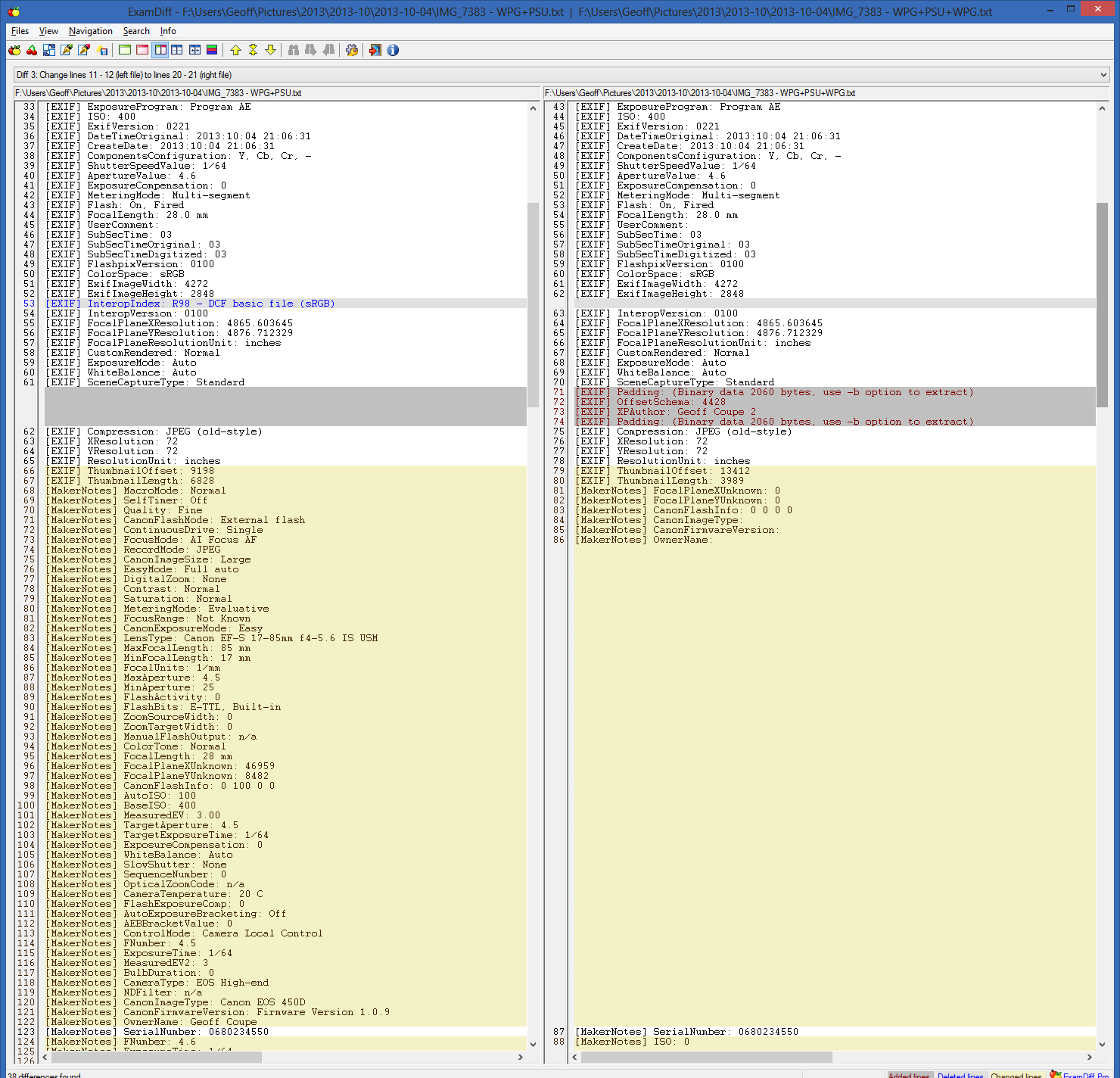
    And indeed, whole chunks of the Canon Makernotes are missing from the image file (left is the metadata in IMG-7383 – PSU.jpg and right is that in IMG_7383 – PSU+WPG.jpg):

    Metadata test 05

    There are also two other possibly significant things about this image file, captured in the metadata. The first is that when WPG writes back to the image file, it reverses the byte order of the Exif data structure. Originally, the Exif is in Little-endian order as shown in this line from both the original IMG_7383.txt and the IMG_7383 – PSU.txt files:

    [File] ExifByteOrder: Little-endian (Intel, II)

    However, once WPG has changed the file, the byte order is now Big-endian:

    [File] ExifByteOrder: Big-endian (Motorola, MM)

    Now, this may, or may not, be a problem, but it is definitely contrary to the advice given by the Metadata Working Group, which states that byte order should be preserved by tools that operate on image files.

    Secondly, WPG introduces an offset in the Exif data structure when adding the changed metadata:

    EXIF] Padding: (Binary data 2060 bytes, use -b option to extract)
    [EXIF] OffsetSchema: 4476
    [EXIF] XPAuthor: Geoff Coupe 2
    [EXIF] Padding: (Binary data 2060 bytes, use -b option to extract)

    So, at this point in the saga, I believe that I’ve established that for any given image that contains Canon Makernotes data, using PSU followed by WPG to edit metadata will result in the corruption of the Makernotes data. This is repeatable for all such image files that I’ve tested.

    What happens if I use WPG followed by PSU to edit metadata? Let’s find out. 

    I used WPG to add myself as author to a copy of the original image: IMG_7383 WPG.jpg. The metadata listing (IMG_7383 WPG.txt) is here:

    http://sdrv.ms/1e16G6W

    You’ll notice immediately that ExifTool gives a warning about the Makernotes structure:

    [ExifTool] Warning: [minor] Adjusted MakerNotes base by 4176

    Also, the byte order has been changed, and padding introduced:

    [File] ExifByteOrder: Big-endian (Motorola, MM)

    [EXIF] Padding: (Binary data 2060 bytes, use -b option to extract)
    [EXIF] OffsetSchema: 4176
    [EXIF] XPAuthor: Geoff Coupe
    [EXIF] Padding: (Binary data 2060 bytes, use -b option to extract)

    However, there is no Makernotes corruption.

    Now let us use PSU to edit the metadata in this file (I changed the Title to read IMG_7383 – WPG+PSU). The resulting image file is IMG_7383 – WPG+PSU.jpg and the corresponding listing of the metadata is IMG_7383 – WPG+PSU.txt, and can be found here:

    http://sdrv.ms/GEzvu1

    The interesting thing here is that the byte order has been switched back to Little-endian, and the padding removed:

    Metadata test 06

    Other than that, the metadata looks fine; no Makernotes are missing, and ExifTool reports no errors.

    So far, so good, but now if I go back and use WPG once more, I get Makernotes corruption again. The image file is IMG_7383 – WPG+PSU+WPG.jpg and the metadata listing is IMG_7383 – WPG+PSU+WPG.txt:

    http://sdrv.ms/192O5V7

    The byte order has been switched again, padding introduced, and ExifTool reports:

    [ExifTool] Warning: [minor] Possibly incorrect maker notes offsets (fix by 4428?)
    [ExifTool] Warning: Invalid CanonCameraSettings data
    [ExifTool] Warning: Invalid CanonShotInfo data
    [ExifTool] Warning: Invalid CanonFileInfo data
    [ExifTool] Warning: [minor] Suspicious MakerNotes offset for DustRemovalData
    [ExifTool] Warning: Invalid CustomFunctions2 data
    [ExifTool] Warning: Invalid ProcessingInfo data
    [ExifTool] Warning: Invalid MeasuredColor data
    [ExifTool] Warning: Invalid SensorInfo data

    And once again, chunks of Makernotes have gone:

    Metadata test 07

    So it seems that using PSU first, followed by WPG, will trigger a corruption of Canon Makernotes; however, using WPG followed by PSU does not.

    But there is one more twist to this saga.

    Remember that Mike had said that a sample file that I had uploaded to SkyDrive to share with him contained metadata errors, whereas I was positive that it was error-free?

    I know that the image files IMG_7383 – PSU.jpg and IMG_7383 – WPG+PSU.jpg do not contain errors. I have the metadata listings to prove it. And yet, if you download these files from SkyDrive, you will find that the Makernotes have also been corrupted. By comparison, if you download the same files from this set on Flickr, you’ll find that they are error-free.

    What’s going on here? I can only surmise that SkyDrive is doing some metadata processing on the images stored on the service, and that a similar, or the same, code library has the processing fault that triggers the Makernotes corruption on images that have already been processed by PSU.

    The SkyDrive folder containing these test images and their metadata files is here.

    The Flickr set containing the same test images is here.

    I like both PSU and WPG, but using them together can be dangerous.

    Addendum 7 October 2013

    I’ve been doing some further investigation and established the following

    • WPG definitely doesn’t like something about the metadata structures that PSU creates
    • None of my other metadata tools complain about PSU
    • ExifTool shows nothing amiss with the metadata that PSU creates.

    I can have an image file that has had metadata edited by a whole series of tools, but if at any point I have used PSU followed at some point further down the chain by WPG, then WPG will corrupt my Makernotes metadata.

    For example, I created two examples of chained metadata operations on files. The first was the sequence: Geosetter, XnViewMP, Lightroom 5, and WPG. At each stage I added a keyword identifying which tool I was using. The final result is given in the metadata listing: IMG_7383 – G+X+LR+WPG.txt, and there’s no corruption; here’s the start of the listing (but note the final offset, and the reversed byte order):

    [ExifTool] ExifToolVersion: 9.35
    [ExifTool] Warning: [minor] Adjusted MakerNotes base by 4236
    [File] FileName: IMG_7383 – G+X+LR+WPG.JPG
    [File] Directory: F:/Users/Geoff/Pictures/2013/2013-10/2013-10-07
    [File] FileSize: 3.9 MB
    [File] FileModifyDate: 2013:10:07 18:10:04+02:00
    [File] FileAccessDate: 2013:10:07 18:10:03+02:00
    [File] FileCreateDate: 2013:10:07 18:09:27+02:00
    [File] FilePermissions: rw-rw-rw-
    [File] FileType: JPEG
    [File] MIMEType: image/jpeg
    [File] ExifByteOrder: Big-endian (Motorola, MM)
    [File] CurrentIPTCDigest: f042c8560b6fafea9c47a1c0249baec1
    [File] ImageWidth: 4272

    The second was the sequence: PSU, Geosetter, XnViewMP, Lightroom 5, and WPG. Again, at each stage I added a keyword identifying which tool I was using. At each step, the metadata was as expected. Then in the last step, WPG is used to add another keyword, and bang – corruption occurs . The final result is given in the metadata listing: IMG_7383 – PSU+G+X+LR+WPG.txt. Here, WPG will corrupt the Makernotes metadata; here’s the start of the listing:

    [ExifTool] ExifToolVersion: 9.35
    [ExifTool] Warning: [minor] Possibly incorrect maker notes offsets (fix by 4526?)
    [ExifTool] Warning: Invalid CanonCameraSettings data
    [ExifTool] Warning: Invalid CanonShotInfo data
    [ExifTool] Warning: Invalid CanonFileInfo data
    [ExifTool] Warning: [minor] Suspicious MakerNotes offset for DustRemovalData
    [ExifTool] Warning: Invalid CustomFunctions2 data
    [ExifTool] Warning: Invalid ProcessingInfo data
    [ExifTool] Warning: Invalid MeasuredColor data
    [ExifTool] Warning: Invalid SensorInfo data
    [File] FileName: IMG_7383 – PSU+G+X+LR+WPG.JPG
    [File] Directory: F:/Users/Geoff/Pictures/2013/2013-10/2013-10-07
    [File] FileSize: 3.9 MB
    [File] FileModifyDate: 2013:10:07 18:25:07+02:00
    [File] FileAccessDate: 2013:10:07 18:25:07+02:00
    [File] FileCreateDate: 2013:10:07 18:24:37+02:00
    [File] FilePermissions: rw-rw-rw-
    [File] FileType: JPEG
    [File] MIMEType: image/jpeg
    [File] ExifByteOrder: Big-endian (Motorola, MM)

    WPG is sniffing out something that PSU puts in a file, and throws a fit… I’ve asked the developer of PSU for help, but he can’t guess what WPG chokes on. Right now, without input from Microsoft, it’s all guesswork and that could take forever.

    Microsoft were informed about this a couple of years ago, but since acknowledging that there was an issue, there’s been complete silence. 

    33 responses to “Photo Metadata Tools – The Saga Continues”

    1. […] Photo Metadata Tools – The Saga Continues […]

    2. Ludwig Avatar

      Well, Geoff, I think you have devoted more time to investigate these bugs than Microsoft has spent on maintaining or improving Photo Gallery. With you presenting them with the details on a silver platter, maybe there is one person still left who can implement a solution.

    3. Arunas Avatar
      Arunas

      Geoff, you don’t mention Picasa in this post, but previously I believe you said that Picasa was also corrupting makernotes metadata. Is this related to PSU as well, or Picasa corrupts metadata on its own?

      1. Geoff Coupe Avatar

        Arunas, as far as I know, the Picasa issue is independent of any use of PSU. What happens with Picasa is that it strips out the Makernotes entirely from the Exif section. This has been reported by others, who may or may not be using PSU.

    4. Hert Avatar
      Hert

      I’d like to make it clear that ExifTool doesn’t report anything wrong with metadata that was written with PSU. The corruption that ExifTool reports occurs *after* the metadata was written with WLPG. If there’s something that PSU wrote to the file and what, for some unclear reason, chokes WLPG then I’d be more than happy to help provide a workaround so that WLPG no longer chokes on it.

      This is what ExifTool reports about Makernotes that are written with Microsoft tools;
      http://owl.phy.queensu.ca/~phil/exiftool/standards.html#PhotoInfo

      1. Geoff Coupe Avatar

        Hert – I agree, the metadata written by PSU looks fine. However, WPG clearly doesn’t like something about it, and I don’t mean to imply that that is PSU’s fault.

        I know that you are willing to provide a workaround, but unfortunately we first need Microsoft to identify what the issue is, and so far they clearly can’t be bothered to provide any assistance. I’m waiting to see if I can get any reaction from them via an approach to the Microsoft representative on the Metadata Working Group. Thus far, there’s been no reaction from that quarter either.

    5. Norm Avatar
      Norm

      I currently use Picasa, love the facial recognition but have never used it to add tags or make corrections to my photos. I’ve use it for facial recognition and cataloging only. I only shoot jpeg and have never altered any of my photos with any program. Since my old naming convention includes a lot of info in the name of the photos, I have not added any Tags to the Metadata either. I recently bought a new OM-D E-M1 M43 camera and thought it would be nice to start simplifying my photo naming conventions and switch over to using Tags as well as doing some post processing. So, I started doing a little Google searching and came across your blog. I had remembered reading a little of it a couple years ago and just assumed most of the problems had been fixed by the various software companies. Boy was I surprised. I’ve been reading through your blogs for a while now and this whole mess is really disheartening. I have no idea what to do.

      I was thinking of switching over to LightRoom but after a little research I found that the company may only provide their CLOUD version on their next release. Anyway, I have no idea what product to use that will keep my Metadata safe while adding Tags, allow facial recognition and store it in the Metadata and allow me to perform some very simple post processing. I don’t use geo data yet.

      In preparation to migrating away from Picasa, I was also going to try to move the facial recognition information in Picasa from the .ini files to the XMP Metadata of each photo. In Picasa under Tools, Options, Name Tags, there is an option to Store Name Tags in Photos. This is for all faces found after the check box is checked. If you want to have Picasa go through all of your older photos you have to go into Tools, Experimental and run the Write Faces to XMP tool. I can only assume this will corrupt the heck out of all of the metadata?

      Any words of wisdom? Is there a single program that will do what I’m asking without corrupting Metadata and still provide facial recognition? Is there a clean way of migrating the facial info in Picasa over to the Metadata so it can be used by other programs?

      Norm

      1. Geoff Coupe Avatar

        Norm, I haven’t been running Picasa on my system for a while now (I’m waiting for a major upgrade from Google before I take another look). However, I think that the current version will store the facial recognition data into the image metadata (using the MWG standard) without problems.

        The only issue that you might have is that Picasa will remove Makernotes from your images, but frankly, if you are using JPG files, this may not be relevant for you. It’s only for anal types like me who insist that the original files remain pristine in all cases that it starts to be an issue. I think you’ll be OK going with Tools, Experimental and running the Write Faces to XMP. Then you’ll have facial recognition data written using the MWG standard in your images, which should be future-proofing for a possible future move away from Picasa to some other tool of your choice. If you don’t mind losing Makernotes from your files, then this is not an issue.

        My main application for metadata handling continues to be Photo Supreme. This also supports the MWG facial recognition standard, so it would read in, and display, the metadata written by Picasa for facial recognition.

        1. Norm Avatar
          Norm

          Geoff,

          Thanks so much for your prompt reply. This stuff is so confusing to me and I don’t want to have to try to repair everything months from now if I can help it.

          I’m not trying to be cheap and am willing to pay for a product that works and adheres to the standards that have been established. Although I don’t typically use maker notes at this time, I may want them in the future and although I’m currently using jpeg, I may end up messing with raw as well – not likely but possible. I just cringe at the fact that several programs stomp on this data and the authors have not made any attempts to fix it. Once it is gone, it is gone forever.

          Can you tell me if Photo Supreme has facial recognition built into the product? In other words will it detect faces and associate names with them and populate the Metadata or do you have to run a separate product like Picasa to populate the data and after that Photo Supreme recognizes it?

          Do you know if Lightroom adheres to these standards? Is it safe to use and does it do facial recognition?

          Norm

          1. Geoff Coupe Avatar

            Norm,
            Photo Supreme does not have automatic facial recognition; only manual (you place a rectangle over a face and assign a name to it). As you say, it will recognise MWG face metadata that has been created by Picasa. It also knows about the Microsoft People Tag metadata used by Windows Photo Gallery. So either Picasa or WPG can be used to populate face recognition metadata, which will then be read in by Photo Supreme for subsequent management.

            The current version of Lightroom does not support face recognition, either manual or automatic. If an image contains face metadata (either the MWG or the Microsoft standard) then it will just ignore it, and leave it alone.

            1. Norm Avatar
              Norm

              Ok, say I decide to go with Photo Supreme. As I’m seeing it, there is not a way to get Picasa to populate the faces and location of faces without corrupting the maker data.

              WPG on the other hand doesn’t corrupt the maker data but then again doesn’t put the faces and location of faces into the proper areas within the Metadata. There may be other problems with WPG that I’m not aware of.

              So should I go with Photo Supreme and NOT use any facial recognition until someone figures out how to do it without corrupting the maker data? That’s terrible because I really like facial recognition.

              I’ve been in limbo for a while now and have not done any tagging or post processing because the process seems to involve using several different programs, one for each function – cataloging, facial recognition, tagging, rotating, post processing, etc. This is confusing and I’m not sure exactly what application to use for each function.

              Sorry I come across as a newbe but that’s exactly what I am and I want to get started off down the right path. I really appreciate your blog and all the research you’ve put into this.

              Norm

              1. Geoff Coupe Avatar

                Norm,

                I’m afraid that it’s a little bit different to what you’ve written…

                Picasa doesn’t “corrupt” the Makernotes metadata – it just removes them completely from your image files.

                The situation with WPG is a bit more complicated. Normally, it will leave Makernotes alone. It twiddles about with the metadata (in more technical terms, it switches the byte order). However, and most unfortunately, there is the interaction between PSU and WPG described in this post – if PSU has been used on an image file, and WPG is used subsequent to this, then if WPG writes back metadata into the file, it will corrupt the Makernotes metadata.

                I, and the developer of PSU, have never been able to get to the bottom of this. Microsoft refuse to help, despite acknowledging that there is an issue, so we are stuck with it.

                What you could do (and it’s a kludge, I admit), is to first use WPG to do face recognition on your files. That would add Microsoft People Tags into your metadata. From that point on, use PSU to do all the rest of your metadata management. PSU will read in the Microsoft People Tags, and convert them to the MWG standard, and the original Makernotes will be preserved. You can also use PSU for simple post-processing (rotating, cropping, colour balance).

                PSU, like Lightroom, is a non-destructive editor in post-processing, so your original file can be preserved at all times. You can apply a post-processing recipe to a file and export a finished, changed file if you want, but it’s not required. I happen to use Lightroom in addition to PSU, but that is simply because Lightroom has more flexibility in image processing than PSU for RAW/DNG files. However, for metadata management, nothing comes close to PSU.

                1. Hondor Avatar
                  Hondor

                  There’s one catch to using WPG before importing into PSU, though.

                  The area tags in my experience are not in their correct places after import, and manual correction leaves the original (misaligned) WMP-MP tags – undeleteable from PSU.

                  I have reported the issue to the PSU team, but I have also subsequently de-installed WPG, since I don’t really like the way it pokes around in all my Photos folder without me being able to exclude any from it’s sticky metadata-corrupting ways.

                  Since facetagging really is a chore, I’m still on the lookout for a non-makernote-destructive way of using a facetagging program like WPG or Picasa in combinatation with PSU – which I really like and have recently bought. I’m wondering if makernotes could be merged back into the picture from a backup-copy of the picture, so that Picasa could be used after all – their facetags are not misaligned when imported.

                  Your blog is a delight to read BTW – I’ve been doing it for the better part of a year.

                  1. Geoff Coupe Avatar

                    Hondor, you wrote:

                    “I’m wondering if makernotes could be merged back into the picture from a backup-copy of the picture, so that Picasa could be used after all”

                    This sounds like something that could be done using Exiftool and some clever scripting. I’m afraid it’s well beyond my capabilities to come up with such a script. Perhaps you could ask on Phil Harvey’s Exif forum?

                    Thanks for the compliment, BTW 🙂

                    1. Hondor Avatar
                      Hondor

                      Just an update – the problem with misaligned imported WMP-MP has been corrected in the latest build of PSU.

                      1. Geoff Coupe Avatar

                        Hondor, thanks for letting me know. Hert is very good at supporting PSU – the next version (V3), currently being beta-tested, has some good new features as well.

    6. Norm Avatar
      Norm

      Thanks Geoff,
      It bothers me that PSU and WPG don’t play well together. It really makes me reluctant to use them. I’m guessing WPG is the culprit.

      I’ve done some more investigating and came across a program called AvPicFaceXmpTagger to search for .picasa.ini face definitions. If face definitions are found for a file, they are added as XMP tags. Optionally, you can also have the program add the persons names as IPTC Keyword tags.

      The actual tagging of the JPEG files is done using ExifTool which provides good makernotes handling.

      What do you think of using Picasa for facial recognition, management and viewing. Then run AvPicFaceXmpTagger to populate the XMP tags and IPC keyword tags. I’d still need to find a good program (PSU) for post processing photos and adding any additional tags. Not a simple solution though……

      Norm

      1. Geoff Coupe Avatar

        Norm,

        I wouldn’t use AvPicFaceXmpTagger if I were you. It was developed for earlier versions of Picasa that did not store Face regions in the metadata, but only in the local Picasa database on your computer. It actually uses the Microsoft People Tag standard (the same standard used by WPG). Now that Picasa stores face regions in metadata using the MWG standard, the time of AvPicFaceXmpTagger has passed, as far as I’m concerned. I think as far as the developer, Andreas Vogel, is concerned as well. I don’t think that there have been any updates for several years now.

        Just use Picasa for facial recognition, management and viewing. Turn on the writing of face regions into the metadata and you’re set. PSU has a free trial, give it a whirl. That should give you the link between the face regions and the IPTC Core Keywords that you’re looking for.

        The only thing is that Picasa will remove Makernotes, so if that’s really important to you, then you’ll have to go down the AvPicFaceXmpTagger route, and not use Picasa for ANY keyword management. Once Picasa writes metadata into a file, your Makernotes are gone.

    7. Pieter Roggemans Avatar

      Hello!
      Regarding makernotes and Picasa… to be more precise:
      – Picasa never explicitly removes the makernotes
      – Picasa preserves the makernotes correctly for quite some camera’s
      – For some camera’s, Picasa doesn’t identify the (proprietry) makernotes correctly and so they are written back to the file in a wrong format… and they become unreadable.

      In the latest version of Picasa support has been added for some additional camera’s… it might be a good moment to test it again.

      If not ok yet, it would be great if you post the problem in the picasa forum and mention the brand and the model of the camera and upload a (zipped) before and after version of the test picture.
      https://productforums.google.com/forum/#!forum/picasa

      1. Geoff Coupe Avatar

        Hallo Pieter, it’s been a while since I tested Picasa, so perhaps things have changed in the latest builds. But certainly, the last time I looked (six months ago?), Picasa was definitely deleting the Makernotes created by my Canon 450D.

        I’ll try and find time to re-examine the latest build and post results in the next month or so.

        In any case, thanks for the comment.

        1. Pieter Avatar
          Pieter

          Thanks,
          As far as I know it wasn’t fixed for that camera model, so most likely it will be still broken for you… but if you post in the picasa forum with an original picture containing the markernotes, there is at least a reproducable example, and that is the start of any possibility for a solution. Mind: I’m not a google employee, just a Picasa enthousiast, so I cannot guarantee it will be solved nor can I give any ETA.

          Same message ofcourse to anyone having any camera that gives makernotes problems in Picasa at the moment…

          Thanks.

          1. Geoff Coupe Avatar

            Pieter, this issue has been around since at least 2011. Like Hondor, I have little confidence that the Picasa team will address it successfully. I’ve just done a quick scan of the product forum and when I come across threads such as this, then I really wonder whether the team has either the will or the competence to address the issue satisfactorily. That sounds harsh, but that’s what I see. Other software vendors (and Phil Harvey) seem to be able to preserve Makernotes, but not the Picasa team it would seem.

            1. Pieter Avatar

              Geoff,
              That thread is actually not the best example… the conclusion of that thread was that the “Gallery” on Android strips all exifdata, so Picasa didn’t strip anything…
              https://productforums.google.com/d/msg/picasa/d3iRdl0jOm8/U5_ZVOIg-nsJ

              But… no problem of course, you are free to supply example files or not.

    8. Hondor Avatar
      Hondor

      Full of hope, I re-installed the latest Picasa 3.9.138 and hesitantly tried writing XMP facetags out to 4 test pictures of mine taken each taken with a different camera. I used a pictue from an oll Canon P&S, an newer Panasonic compact, and two Canon DSLR’s including my current 6D.
      Same result every time.
      All Makernotes and not a few EXIF notes were completely wiped out.
      Much as I yearn for having automatic face tagging back in my workflow, I simply cannot trust Picasa anymore…

      1. Geoff Coupe Avatar

        Ah, not good. Thanks for letting us know, at any rate.

      2. Pieter Avatar

        Hondor,
        That’s not good. Could you please post example pictures of the different camera’s in the Picasa forum? No guarantees, but example photos are the first small step towards a possible solution…
        https://productforums.google.com/forum/#!forum/picasa

        1. Hondor Avatar
          Hondor

          I’m afraid I can’t trust the Picasa team anymore to address this matter adequately. I was particularly dismayed to see Picasa fail on each and everyone of my cameras. AvPicFaceXmpTagger contrarily got it right the first time friggin’ 5 years ago. I have just checked that AvPicFaceXmpTagger will not remove anything, and will just add the XMP tags non-disruptively. Makernotes preservation as far as I can see doesn’t seem to be a priority to the Picasa team.

          1. Pieter Avatar

            Hondor,
            OK, at least we have the camera models that give troubles for you, probably we’ll be able to find example files from those camera’s on the web somewhere to get test cases.

            FYI: AvPicFaceXmpTagger only adds name tags in the XMP section of the file, so it doesn’t need to touch the EXIF section… and the EXIF section is the nasty one as it is there that the proprietry makernotes are put.
            But, even if it is not a fair or relevant comparison, you are right that it is a pity Picasa doesn’t do a better job…

            1. Hert Avatar
              Hert

              @Pieter; that’s not entirely correct. For embedded formats, XMP is written as a tag in EXIF. And so in order for a tool to write embedded XMP it needs to rewrite the entire Exif section of the file (padding aside). For AvPicFaceXmpTagger to write the XMP it needs to touch the EXIF section too.

              1. Pieter Avatar
                Pieter

                @Hert: OK, sorry, I haven’t studied XMP and EXIF that deeply, and aparently I made a wrong assumption :-(.

    9. nogginthenog Avatar
      nogginthenog

      Very interesting, both the blog entry and the comments. I have just spent an afternoon tracking the extent to which XnViewMP is trashing my metadata, including Makernotes.

      I was interested to hear of Mike Lee’s MetadataMirror. It doesn’t seem to be there any more. Has it moved? Does anyone know a good alternative?

      1. Geoff Coupe Avatar

        Hi nogginthenog. Probably the best thing is to contact Mike directly via his web site?

        1. nogginthenog Avatar
          nogginthenog

          Wil ldo. Thanks.

    Leave a comment

  • Indistinguishable From Magic

    Arthur C. Clarke once wrote:

    Any sufficiently advanced technology is indistinguishable from magic.

    That’s the thought behind this video: Box.

    (hat tip: Richard Wiseman)

    Leave a comment

  • RIP Margi

    I’m afraid I’m of an age where I read the obituaries to see if another connection with my past or present has gone. Most of the time they are of somebody famous, a well-known author perhaps, whose work has influenced me, but with whom I have had no personal connection.

    Occasionally, however, I come across the obituary of someone whom I have known quite well, and it comes as something of a shock. It happened again last Thursday, when I read the obituary of Margi Levy in the Guardian. I knew Margi back in the 1970s. She was warm, funny, passionate and intelligent. I met her via a mutual friend, Len Curran. He was a great one for having parties, and I would often see Margi at one of these affairs, where wine and good conversation would flow freely. I still have a photo of a picnic that the three of us (and two other friends) had in August 1974 in Windsor Great Park. The photo is of Len and Margi sharing a joke, and Margi has the same broad smile as in the photo that accompanies her obituary.

    img381

    We became geographically separated in the 1980s – I moved to the Netherlands, Margi moved to Australia, and I lost touch with her. Alas, both Len and Margi are now gone, but their memories will remain for a while with me. I thank them for the time we shared.

    Leave a comment