Reflections on life at “De Witte Wand”…

  • “It’s An Incredible Deal”

    That’s the summary of Paul Thurrott’s article on Microsoft’s Office 2013 pricing. I think his understanding of the definition of the word “incredible” is rather different to mine.

    While you will be able to purchase licenses for the Office 2013 suite, the main thrust of Microsoft’s announcement is to move from a license purchase model to an annual subscription model.

    Thurrott enthuses that:

    Yes, you’ll be able to acquire Office 2013 the old-fashioned way. But the benefits and pricing of the subscription plans are so attractive you won’t want to.

    However, when I do the sums, the subscription model has zero attraction for me.

    I bought a copy of Office Home and Student 2007 for €125 almost 6 years ago; it’s still fine (I never felt the urge to upgrade to Office 2010), and licensed for 3 PCs – which is all I need.

    Under this new subscription model, I would be paying €600 for the equivalent term for Office 365 Home Premium. If I want to buy Office 2013 for my PCs, then I’ll now have to buy three licenses; Microsoft has stopped doing the “licensed for up to 3 PCs” deal that they had for Office 2007 and Office 2010. However, while buying three copies of the traditional Home and Student versions of Office 2013 is cheaper at €420 Euros than the subscription cost for a six-year term, it’s still an enormous increase over the €125 cost of the equivalent license for Office 2007.

    Frankly, if I’m going to get Office 2013 at all, then I’ll only be tempted to buy just one copy of Office 2013 for €140, and leave Office 2007 on the other two PCs.

    The subscription model may be great for Microsoft, but it makes no sense for me.

    21 responses to ““It’s An Incredible Deal””

    1. Al Feersum Avatar

      Well… there could be other ways… depending on how much ‘new’ MS software you want…

      Buy an MSDN subscription, which will allow you to legitimately ‘obtain’ MS software for the duration of the subscription. This is expensive, but as I said, it depends on how much software you want.

      You could also join up as an ISV. For about 1,500 euro, you could get a ‘reseller’ subscription, which will entitle you to SBS, SQL Server Standard, minimal Exchange, 10 workstation licenses, Office for 10 workstations…

      … some of the deals that MS do are pretty damned good: the MSDN sub I’ve got gives me access to around $800k worth of MS software – sure, I don’t use all of it, but Server 2008 R2, SQL Server 2008 R2 Std, Visual Studio 2010 Ultimate, Office on 3 PCs, Team Foundation Server 2010, WIndows 7 Ultimate on 3 PCs, and Windows Home Server all cost a damned sight more than the MSDN Premium+VS Ultimate subscription (which is about $5k).

      1. Al Feersum Avatar

        Oh yeah, and once you’ve registered your software, it’s yours. It doesn’t expire. There are one or two restrictions on its use, but these should be no barrier for someone with an IT background like yourself Geoff,.

      2. Geoff Coupe Avatar

        Al – I’m a pensioner – the MSDN subscriptions are already more than I’m willing to pay. Also, the software is only to be used for “testing”. I, and I suspect Microsoft’s lawyers, view that using this stuff on a daily basis constitutes being in “production”. That’s why I bought licenses for the stuff I use…

        1. Al Feersum Avatar

          Yeah – sorry about that Geoff… anyway, if you’re using it at home, you’re using it for ‘development purposes’, which is covered by the terms of the agreement. I don’t know how the tax laws work in Flatland, but if they’re anything like they are over here, if you do a self-assessment, they could be considered ‘a legitimate expense’, and it’d reduce the tax you pay on your pension… just a thought…

          Anyway, I digress. I’ll respond further down the threads…

          1. Geoff Coupe Avatar

            Al, best of luck with that definition of ‘development purposes’… 🙂
            According to Microsoft:

            Many MSDN subscribers use a computer for mixed use—both design, development, testing, and demonstration of your programs (the use allowed under the MSDN subscription license) and some other use. Using the software in any other way, such as for doing email, playing games, or editing a document is another use and is not covered by the MSDN subscription license. When this happens, the underlying operating system must also be licensed normally by purchasing a regular copy of Windows such as the one that came with a new OEM PC

            .

            1. Al Feersum Avatar

              Well… I’m hardly implementing a full-blown public facing Exchange server… but my use of the MSDN subscription follows, if not the letter of the agreement, certainly the spirit of the agreement. And when the organisation I work for has a huge contract with MS, I don’t think that they’ll be that pissed off with the developers who are using their products for home use, learning them, and consequently evangelising them… 😉

    2. Peter Ferguson Avatar
      Peter Ferguson

      Geoff,
      I see you intend to move to Windows 8 as I will. What e-mail client are you using? I use Outlook 2010 and it is not Windows 8 friendly. W8 is forcing us into the cloud, I try to resist but to no avail. I have a WP6.5 phone & refused to move to a WP7 because at present my WP6.5 syncs perfectly with Outlook 2010 (Tasks,Appointments etc.) using Active Sync, WP7 and WP8 will not sync with Outlook 2010 . But they have me beat.

      1. Geoff Coupe Avatar

        Peter, I use the Windows Live Mail client that comes as part of Microsoft’s Windows Essentials suite (formerly Windows Live Essentials). It’s not as fully featured as Outlook (e.g. no Task support), but it meets my needs. It handles multiple email accounts (POP, IMAP, Hotmail, Google) and integrates my Contacts and multiple Calendars.

        I have it handling four email accounts, my two primary accounts from my ISP, and two secondary accounts on Outlook.com. I use IMAP for my primary accounts, and archive my mail locally (i.e. not in the Cloud). Windows Live Mail supports local storage folders, and it holds messages as individual .EML files – no OST or PST database files here. Personally, I prefer this approach of Windows Live Mail.

        I have WP7, and even though my primary email accounts are non-Microsoft, the WP7 mail client handles them well, and my Contacts and Calendars (both using Windows Live) are synced across my devices.

        The W8 Modern mail client is too limiting for me (at least the version I’m seeing in the W8 Release Preview), so I expect to be continuing with Windows Live Mail for some time to come.

    3. Peter Ferguson Avatar
      Peter Ferguson

      So now I understand, you don’t need Office 365 as you don’t use Office Outlook. You can stay with Office 2007/2010. I am forced to either stop using Outlook and switch to the W8 Client with its limitations (especially with POP3 Clients) or to “upgrade” to Office 365 and keep paying monthly forever. I have been using Outlook with a pst file for many years and am hooked on the Tasks, Appointments etc. Unfortunately I don’t think I can kick the habit.

      1. Technogran Avatar

        There is no need Peter as there is a viable alternative in Windows Live Mail! It works with all email accounts including POP and also my favourite RSS feeds via Internet Explorer. It has a built in Calendar (which you can add to at the side) and I personally prefer it to Outlook which is far too ‘bloated’ with unnecessary features that I never use. Give it a whirl.(and best of all, its free!)

        1. Al Feersum Avatar

          Yeah, but Outlook is so damned useful. I hated it for a long time, even as OE (now known as Windows Mail), preferring to use the mail client that my ISP developed and offered for free, or later, using Thunderbird. When I was forced to use Outlook at work in lieu of using Lotus Notes (how dare they call this a Productivity and Collaboration suite!) when I changed jobs… and decided I quite liked it. This was Outlook 2003. As I had an MSDN subscription, and I needed Office at home, I just downloaded and installed it. I’ve never looked back, using every release within weeks of RTM – though I must admit, I’m nervous of Outlook 2012…

          1. Peter Ferguson Avatar
            Peter Ferguson

            I’m with Al Feersum. I have Windows 8 loaded as dual boot and I have tried the native Mail client adding both my outlook.com (old Hotmail) and my POP3. They work OK. Then I loaded the new Office 2013 and tried Outlook 2013. They don’t compare, as I said earlier I’m hooked on Outlook. The problem is to get the Outlook to sync with all the new metro stuff and later with Windows Phone 8 you have to have the 365 version of Office. Also with Outlook I get to access all my emails from over 10 years in my pst file.

            1. Geoff Coupe Avatar

              Peter, as both TG and I have said, try Windows Live Mail, rather than the Modern mail client bundled in W8. The latter is a toy, and does not integrate your contacts and calendars into the mail display (they are separate Modern apps in W8).

              My Windows Live Mail also accesses all my emails from over 10 years…

              I get all my contacts, calendars, and emails synced between my devices (including my WP7) and I’m not forced to sign up to Office 365

              1. Al Feersum Avatar

                I was messing around with my gmail this evening, setting up filters for useless crap that keep pinging my Lumia as new mail, and the functionality is looking more and more like Office than it ever did, including the integration with Google Drive (used to be Google Apps). The only thing it doesn’t have is the same look-and-feel… oh yeah, and PSTs. But then again, with >10G of storage, who cares? The only downside are the ads in the interstices, but it’s free, so Google have to pay for it somehow. And no thick client either. It doesn’t stop me from using Outlook 2010 though.

                1. Geoff Coupe Avatar

                  Ads? You get Ads with Gmail? Yet another reason to stick with Outlook.com and SkyDrive, perhaps?

                  1. Al Feersum Avatar

                    The ads can be quite entertaining, e.g. when checking for false positives in the spam trap: “Spam and tomatoe [sic] pasta bake recipe”

                  2. Al Feersum Avatar

                    What? Yuk.

                    “Spam Vegetable Strudel – Bake 20 minutes or until golden, serve with soy sauce”

    4. Mark Avatar
      Mark

      Ah yes, the old rent versus buy argument. Nice of Paul to label everyone who doesn’t agree with him a Luddite.

      Not sure why I can’t find the same information. Paul has some specific information, but when I go to Microsofts Office 365 site ( http://www.microsoft.com/en-us/office365/compare-plans.aspx ) there is no “Home Premium” plan for Office 365 and the plans listed are considerably more than what Paul quoted – a 5 seat license that allows editing of Word docs is $30/month ($360/yr)

      1. Geoff Coupe Avatar

        Mark, follow the link I give in the post for Microsoft’s Announcement, and you see the pricing for consumers. The Office 365 site is intended for businesses, and the prices reflect that.

    5. […] in September last year, I wrote about the pricing of Microsoft Office 2013. Unlike Paul Thurott , I failed to see how it was “An Incredible Deal”. For my use, the […]

    6. […] commented a couple of times before on the new licensing models that Microsoft has introduced with Office […]

    Leave a comment

  • Polling Day

    It’s polling day here in the Netherlands. It’s our chance to exercise our democratic right to choose the members of the Tweede Kamer (Second Chamber), and, indirectly, the makeup of the next Dutch Government. With twenty political parties to choose from, the next government will almost certainly be a coalition, as usual.

    There’s a chance that we might see a swing to the left, but it seems that it will be a close run thing.

    At least I should get some respite from the last few weeks of a constant barrage of web ads urging me to vote for the VVD. Their crude slogans – Meer straf en minder begrijp voor criminelen (more punishment and less understanding for criminals) – have merely confirmed me in my belief that I am doing the right thing by voting for the PVdA.

    One response to “Polling Day”

    1. Matt Healy Avatar
      Matt Healy

      Meanwhile, as you are probably aware we have a campaign going on in the USA. Very negative campaign on both sides, unfortunately. Since I live in what is called a Blue State (one that always gets colored blue meaning the Democratic Party) in the maps on TV, there has been very little advertising from either Presidential campaign here. But in Connecticut we are seeing MANY advertisements for the multimillionaire professional wrestling executive who is the Republican candidate for our open Senate seat. Her Democratic opponent has a long and distinguished history in state and national politics so would normally be the overwhelming favorite. But the wrestling executive has so much more money to spend on advertising that the outcome in this election is very uncertain. Last time she failed to buy herself a Senate seat with her millions, but she may pull it off this time.

      This in a rather ugly election year.

      I have voted for every Democratic candidate for President since Carter myself; my wife and I certainly plan to vote for Obama again this time.

    Leave a comment

  • Lichtenvoorde’s Bloemencorso

    The nearby town of Lichtenvoorde holds a Bloemencorso, or Flower Parade, every year on the second Sunday in September. For 2012, that was yesterday, and as it was a beautiful sunny day, we went along to watch the parade.

    There’s a quite staggering amount of work that goes into making these floats, involving thousands of Dahlia blooms, and the results are spectacular. I took about 400 photos, but unfortunately, my camera lens (a Canon EFS 17-85mm) developed a fault during the parade, so I didn’t capture all of it.

    As well as the floats, there are a number of marching bands and theatre groups taking part. First up was a Brazilian dance and percussion group from The Hague:

    20120909-1416-11

    20120909-1417-44

    The children of Lichtenvoorde and the surrounding area have their own section in the parade. These are just a few of the floats (click for larger images):

    20120909-1442-36 20120909-1442-49

    20120909-1443-11 20120909-1443-24

    20120909-1444-04 20120909-1444-57

    20120909-1446-10 20120909-1449-38

    Then the main floats started to arrive…

    20120909-1453-19

    20120909-1500-46

    20120909-1500-56

    Many of the floats had moving parts. This next one is difficult to appreciate in a photograph, but the bison and the hunters both turned in constant motion:

    20120909-1502-57

    20120909-1503-17

    This next one was titled “Water and Fire”:

    20120909-1504-38

    20120909-1504-43

    20120909-1504-52

    Then came my personal favourite of the parade – carnivorous plants, complete with black flies in attendance. The plants opened and closed their jaws as they passed:

    20120909-1514-3320120909-1515-11(001)

    20120909-1514-50

    Keeping with the Nature theme, this next float was titled “Tarantula”:

    20120909-1519-10

    Followed in turn by a bunch of killer wasps in “Attack”:

    20120909-1524-42

    This next float was titled “Underground”, and presumably represented a mechanical mole, judging by the “miners” working it:

    20120909-1545-10

    20120909-1545-16

    20120909-1545-20

    20120909-1545-31

    20120909-1545-43

    I’m afraid that it was at this point that my lens began to play up, so I haven’t got good pictures of the last floats. However, I want to make special mention of the “Verpakt” (packaging) float. This represented six Japanese toy dolls in their packaging. The dolls moved as they passed by.

    20120909-1549-33

    A nice touch was the inclusion of a QR code on the “box”, which takes you to the fake web site of the Go-Kyo toy

    20120909-1549-43

    This float won the jury prize.

    One response to “Lichtenvoorde’s Bloemencorso”

    1. […] I dabble in photography, but I’d hesitate to call myself a photographer. Nevertheless, I invested in a Canon EOS 300D back in 2005, and replaced it with a Canon EOS 450D in 2008. Along with the cameras came investment in four lenses to cover a range of situations. I’ve been very satisfied with the equipment, despite having to spend 145 euros on a repair to the electronics in one of the lenses that failed during a shoot. […]

    Leave a comment

  • Life Is Fragile

    A sober reminder yesterday of how fragile our lives are. I received an email passing on the news that someone I knew, liked, and respected from my days of working in IT in Shell was killed in a light aircraft crash last Friday.  He was only 42.

    He leaves a widow and two young daughters. He is sorely missed.

    Leave a comment

  • A New Arrival

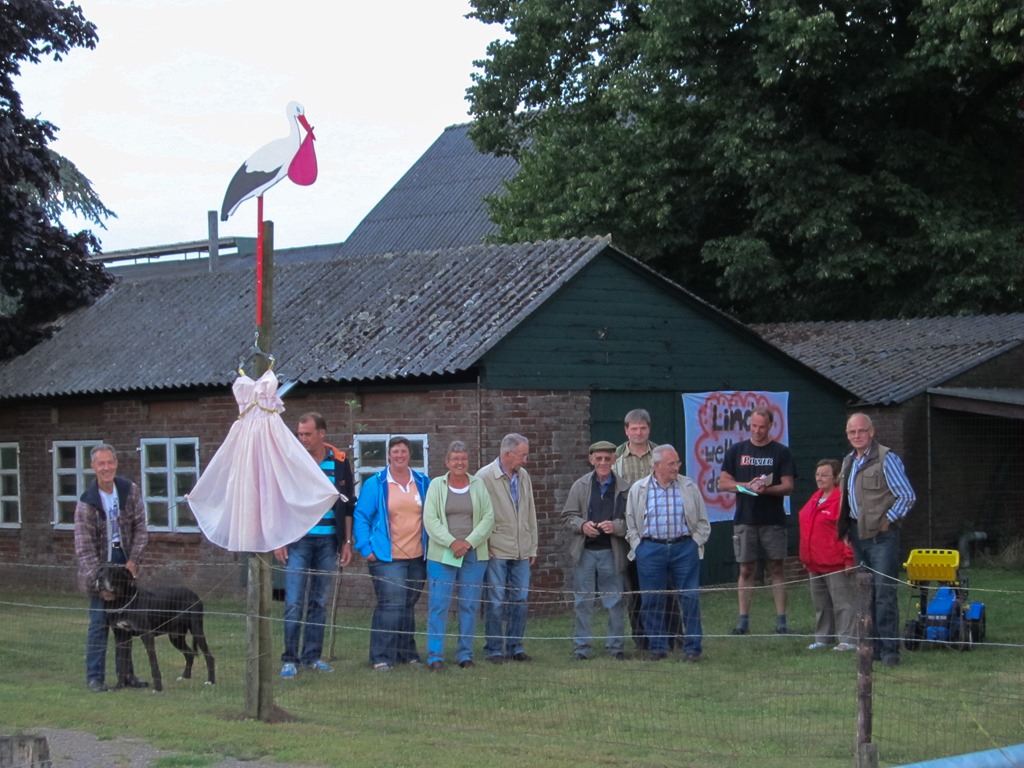
    Our nearest neighbours, Herman and José are currently celebrating (and having sleepless nights) because José gave birth to their second child last Tuesday. Her name is Linde.

    Yesterday, as is traditional around these parts, we, the neighbours, assembled to erect a stork in the garden to proclaim the arrival of a baby.

    20120830-1955-07

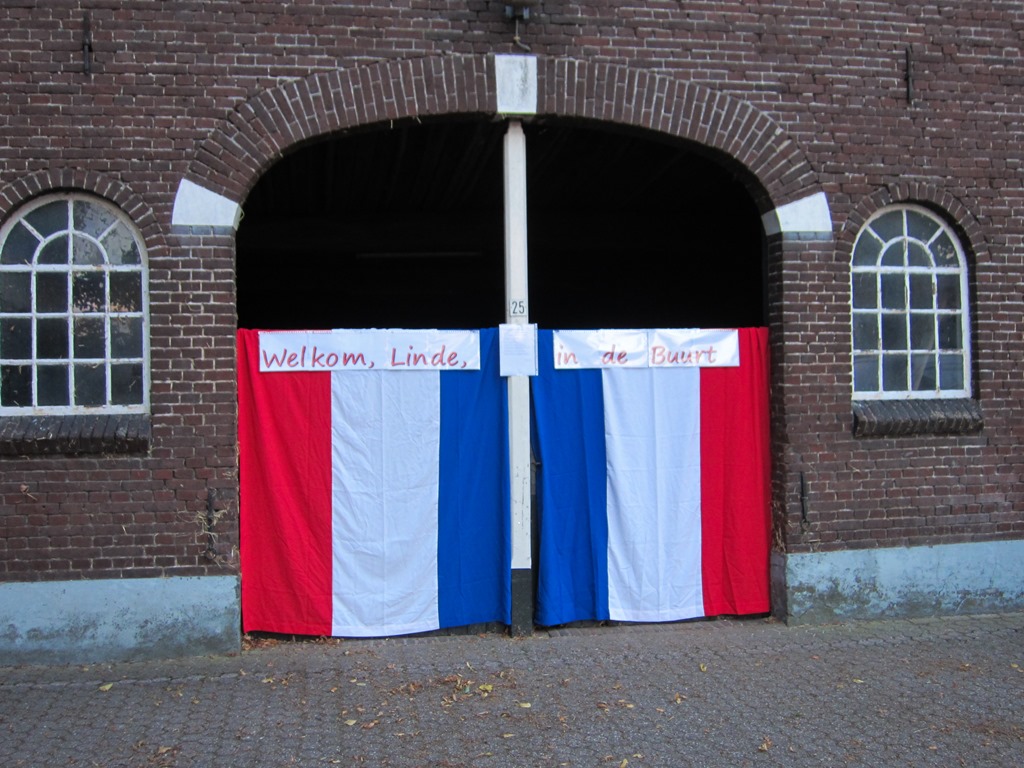
    Because Linde is a girl, Martin added the princess dress to indicate the fact. He also decorated the entrance to the cattle barn…

    20120830-1953-48

    The text reads Welkom, Linde, in de Buurt (Welcome, Linde, into the Neighbourhood).

    Leave a comment

  • “Windows 8 is Windows 7+1”

    I’ve mentioned before how much I’ve been surprised by the level of vitriol and hatred that has been unleashed against Microsoft’s forthcoming Windows 8 operating system. Everywhere I turn, on tech blogs and forums, there are articles, posts and threads complaining about the “disaster” that is Windows 8. Opinions galore, often complete with falsehoods stated as facts.

    I find it all a bit bemusing. To be sure, Windows 8 is not without blemishes, but it’s hardly a disaster. I actually like it. I’ll be upgrading my release preview of Windows 8 to the full Windows 8 Pro when it is released on October 26. I certainly will not be returning to Windows 7.

    So it’s something of a relief to find a kindred spirit in the form of Scott Hanselman, who describes Windows 8 as Windows 7+1:

    Maybe I’m too relaxed but after a few days and some hotkeys I’ve found Windows 8 to be Windows 7+1. Works fine, no crashes, lots of improvements. I spend most of my desktop time in Windows apps, all of which work. I keep News apps or Video apps in full screen on other monitors and I do move the Start Screen around but generally the whole thing has been a non-issue.

    And he actually shows why he has reached this conclusion in a detailed post. It’s worth reading.

    3 responses to ““Windows 8 is Windows 7+1””

    1. MarkB Avatar
      MarkB

      Perhaps so but for the average desktop user, there is little here for them. Expecting people to learn new windows-key combinations just because its more difficult to do familiar things is not much of an endorsement. All of the “pin it to the task bar” sounds good until you realize that the defaults are ALWAYS to Metro (sorry, Windows-8-style) apps and cant easily be changed. Double-click on a picture and you are dumped into the pic viewer and have to figure out how to get back to your files.

      For laptop and small-screen people I think all the chromeless stuff will be great, but when a tech-savvy person after having it installed for a month and is now saying “have got myself productive again” – I wouldn’t consider that much of a success-story.

      1. Geoff Coupe Avatar

        Mark – yes, I agree that post-installation, file defaults are set to Modern UI Apps, but that’s only until you install further software. As soon as I installed Windows Essentials, the file defaults got switched to those applications automatically.

        By coincidence, I see that Paul Thurrott wrote about this here: http://www.winsupersite.com/article/windows8/windows-8-tip-change-file-associations-144102

    2. […] and vitriol, from many users of traditional PCs. Personally speaking, I singularly fail to see what all the fuss is about. I use Windows 8.1 on both my PCs and Tablets, and am perfectly comfortable in both environments. I […]

    Leave a comment

  • Microsoft’s Photo Gallery – Yet Another Missed Opportunity?

    As I wrote in my last post, Microsoft has recently released a new version of Windows Live Photo Gallery, now simply known as “Photo Gallery”. That last post documented an issue that Photo Gallery has over its handling of geotags. In this post I want to look at what I would consider to be missed opportunities by Microsoft to set the lead in the field of software aimed at organising digital photos.

    Microsoft is a founding member of the Metadata Working Group, a consortium of leading companies in the digital media industry, focused on the following goals:

    • Preservation and seamless interoperability of digital image metadata
    • Interoperability and availability to all applications, devices, and services

    Almost two years ago, in November 2010, the group published version 2 of its Guidelines for Handling Image Metadata. As I wrote at the time, it’s “a major new version of the Guidelines”. The document states:

    This expanded specification builds on existing metadata standards to describe several emerging consumer properties that:

    • Use regions to record faces, focus points, barcodes, or other data in an image
    • Provide hierarchical keywords to richly describe and classify images
    • Flexibly identify an image as part of a greater media collection

    While software applications are supporting features such as people tags and hierarchical keywords, they use differing implementations, so that interoperability between applications is difficult, if not often impossible.

    Version 2 of the Guidelines was an attempt to define a common specification in these areas, to drive interoperability forward.

    What I find disappointing is that, nearly two years later, the new version of Photo Gallery has not implemented any of these proposed specifications, and continues with the old Microsoft-proprietary ways of doing things, despite the fact that Microsoft is a founding member of the Metadata Working Group.

    Still, the same charge can also be levelled at Adobe, another founding member. Their latest version of Lightroom, Lightroom 4, also continues with the Adobe-proprietary ways of doing things. The result? You can forget about any real interoperability between Photo Gallery and Lightroom when it comes to People Tags and Hierarchical Keywords.

    One last, rather ironic, point. Despite the fact that Google is not a member of the Metadata Working Group, I’m heartened to see that Google has actually implemented the version 2 Guidelines proposed standard for People Tags in version 3.9 of Picasa. So it can be done. C’mon Microsoft and Adobe, get with the programme, give us tools that actually talk to each other…

    Leave a comment

  • Windows Photo Gallery, Geotags and Other Issues

    Microsoft has recently released a new version of Windows Live Photo Gallery. In keeping with Microsoft’s plan to kill off the “Live” branding, it is now simply known as “Photo Gallery”, and the suite of software utilities is now known as Windows Essentials, rather than the old name of Windows Live Essentials.

    Since this is a step change in the software (it’s now at version 16.4.3503.728, while the last version of Windows Live Photo Gallery was 15.4.3538.513), I thought I’d take another look at it.

    Apart from the name change, not much seems to have been done with the product. Yes, Microsoft has added in the possibility to publish videos to the Vimeo service and Photo Gallery now includes an Auto-Collage feature by default (this was a downloadable plug-in for the previous version), but that’s about it.

    However, while playing around with it, I discovered there was an issue with the way in which Photo Gallery was handling geotags.

    Some of you may recall that, when it was first released in 2010, Windows Live Photo Gallery had a major problem with geotags.  It was writing out GPS coordinate data into photos that was often completely wrong. Microsoft got this fixed in December 2010.

    And there the matter rested, or so I thought.

    However, I have discovered another issue related to geotags in Photo Gallery. For a long time now, Microsoft has said that it holds to the principle that “the truth is in the file”. That means that metadata you apply to your photos is part of the photo, and available to any application that knows how to read it. But I’ve found that this does not apply to geotags in all cases. Photo Gallery looks to see if the image contains metadata, and if so, the following operations occur:

    • If the photo contains Keywords in its metadata, these are added to PG’s list of Descriptive Tags, which it holds in its database and displayed alongside the photo in PG’s information pane. 
    • If the photo contains technical data in Exif (e.g. date taken, shutter and ISO speeds, etc.), these will be copied to PG’s database and displayed in PG’s information pane.
    • If the photo contains GPS coordinates in its metadata when it’s examined by PG, reverse geocoding will be triggered and the location is displayed as text addresses in the information pane.

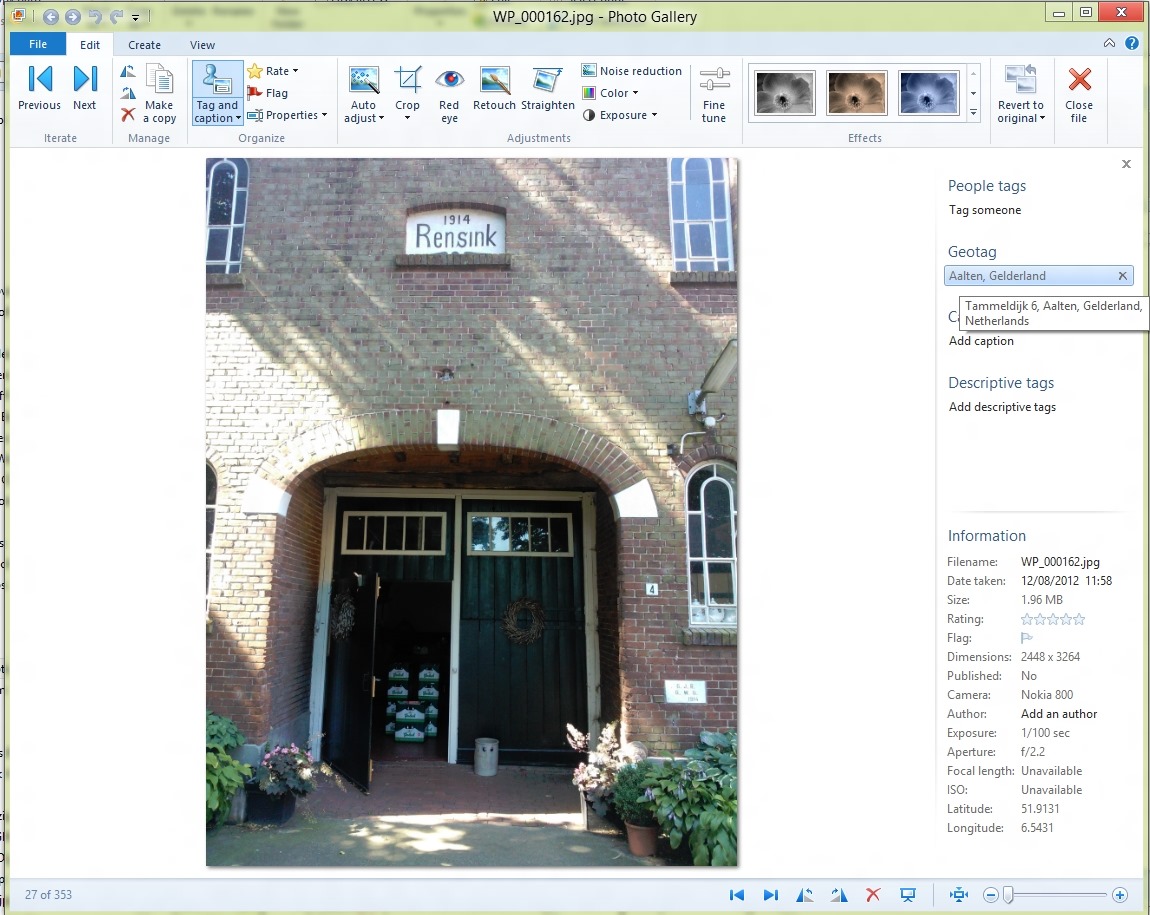
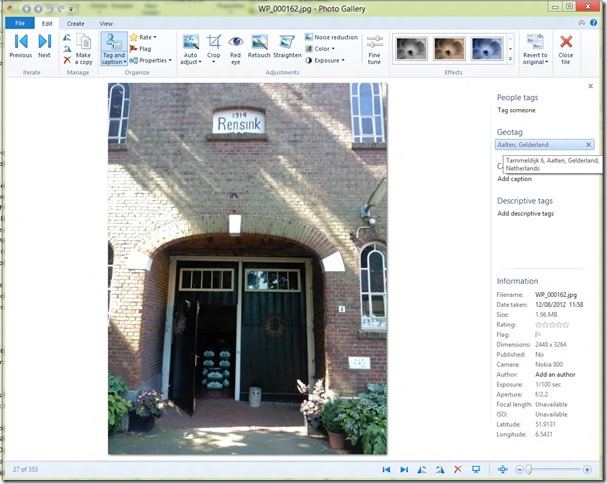
    The screenshot below shows a photo taken with my Nokia Lumia 800 Windows Phone being displayed in Photo Gallery (click for the full-sized image).
    WPG test 10

    In the information pane on the right, you can see some of the metadata present in the image being shown, including the GPS Latitude and Longitude (at the bottom right). Photo Gallery has used this GPS data to do reverse geocoding via a Bing service to resolve the coordinates to an address. That is being shown under the Geotag heading in the information pane. By default, only the City and Province/State data is shown (i.e. Aalten, Gelderland in this case). The full address is shown in a tooltip if the mouse cursor is placed over the Geotag – in this case, Bing has said that the GPS data is for the location: Tammeldijk 6, Aalten, Gelderland, Netherlands.

    As an aside, Bing has actually got the address wrong. It should be Tammeldijk 4, not 6. Google Maps will show the correct address, if fed these GPS coordinates…

    So, Photo Gallery has just generated some location data based on the GPS coordinates. Now the question is, how is it going to stay with the principle of “the truth is in the file”? It needs to write this generated data out into the image metadata in some fashion. How will it do this, and what standard will it use? I need to make a short digression here into the murky waters of industry standards…

    One very common industry standard for location (and other) metadata used in photos is that defined by the International Press and Telecommunications Council. Back in the early 1990s, the IPTC defined a standard for image metadata: IPTC-IIM. This became widely adopted and supported in many software tools and applications. However, it had design limitations, and the IPTC introduced a new version in 2005, based on the XMP standard, known as IPTC Core. Many software tools and applications handle both standards, and keep the metadata content synchronised between the legacy IIM and the new Core standards. Along with the Core standard, the IPTC also published a set of extensions, known, unsurprisingly, as Extension. The IPTC Core and Extension are published together as the IPTC Photo Metadata Standards.

    Both IPTC-IIM and IPTC Core contain fields for defining locations. Essentially, both define a hierarchy of (sub)location, city, state/province, country and country code. I, like many other photographers, use these fields for assigning locations to my photographs.

    However, somewhere along the line, photographers realised that the term “location” was ambiguous. Did it refer to where the photograph was taken, or did it refer to the location depicted in the photograph? These were not necessarily the same place. The standards did not specify a resolution to this conundrum. That is why, in the IPTC Extension standard, there are two sets of location fields: the location where the photograph was created, and the location depicted in the image.

    Clearly, the GPS coordinates reflect the location where the photograph was created, and Microsoft elected to use the IPTC Extension LocationCreated fields to store the results of the reverse geocoding lookup. The correct decision, in my opinion.

    Back in 2010 when I found that false GPS coordinates were being written out to my photos, what was happening was that Windows Live Photo Gallery was doing the following:

    • If a file contained IPTC-IIM or Core location metadata when it was brought into WLPG, then WLPG used the IPTC Location data to set the location strings in the geotag field of the info pane, and wrote them out into the image metadata as IPTC LocationCreated fields.
    • If the file did not contain GPS coordinates, WLPG would attempt to use the Location metadata with a Bing lookup to get the closest match for the GPS coordinates. In many cases, “the closest match” was miles away, or even in another country…
    • WLPG would then write out its idea of the “correct” GPS coordinates into the Exif metadata of the image.

    I, and other photographers, who had been using IPTC-IIM/Core location metadata, suddenly found our photo collections filled with false GPS coordinates. We complained, and Microsoft responded and changed the way in which WLPG worked. Microsoft told me the changes were:

    • GPS coordinates on a file are read-only inside of WLPG.  WLPG will never add, change or delete the GPS coordinates.
    • If a file contains GPS coordinates when it’s brought in to WLPG, reverse geocoding will be triggered and location strings are displayed in the info pane, users can rename or remove the strings but GPS coordinates won’t be touched. Users may Rename a location but it will then leave a mismatch between the coordinates and the string since the coordinates are read-only.
    • If a file does not contain GPS coordinates, users will be able to geotag by adding a string (that gets validated against Bing as it does today) but no GPS coordinates are added to the file.  The user can remove the string or rename it.
    • If the file contains a geo name only, there will be no GPS coordinates calculated for it.

    What I now see that I missed at the time is that WLPG, and now PG, no longer write out the result of a reverse geocode lookup into the IPTC Extension LocationCreated fields when the lookup is triggered by the presence of GPS coordinates in the image.

    The only time that LocationCreated metadata gets written out into the image is when the user makes an explicit change to the geotag information in PG. And it has to be a real change. I can open up the “rename location” panel, and click “Save”, but unless I’ve actually made a change in the data, nothing gets written out as metadata – the geotag information resides solely in Photo Gallery’s local database. In other words, the truth is no longer in the file.

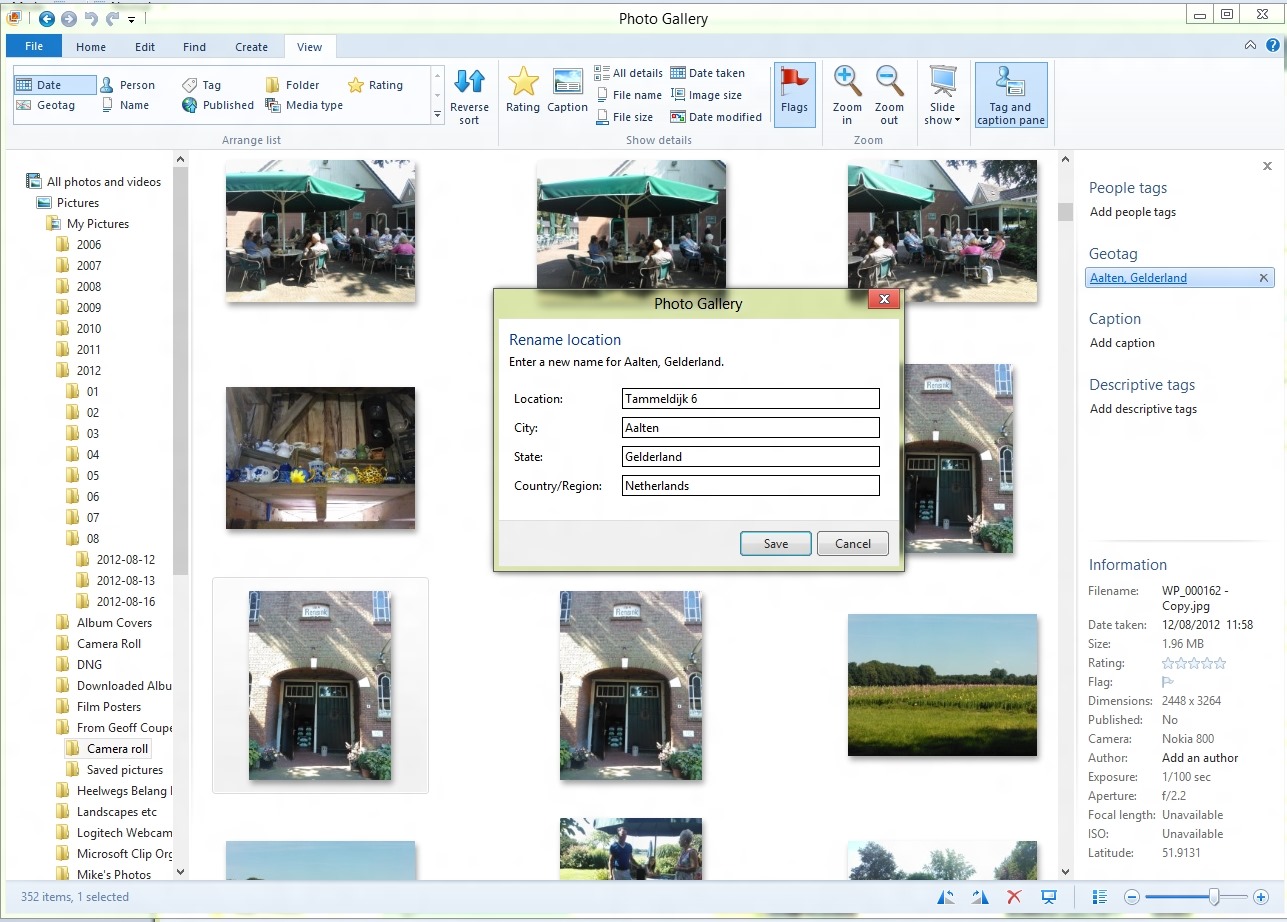
    This screenshot shows the “rename location” panel. Clicking “save” does not make Photo Gallery write out the metadata, because I’ve left the contents unchanged.

    WPG test 2

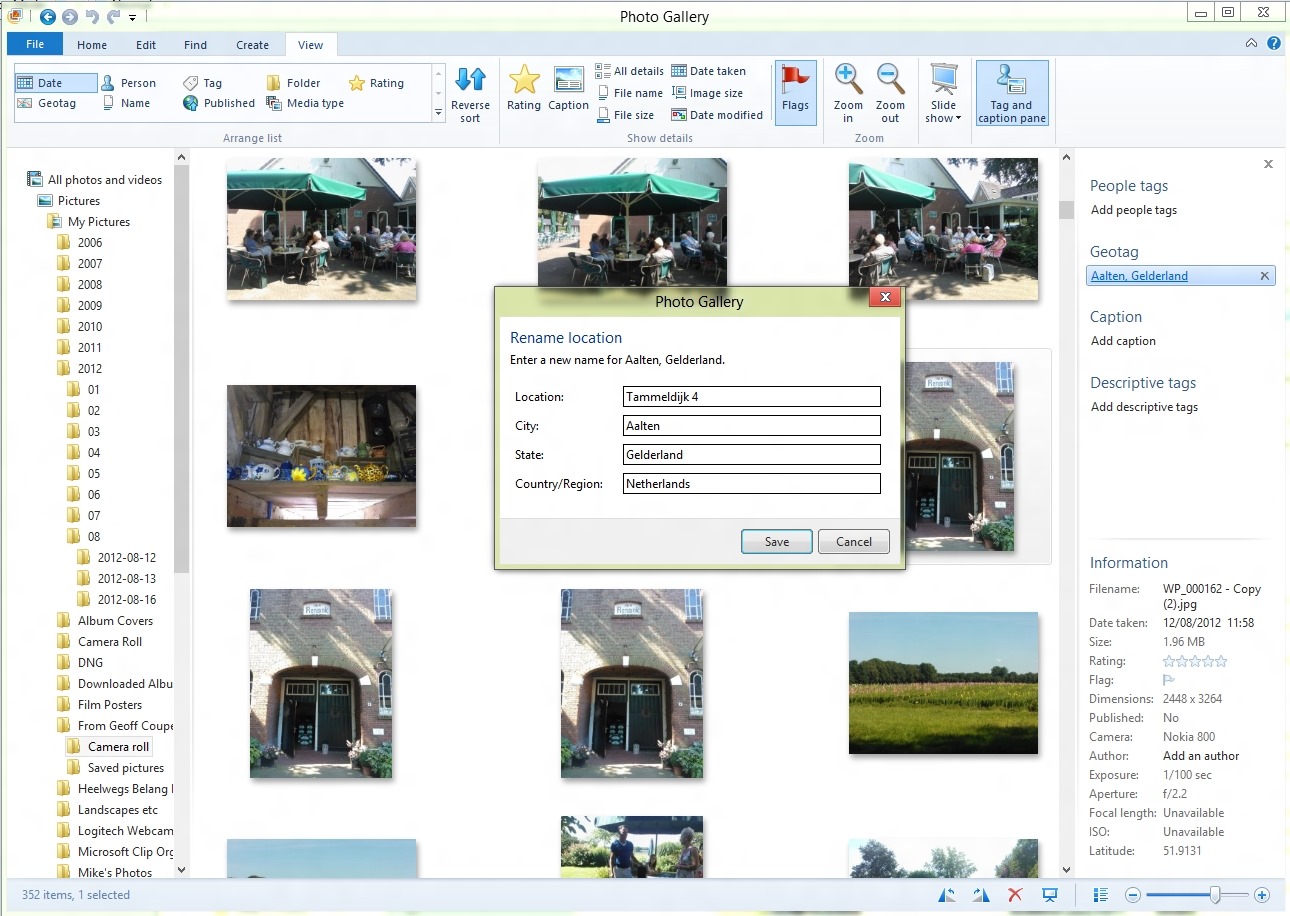
    In this screenshot, I’ve changed “Tammeldijk 6” to “Tammeldijk 4”, and now when I clicked “Save”, the LocationCreated metadata was written out.
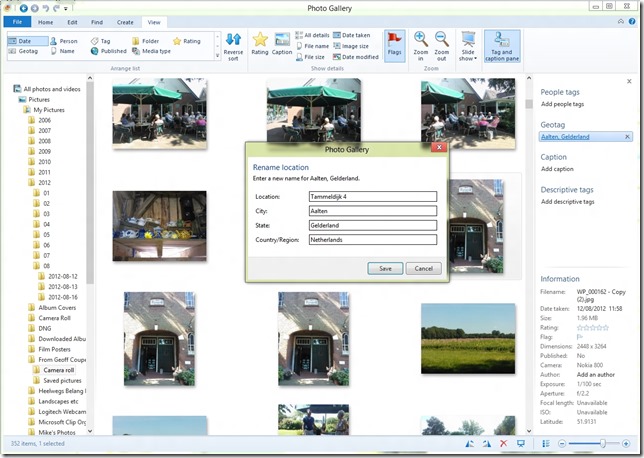
    WPG test 3

    This strikes me as a bit counter-intuitive. I would think that clicking “Save” in both cases should force a write of metadata. After all, if Microsoft is going to say that writing out of metadata should be under the explicit control of the user (which I tend to agree with), then even if I don’t change the result of the reverse lookup, I should be able to confirm my acceptance of it by the act of clicking “Save”. If I don’t want PG to write out the metadata, then I would click “Cancel” instead.

    So we currently have here a design where “the truth is in the file” is not fully in place, and where user confirmation is inconsistent.

    That’s poor design, and a poor user experience, in my book.

    I have to say that in one way, I’m rather thankful that the design is still broken. That’s because one of the other bugs in Photo Gallery is still present: it corrupts Canon Makernotes data when it writes out metadata to images. Just imagine: Photo Gallery would be finding location data or GPS coordinates in my photos and writing out LocationCreated metadata to those images. And in doing so, it would be merrily corrupting the Makernotes metadata in every single one of those images. Shudder.

    37 responses to “Windows Photo Gallery, Geotags and Other Issues”

    1. […] Geoff Coupe's Blog Reflections on life at "De Witte Wand" Skip to content HomeAboutGardensWedding AlbumWines I Have Known ← Windows Photo Gallery, Geotags and Other Issues […]

    2. osm Avatar

      Thanks for the useful articles on how Picasa and WPG.

      I’m having an issue with Picasa / WPG interoperability. I don’t think it has been mentioned in your articles: After editing some photos in WPG, its useful to be able to quickly locate the photos which have been edited so that I don’t lose track of them. The Edited button in the Find ribbon is useful for this. An edit of the metadata in WPG (e.g. adding a tag) is not treated as an edit for this purpose, and that’s how I like it. When I use find->edit, I want to find pixel edits, not metadata edits. However, if I tag some photos in Picasa and then use Find->Edit in WPG, it will find those photos that have had the tags added/modified in Picasa. This obviously renders the Find->Edit function in WPG useless, because I can no longer find my pixel edits.

      Are you aware of this? If not, are you able to reproduce it? Who is at fault, Picasa or WPG?

      1. Geoff Coupe Avatar

        osm – I’m not sure what criteria WPG is using to classify an image as “edited”. On the face of it, it looks as though WPG is using a pixel edit as the criterion, but there may be something else going on that changes in Picasa is affecting. I currently don’t have Picasa installed on my PC so I can’t test this. I’ll take a look using my other image editing tools and see if I can reproduce something similar to what you are seeing.

        1. osm Avatar
          osm

          I’ve now added some tags in Adobe Lightroom 4 and GeoSetter. WPG reads the tags (I can see them in the side panel) but they don’t appear to WPG as edited photos. So the issue seems to be Picasa-WPG specific. I have posted on Picasa forum.

          1. Geoff Coupe Avatar

            OK, thanks.

            I can confirm this behavior of Picasa, and will add a comment to the Picasa forum thread: http://productforums.google.com/d/msg/picasa/Y-8t3WTfw8Q/Mtzt-gvFGPkJ

    3. JL Beeken Avatar

      Coupe – I’m catching up in my rss reader and came upon this. Your patience after all this time is nothing short of outstanding. Frankly, I don’t even want to know what damage PG and Picasa are still inflicting (wake me up when it’s over) but it’s (sort of) fun to find out in passing. (You have such a delicate way with language.) And then I can forget about them again. Oh, oops, not quite yet. Still have two years to go in repairing the date/time damage from WLPG.

      1. Geoff Coupe Avatar

        I suspect I have masochistic tendencies. It sometimes feels like a Sisyphean task, trying to get Microsoft or Google to fix things – or even acknowledge that something’s wrong. Case in point, this WLPG behavior for renaming locations – I’ve just been informed by the product team that this behavior is “by design”. It may be piss-poor design, but by god, it’s their design, and they’re standing by it…

    4. JL Avatar

      Since all that fun we had in 2010 I keep my photos as far away from Windows as I possibly can and still use a Windows OS.

      But, here’s one (small) thing that I still can’t get away from: That option under View called ‘Choose Details’. There are hundreds of ‘fields’ of some kind that can supposedly be displayed in columns across the screen. What are these fields?

      Only a VERY few of them have anything to do with IPTC metadata. And then everywhere I go where there’s a photo to view the ‘info bar’ at the bottom of the screen doesn’t even bother to use standard fields. Keywords become ‘tags’. Caption becomes ‘subject’. Object name becomes ‘title’. Would it be so damn difficult to just get with the program? Obviously.

      I’m finding Windows can search at least a little bit of what I enter using Photo Mechanic or GeoSetter. It will search location fields entered in other programs but, still, it won’t display it in its columns.
      It’s the usual schmozzle I see in too many places. They’re sort of doing something but not really.

      1. Geoff Coupe Avatar

        Those fields are the metadata that Windows knows about. They are drawn from a variety of sources. Some of them are metadata that Microsoft has defined for Windows file properties. Some of them are properties used by applications such as Microsoft Office (e.g. Business Phone). Some of them are used by Windows Media Player, and are ID2 tags used to add metadata to audio files. And some of them are Exif and IPTC/XMP metadata used in images.

        Being a whole mishmash of metadata, and one that has, essentially, just growed, like Topsy, then there is a lot of “junk DNA” in there. As you’ve noted, some of the names are different, or associated with different fields to what you might expect.

        I’m afraid that there’s not much chance of this stuff being cleaned up by now – we’re probably stuck with it. Like the fact that the qwerty keyboard is a historical accident that just won’t die in favour of more logical layouts.

        You can use Windows Explorer to create a Details view displaying the metadata that you want in columns. First, open a Folder using the Details view (so that the standard columns are displayed across the top. Then move the mouse to the column heading line and right-click. You’ll then see a list of the most commonly-used properties. Click on “More…” to see the full list. Check the properties that you want to be displayed, and click OK.

        You can drag the column headings around to get the order that you want.
        You should be able to search on any of these fields. If a property has more than one word (e.g. Camera Maker), then just take out the spaces, append a colon, and it searches in that property. So, for example, in the “Search” box of Windows Explorer, if I want to find images in the Folder(s) I’ve got displayed that were taken with a Canon camera, I’d enter “cameramaker: canon” in the search field (without the quotes). I can do these searches without needing to have the columns being displayed.

        There are other Search operators that can be useful. Try date: or datetaken: in the Search field, for example…

        1. JL Avatar

          That’s pretty funny. All these years and I didn’t know I could right-click on the column headings. The ‘More’ box I knew about. It’s my worst nightmare.

          I really hope they don’t change the qwerty layout because it took me 50 years and several attempts before I learned to type and now I’ve really got it down. Can hardly hold a pencil anymore.

    5. […] Under certain circumstances, WLPG can store this address information in the image file, using the IPTC Extension LocationCreated metadata fields. Since this is a cross-industry standard, other applications that support this standard should be able to work with the metadata. However, you cannot use WLPG to create GPS coordinates for an image. Perhaps in the next version? […]

    6. Grizzley Rob Avatar
      Grizzley Rob

      I am wondering if you may have any suggestions on an issue I have with Windows Photo Gallery. I have gone through and Geotagged all of my pictures, but when I imported the pictures into Light Room I found that the Lat/Long didn’t import. After many investigations I realized that even thought I geotagged the pictures the Lat/Long was not written to the properties of the pictures. Is there any way to get a Lat/Long to write to all my pictures without having to go and re-geotag them all now in Light Room?

      1. Geoff Coupe Avatar

        How have you used Windows Photo Gallery to geotag your pictures with Lat/Long info? As far as I’m aware, it doesn’t do this at all.

    7. Mike Avatar
      Mike

      Thanks Geoff – very interesting stuff. I have a query similar to Grizzly Rob – I have some old photos that do not have GPS Lat/Long data. I have geotagged the photos using PG, but other programs ignore this data..
      Is there some way to get the Lat/Long data written to the file; perhaps a different program?

      1. Geoff Coupe Avatar

        Mike, I would reccommend Geosetter for this (http://www.geosetter.de/en). It’s an excellent program.

      2. Geoff Coupe Avatar

        Mike, a question of clarification: when you say that you “geotagged the photos using PG”, I assume that you are using Microsoft’s definition of the term “geotagging”, and using the “Geotag” feature of PG?

        I ask this, because Microsoft, as usual, are defining the term “geotag” in their own way, and differently from everybody else. What Microsoft is actually doing is “geocoding”, rather than geotagging. See here for a full discussion of the differences:

        Picasa versus Windows Live Photo Gallery

        You cannot use PG to define GPS Lat/Long data (which is what a geotag is), PG will only handle geocoding – using textual address fields, and it won’t write any of this out into the image file’s metadata, but only store it in PG’s local database.

        So if you want to actually use Lat/Long data, you’re going to have to use something like GeoSetter to store the GPS data into the image file’s metadata.

        1. Mike Avatar
          Mike

          You interpreted me correctly. When I said geotagging, I actually meant geocoding. I will try GeoSetter – thanks for the suggestion. Do you think it will take my PG geocodes and automatically convert them to true geotags (ie lat/long settings)?

          1. Geoff Coupe Avatar

            Mike, I’m afraid that GeoSetter does not take geocodes and use them to produce Lat/Long coordinates – I don’t know of any program that would do this. It would be a very tricky thing to do, because textual information is free-form. An earlier version of PG tried to do this, and it was an absolute disaster. False GPS coordinates got placed in thousands of my files. Microsoft eventually withdrew this feature following an outcry from users.

            You’ll have to manually generate the GPS data in GeoSetter by selecting your photos (either individually or in groups, as the case may be), and then placing a marker pin in the map interface of GeoSetter. That will write out the GPS coordinates into the image metadata.

            1. Mike Avatar
              Mike

              Yep… thought as much. Thanks for all your advice, it has been extremely helpful. And nice to know someone is keeping an eye on Microsoft 😉

    8. Chris Mitchell Avatar

      Hi Geoff Coupe,

      Thanks for all your information regarding metatagging. Your name has popped up on a few sites I have looked at for advice. I wondered if I asked you for a recomendation you may be oblige me with some more.

      I work for a small organisation that has a backlog of images to be tagged with metadata. After this they would like to upload to flickr and have an online photo database staff can utilise. This would contain basic tags like the photographer, the year taken, a rating, and some other simple tags.

      Geotagging would be great. Could you recommend a programme that would help us. I have had a play with Geosetter though find it a bit difficult to navigate. I will be training some students to help us with tagging so I need something quite intuitive. Metadata templates would also be great for basic, repeating tags.

      Thanks very much,
      Chris,
      Wellington, New Zealand.

      1. Geoff Coupe Avatar

        Chris, I use Geosetter myself, so that would have been my first recommendation… I see that Microsoft’s Pro Photo Tools version 2 is still available, so you could take a look at that:
        http://www.microsoft.com/en-us/download/details.aspx?id=13518

        It’s a very simple tool, but does do proper geotagging (not geocoding, like Photo Gallery). It may be simple enough to be intuitive… Good luck!

        1. Chris Avatar
          Chris

          Thanks so much, really appreciate you getting back to me. Now to cull a photo database of around 160,000 images to about 15,000. Good times ahead…

          Cheers!

    9. Michael Lee Avatar
      Michael Lee

      Geoff –

      Today I downloaded and installed the latest version of Photo Gallery. I made copies of several Canon geotagged photos and renamed their location (just enough for it to “stick”) in Photo Gallery. Comparing the originals to the renamed versions (using the tool ExamDiff) the only changes observed were the four added XMP LocationCreated tags. No Canon Makernote metadata (or indeed any other metadata) was changed, corrupted, added or deleted. This is very good performance, in that most software modify metadata they actually shouldn’t.

      This all leads me to believe that your previously observed behavior of metadata corruption has been fixed.

      Mike
      (former Canon rep, Michigan, and supporter of the Embedded Metadata Manifesto)
      GPStamper.co.nr

      1. Geoff Coupe Avatar

        Mike,

        What version of Photo Gallery have you got installed?

        I am using build 16.4.3508.205, which as far as I am aware is the latest.

        And I have just retested the Makernotes corruption, and it’s still there on my images. I am using a Canon 450D camera, and adding a Descriptive tag to an image that has been produced by the camera is still resulting in Makernotes corruption…

        Here’s a screenshot of part of the Exif contents (using Geosetter to display the metadata) before applying the descriptive tag using Photo Gallery:

        http://sdrv.ms/1hqcu9W

        And here’s the metadata content after using Photo Gallery to add a descriptive Tag:

        http://sdrv.ms/15MHph1

        Thanks.

    10. Mike Vislocky Avatar

      Geoff,

      I’ve tagged and rated hundreds of photos and video clips in Windows Photo Gallery (Build 16.4.3508.205). I really like the organizational features that can be applied to all media types, whether or not the files themselves can store metadata.

      I discovered too late that the metadata that is stored in the pictures.pd6 file cannot be used or exported to another PC without employing some extraordinary measures. That means I can’t move selected files to a laptop or tablet (Surface) along with the metadata. It also means that someday, when I migrate to the next desktop, it will be very challenging to move the metadata along with the libraries.

      Are you aware of:

      1. Any evidence of Microsoft development activities that might address migration or exporting of Photo Gallery database metadata? It seems like migration of media libraries from one PC to another should be supported.

      2. Any third party application that can convert the metadata in pictures.pd6 to another organizer application’s database or “sidecar” files?

      Thanks,

      MikeV

      1. Geoff Coupe Avatar

        Mike, I’m not aware of any utilities (either Microsoft-developed or third party) that allow the exporting of data from the pictures.pd6 database. It’s quite possible that Microsoft has such utilities for internal use, but they’ve never made them publically available to my knowledge.

        Some metadata should already be duplicated in the photos themselves (e.g. descriptive tags, people tags, captions, Exif data and ratings), so when you move the photos to another platform, this metadata will move along with the photos. However, this is only true for photos in the JPEG format. If you have photos in RAW format, then Photo Gallery only has metadata that you apply to them held in the pictures.pd6 database. That may also be the case for video files – I don’t tag video clips, so I don’t know how Photo Gallery behaves.

        For the most part, Microsoft has adopted cross-industry standards for the metadata stored in JPEG images, so you should be able to pick up most of the metadata from the images themselves.

    11. J Avatar
      J

      Hello Geoff — I have a question for you, after stumbling via a Google search across this blog post. I have a Nokia 920 Windows phone. I just downloaded an app called GeoPhoto, because (as an urban planner) I want to be able to do field work, photographing sites that I will later need to describe, comment on, etc. Is there an easy way that I can add the photos I take with my Windows phone/GeoPhoto app to Google maps? Do you happen to know if there is an easy way to add the photos I take with my Windows phone/GeoPhoto app to ESRI’s ArcGIS (a very common/popular Geographic Information System program/platform?
      Thanks in advance,
      john

      1. Geoff Coupe Avatar

        John, sorry, but I don’t know the answers to your questions. You could have the photos you take synced to your OneDrive Camera Roll, where they would be available to add to other apps and applications such as Google Earth and Google Maps (and you can have the GPS coordinates included in the metadata) on a PC; but I’m not aware of anything that would do everything via the phone itself. Same for ArcGIS. You could try asking your question over in the ArcGIS forums; someone might know a way to do this.

    12. Kayla Avatar
      Kayla

      I know that this article was written back in 2012 so I don’t know if I will get a response.I figured I’d ask anyways. ツ

      This article was written about the geotag feature on Windows Photo Gallery but I have got a question concerning the description tag feature that I was hoping to could help me with. When I click on ‘manage tags’ it takes me a list of all the descriptive tags associated with my photos on my computer. The vast majority of these descriptive tags I haven’t tagged them to the photos myself. Tags like feelings, disorder, framework, etc. Completely random tags that has nothing to do with the actual photo itself. Windows Photo Gallery seems to be automatically putting these descriptive tags onto my photos by itself. Whenever I click the option to manage the description tags it does give me the option to delete the tags. I was wondering though, is there anyway to change the settings so that Windows Photo Gallery doesn’t automatically put their own descriptive tags on my photos?

      Thanks in advance,
      Kayla

      1. Geoff Coupe Avatar

        Hello Kayla,
        I’m wondering whether at least one of the photo folders you have included in Windows Photo Gallery is a OneDrive folder?

        You see, OneDrive will automatically try and tag photos that it finds, and if the OneDrive folder that is in the OneDrive cloud is set to automatically sync itself with the folder that is on your PC, then these tags will be synced along with the photos (because they are metadata contained in the photos themselves).

        Once the tags are in the photos that you have on your PC, then Windows Photo Gallery will see them and add them to the list of tags that it has.

        If this is what is happening, you can turn off OneDrive’s automatic tagging of your photos. Go to OneDrive with your web browser, and click on the gear icon next to your account photos (top right of the title bar running across the top of OneDrive). That takes you to OneDrive’s options. Click on ” Tagging”, and there you will see where you can turn off OneDrive’s automatic tagging of photos.

        Once you’ve done that, then once you delete the unwanted tags from within Windows Photo Gallery, these tags should also get deleted from the synced photos in the OneDrive cloud as well.

        1. Kayla Avatar
          Kayla

          Thankyou, thankyou, thankyou! I do have OneDrive installed onto my computer, I;m going to OneDrive’s website now to change my settings. I had also Googled my question & couldn’t find an answer so I appreciate it verrry much.

    13. Mark Avatar
      Mark

      Geoff – nice article with useful information.
      Another question for you. I am new in using PG and learning how to best use the GeoTag feature. Could you please tell me which metadata fields the GeoTag writes to for the 4 fields; that is, which fields in the Windows Explorer file do the map to?
      Thank you in advance for your assistance.
      Mark

      1. Geoff Coupe Avatar

        Mark, it’s been a while since I used PG, but at the time, as I wrote in the post, PG used the IPTC LocationCreated fields to store Geotag data. As far as I’m aware, these fields are neither exposed, nor mapped to alternatives in Windows Explorer.

    14. Paul Avatar
      Paul

      Hi Geoff,

      Not sure if you will still get this. I am very late to the whole sorting out a lifetime of photos enterprise.

      I like WPG due to its simplicity and UI, however I do not want to invest effort in sorting out thousands of photos (mainly with people info) if it is a) not stored with the file, and b) not readable by at least some other programs (for when WPG really dies – it is already difficult to download except from bloatware sites).

      Do you know where WPG people tags are stored? I have tried using Exif Pilot to read the file data after saving some people tags but can’t find the data.

      I also know that the test image file has some IPTC extension data in it from Photoshop (I find that in XMP – PersonInImage tag on Exif Pilot) but cannot find that via the WPG UI – is that me or WPG at fault?

      Thanks in advance (if this reaches you)
      Cheers
      Paul

      1. Geoff Coupe Avatar

        Hallo Paul,

        As you’ve found, WPG people tags are stored in the file metadata using Microsoft’s People Tag schema. Unfortunately, this is pretty much unique to Microsoft, hardly anyone else uses it, and even Microsoft haven’t taken it further.

        The image region tagging standard that seems to be surviving is that documented in the Metadata Working Group’s guidelines. It’s used in Adobe’s Lightroom, Picasa, Photo Supreme, and (I believe) Google Photos.

    15. Paul Avatar
      Paul

      If anyone googles this – I have found the WPG people tag data is XMPBasic(CreatorTool) – MicrosoftPhoto_1.2(RegionInfo).

    16. Moving away from Windows Photo Gallery Geotags – José Oliver-Didier Avatar

      […] Geoff Coupe’s Blog – Windows Photo Gallery, Geotags and Other Issues […]

    Leave a comment

  • The Right To Die

    I am profoundly thankful that I live in a country where I can choose if I wish to die.

    Tony Nicklinson has been denied that choice, and is condemned to serve more time in a living hell.

    Update #1: Polly Toynbee has a good article on this issue. As she says:

    The verdict was morally abominable – but inevitable. However bad a law may be, it is not for the courts to make fundamental change but for parliament – even when parliament sentences thousands a year to brutal and pointless suffering.

    However, as she points out, it will be difficult to persuade the UK Parliament to right this wrong. The religious lobby is extremely powerful.

    In opinion polls, for years, more than 80% have supported this change in the law, but every attempt at a right-to-die reform has been sabotaged by the large religious lobby, galvanised by Care Not Killing. The red benches, heavily stacked with the religious, including 26 bishops, saw off the last bills.

    Rowan Williams’s pretence is that their opposition springs from a fear this will lead to mass extermination of the inconvenient old. But why should the religious worry more about that than everyone else? The law would provide safeguards. The real religious reason is theological, as voiced in the Lords by the bishop of Oxford when he proclaimed “We are not autonomous beings” – we must all wait for God’s release. Presumably avoidable suffering is part of God’s mysterious purpose.

    As I said, I am thankful that I live in the Netherlands. Contrary to what the bishop of Oxford may choose to believe, I am an autonomous being.

    Update #2: Sarah Wollaston has an atrocious article on this issue. It appears that not only is she a physician, but she is also the Member of Parliament for Totnes. My heart goes out to the people of Totnes for being saddled with her to represent them in the democratic process, and I would hate to end up as one of her patients. She would quite cheerfully condemn me to continued suffering rather than respect my wishes to end my life.

    As Eric MacDonald says:

    The trouble with people like Sarah Wollaston is that they do not seem to understand what a human life is. They think, for some reason, that human life is simply a biological reality, the fact that a body is breathing. The human life that we value is very different. A life is a continuum of sorts, with a unity of conception. I do not want to enter into the philosophical problem of identity, but the important thing about a well-lived life is that it has a sense of overall consistency and coherence. That is why we respect people’s autonomy, the right to make their own decisions about life: what to do with their lives, who to marry, whether to have children, which vocation to pursue, and many other decisions that go to make up a life rich in experience and held together, so far as is possible, by a single, or at least a unified sense of what is appropriate for a life so conceived.

    A life conceived in this way includes some of the most important decisions that must be made, and includes, as an essential part, how that person understands the part that death plays in life. Most of us do not think much about death, especially when we are in the midst of life, but the time will come when the issue of dying will loom very large indeed. To be unable to make decisions about dying is to put outside the scope of a person’s conception of life all those things that may befall them at the end of life.

    Update #3: Tony Nicklinson has died. RIP. He fought well for the right to die with dignity.

    Leave a comment

  • Lest We Forget

    The BBC showed a one hour documentary last night: Death Camp Treblinka: Survivor Stories. The survivors in question were Samuel Willenberg and Kalman Taigman. They were among 600 prisoners who escaped during a revolt at the camp on August 2nd, 1943. Only 40 of them were known to have survived to the end of the war, and now, only Samuel Willenberg remains to bear witness – Kalman Taigman died in July this year.

    The programme was profoundly shocking – Treblinka II was a death camp that existed for no other purpose than for the killing of human beings. Over 800,000 Jews and Gypsies were gassed, shot and cremated during the 13 months of the camp’s operation.

    What struck me was how small Treblinka II was – only 600 metres by 400 metres. The Nazis kept between 700 and 800 prisoners to operate the camp, while 90% of the inmates sent to Treblinka were killed within the first 2 hours of arriving.

    Willenberg and Taigman told their stories to camera, and they were harrowing. For example, Willenberg found the coats of his two younger sisters among the personal effects of the dead he had been made to sort through by the Nazis. Or the fact that during his escape from the camp, a fellow escapee, who was wounded, begged Willenberg to shoot him, rather than be recaptured. Willenberg gave him his wished-for coup de grâce.

    The light at the end of the tunnel was the closing section of the programme that showed that the two men had survived the horrors of Treblinka and rebuilt their lives. Taigman had gone on to fight in the Warsaw Uprising, while Willenberg was a witness at the trial of Adolf Eichmann. The closing moments of the programme managed to bring a profound sense of peace and regeneration of the human spirit at its best – something that I never thought would be possible given what I had just seen and heard earlier in the hour

    Leave a comment

  • RIP, Harry

    Harry Harrison has died. When I was going through my phase of devouring SF books during my teens and twenties, he was one of my favourite authors. On one level, his books could be read as action tales, but there was usually a serious underpinning. So Deathworld was underpinned by Darwinian selection, Bill, The Galactic Hero by an almost Swiftian satire, and Make Room! Make Room! by the question and consequences of human overpopulation.

    But I think my favourite of his novels remains Captive Universe, which opens with a heartstopping sequence (quite literally) in an apparently Aztec setting. It develops into a thought-provoking tale about colonisation and eugenic control. Well worth reading.

    2 responses to “RIP, Harry”

    1. Al Feersum Avatar

      Damned shame. Great for kids getting into SF – Stainless Steel Rat was my first taste, and I was really pleased when one of the stories was serialised in 2000AD.

      And he could do humour really well…. ‘Star Smashers of the Galaxy Rangers’ – class.

    2. Miriam English Avatar

      [sigh] They’re all dying…
      Harry Harrison was always one of my favorite writers too. I used to read many of his stories aloud to my girlfriend. His stories are particularly suited to reading aloud as he recommended that as a good way to check your writing.

      He could write science fiction with biting social comment, action, humor… anything.

      Death sucks! Bring on the immortality, I say!

    Leave a comment

  • When All Else Fails…

    …change the cable.

    A few days ago, my Nokia Lumia 800 phone suddenly refused to connect to my PC for synchronising. I’d plug it in, but nothing would happen – Windows would not react to the connection, the Zune software would not start, zilch. And when I disconnected the phone, Windows would give me an error saying: “USB device not recognized”. However, the phone would still charge via the connecting cable, so at least something was happening.

    So I searched the web for this error and got lots of advice. Mostly involving uninstalling and re-installing the Zune software on the PC and doing a hard reset on the phone (which loses all my information on the phone).

    I followed all of this, without any resolution of the problem. I even installed the Zune software on another PC and tried connecting the phone there. Still the same error.

    Right, this then meant that there were two possibilities:

    • Either the phone was faulty, or
    • the connecting cable was faulty.

    Not having a spare micro-USB cable handy, I decided to buy a new cable, at – gulp – €24.95. It arrived today. With some trepidation, I plugged it in and voilá – synchronisation began.

    So the moral of the story is that even with modern electronic devices it can still be simply a  faulty cable that causes the problem.

    2 responses to “When All Else Fails…”

    1. boma23 Avatar

      HI Geoff,
      Bad/cheap USB cables are a surprisingly common source of issues, and I’ve learnt to swap them first of all in any situation. Have had customers bringing in “dead” external hard drives, that weren’t reading properly, or at all, until the cheap USB cable was swapped for another… have also seen bad USB cables stopping PCs from booting when plugged in as well!

      1. Geoff Coupe Avatar

        Yes, you’re right, but the trouble was that the bad cable was the Nokia cable that came with the phone. In this particular case it was not cheap, but turned out to be bad after 8 months of use…

    Leave a comment

  • Intricate Processes of Fantastic Horror

    In the novel, The Midwich Cuckoos, by John Wyndham, one of the characters, Gordon Zellaby, says:

    “I wonder if a sillier and more ignorant catachresis than “Mother Nature” was ever perpetuated? It  is because nature is ruthless, hideous, and cruel beyond belief that it was necessary to invent civilization. One thinks of wild animals as savage but the fiercest of them begins to look almost domesticated when one considers the viciousness required of a survivor in the sea; as for the insects, their lives are sustained only by intricate processes of fantastic horror.” 

    Using that as a springboard, Kij Johnson has penned a page of unsettling ruminations: Mantis Wives.

    Eerie, disturbing, and practically factual descriptions of the sex lives of the Mantis.

    2 responses to “Intricate Processes of Fantastic Horror”

    1. Matt Healy Avatar
      Matt Healy

      John Wyndham: classic SF writer of the 1950s and 1960s! Day of the Triffids & The Kraken Wakes are both well worth reading; I’ve not read the novel you mention.

      1. Geoff Coupe Avatar

        Matt, “Midwich Cuckoos” was also made into a 1960 British horror film: “Village of the Damned”. Not a bad little film, and apparently better than the 1995 remake by John Carpenter (which I haven’t seen).

    Leave a comment

  • The Perseids

    The Perseid meteor swarm reached its annual maximum at around 14:00 yesterday afternoon (local time) on the 12th August. That meant that for the past couple of nights (and hopefully tonight) the chances of seeing a meteor streak across the sky have been substantially increased.

    So far, I’ve had a couple of attempts at observing. I was out at 04:00 on the 12th (I couldn’t sleep), and I did see many meteors. However, I was singularly unsuccessful at capturing any of them with my camera.

    Last night, I tried again at about 00:30 for an hour or so. It seemed to me that the rate of meteors had fallen away considerably from the night before, but I did manage to capture one with my camera. It’s not a very good photo, but it does show Ursa Major (the Plough) over the house, with a Perseid streaking in from the right of the frame.

    20120813-0129-25

    Leave a comment

  • Fun and Games With WHS 2011

    Despite some quirks and shortcomings, my Windows Home Server system has been quietly backing itself up onto a pair of hard drives that I rotate to an off-site location.

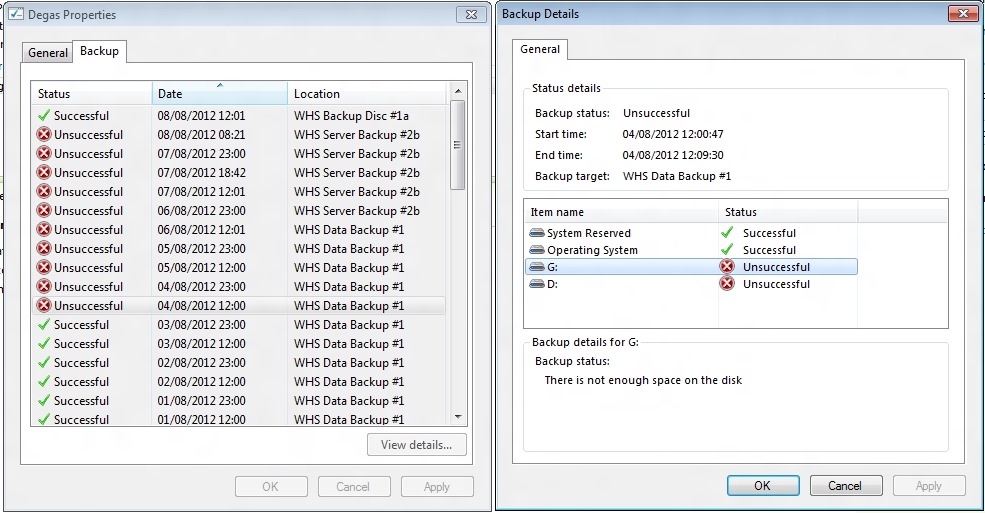
    But four days ago, the server backups started failing. The error being reported was “There is not enough space on the disk”. This was being reported for both the G: and the D: drives on my system.

    WHS2011 106

    Well, I could understand that being the case for the G: drive, since that had filled up with data leaving only 60 GB free on a 1 TB drive. However, the D: drive had nearly 385 GB free on a 405 GB drive.

    I wondered whether in fact the disk being referred to was not the data disk, but the backup disk, WHS Data Backup #1, which only had a few GB free. WHS 2011 is supposed to purge old backups from the backup drives when they get full, but there seems to be no way to predict when it will do this – I’ve had backup drives bob along for months with only a few GB free.

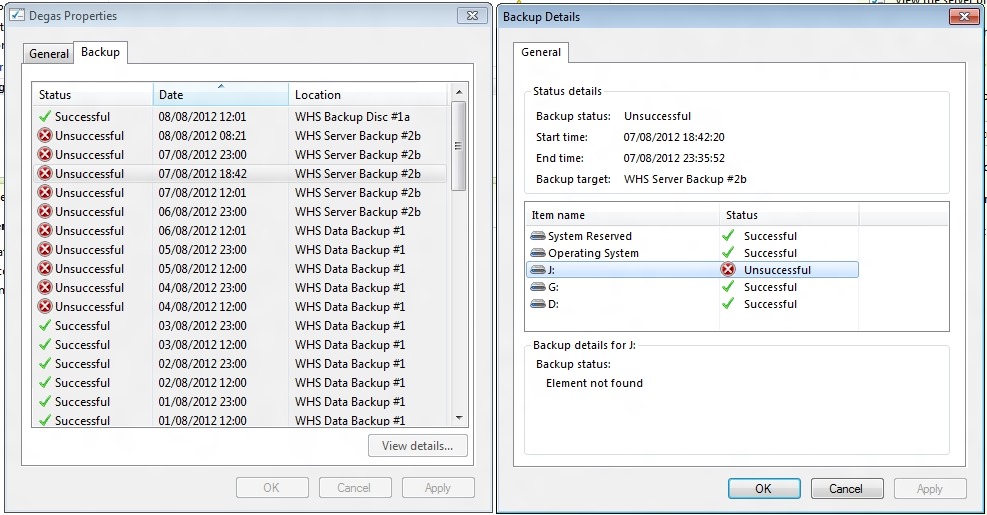
    I tried a few more server backups, but as you can see from the screenshot, they were all unsuccessful. I also swapped the backup drive for a second drive (WHS Server Backup #2b), but as you can see, server backups still weren’t working.

    I began to wonder whether it was data drive G: being almost full that was triggering the failure, so I moved one of the Shared Folders from the G: drive to the J: drive. Unlike WHS v1, WHS 2011 does not have drive pooling, so you have to manage the storage as a bunch of separate drives.

    Once I’d moved the Folder across to the J: drive (using the “Move the Folder” task in the WHS 2011 Dashboard), the G: drive now had 248 GB of free space, while the J: drive now had 714 GB of free space.

    I tried another server backup. This was also unsuccessful, with an “Element not found” error (whatever that means) being reported on the J: drive.

    WHS2011 107

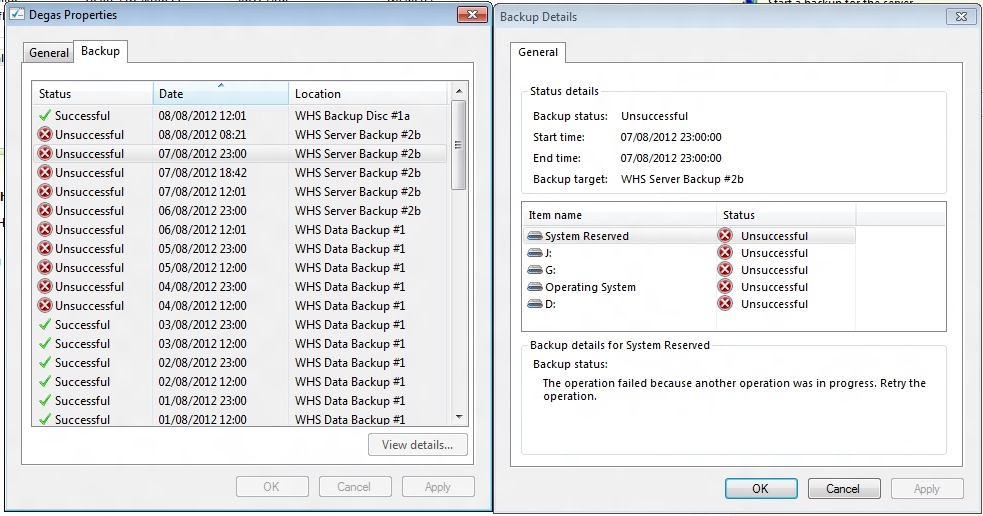
    I left the system running and waited to see whether the next scheduled backup (at 23:00) would work. That was also reported as unsuccessful, with all drives reporting a “The operation failed because another operation was in progress. Retry the operation” error.

    WHS2011 110

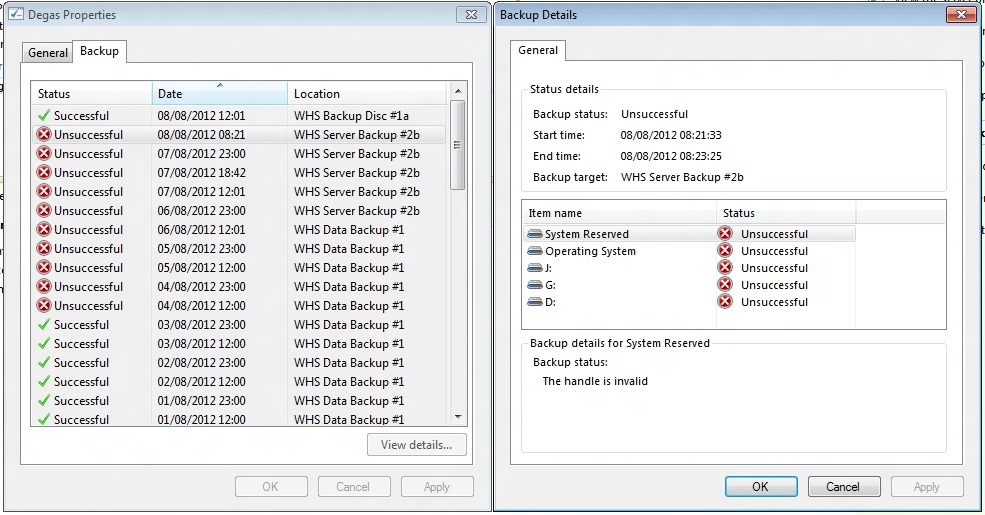
    Trying not to panic, I rebooted the system and tried one more time. Now I got a “The handle is invalid” error on all drives. Another mysterious and opaque message.

    WHS2011 108

    Finally, in desperation, I told WHS 2011 to remove the WHS Data Backup #1 drive from the server backup definition, and added it back as though it was a totally new backup drive. WHS 2011 formatted it, and I gave it the name of WHS Backup Disc #1a.

    The next time server backup ran, the backup was successful. Phew!

    WHS2011 109

    I suspect I’m going to have to reformat the second backup drive, and add it back into the server backup task as a new drive.

    I think things are back to normal again, but I have to confess that this little episode has shaken my confidence in WHS 2011 a bit.

    11 responses to “Fun and Games With WHS 2011”

    1. Jeremy Stevens Avatar
      Jeremy Stevens

      I have also had numerous odd issues with WHS 2011. However, it has been on the client end. A reload of the computer that was not backing up resolved the issue…. I am not sure, if the backup agent was the cause, or what. I know its not the exact same as your issue, but I wanted to give you a shout out, seeing how I have had issues with backups. The errors are so effing vague, that it really leaves you scratching your head, more than you were, before you look into the error… I know in the States, WHS is/was selling very cheaply. Last I seen it, it was $49. I paid $120 for WHS v1 in 2010, two years after its release…. I think MS (Not excusing, just an observation) when putting this together, about half way through develaopent, changed their minds on Home Servers complete, and decided to ship everything to the “cloud”. Probably not a bad idea, for the average consumer, but I have over 3 TB of data that I would have to pay thousands of dollars a month for storage, let alone bandwitdth cost. I suppose I could just put a full server together, and go that route in the near future……

    2. Jeremy Stevens Avatar
      Jeremy Stevens

      Pardon my missplelings, and horrible grammer please…..

    3. Greg Mickel Avatar
      Greg Mickel

      I have had extensive file and data experience with WHS 2011 and I have had the same problems with the server backup deletion system. It doesn’t work right! I just format my drives and goes a new. It should do it automatically and mine did at one time but it stopped. I have never gotten a answer from Micro-who on the issue. All we can do is try.

    4. Peter Ferguson Avatar
      Peter Ferguson

      Same problem here today. My 1TB HD for server backup is nearly full. So from what you have said all I can do is reformat and start again?

      1. Geoff Coupe Avatar

        Peter, indeed, I think that’s the only option. I have the strong suspicion that since installing Rollup 3, the Server Backup function does not purge old backups automatically any more, or if it does, it’s not working as effectively as it did prior to the Rollup.

        The data that I backup using the Server Backup has grown to such an extent that it will fill up the 1TB drives that I was using in less than a week. Earlier this year (i.e. prior to Rollup 3), even when there was only a couple of GB free on the backup drives, the Server Backup would complete, and it looked as though it was purging old backups automatically. Now it will simply fail with the errors shown above.

        Rather than reformat the backup drives on a weekly basis, I’ve invested in a couple of 2TB drives for the Server Backup. This should mean that I’ll be able to carry on for some time before the drives get full. I’ll be interested to see if WHS will automatically purge old backups from these larger drives, or whether once they are full, I will have to go through the reformat route again…

        1. Peter Ferguson Avatar
          Peter Ferguson

          Geoff,
          I have 39 GB left on my 1TB disk. I will do nothing and see what happens. It reports Server backup completed successfully. I think I am set at 2 per day as I recall. I will keep you informed.
          Peter

          1. Peter Ferguson Avatar
            Peter Ferguson

            Geoff,
            WHS 2011 tells me I now have 2.7GB left.
            “I hate to rain on you parade”.
            I love your turn of phrase but well you are English. I am “Smithkid” on “wegotserved” that you kindly replied to. My problem is that although WHS 2011 tells me my server backup is “successful” every day, I cannot tell if this so because any drive designated as a server backup cannot to be seen from the Dashboard. However if I open a remote desktop connection I can see the drive in explorer. I note that files are being added everyday. I will take note of the oldest files on the drive and see if they are being deleted.

            I have added a third hard drive to my server and can remove the drive that is full as the server backup and replace it with the new drive. Then rotate them in and out as they fill (and delete them) but it would be nice to know exactly what is happening to to the “full” drive.

            1. Geoff Coupe Avatar

              Peter,

              You write: “any drive designated as a server backup cannot [to] be seen from the Dashboard”.

              That’s a bit odd, because you should be able to see drives designated as Server Backup drives under the Hard Drives tab on the Server Folders and Hard Drives window in the Dashboard. You should see a list of your OS and data drives at the top of the pane, followed by a list of the Server Backup drives that are currently mounted below that. Entries for the Server Backup drives will also list the capacity, used spaces and free space, just like the OS and data drive entries.

              Are you not seeing this?

              1. Peter Ferguson Avatar
                Peter Ferguson

                Sorry, did not make myself clear.
                I meant you cannot see the files on the server backup drive. I am trying to workout what happens at each serve backup instance now that it is full. Are older files being deleted as new ones are added. I have taken a snapshot of the file contents and will check tomorrow to see what has changed.

                1. Geoff Coupe Avatar

                  Ah, OK, but I’m also confused when you say that “you can see the files in Explorer” via RDP. On my system, the drive does NOT show up in Explorer. That’s because, under normal circumstances, it’s a VHD format drive that is never mounted to be shown in Explorer. I can see the physical disc in the Server Manager Disk Management screen, and I can see the backups in the Server Manager Windows Server Backup screens, but that’s it.

                  1. Peter Ferguson Avatar
                    Peter Ferguson

                    Geoff,
                    You are right again. It’s morning here now and I had a little wine last night (Pinot from Tasmania). I was looking at the client backup not the server backup which we now both agree cannot be seen when mounted as “the” server backup. So I am back to the position where I can only assume that what is happening is that older files are being delete when a new backup is performed. I am going to add another HD as a server backup, demount the first and see what happens!!!!!!!!

    Leave a comment

  • Curiosity Rover and Usain Bolt

    Yesterday, a man ran 100 metres in 9.63 seconds. This morning, a robot laboratory successfully landed on Mars and will begin its search for evidence that life may also have existed on a neighbouring planet.

    Of these two stories, it’s the second that makes me feel more proud of what my species can achieve when it puts its mind to it.

    And as one of the comments on the Curiosity Rover story says:

    Oh man, that was so cool!

    They basically just parked a Volkswagen Beetle on a predetermined spot on another planet more than 150 million miles away by lowering it with ropes from an almost hovering jetpack.

    Just like that.

    Of course, ordinary folks like me in the nation that managed such a feat still can’t afford healthcare insurance, and Texas is about to execute someone with an IQ somewhere in the 60’s.

    Goddam, this is one crazy fucking world, ain’t it? You couldn’t make this shit up, y’know?

    Quite.

    Leave a comment

  • The Amish – Lovely People…

    So, the BBC had yet another documentary about the Amish last night. Following on from the programmes about the Stoltzfus families, the BBC gave us a programme about David and Miriam Lapp and their adorable children.

    And, just as with the Stoltzfus families, I found myself simultaneously liking the Lapps, but also cringing at their complete obliviousness of what humanity has achieved, for better or for worse.

    David and Miriam came across as genuinely likeable, but there was that awful frisson when Miriam started talking about the rod (as the Bible states), as an effective method of chastisement of her children, while smiling all the while. At this point, her youngest son pipes up to implore her not to use the rod (in her case a wooden spoon – with a smiley face drawn upon it!) on him. She grinned. I found that shocking and not at all cute or lovely.

    In the end, I once more found myself thanking my lucky stars that I was not born into an Amish community. The chains around the human spirit would have proved too much for me.

    38 responses to “The Amish – Lovely People…”

    1. Arthur Murgatroyd Avatar
      Arthur Murgatroyd

      Seems you have a problem with parents disciplining their children.

      Regardless, the discipline of Amish parents does not necessarily result in ideal citizens as you would learn from the Stick Figure Production documentary “Devil’s Playground” about Rumspringa.
      Some Amish teenagers have even been arrested for being drug dealers.

      1. Geoff Coupe Avatar

        I don’t believe that beating children is a good way to bring them up.

        1. L. Guenther Avatar
          L. Guenther

          I realize that the Lapps are in favor of corporal punishment, but I didn’t find that scene gruesome at all. The child in question was too young to hide fear and he obviously didn’t fear that spoon one bit……he was playing with it. Now, Miriam Lapp may use that spoon on occasion, but if you look at the body language and the interaction between the children and their parents, they have loving and gentle interactions with one another. I didn’t see it as anything more than that.

        2. henrirt Avatar
          henrirt

          Thats not a beating when spanking a disobedient child.
          A beating is what America did to Britian during the revolutionary war.

        3. Ivan jimenez Avatar
          Ivan jimenez

          Geoff, if you want to be taken seriously you need to leave the logical fallacies out of your arguments. When you wrote that you don’t believe that “beating children” is a good way to bring them up, it reeks of bias. If anybody were to watch the documentary they would see that Miriam referenced “light taps” and sometimes “harder tap”. For you to suggest that she beats her children is simply wrong. To give a name to the logical fallacy you used, my first thought would be a “thought terminating cliché” by the use of “beating”, but you also made “conspicuous withholding of relevant facts”, and a whole bunch of others.

          1. Geoff Coupe Avatar

            You’re also assuming that her definition of a tap is your definition of a tap. The look on the child’s face when she spoke of this was, as I recall, not one of relaxation.

    2. l0lls22 Avatar
      l0lls22

      I thought Miriam was generally very smiley and I didn’t think it was a terrible moment when she described her discipline methods – even though I disagree with them. Generally, I thought they were a lovely family and I was very touched by this programme. I think its wonderful that this couple, despite their very simple and prescibed existance have nevertheless had an awakening…really touching.

      1. Clare Avatar
        Clare

        I tend to agree with this.

    3. Clare Avatar
      Clare

      I agree. This was a truly insightful programme into the lives of Christian Amish. I was touched by their simple and family-loving way of life. The lack of need for materialism was refreshing and for me, thought provoking.

      1. Geoff Coupe Avatar

        Lack of need for materialism is one thing. Being bound by archaic, and sometimes somewhat bizarre (e.g. no bicycles!), rules is another. I can do the former without the latter.

        1. Clare Avatar
          Clare

          It may be ‘bizarre’ for you Geoff in your world, but evidently not for them.

            1. Clare Avatar
    4. Matt Foot Avatar

      The Bible is the word of God. Whether or not you agree with it is irrelevant; they follow it to the letter, and look HOW happy they are. I’ve yet to find SO many families as content with SUCH a simple and blessed life, as the Amish.

      Follow God’s instruction and ignore “opinions” – you won’t go wrong. God is perfect, ergo, his instruction manual gives you guidance for a happy life.

      1. Geoff Coupe Avatar

        Matt, thanks for your opinion. However, based on the evidence I see, god is a human invention, and the bible is a collection of writings by human authors.

        1. Zubin Avatar
          Zubin

          Geoff, its difficult to explain God’s existence- as difficult as explaining the taste of honey. Sincerely seek – from the bottom of your heart – saying, ” God , if you exist , reveal yourself to me” everyday ..and wait. I too had your belief that God was created by man but before I came to a final conclusion I did what I suggested to you … and my beliefs were turned on its head by Him whom I now worship as God my creator through a personal encounter which he gave me. No wonder Jesus said that He would reveal himself not to the wise of this world but to children!!

          1. Geoff Coupe Avatar

            Sorry Zubin, you might believe that; however that does not make it true. Personal encounters are not sufficient evidence except in the minds of those that have them. The brain is capable of many peculiar beliefs. Look up Cotard’s syndrome sometime, and then try and convince a sufferer of that that they are not dead but alive.

        2. Pamela Enmark Avatar
          Pamela Enmark

          YES! And Shakespeare happens to be one of them! You’re right on this one Geoff!

          1. Geoff Coupe Avatar

            Well, to be strictly accurate, I think it’s fairer to say that Will was fond of quoting from it, but he wasn’t one of the original authors…

    5. Lynn Peckham Avatar
      Lynn Peckham

      I enjoyed this programme.I am a Christian but for me, that wasn’t what was pertinent. I found their entire way of life fascinating. Life is so frenetic, that to see people able to live in this world without all the things we think we can’t live without, mobile phones, computers, cars etc, was really refreshing. I found myself envying the total simplicity of their lives. Yes, they work hard but they have something to show for it. And their families definitely benefit. Family life today is under threat, these people know that family is important and something to be valued. We have so much technology that is supposed to make our lives easier. All it seems to be doing is making life faster and isolating us even more from each other. Maybe it’s time to take note and realise that we need to simplify our lives and concentrate more on the small things…..?

      1. Geoff Coupe Avatar

        Lynn, I sympathise with your viewpoint, but the means to live simpler is within ourselves. I concur with you that concentration on the small things in life is valuable. I just happen to do that without the need for gods. Family is important, but I suspect that the Amish would disagree with me over what a family is.

        1. Lynn Peckham Avatar
          Lynn Peckham

          Yes,Geoff, I agree. The mere fact that I am sitting in front of this computer proves that we are not always strong enough to resist the lure of technology. I yearn for a simpler life, for myself and my children. I despair that children are forced to grow up so quickly, not knowing a childhood. What I loved about this programme was how the children had such freedom and innocence. My 10 year old is more like a teenager despite our efforts to keep things simple. We have tried to hold off on the gadget buying, she’s just got an MP3 player and her requests for a mobile phone have been ignored. We live in the country and I am keen to move to an even more rural area to try to escape the frenetic pace of a town/city. We tried living in London before we had children(we’re originally from South Africa) and just couldn’t take the pace of life there. It was too loud, too fast and way too superficial and impersonal. Society is losing sight of the importance of connections, everyone is only in it for themselves. It’s very me-orientated…what can I get out of it…Anyway, sorry for the soapbox speech. This is something I have a very strong opinion about and as I said, I have long found the simple Amish way of life enviable. I mentioned to my daughter tonight that we need to move to America and go to live with them. Needless to say she was horrified…esp when I said there is no tv, no phones, no computers 🙂

          1. Geoff Coupe Avatar

            Lynn, no need to apologise for the soapbox!

            As I said before, I can sympathise. When I was young, I lived in London and loved it, but now I’m very content to live in the country, and don’t miss city life at all. Nonetheless, technology is extremely useful, and I don’t think should be dismissed as simply “a lure”. My computer and the internet is what enables me to keep in touch with my “nearest” and dearest beyond my physical neighbourhood, and that’s a boon, and it enables broadening of horizons far beyond what was available to my parents or others in the world today.

            Connections *are* important, but they can occur in all sorts of ways and places, and while some of them can only be mediated via technology, they’re not necessarily the worse or the poorer for that.

    6. Karen Collins Avatar
      Karen Collins

      While I think the Lapp family seem really lovely people, and I do slighly envy what seems a very simple life, realistically though I don’t think god would deem all modern technology as a sin if they had any. Its all about control and it does not need to damage any ”family time”. I don’t really like the way the Amish elders seem to dictate their parishioners lifes and the fact they could not be honest and tell their elders in fear of being ex-communicated tells me something is wrong. God forgave sinners and nobody has the right to say anything different.

      1. Zubin Avatar
        Zubin

        Yes Karen,I agree with you. I however think that the Lapp family is challenging those beliefs within their community. The challenge for us is greater- not to become Amish but to incorporate their value and priority systems of 1st place to Jesus, then family , then work, centering their lives around the principles, words and faith in Jesus while living in the midst of technology and within the hustle and bustle of modern life. I guess the key is to love …love of God and of man under the power and leading of the Holy Spirit. Then as scripture says….we would truly become..”the lamps to be kept on the lamp-stands”..children of God. “Bloom where you are planted”

    7. Maggie Avatar
      Maggie

      I just watched this documentary and realised what we are missing in life…….simplicity and love towards one another. The world is in turmoil and yet they seem to escape it, instead, focussing on their beliefs and values. I wonder if the world would be a much better place if only we held the same values……..love goes a long way.

    8. Matt Foot Avatar

      You see the happiness, yet cannot account for it, since you seem to be rejecting God. You could never experience the joy these Amish have in life WITHOUT God, to pretend otherwise is just foolishness. The remainder is a big wooden house, nice people and lots of hard work. They alone do not create happiness. Impossible.

      1. Geoff Coupe Avatar

        It may be impossible to you Matt, but it’s clearly not impossible for many of us to achieve happiness without gods or goddesses.

    9. Rob Avatar
      Rob

      During the show, there was a simply lovely piece of music played in the background. It sounded like Bach and was sung by 2 women – anyone out there know the song/singers etc? it was breathtaking

      1. Katie Avatar
        Katie

        Rob,

        The music is Salve Regina and It is performed by a group called ‘All Angels’. You can purchase it from Amazon.

        I concur that the music is very beautiful. But.. the good people at the BBC showed how little they really understand about the history of the Amish people. Salve Regina is an anthem that exalts the Virgin Mary in the sense that Catholics view her. The Amish are Anabaptists and find Catholic doctrines regarding the virgin Mary to be profoundly in error. The Anabaptists fled Catholic persecution. I’m not going to take sides here, I just think that it shows how little the BBC seriously researched their subject.

        In general the BBC has done good work, so this surprised me.

        Because He Lives……

    10. ottomummy Avatar

      Bit late on the responses, but I just Googled to find out what happened to the Lapp family. I too was taken with their “simple” lifestyle. But the undercurrents of their life is far from simple. Remember how they had to hide the fact that they had been re-baptised for fear of excommunication. In what way is that a good life to lead. That your elders will cast you out if you do not follow their strict and unbending rules and therefore you have to “lie” to them or “avoid telling the truth”. What the programme did not discuss (and good, because it was about the Lapp family only) was that the Amish community is in a state of turmoil and are split into many divisions. Let’s take the simple life and the religious life separately. We can all lead a simple life, making decisions that we do not have to hide from others for fear of exclusion. I though Miriam was great and she seemed to understand that the elders had some strange ideas that rather got in the way of being a Christian.

    11. Paul T Avatar
      Paul T

      I think the piece of music you mention was a variation of Pachabel’s Cannon – I agree a lovely piece of music. This was a wonderful, thought-provoking programme.

    12. Ohanzi Avatar
      Ohanzi

      I think the family is wonderful, although I don’t agree with the wooden spoon as a punishment. I never or have spanked my child. She is 21 yrs. old now. But, as a child when she fibbed or said a swear word, I had no one to blame but myself. When she done something that I didn’t approve of, I just pulled her aside and talked to her, in a calm voice… after that…she went outside to play and I went about my house work…. end of story.

    13. val dc Avatar
      val dc

      Hi ! I’m french abd I’ve just seen that documentary. Something really shocks me ! Did you hear Miriam when she talks about her wife condition ? She said that sometimes David blames her for things that she has done wrong. She said that she must be grateful even if it hurts her. And I think to myself that the woman condition take a big slap of 50 years back. She lives trought her husband, she have no own personnality, she’s a shadow… do you really think that’s she’s happy ?
      And when she talks about her poor David who’s suffering so much because means womens are not dressed in a appropried way… She didn’t know anything about that before he told her how difficult it is to be a man ! Hey ! Are you kidding ? It must be a joke !
      Just like you I thought at first that they were a quite nice family, but there’s someting strange, something wrong in that so perfect life they seem to have.
      Sorry for my english, I know it’s not perfect 🙂

      1. Geoff Coupe Avatar

        Your English is very good – far better than my French!

    14. Dave Avatar
      Dave

      I guess I’m a bit late with my response here, just a few years. Anyways, English isn’t my mother tongue either but I feel confident enough to give it a shot. Just deal with the typos and grammatical horrors I will most likely fabricate.

      Maybe it’s a good idea to elaborate on the way the documentary was seen through my eyes. Go get some coffee or tea, because this might become lengthy. (edit: it’s ridiculously long. Maybe I should have just said “hi”.)

      Since I am agnostic to the core, I didn’t come here to sell a religion or deny the existence of any religion. My world revolves and evolves around evidence, logic, common sense and plausible theories. I approach science in the same manner as I approach religion. Let’s just say that in science things add up most of the time, and when it doesn’t it’s because old scientific theories have been found inaccurate or simply wrong. When that happens the scientific world usually embraces these new findings. Science is open minded and always can always undergo massive changes within its own theories.

      That’s where religion falls short in my opinion. There are so many different religions (and branches) out there that all claim they are right. I’ve taken a lot of time to dive into many of them. If one religion is right, other religions must be wrong. That would mean quite a few people have gambled wrong. All those unfortunate people will have wasted their lives and will, according to some religions, end up in hell. So even when they think they are doing the right thing, some loving and forgiving god will send them to hell. If you grew up without even knowing about religion, you’ll go to hell. If you’re a baby that died before being baptized, theoretically you’ll go to hell too. If you chose to be agnostic and live a good and loving live without causing any harm, you’ll still go to hell according to some of these religions. These are usually the same religions that have left an unerasable trace of pain, torture, rape, murder, blood and suffering throughout history. Many times contradicting the very essence they try to underline. And all this horror just keeps on happening as we speak. All in the name of some loving god.

      There´s very little logic and common sense in all of that. Which brings me back to what I said before; I am agnostic. I’m not saying there is no god. I’m just saying that if there is a god and all those men written scriptures were right, I will most likely go to hell. Despite the fact that I try to live my life the best way I can. Helping, caring, loving those around me and even some I don’t even know. If I chose to live like this and it turns out that there is a god after all, and he’ll send me to hell for not believing in him,.. I’d rather be in hell. That kind of god is not loving, forgiving or caring. That kind of god is a dictator, a narcissistic and truly nasty creature. That’s all hypothetical of course, from an agnostic point of view.

      Now, for the documentary. I found it very enlightening to see how these wonderful people live. One thing that really stuck with me was how David noted that he hoped that he didn’t offend anyone by showing the world how they live and showing their vision of life. If all religions would be like that this world would be a much better place. In that aspect he is a much better man than I am since I am pretty sure I offended a few people by writing some of the things above. The documentary has also shown the struggles within this particular religion itself, and how structures are being build to avoid people from leaving the religion. This is how every religion works though. There’s very little to no room for questioning. Believe or be wrong and pay the price. In this particular case Miriam even mentioned the lies that have been forced upon them.

      Something I find strange about the Amish is how they (most of them anyways) do their best to avoid the use of technology.Yes a phone is okay, as long as it’s not in the house. Using technology when it’s owned by someone else (a car for instance) is okay as well. Living your life simple out of free choice isn’t a bad thing. Living your life simple because your religion tells you to live it simple is something a bit different. There’s really no choice in what you want then really. Your children won’t really have a choice either. Religious rules are spoon fed into them, shielding them from the outside world, for the sole purpose of protecting the religion itself. How can you challenge your believes if you have no idea what the alternatives are? How can you determine what is the truth and what isn’t if you’ve only been shown one “truth”? Even more important: How can you know Tony Blair isn’t pulling the strings anymore if you’re shielding yourself and those you love from the outside world?

      Another thing that made me think was that, apparently, David had some inner battle going on regarding the opposite sex and the challenges it presented in regards to lust. The total lack of education is overwhelming. It would be interesting to witness a conversation between him and a radical muslim. “You blow yourself up and you get how many virgins you said???”

      Apart from that, I truly admire David and Miriam. It must have taken a lot of courage, faith and doubts to go along with this documentary. My heart broke when I saw the sadness and pain Miriam was going through when she started crying. The smile she wore throughout most of the documentary was replaced by reality and awareness. The mask came off, just for a little while.

      Still, this dysfunctional planet has a lot to learn from them when it comes to basic values. If David and Miriam are brave enough, they could learn a thing or two from us as well. They opened the door for us, reaching out and offering some insight. An open door allows passage from two directions. Let’s hope the best values and standards will find they way through.

      I hope David, Miriam and their beautiful kids didn’t have to go through a lot of stress and pain as a result of this documentary. Either way, I’m grateful that they had the courage to allow this to be filmed.

      1. yahwehprevails Avatar
        yahwehprevails

        Thumbs Up Dave!

        I sooo enjoyed reading your comment. You sir are a wonderful person, as I assessed from your statements. I am a believer of our Heavenly Father and a believer of His Truth. You are spot on about the division in religion… Religion is a lie & a trap from ye old evil one, indeed! The Bible has become the ‘Holy Babble’ with its many versions abound to surround and confuse the masses. Many tales of woe have been stated about our Heavenly Father, yet another way to seek, kill & destroy the masses one way or the other.

        I understand that you are agnostic and clearly see why it is so… In your statements I see that you are ManKind living in the ways of this world and the deception thereof. You have a brilliant mind and at best have kept yourself away from the minds of many, setting your own self set-apart from the rest who follow this and follow that never finding TRUTH.

        I leave this comment section with special thoughts of you, blessed to have read your statements. Take Care & Stay Safe!

    15. yahwehprevails Avatar
      yahwehprevails

      What a crock @Geoff…

      How you found anything @ the Lapp’s family filming out of order shows you have no respect for a family living a life worth the living! You need to go back to kindergarden and start over, more so as a young Amish child. Complete obliviousness is who you are! You see only what man has invented over time, not what ManKind should do to live a life well worth the living! Kiss Off!!!

    Leave a comment

  • “So, How Much Trouble Are We In?”

    The opening quote, from the lovely Rory, in the trailer for the BBC’s next season of…

    Doctor Who!

    Ooh! I can’t wait! And was that a baby weeping angel doing a riff on the definitive moment from Pitch Black? Damn, this looks to be worth waiting for…

    Leave a comment

  • Let’s Have A Kiki

    Despite those who feel that this is merely passé, I like this track enormously, and am pleased to see the video from the Scissor Sisters.

    My niece recently sent me an email reporting that she and her family had seen Scissor Sisters at the Wickerman Festival this year, and saying how much they had enjoyed the performance. As she wrote:

    They will be the talk of the festival for years and I’m delighted many of Ana Matronic’s comments will have upset all the homophobes in the audience.

    Amen!

    Leave a comment

  • Litmus Test

    Reading the reactions to Danny Boyle’s Olympic Opening Ceremony is something of a litmus test, gauging where the commentator resides on the spectrum from left to right, or from heartfelt to disingenuous.

    I have to say that I loved it, although it was so full of cultural references that I will need a second or third viewing to appreciate them all. As Marina Hyde wrote,

    …as deliciously indigestible to global tastes as Marmite or jellied eels. I loved it.

    Just to make it clear, I am on the opposite end of the spectrum to the tweets from Aidan Burley, and from the blindness of those who did not see the Windrush reference (Ranga Mberi, I’m looking at you).

    Overall, I find myself in agreement with Al Weiwei, who compared the machine-like opening of the Beijing games (impressive as it was) with the gentler, more human-scale vision of the London Olympics.

    But I have to doff my hat at Marina Hyde’s invention of the term “the global arseoisie”, and her description of them:

    For while it was the best of folks, it was also the worst of folks. Gazing stonily down on a parade of athletes, about whose dreams and sacrifices this entire extravaganza is supposed to be, were some absolute shockers. Taking gold in the Biggest Scumbag in the Stadium event was probably the Bahraini prince, on whose directives athletes are reportedly tortured, flanked on the podium by Rwanda’s Paul Kagame and Prince Andrew’s brutal mate from Azerbaijan.

    That’s humanity – the best and the worst; thrown together, with mostly the worst in charge…

    4 responses to “Litmus Test”

    1. TomT Avatar
      TomT

      Now that I’ve discovered it featured Rowan Atkinson and dancing nurses I rather wish I’d watched it.

      1. Geoff Coupe Avatar

        Tom, I’m sure that YouTube will have something of the glory that was Rowan and the Nurses… I thought both were inspired…

        1. TomT Avatar
          TomT

          I am usually loath to watch such ceremonies (four years on and I’ve still seen only snippets of Beijing) but considering this was Old Blighty and I am an armchair Anglophile I really should have tuned in. I have to assume I’ll be allowed to pay for the privilege of viewing it again at some point, whether on disc or streaming.

    2. Matt Healy Avatar
      Matt Healy

      As a US citizen, I prefer such authenticity to the mix of jingoism and crass commercialism that my country tends to produce on such occasions. I’ve been to London a few times over the years. I’d like to visit Beijing some day, but if I were picking a place to live I’d certainly prefer London to Beijing.

    Leave a comment