Reflections on life at “De Witte Wand”…

  • I Don’t Believe It!

    I’m channelling Victor Meldrew again today. And the cause of my frustration is once again the forthcoming Windows Home Server 2011. I wasn’t too impressed with some of the backup features I found when I looked at them a few days ago. After digging a bit further, I’ve come across one “feature” that has flabbergasted me. It really should be called a bug, because it introduces an extraordinary limitation into WHS 2011.

    It turns out that the maximum size of a server backup that can be made is 2TB.

    OK, you say, but WHS 2011 recognises multiple backup discs. So suppose my WHS has 5 TB of data that needs to be backed up, then I just use three backup discs, right? Two discs of 2TB capacity and one disc of 1TB capacity (or three discs each of 2TB capacity; the third will only be half-used). Plug ‘em in, let the server backup processes run, and everything’s hunky-dory, right?

    Wrong.

    Even though WHS 2011 will recognise multiple backup discs, it won’t let you slice up the server storage across them. You can only backup the same files and folders to any of the multiple discs. So, in the example I used above, even though I have three backup discs, I can only ever backup a maximum of 2TB of the 5TB stored on my server.

    I ask you, what sort of design is that? The term brain-dead springs to mind.

    The WHS team at least do recognise the limitation. Over at the Microsoft Connect bug-reporting site, a member of the team has written:

    At this time we can only back up to 1 single 2 TB disk. We realize the limitation and are working with the Core Windows team to fix this. Hopefully it’s something we can provide in future releases. For now you have to pick your critical data.

    Er, “hopefully” you can fix it? Dear lord, is that the best that you can do?

    It turns out that there seems to be a workaround, but it’s not, I think, for the average home user – you know, the sort of person that WHS 2011 is targeted at.

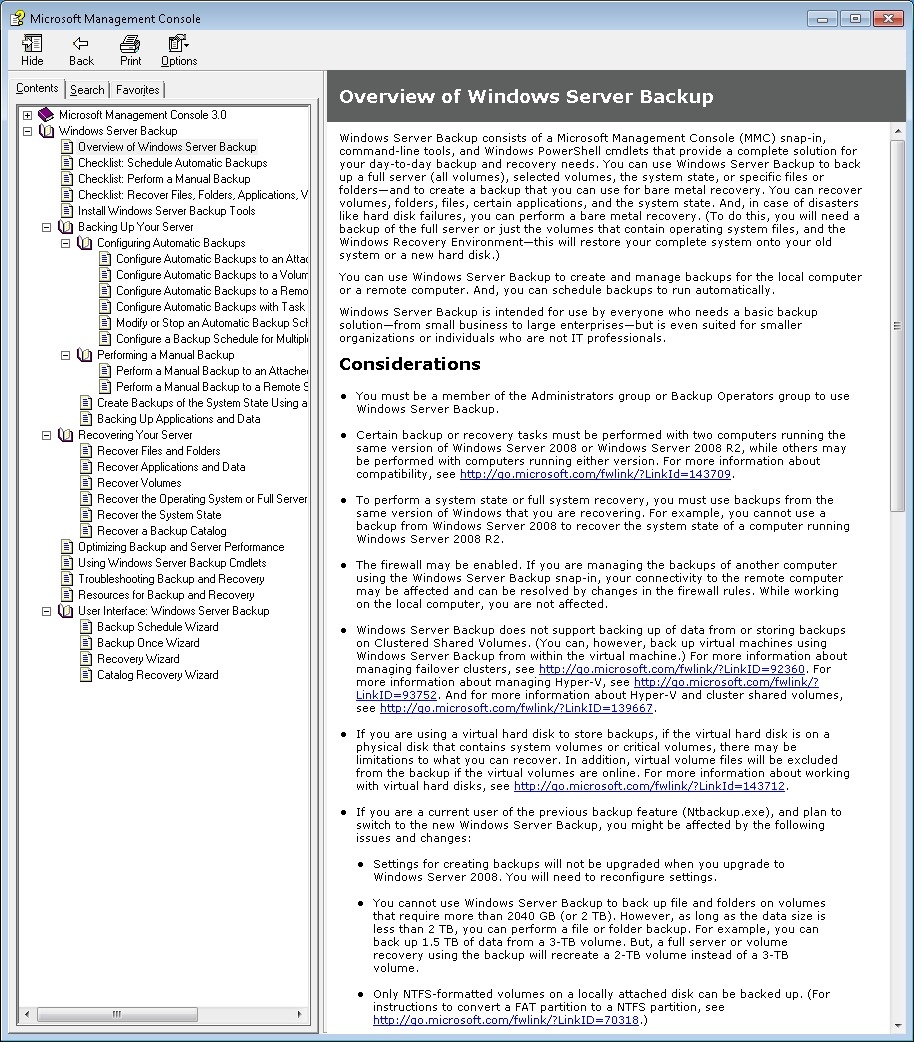
    WHS 2011 is built on top of Windows Server 2008 R2 – an extremely powerful server operating system. This has its own Backup and Restore mechanism, which is equally powerful. However, this mechanism is designed for IT people, not for the home user. Here, for example, is a screenshot of partof the Overview of Windows Server Backup, taken from the online help manual (click to see in its full gory glory). Full of jargon and certainly not for the faint of heart (or non-IT person)…

    WHS2011 19

    If you want to take a look at the full manual, then please, be my guest, and visit Microsoft’s online help web site.

    Now, it is certainly possible to use the Backup and Restore mechanism of Windows Server 2008 R2 to do what I want to do – slice the 5TB of storage on my WHS across three backup discs, but I’ll have to figure it out for myself, and start being an IT person again.

    The whole point is that I shouldn’t have to do this. WHS 2011 is supposed to be for the home user.

    The last irony about all of this is that in fact the backup features of WHS 2011 do seem to be using the underlying mechanisms of Windows Server 2008 R2, it’s just that their current design is extraordinarily limited, and, in my case with more than 2TB of data on my server, utterly useless.

    Update 20 October 2011: I see that Microsoft have now posted a TechNet article covering this 2TB limit in the TechNet Wiki. Since it’s a wiki, I’ve edited it to improve the language and the grammar. The original was clearly written by someone for whom English is not their first language.

    Update 31 March 2014: It appears as though there has been some improvement made to the Server Backup function in the Dashboard since I originally wrote this article. It remains the case that WHS 2011 continues to use the VHD format for backup, which has a maximum capacity of 2TB. However, it now appears (contrary to what Microsoft originally stated) as though the Server Backup function can now deal with multiple VHDs, providing the backup drive is big enough. So, if your backup drive is 4TB, that means you can have 2 VHDs of 2TB created on it. That, in turn, means that you can backup up to 4TB of data from your data storage drives (with a maximum of 2TB for any one drive). That’s a theoretical maximum, since Microsoft also recommend having some free space in the VHDs to handle incremental backups.

    16 responses to “I Don’t Believe It!”

    1. […] disc, but also to the maximum amount of server storage that you can backup for offsite storage. I don’t believe it! GA_googleAddAttr("AdOpt", "1"); GA_googleAddAttr("Origin", "other"); GA_googleAddAttr("LangId", […]

    2. Denis Avatar
      Denis

      Geoff, thanks for the simple explanation of the backup. Your post was the first one I saw explaining the single drive limitation. I saw plenty explaining the 2Tb limit, but none about the single backup drive. I was trying to backup my DVD collection. I broke up my collection into 4 approx 1Tb folders thinking I would have to use the backup wizard and select different drives for different folders. Could not get it to work. Thought I must be missing something. Turns out I was missing something. I was missing how crappy the backup feature really is. The buzz about removing DE was very negative at first, then, suddenly most of MVPs starting singing the praises of WHS 2011. I wonder if they didn’t get a “talking to” from Redmond. My biggest complaint about the product is that they left the word “Home” in the name but took out a lot of the HOME user features.

      1. Geoff Coupe Avatar

        Denis, thanks for the comment. I find it difficult to fathom how badly Microsoft have bungled the design of WHS 2011 when it comes to aiming at the home user. It beggars belief.

    3. […] of WHSv1 as a server and media appliance that could be used by the average consumer, and they’ve thrown that chance […]

    4. […] text spell out that (a ) your backup storage drives can not be bigger than 2TB in size and (b ) you can’t actually backup more than 2TB of server data in any case. And that “Because server backups are incremental, a backup drive of 300 GB in size or more can […]

    5. […] to see how well it works. And so, I’ve messed about with the beta versions of WHS 2011 (and found some bad limitations, as well as the occasional plus […]

    6. Daniel Bates Avatar

      Thanks so much for clarifying this. I’ve just ‘upgraded’ to WHS 2011 from V1, and I can’t believe this is so bad. I’m already having to spend a lot of time and effort chasing my data around this. The whole area of data management (isn’t that what WHS is FOR?!) is much less refined in 2011. And you are confirming what I was trying to do, and couldn’t understand why it wasn’t working – split a >2tb backup over several discs.

      So, it can’t be done? What a pile of cr*p… I’ve been a faithful WHS user, and I feel like I’ve been taken advantage of. This is no good for storing large amounts of data at home safely?

      I suppose I’m now forced to manually set up scheduled copies of other folders to other discs in the server. TOO MANUAL and TOO RISKY… Thanks Microsoft…

      1. Geoff Coupe Avatar

        Daniel, thanks for your comment. I’ve been forced to adopt a two-tier strategy for server backup; use the built-in server backup for my critical data (luckily it comes in under the 2TB limit), and use SyncToy for the rest. But as you say, it is MANUAL and RISKY… See https://gcoupe.wordpress.com/2011/05/27/my-whs-2011-experience-thus-far/

    7. Marc Johnson Avatar

      Geoff, thanks for so much knowledge sharing. Why oh why did I upgrade to 2011 from v1… what a mess I have now.

      Have you toyed with any of the DE replacements – DrivePool, etc. ? I’m pondering doing your sync-toy trick until I can replicate disk duplication again.

      The entirety of WHS 2011 has, as you said, lost the home part. I work for HP and fully understand why we ran away from this product now. I love my ProLiant MIcroserver, but I am not liking WHS 2011 yet.

      Cheers,
      Marc

      1. Geoff Coupe Avatar

        Marc, thus far I haven’t toyed with any of the DE replacements – I view my WHS as a production environment, and I don’t want to put beta software on it that is as fundamental as a DE replacement. I have run the MyMovies for WHS 2011 when it was in beta, but running a beta that is at the level of the file system? I’m not that brave.

        Having said that, if one (or more) of them emerge as a solid DE replacement, then I would be happy to use it. I do miss DE, for the ease that it gave and for simple folder duplication. I’m glad that others are brave enough to test these betas – an old colleague of mine is one of them. If he pronounces that the product he is testing is good enough, then that will be good enough for me. Until then, I’ll live with multiple drives and the hassle that that entails.

    8. […] you are probably aware, WHS 2011 can only take a backup of the server data that is 2TB or less in size, and can only handle backup drives that are limited to […]

    9. mccay_a Avatar
      mccay_a

      3 things

      1) Finally an explanation. thank god
      2), I have been using Stablebit Drivepool since first release and was just now attempting, backup to multiple disks. As i was fouled to thinking before i read your post, “i thought the limitation was on the VHD file limit of 2TB that where created per disk in backups, so i attempted to backup whole drives. Shame on me. A little bird told me that whs 2011 Server backup MAY be there next task or the creators of Stablebit drivepool (covecube). I have been interacting with the head of their team on this, and all hopes lie within their possible solution once they finally release their drive pool
      3) I am by profession a systems engineer, and will be trying the windows server backup option, through powershell or what ever method works, and i will be happy to provide my methodology, or even alternative methods, once i define them.

      Thanks again for spending the time explaining this

      Regards, mccay_a

      1. Geoff Coupe Avatar

        Thanks for that tidbit about Covecube – it would be great to have decent Server Backup functionality in WHS 2011. Since Microsoft have failed miserably, perhaps Covecube can succeed with an Add-in!

    10. Luke Avatar
      Luke

      Hello, Victor :), Geoff

      Since the March 2014 have you had any luck baking up more than 2TB of data? I’ve looked into this and just can’t seem to find a way around this limit.

      Thanks

      1. Geoff Coupe Avatar

        Hello Luke, I’m sorry, but I’ve not found a way to back up more than 2TB using the built-in backup function. I use this simply for backing up the core Server OS files, and the client PCs backups. The rest of the Server data storage I backup to external HDDs using Allway Sync. Since this is media data (music, pictures, TV, films), it changes relatively slowly, so a weekly, or even monthly, backup to discs which are then stored offsite is sufficient.

        The 2TB limitation was removed with the introduction of VXHD into Windows Server 2012, but it was never retrofitted back into WHS 2011. The cost of even Windows Server 2012 Essentials (the cheapest version) is an order of magnitude more expensive than WHS 2011 was, so I’m still on WHS 2011.

    11. […] of WHSv1 as a server and media appliance that could be used by the average consumer, and they’ve thrown that chance […]

    Leave a comment

  • Polling Day

    Today is polling day for the provincial elections here in The Netherlands. It appears that us oldsters may have an effect on the outcome and impact the position of the current coalition government.

    Meanwhile, the young appear to have swallowed the anti-Islam propaganda of the appalling Geert Wilders and his PVV party. You can guess who I won’t be voting for today.

    Leave a comment

  • Backups in Windows Home Server 2011

    I wrote yesterday that I’d decided to kick the tyres of the Release Candidate of Windows Home Server 2011. Today, I thought I’d take a look at how server backups are handled in WHS 2011.

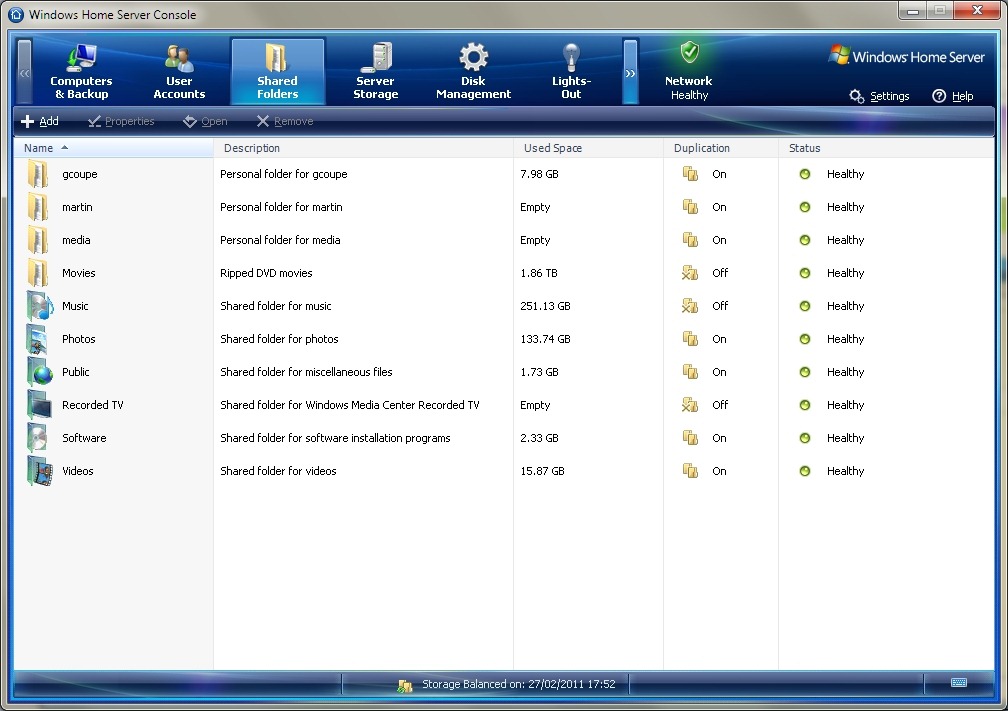
    First, a bit of background. WHS Version 1 can make backups of its shared folders (e.g. the Pictures, Videos, Music and User folders held on the server) to external discs. This is a one-click manual process (see figure 1). That means, unlike the backups of client computers attached to the server, there’s no built-in function in WHS V1 to schedule the backups of shared folders. Also, WHS V1 does not have the option of backing up the client computer backups from the server itself onto external discs. There’s a third-party add-in to do this, but this function is not built into WHS V1 by Microsoft.
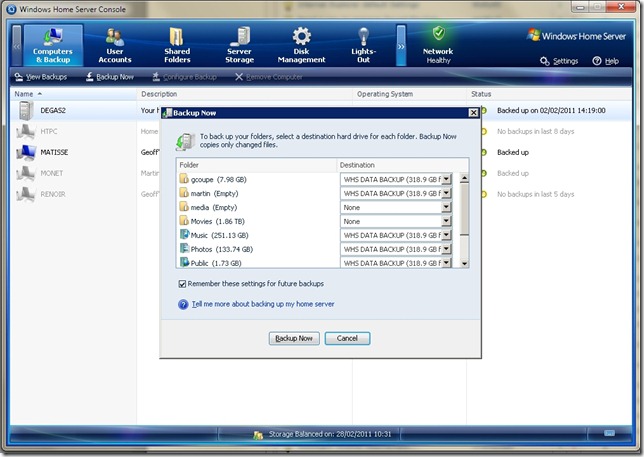
    whs Storage 3

    figure 1

    When it comes to WHS 2011, there are a number of changes in this area over WHS V1. First, server backups are always scheduled – you can’t actually initiate a server backup manually with one click of a button (NOTE: the final version of WHS 2011 does now contain a button to start a server backup manually. Microsoft added this in). Second, in WHS 2011, server backups can include both the contents of the shared folders and the backups of the client computers held on the server.

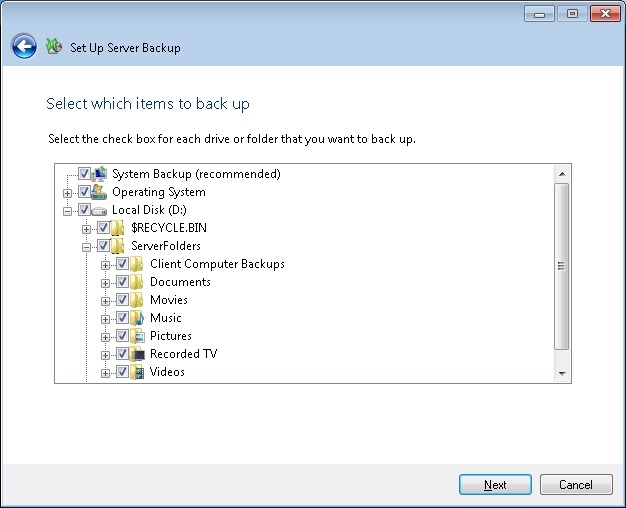
    I find these changes a bit of a mixed blessing. First the good news: it’s great that you can backup the client computer backups to external discs in addition to the shared folders (see figure 2).
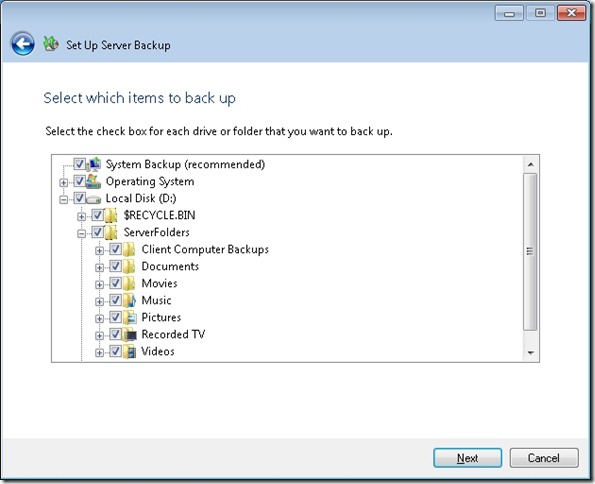
    WHS2011 9

    figure 2

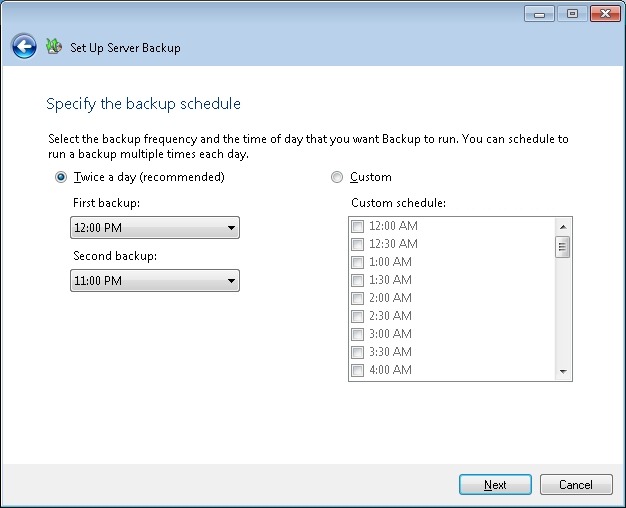
    However, I’m less enthusiastic about the fact that server backups are always scheduled, and that they run daily (see figure 3).
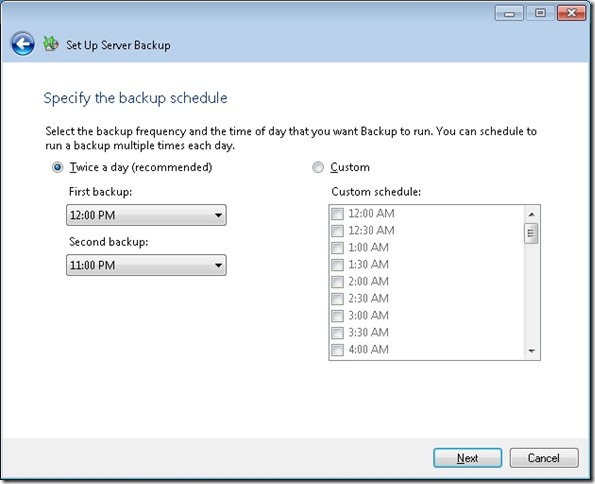
    WHS2011 8

    figure 3

    Let’s think a moment about the nature of these backups to external discs. As far as I’m concerned, they are for the purpose of making backups to be held offsite. That’s what I use them for, at any rate. If I were to have the external discs permanently connected to a WHS 2011 system, then, it seems to me, I’m only getting a slower version of the Shared Folder duplication that was built into WHS V1 and which was provided by the now-removed Drive Extender technology.

    And Microsoft’s own guidelines for Backup best practices for WHS 2011 state:

    You should backup server data to multiple external hard disks and rotate the hard disks between onsite and offsite storage locations. Doing so can improve your disaster preparedness planning by helping you recover your data if physical damage occurs to the hardware onsite.

    So if I’m going to be using the external discs for making server backups to be held offsite, then allowing the backups to be made only on a scheduled basis seems to be a bit counter-intuitive to me. I want to be able to fetch the discs from offsite, plug them in, push a button to initiate the server backups, and then return them offsite. I do this on a weekly basis. I can do this with WHS V1; I can’t do this with WHS 2011: (a ) there’s no manual server backup and (b ) the backups run on a daily schedule. At the time of originally writing this post, the Beta version of WHS 2011 did not have the capability to manually initiate a server backup. The final release version does. However, the backup task still continues to run on a daily basis…

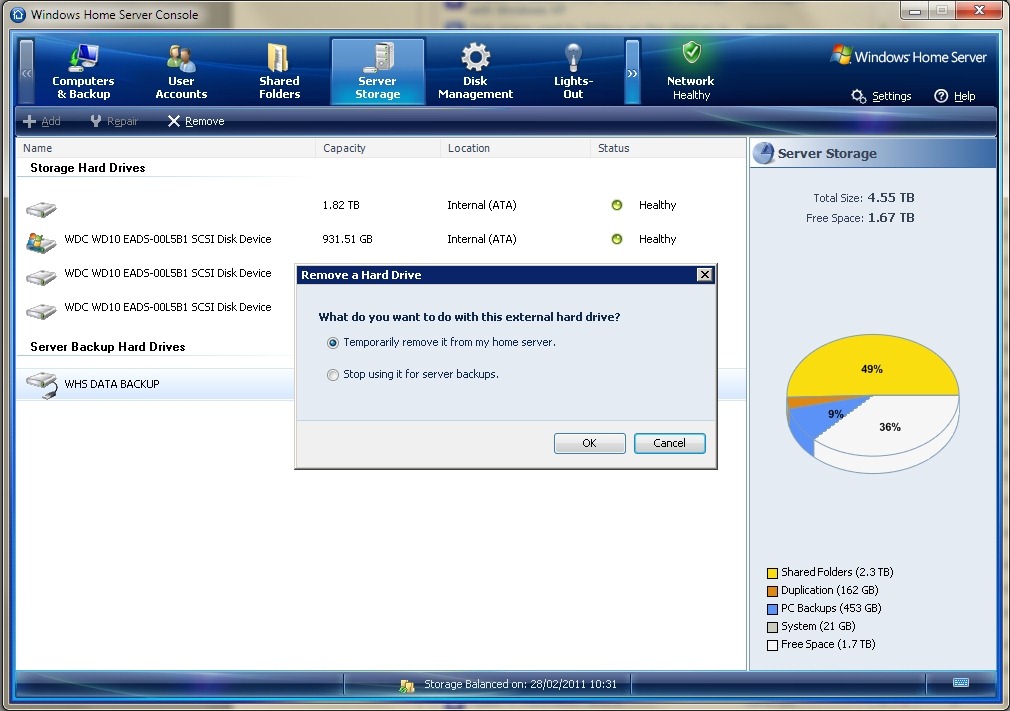
    In fact, even the act of removing external discs seems less clear in WHS 2011. In WHS v1, once the server backup is complete, then I simply select the external drive and click “Remove drive”. WHS V1 will ask if I want to remove the drive temporarily or permanently (see figure 4), and I select the “temporary” option. The disc is then safely dismounted from the system, and it can be returned to its offsite location.
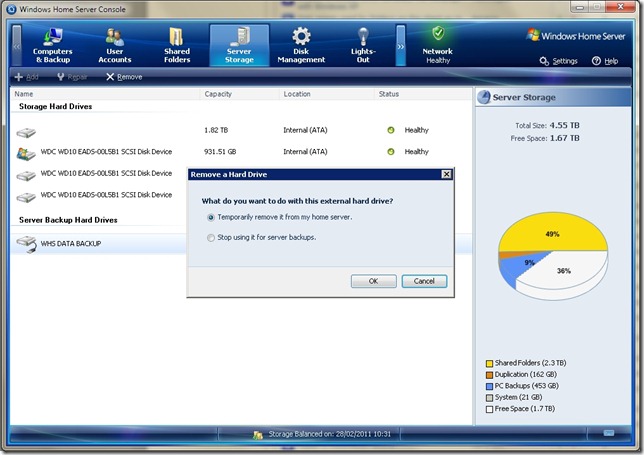
    WHS Storage 4

    figure 4

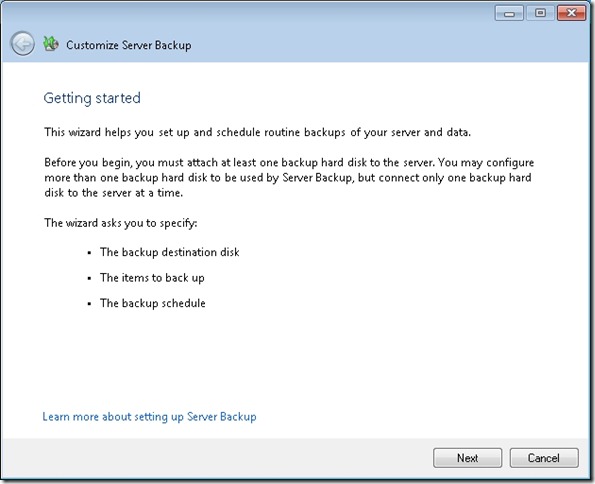
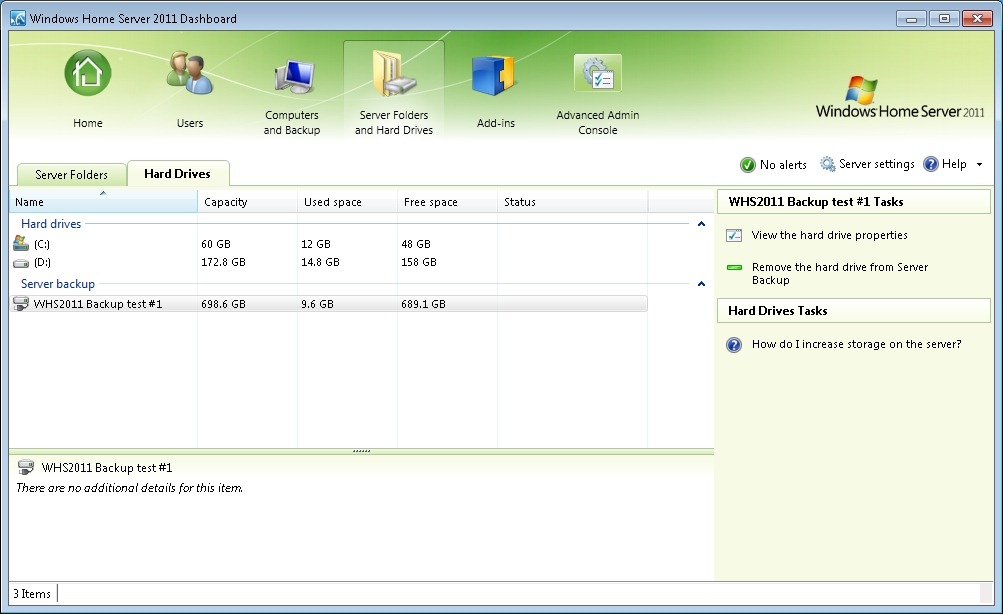
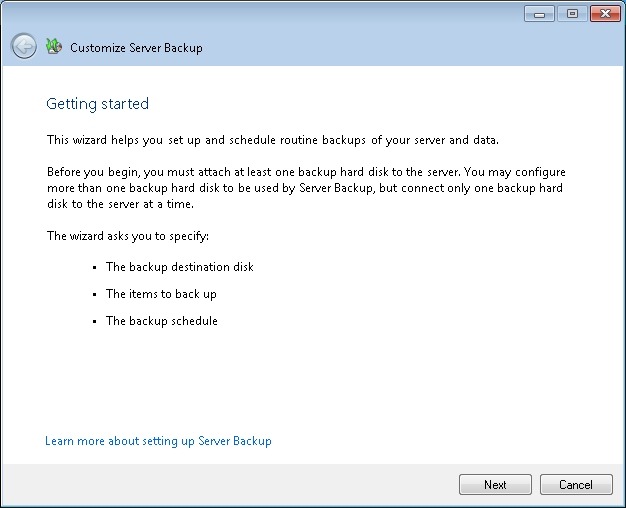
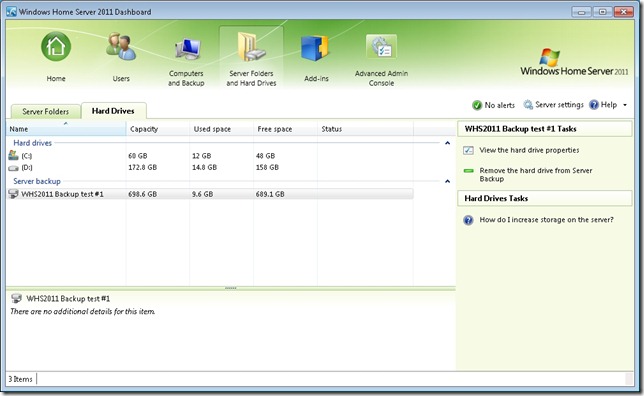
    In WHS 2011, if I select an external drive, I don’t get a choice to remove it temporarily, the only option shown is to remove it permanently from the server backup (see the tasks shown in figure 5). Choosing this starts the “Customise Server Backup” wizard (see figure 6), which I find somewhat confusing. I’m not trying to customise the server backup – I want to remove the drive… It turns out that the only way to temporarily remove a drive seems to be to yank out the cable. I suppose I’m set in my ways, but I always prefer to safely eject media (as WHS V1 allows me to do).
    WHS2011 14

    figure 5

    WHS2011 16

    figure 6

    The elephant in the room with server backups is that WHS 2011 can’t easily deal with discs bigger than 2TB. Now I know that even only a couple of years ago, this would have seemed an enormous capacity. However, with today’s high definition media, coupled with the ready availability of 3TB discs (with higher capacities on the horizon), then this limitation seems very surprising. The sad fact is that the backup method that Microsoft has chosen to go with in WHS 2011 has 2TB built-in as an upper limit. Never mind the fact that Windows 7 (even Windows Vista) and Windows Server 2008 (the operating system underneath WHS 2011) can support disks of more than 2TB capacity, WHS 2011 and its backup does not. If you install discs of more than 2TB into WHS 2011, then you must partition the disc into chunks, none of which can be more than 2TB in size. Even more frustrating, you can’t even backup a client computer that has a disc of more than 2TB assigned as one contiguous space. The Windows 7 client computer will be perfectly happy, but WHS 2011 will refuse to have anything to do with it (note: please see Addendum 2 at the bottom of this post for some clarification of this statement).

    I note that, on my WHS V1 server, my Movies shared folder is already at 1.86TB. Just a few more Blu-rays added to my library, and I won’t be able to use WHS 2011 without having to sit down and plan my storage, both for now, and in the future, very, very carefully.

    And this, to me, is the bottom line. WHS 2011 seems to force me to think like an IT support person; far, far more than WHS V1 ever did (or does!). That’s why I continue to think that the current WHS team don’t understand the home market sufficiently for WHS 2011 to succeed.

    Addendum 1: It just gets worse. It turns out that the 2TB limit doesn’t just apply to the size of a backup disc, but also to the maximum amount of server storage that you can backup for offsite storage. I don’t believe it!  Update 31 March 2014: It appears as though there has been some improvement made to the Server Backup function in the Dashboard since I originally wrote this article. It remains the case that WHS 2011 continues to use the VHD format for backup, which has a maximum capacity of 2TB. However, it now appears (contrary to what Microsoft originally stated) as though the Server Backup function can now deal with multiple VHDs, providing the backup drive is big enough. So, if your backup drive is 4TB, that means you can have 2 VHDs of 2TB created on it. That, in turn, means that you can backup up to 4TB of data from your data storage drives (with a maximum of 2TB for any one drive). That’s a theoretical maximum, since Microsoft also recommend having some free space in the VHDs to handle incremental backups.

    Addendum 2: Above, I wrote that: “you can’t even backup a client computer that has a disc of more than 2TB assigned as one contiguous space”. It turns out that’s too sweeping a statement. It was clarified by a discussion in the comments, and it’s worthwhile repeating the main points here in the blog entry itself.

    The issue is that you cannot Backup and then Restore a GPT OS drive with Windows Home Server. You can backup a GPT with v1 and perform the Restore but the disk will not boot. You can Restore individual files from a GPT backup but again not the OS into a bootable device.

    For WHS 2011, Microsoft’s release notes state:

    “If a client computer is running Windows Home Server 2011, and it has a hard disk that is configured to use the GUID Partition Table (GPT) format, you cannot use back up or restore data from the operating system, individual files, or folders on that computer. However, you can restore individual files or folders from other computers to a client computer that uses GPT formatting.

    In the event that a client computer is configured to use GPT hard disks, you must employ an alternative method to back up or restore that computer”.

    [Update 4th March 2013: Microsoft has at last issued a Hotfix to add backup support for UEFI-based computers to back up to servers that are running Windows Home Server 2011]

    Addendum 3: There are other issues with the Server Backup function in WHS 2011 that I explore in depth here. Sigh.

    57 responses to “Backups in Windows Home Server 2011”

    1. JL Avatar

      Geoff, I’ve been reading this saga for quite awhile and I’m confused. It might help if I was to go looking for a description of the product because I’m not understanding it here. Are you just needing ‘something’ to direct your backups to your external drives, or do all your files go to somewhere controlled by Microsoft?

      What have you paid for that’s got you up a wall? because it certainly doesn’t seem worth it. I do backups several times a day/bi-weekly and monthly, depending, to a series of drives and have no problems at all. I shall return after I look this up.

    2. Geoff Coupe Avatar

      OK, JL I’ll wait until you return and then we’ll talk. The product description of the original (and current) version of Windows Home Server is here. The next version (WHS 2011) has not yet been formally released (expected around mid-year, I reckon). For many users of the current product, it seems a step back over what we currently have.

    3. JL Avatar

      Ok, I’m back and I think I’m starting to get it. Central drive location accessible by a multitude of computers, or at least two. They took out the Drive Extender and limited the drive space to 2T. Am I close?

      1. Geoff Coupe Avatar

        Yup, that’s about it. I would put it as a central storage location, rather than a “drive” location. In V1, all drives were seen as a single storage pool (that’s the Drive Extender at work). Some people have at least 26TB on their systems. Now, with WHS 2011, instead of a storage pool, you have to deal with drive letters, and each of these can be no larger than 2TB.

        You can have up to 10 client computers being automatically backed up to the server, and it does neat tricks such as only making one copy of files that exist on more than one client computer. Also, you can “roll back” to restore previous versions of files or to previous states of your client computers. It’s far more efficient in terms of storage space than a filelevel-based backup system, since it deals at a more granular level of clusters within the file.

        It’s what saved my bacon with the WLPG debacle – I was able to restore earlier versions of my photos before WLPG stamped all over them.

        1. JL Avatar

          I was just going to ask about the WLPG debacle. Interesting. I have two computers but not a large enough abode for this type of thing but otherwise I’d want one right now! If Windows is the software and HP or Acer or whoever is the hardware, can’t you get some other software?

          1. Geoff Coupe Avatar

            In my case, I built my own server and bought an OEM license of WHS to install on it. The thing is, I like pottering about with computers, so it doesn’t bother me.

            What I’m really pissed off about is that Microsoft had a great product with V1, but they’ve knifed it in the back with V2. Someone put their finger on it in the WeGotServed forum:

            I think the biggest determinant here is not profit, but executive support. Charlie Kindel (original head of WHS) was a strong supporter of the concept of a home server, and could defend against the inevitable bean-counter types. Unfortunately, after the reorg and his departure WHS was ‘adopted’ by a group that doesn’t understand the value proposition of a home server. There is no executive-level WHS champion anymore. So from here on out, it will be judged by units sold, for better or worse.

    4. JL Avatar

      Ok, another dumb question. If v1 worked so well, why would they take ‘parts’ out of it? Does that make it more profitable? It reminds me of EverNote; totally different thing but it was great software that went completely wrong. And you just have to wonder why. If it ain’t broke don’t fix it.

      Is there a good alternative to WHS?

      It’s breakfast time at your house and bedtime at mine so I’ll have to get back to this after some sleep.

      1. Geoff Coupe Avatar

        Not a dumb question at all. There were probably two forces at work here: organisational and technical.

        The organisational force is that the WHS team were reorganised and moved out from the Windows consumer-focused part of Microsoft into the Small Business Server group. Here, they’re a small fish that found themselves in a big pond focused on business customers.

        This organisational change then influenced the second force: the technical aspect. The original Drive Extender technology was designed for consumer scenarios, where, for the most part, it worked really well. There was, at the beginning, a major problem with it, where under certain circumstances, files could get corrupted. This was fixed, and then, for most people, DE worked very well. Some people who have very full storage find that media streaming can stutter when a DE process runs to balance storage of duplicated folders – the so-called Demigrator issue. For them, the solution is to schedule the Demigrator process to run when they are not watching movies streamed from their WHS. It’s not affected me, but then my storage is only 75% full.

        Now, when it came to developing WHS 2011, the team took a decision to do a major re-design of the DE technology. The original DE ran as a layer over NTFS (the file system of Windows). The new design moved DE under NTFS. Since the team was now part of the SBS organisation, and they didn’t want to fork the code (i.e. have a different code base from the rest of the SBS products), that meant the the new DE would be present on all the products from the SBS organisation. And then they found problems with the new DE when running in business scenarios. The decision was taken to scrap the new DE altogether, rather than delay all the products and fix the problem, or fork the code and have WHS 2011 shipped with the new DE (or even an improved old DE), and the other business-oriented products shipped with plain old NTFS.

        It’s a perfectly understandable decision, I just don’t think it was a consumer-focused decision. The little fish found itself in a big pond filled with business sharks.

        The beauty of WHS V1 was that combination of a simple, efficient way of handling client computer backups (complete with version history) and a simple efficient way of handling server storage such that it was a consumer product. There are other products on the market that do one or the other, but there really isn’t anything that does both, such that ordinary consumers (rather than IT nerds) can just plug in and use.

    5. JL Avatar

      I think I’m understanding now. Y’all had a good thing going on and now you’re screwed. We are navel lint.

      1. Geoff Coupe Avatar

        Succint and accurate. Thank you.

        1. JL Avatar

          I hope you can hang on with v1 for awhile yet. Can you?

          1. Geoff Coupe Avatar

            Yes. It will be formally supported by Microsoft until 2013, and of course I can continue to use it after that. The limiting factors will be when newer hardware is available that isn’t supported by the software, or if Windows 8 can’t be supported as a client computer OS.

            For an example of a hardware factor, new large capacity hard discs have a different sector size. This isn’t supported by the underlying operating system in WHS V1. While these drives currently come with a jumper to set the sector size in the old mode, there’s no guarantee that this will always be so.

            I reckon that I can continue to use WHS V1 for certainly the next five years without issue, and maybe even ten.

            It’s also possible of course that a third party will successfully recreate the old DE technology for WHS 2011. There are already three companies working on this. There’s a gap in the market, and they want to fill it…

    6. JL Avatar

      Great! Sounds like it’s not a crisis for 5 or 10 years. That’s a long time at our age. Can you use AWS instead, or is that just for businesses? No, I guess you can’t. Going a couple steps too far. You’d have to build your own app first, wouldn’t you? O would you? Can’t you just rent a virtual server and dump your stuff into the cloud? OK, I confess; it’s late again.

      1. Geoff Coupe Avatar

        I’m sufficiently old-fashioned not to want to put all my eggs in the cloud-computing basket. First, because of the amount I have; second because relying completely on the cloud won’t work for me (out here in the countryside, streaming of Blu-ray movies from the cloud to my TV is never going to be a satisfactory experience) and third because I don’t want to put my trust in the cloud for irreplacable content (the recent Hotmail and Gmail incidents of losing users’ email boxes are cases in point). Sleep well.

        1. JL Avatar

          I was pulling your leg a bit having just watched a one-hour video on ‘What is Cloud Computing?’ It was highly technical, of course, and I hardly understood a word but it was so fascinating I couldn’t stop. I wouldn’t do it either. I don’t even want stuff on Google Docs. The weirder she goes the more I’m attracted to pen and paper.

    7. […] Windows Home Server 2011. I wasn’t too impressed with some of the backup features I found when I looked at them a few days ago. After digging a bit further, I’ve come across one “feature” that has flabbergasted me. It […]

    8. […] It’s a great read which you can find here. […]

    9. John Zajdler Avatar

      Hi, Thanks for the interesting read. One point though, you mentioned “The Windows 7 client computer will be perfectly happy, but WHS 2011 will refuse to have anything to do with it.” WHS2011 will take a 3TB drive into the mix, however it will format it as NTFS with a 2TB partition and a 2nd partition with the balance.

      1. Geoff Coupe Avatar

        Hi John, I should have been clearer: if the Win7 client has a GPT disc (which can be more than 2TB), then actually neither version of WHS can deal with it… I got that little nugget from Tim Daleo’s excellent write-up on GPT and MBR partitioning.

        1. DoctorX Avatar
          DoctorX

          not true… i have a 3.8TB GPT being backed up on WHS v1 and I have restored it several times. GPT works just fine.. just cannot do it on whs itself

          1. DoctorX Avatar
            DoctorX

            should have stated that it is win7 x64 with about 7TB of disk and more than 4TB filled at any one time.

          2. Geoff Coupe Avatar

            DoctorX, the primary discussion is about WHS 2011 – not WHS V1. Microsoft’s release notes for WHS 2011 state:

            “If a client computer is running Windows Home Server 2011, and it has a hard disk that is configured to use the GUID Partition Table (GPT) format, you cannot use back up or restore data from the operating system, individual files, or folders on that computer. However, you can restore individual files or folders from other computers to a client computer that uses GPT formatting.

            In the event that a client computer is configured to use GPT hard disks, you must employ an alternative method to back up or restore that computer”.

            There’s also an active bug on Microsoft Connect related to the fact that GPT support on clients is not currently present in WHS 2011. See https://connect.microsoft.com/WindowsHomeServer/feedback/details/646106/client-gpt-system-backup-in-whs-2011-fails-at-1

            So if, as you claim, WHS V1 does in fact deal with GPT clients, then here’s yet another example of where WHS 2011 is a step backwards from WHS V1.

          3. Geoff Coupe Avatar

            Oh, and you might want to comment on Tim Daleo’s post where he states that WHS V1 cannot deal with GPT clients: http://usingwindowshomeserver.com/2011/02/27/gpt-and-mbr-disk-partitioning-a-supplement-to-byob-33/2/

            It would be interesting to understand why you have it working and he doesn’t.

            1. Timothy Daleo Avatar
              Timothy Daleo

              I was specific on this issue. You cannot Backup and then Restore a GPT OS drive with Windows Home Server. You can backup a GPT with v1 and perform the Restore but the disk will not boot. You can Restore individual files from a GPT backup but again not the OS into a bootable device.

              1. Geoff Coupe Avatar

                Thanks for the clarification, Tim.

    10. Dave Avatar
      Dave

      The server backup can be manually done in the same fashion as a client backup. Simply right click on the server in the backups tab and select backup now.
      I’ve either misunderstood what you wrote or you missed the manual server backup.
      Dave

      1. Geoff Coupe Avatar

        Hi Dave, that right-click option is not quite the same as a manual backup; all it’s really doing is firing off the scheduled backup with the right-click.

        Microsoft, over at Microsoft Connect, admit that they have missed providing a true manual backup function. Someone made the suggestion:

        Typically I will backup my server once a month, and remove the drive and put it in a safe place. When you configure Server backup, it should have the option to configure server backup as manual instead of having the only option as automatic.

        To which Microsoft replied:

        we didnt consider this. thanks for the suggestion.

        and

        We are aware of the feature request that you have reported. However, due to circumstances we will not be able to address it in the current release, it will continue to be tracked in our system and we will aim to address it in the near future.

        1. Geoff Coupe Avatar

          Just to clarify: the link to the post on the Microsoft Connect site given above no longer works. The link was originally to a post that was tagged as a Suggestion. Microsoft removed all the Suggestion posts in the WHS section on 12 March 2011.

    11. Andy, CloudBerry Lab Avatar

      If you want to protect your assets on WHS even further and back up your data to Amazon S3 cloud storage, check out CloudBerry Backup add-on for WHS. http://whs.cloudberrylab.com/ . It is one time fee and the rest what you pay for Amazon S3. Besides, there is no proprietary data format and you can access your data using other Amazon s3 tools. Supports all Amazon S3 regions and Reduced Redundancy Storage. WHS 2011 add-on is also available.

      1. Geoff Coupe Avatar

        Hmm, smells like an ad, but I’ll let it pass. Using the cloud as backup doesn’t appeal to me. I’ll stick to my offsite backups, which are more cost-effective in my situation.

        1. James Daniel Avatar

          Geoff
          I have just been reading this as part or R’n’D I’m doing into backing up my WHS 2011 PC Backup Database. I started by asking whether Alex Kuretz’s BDBB was available for 2011 and it isn’t – he says there’s no need because the 2011 Server backup does the same thing.
          So I started reading up on WHS 2011 Server Backup and it does indeed do the same thing – sort of – just by picking the “Client Computer Backups” folder except that your well-researched articles on how it works (or doesn’t) in practice with removeable drives fills me with trepidation. I’m not looking for a solution that spawns more problems!
          Now reading further down the comments above I find the posting from Andy at Cloudberry and I feel like smacking myself round the face! I already have his product installed on my WHS 2011 box, doing shared folder backups to Azure I and I think I once considered using it to pick out the Client Computer Backups folder and secure it separately, but rejected it because the database files are so big and, at the time, the Cloudberry product did not go down to block level. But reading this now, having also recently read that Cloudberry has upgraded their product so that it does go down to block level I put 2 and 2 together and realise that I may have a workable solution after all. Cloudberry, backing up the Client Computer Backups folder at block level to AWS. I for one am very happy I’ve seen Andy’s posting just when I did. If it is an ad, then it has shown up in a very happy context for me.
          You may also be happy to know that the Cloudberry product in question (and I want to be clear that I am nothing more than a contented user of it) not only backs up to the cloud (AWS, Azure and many others), but also can back up to local storage. AFAIK that could be a plug-in USB drive, and I’m guessing that it would carry none of the WHS Server Backup baggage that you so eloquently describe. I’m absolutely going to be testing that out as soon as I have had my brekky!
          I’m not sure of the timing, but it may well be that the Cloudberry product couldn’t do the local storage option when Andy made his posting, which could be why his posting looked unnecessarily tangential.
          Thanks for this – I’m looking forward to a “fun” Easter weekend now.

          1. Geoff Coupe Avatar

            James, let us know how your Cloudberry product gets on as a solution for local backups. I still prefer to have a local backup solution rather than a Cloud solution for reasons of cost and convenience.

            1. James Daniel Avatar

              Geoff.

              I set up a test yesterday afternoon and it worked. The scope of the backup was just the Client Computer Backups folder. The destination was a USB plug-in hard drive (WD Elements 1Tb). The folder backed up fine. I had it set to block-level backup (a better match to my own eventual needs), although I dare say that file level would have worked fine. Although I did not work fully through the drive-swapping scenarios you covered in your postings on WHS Server Backup, I provoked it a bit and saw no signs of Cloudberry being “clingy” about plug-in drives.

              I have not done a test restore yet, but I did check with Alex Kuretz (author of BDBB for WHS v1, which has a restore feature) whether restoring the Cient Computer Backups on its own would be enough on a WHS 2011 box – no Registry baggage or anything like that – and his view was “it’s just another folder”.

              For anyone considering this option, you need to keep calm when setting up the backup scope. By default, Cloudberry presents you with a list showing just the shared folders. The Client Computer Backups folder is not a shared folder, so it doesn’t show by default. You need to check the box at the bottom of the dialog box saying “Show physical drives”, then dig down a couple of levels in the folder nest on each drive until you find it.

              Also, Cloudberry thinks of all backup destinations in terms of accounts (it’s “cloud-minded”, so it wants to know whether to send your backups to AWS, Azure or what, and what the access control details are for your account(s) on those services). There’s an option to create one or more “File System” accounts, which allow you to say on what local drive and in which folder to save the backups, instead of sending them to the cloud. Best to create the appropriate File System account before starting to define your backup job.

              The account concept feels a bit clunky at first, in the context of backing up to local drives, but it provides a useful level of modularity if you want to have different kinds of job backing up to different drives and/or folders on your WHS box.

              If you set up a job which saves to a removeable drive, Cloudberry seems quite happy for you to view or amend the definition of the job while the destination drive is absent.

              I didn’t look to see what you’d see as a list of backups to restore from while the removeable drive they’re on is absent.

              There are options to backup to a schedule or to backup when you click the button.

              Looks as though it could meet your spec.

              Slightly off-topic: The only thing I personally am disappointed about is that Cloudberry doesn’t seem to offer a “bare-metal” restore. But that’s a better class of problem, really. Seems you have to go to Acronis or someone like that for one of those for WHS v1 still. And the Acronis server edition is rather expensive. Their workstation edition won’t run on either version of WHS. Or, on WHS 2011 (but not v1), you can rely on the built-in WHS Server Backup which claims to provide bare-metal restore. I’d rather be working with just one piece of backup software rather than two, but it seems there isn’t one (that I can afford) which covers all required combos of v1 / 2011 and bare-metal / block-level file/folder.

              1. Geoff Coupe Avatar

                James, thanks for the report.

    12. Michael Patrick Avatar
      Michael Patrick

      Why would you not want a daily backup. I have home server installed at several of my smaller customers. I’m backing up their local machines and the server data using a robocopy script that I put together. They change the drive out on a weekly weekly basis and take it off site.
      With WHS 2011 it is automatic. Just change the drive out when you are ready. If you forget, it will run again. I’ve had way too many customers forget to change out drives or even worse forget to reconnect drives.

      1. Geoff Coupe Avatar

        Michael, I already have a daily backup – from the clients to the server. Taking a daily backup of the server (in fact, the default is twice daily) strikes me as overkill. A weekly backup for off-site storage is all that I require.

        Think about the scenarios: (1) a client fails – then I still have the server backup that is at most 24 hours old. (2) the server fails – then I still have the client running, so I have time to get the server running again. (3) both the client and the server fail simultaneously (e.g. the house burns down) – then I have the server backup that is no older than one week.

        I’m not running a business – I don’t need up to the minute data protection.

        What I would like, but which WHS 2011 does not provide out-of-the-box, is for server backups to be more than 2TB. My current WHS V1 is holding more than 3TB data, but without delving into scripting and the Windows Server 2008 facilities, I can’t back this up using WHS 2011.

    13. Michael Patrick Avatar
      Michael Patrick

      There in lies the rub. I have several clients that are using this for their business server. Low budget clients that don’t need or can’t afford to lay out 4 or 5 grand for a server they have to manage. They have shares setup which is a reason for a daily backup.
      I agree about the storage limits and I’m going to install drive bender as soon as I get a copy of the full release version.

    14. John Hughes Avatar

      1. Is the total space allowed for all client computers also 2TB?

      2. I read somewhere that WHS v1 would only store unique files from client computers, so if the same file existed on more than one client computer only one instance would be physically backed up. Is this also the case for WHS 2011?

      Regarding #1, I think I have confused myself by reading too many articles on the 2TB limit. I understand that the home server can only backup to a 2TB (or less) drive. But what about the client computers? Is it a max of 2TB per client computer or must all client computers fit into one 2TB drive?

    15. Geoff Coupe Avatar

      John,

      The 2TB limit applies only to the backup of the server itself – not to the size of the client computer backups. So it is entirely possible for some people to find that they are backing up a total of more than 2TB from client computers to the server. However, they would not then be able to backup these client computer backups off of the server to secondary backup – because they exceed the 2TB limit for backing up of the server… Useful, eh?

      Like WHS v1, WHS 2011 also has single instance backup for the clients, so the same file that exists on more than one client will only be held on the server in one instance. This is spelt out in the “Getting Started Guide for WHS 2011”

    16. John Zajdler Avatar

      Something to consider also is that since there is no drive pool on WHS2011 and if you add a 3TB drive through the normal process ( WHS2011 will format that drive MBR therefor creating a 2TB+ 1TB drive), the maximum space for all the client backups will be 2TB total. Unless you create a RAID array or use one of the 3rd party drive pool addins and move the computer backups folder to a larger partition.

      1. Geoff Coupe Avatar

        Yep, good point, John – I forgot about that limiting factor…

        1. johnnynineJohn Hughes Avatar

          Thanks guys. So it sounds like if you use the WHS tools as opposed to more advanced Win2008 R2 tools you are stuck with a 2TB partition for client backups.

          I use Win2008 R2 daily so I don’t mind partitioning drives a 3TB drive with Disk Manager or using a RAID solution under normal circumstances. However if the Microsoft’s WHS wrapper GUI’s prevent the creation of a volume larger than 2TB then I think that’s enough to discourage me from trying to circumvent the system for fear of breaking something else now or when a future service pack is released. And as you said I still wouldn’t be able to backup the WHS itself.

          WHS 2011 sounds quite nice but the 2TB issues have really be pushing me to look at some of the NAS solutions such as Synology or QNAP. I’m unfortunately leaning towards the NAS solution which is disappointing since I am also looking for a new machine to run my home automation software on.

          1. Geoff Coupe Avatar

            “if you use the WHS tools as opposed to more advanced Win2008 R2 tools you are stuck with a 2TB partition for client backups”.

            Exactly. And like you, I really don’t want to rummage behind the scenes for fear that I might break something.

          2. John Zajdler Avatar

            You can always revisit WHS v1, you can purchase it with all updates up to and including Power Pack 3 for as little as $40 US.

            mControl is also a WHSv1 home automation addin.

      2. Stan Groves Avatar
        Stan Groves

        Perhaps MS has made some strategic update to WHS-2011 since the above was written. Because of the recent floods in Thailand and the skyrocketing prices of HDDs, I bought this week at Costco some WD MYBOOK 3TB drives for a net 109USD. Took one out of the plastic case (carefully!) then added to my WHS-v1. Only 2048GB visible. Moved it to my WHS-2011–could only format it by adding to the ServerBU, but it showed all 2.7TB. “removed” it from server BU, added to useable drives for assignment, still shows 2.7TB available. Hav not moved any folders to it as yet; I am not happy with the WHS-2011 when I use it to stream movies to my TV–It seems I must point my HDTV to the WHS-v1 for some reason.

        1. Geoff Coupe Avatar

          Stan, as far as I’m aware, MS has not issued any strategic updates to WHS 2011 thus far. I suspect that you’ve ended up with a drive of more than 2TB because you added it in a different way. I think that if you add an 3TB drive that is unformatted, WHS 2011 will then partition it into 2+1 as John says. What you did was add a formatted drive, then allowed WHS 2011 to prepare it as a backup drive; remove it from the list of backup drives, and then use it as a storage drive. I’m curious to know whether you will be able to use it with the full 2.7TB storage.

          If you’d have left it as a server backup drive, then you would have run into problems when you tried to use it. See http://social.technet.microsoft.com/wiki/contents/articles/faq-for-windows-home-and-small-business-server-backup.aspx

          1. Stan Groves Avatar
            Stan Groves

            Just FYI, now the 22 Nov, the drive still shows total cap of 2794GB, 988GB used, 1806GB available, so still treating it as “3TB” drive.

            I did indeed format it on normal Win7 PC first.

    17. Daniel Avatar
      Daniel

      I found a way to do a manual backup, but it requires you to do it through the server manager interface (through rdp).
      open server manager, expand storage and select windows server backup, there you have some options.
      I often use the backup once feature for offline storage.
      oh, and if you don’t like the server to do a full backup twice a day you can change the backup schedule, since i don’t have data that changes often i changed the schedule to backup once a week.

      1. Geoff Coupe Avatar

        Daniel, it’s true that the server manager interface of the underlying Windows Server 2008 OS gives you a bit more control, but as you say, it does require the home user to use RDP and rummage behind the scenes. I don’t really think that that’s a good design for the average home user. This whole area of WHS 2011 needs work, in my opinion.

    18. Arun Avatar
      Arun

      Geoff,

      I am close to reaching 2Tb in the videos folder and was wondering if you can share your solution to WHS constraints. I have WHS with Power Pack 3. The obvious solution that I can think of is to split my videos folder but I am not completely aware of the issues that I will run in to when I split. Would greatly appreciate any information that you can share in this regard.

      Thanks.
      Arun.

      1. Geoff Coupe Avatar

        Arun, I assume that you are talking about WHS v1, if you are running Power Pack 3. I never got to the 2TB limit with my critical data when I was running WHS v1, so I don’t know what it will do.

        You might be able to split your Video folder into Video1 and Video2 folders, and use two separate 2TB drives to back them up, one assigned per folder. Try it and see. If that doesn’t work, then you can always use SyncToy to back up your Video folders onto multiple drives – That’s what I did with WHS v1 and what I’ve done with WHS 2011. I just use the built-in Server backup function to handle my critical data (which is less than 2TB), and use SyncToy for the rest (Movie/Videos/Music).

      2. diehard Avatar

        There is no issue here with a 2TB limit for WHS version 1, that applies to WHS2011 backup capacity. The maximum size hard drive to add to the pool is 2TB for WHS v1. Just make sure that you add a new drive to the pool to increase your pool space. WHS will start filling up that drive. You do not need to create a new shared folder. Do not expect the files to balance across the new drive.

        1. Geoff Coupe Avatar

          Diehard, thanks for the clarification; useful to know.

    19. richard Avatar
      richard

      Why is it when i keep adding volumes to the backup, it does not seem to use them. For example i have just added 2x 1TB disks to WHS2011. I want to tell the backup program, backup everything on 1TB disk 1 to 1TB backup disk. I have other folders from various shares i deem important going to a external 1.5TB drive. Why cannot tell the backup app to backup 1 volume to another volume.

      1. Geoff Coupe Avatar

        I’m afraid that the backup program is very limited in WHS 2011.

    20. Chuck Coleman Avatar
      Chuck Coleman

      The Microsoft team is now starting to focus on this. Go to this link and post:

      https://connect.microsoft.com/WindowsHomeServer/feedback/details/734918/whs-2011-server-backup-failures#details

      1. Geoff Coupe Avatar

        Chuck, well, I hope the team is starting to focus on the issue, but I see that you have only just made the feedback, and I don’t see any reaction from Microsoft as yet. Let’s hope you get some traction…

    Leave a comment

  • One Step Forward, Two Steps Back?

    Yes, this is yet another grumbling post about how the current Windows Home Server team just don’t seem to understand what the word “Home” means in the name of the product.

    I decided that I’d take a closer look at the Release Candidate for Windows Home Server 2011. So, I’ve wiped out the Windows 7 installation on my HP TX2000 laptop, and installed the WHS 2011 RC on it. On the plus side, I appreciated the way in which the installation process recognised hardware that had been developed since the days of Windows Server 2003 (that WHS V1 was based on). The installation process was painless.

    On the other hand, there are some losses if I compare what I would have with WHS 2011 versus what I had with the first version of WHS.

    The major difference is of course the removal of the Drive Extender technology. Now, this has been done to death (but that doesn’t mean that it’s not important), however, let’s look beyond that.

    I approach Windows Home Server from the perspective of a consumer who has computers in their home. I’m someone who wants to have two things:

    1. backup to a centralised server of all the data in the individual computers, such that, in the event of a failure of any individual computer, I can quickly restore that computer to a running state with the most recent data and,
    2. to have digital media (music, pictures, videos, movies) available throughout my home from the same centralised server, with connected devices sharing media as simply, and as directly, as possible.

    And I want that centralised server to be easy to manage, with regular offsite backups being made to ensure that the integrity of that server for both shared media and the data of client computers is preserved.

    All this must be done as simply as possible. I really don’t want to carry on being the IT guy in my household. If I fell under a bus tomorrow, I would want my nearest and dearest to be able to carry on without any special knowledge.

    And there’s the rub. While WHS V1 was certainly not perfect in this respect, it seems to me to be light-years ahead of the retrograde step of WHS 2011.

    As I said, let’s ignore the elephant in the room, the Drive Extender technology, for the moment. Let’s just look at managing storage on WHS 2011.

    In WHS V1, you could look at the shared folders to see how much space they currently took up. Here’s an example from my WHS V1 system:

    WHS Storage 2

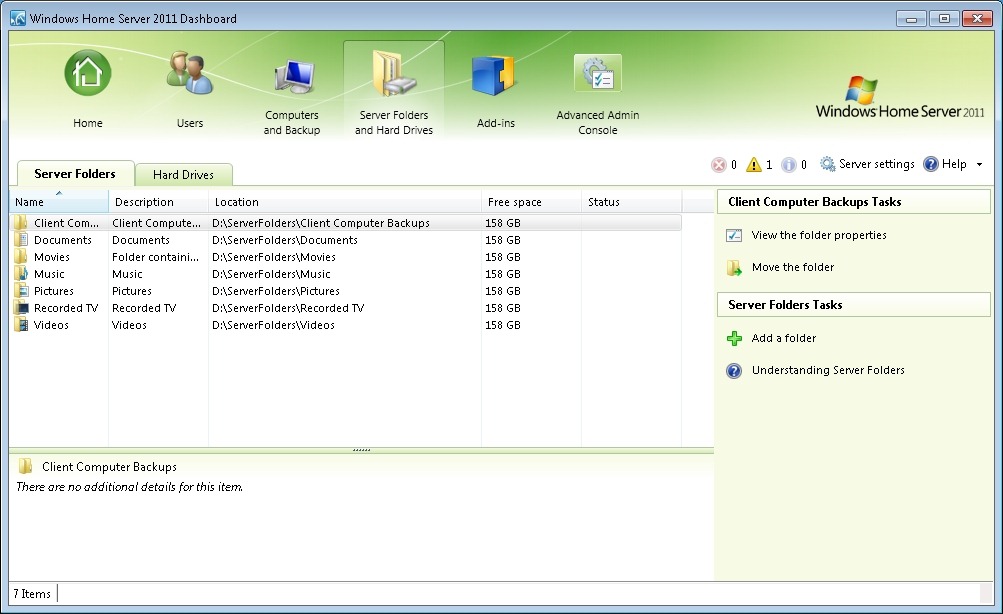
    And here’s the equivalent screenshot from WHS 2011:

    WHS2011 1

    Er, where’s the “used space” column? Well, surprise! It isn’t there. Instead, you have a “Free space” column that represents the space available on an individual drive. Nowhere near as useful. Because drive extender has been removed, the support person has to start thinking in terms of individual drives, not in terms of the total amount of storage as in WHS V1.

    This mode of thinking in terms of individual drives, instead of the total storage pool is also reflected when considering backups. WHS 2011 is unable to deal with backups (or discs) larger than 2TB.

    Frankly, if I were designing the follow-on product from WHS V1, then it would seem to me to be essential that I would handle the situation where discs and backups would be larger than 2TB. After all, if I’m going to claim that:

    Today large hard drives of over 1TB are reasonably priced, and freely available. We are also seeing further expansion of hard drive sizes at a fast rate, where 2Tb drives and more are becoming easy [sic] accessible. Since customers looking to buy Windows Home Server solutons [sic] from OEM’s will now have the ability to include larger drives, this will reduce the need for Drive Extender functionality.

    …then I would make sure that a 2TB limit did not exist in my product. Not so with WHS 2011.

    I really do wonder who the team are designing the product for. Certainly not home users.

    One response to “One Step Forward, Two Steps Back?”

    1. […] Geoff Coupe's Blog Reflections on life at "De Witte Wand" Skip to content HomeAboutGardensWedding AlbumWines I Have Known ← One Step Forward, Two Steps Back? […]

    Leave a comment

  • Turing’s Papers Saved for the Nation

    For a while, it looked as though there was a real possibility that Alan Turing’s papers might disappear abroad, possibly to a private collector in Silicon Valley. However, news comes today that the UK’s National Heritage Memorial Fund has pledged £200,000 to make up the shortfall and meet the seller’s reserve price.

    So the papers should end up in the museum at Bletchley Park where they rightfully belong. Excellent.

    Leave a comment

  • Then and Now – II

    Here’s another example of the changes that have occurred over time on the Isle of Man. This time it’s views of Douglas Bay. The first photo was taken in about 1860 (I think). It’s a bit difficult to see, but at that time the promenade on the seafront, with its frontage of boarding houses, did not exist.

    IOM0070

    This second (hand coloured) photo must have been taken after 1892, but before 1913, because by this time the promenade and boarding houses are visible (built in 1878), and the Victoria pier is in place (opened in 1892), while the Villa Marina (in the estate in the middle of the seafront, just to the right of the first row of boarding houses) looks to be the original private house. By 1913, the house had been demolished and the Villa Marina concert hall had been completed and opened to the public.

    IOM0115

    And here’s a photo that I took from a similar standpoint on Douglas Head in 2005.

    050713-1209-02

    Moving a little way along Douglas Head, and back in time to the early 1900s, this coloured postcard shows the funicular railway that used to run from near the base of the cliff up to the top.

    Scan10110

    Nothing remains of the railway now, as it was dismantled in 1954. By the way, you can see from the number of passenger steamers docked at the Victoria Pier just how popular the Island was as a tourist destination at that time, as these postcards illustrate:

    Oilette0004

    Oilette0005

    IOM0072

    Leave a comment

  • Then and Now

    Since I was looking through old photos of the Isle of Man for my last post, I thought that I might try and see if any of the locations corresponded with photos that I’ve taken.

    So here are a few examples of places showing the passage of time…

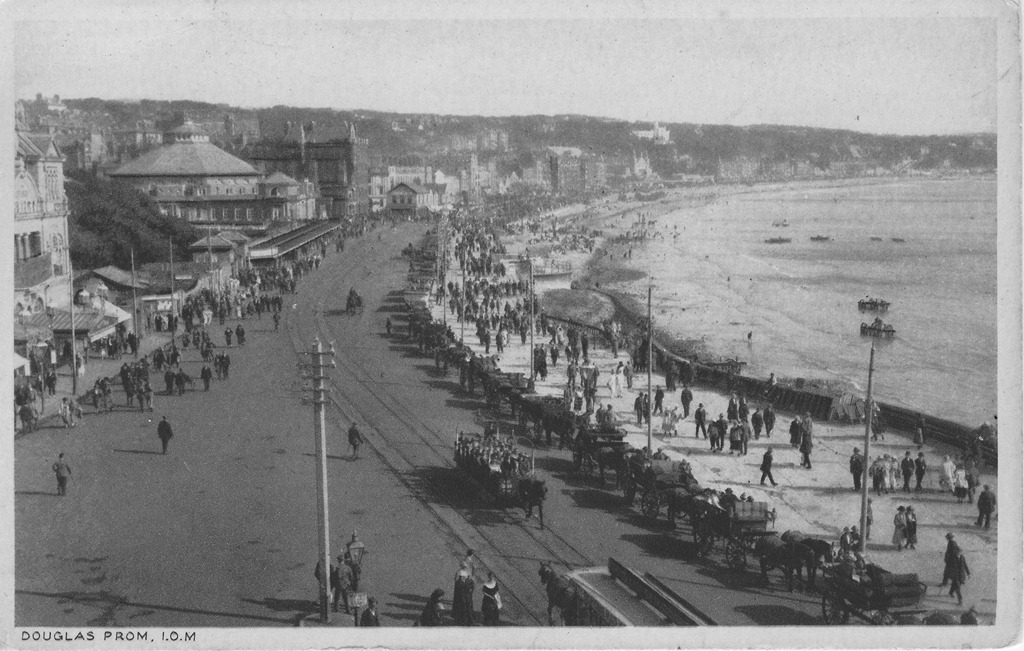
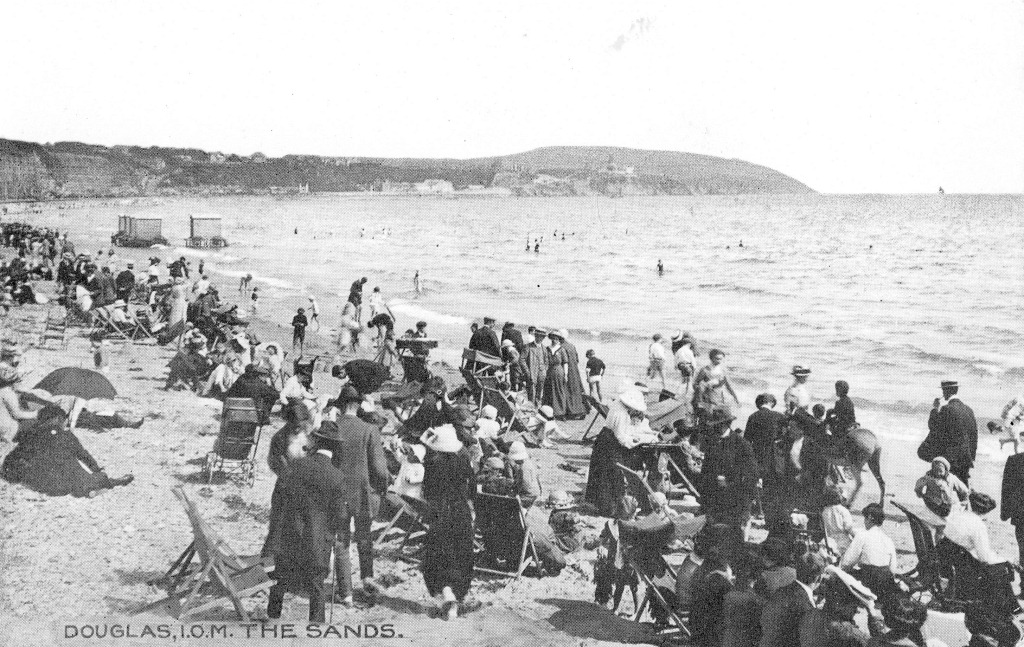
    For example, the Isle of Man was once a very popular holiday destination, but since the era of cheap air travel to guaranteed sunnier climes, the numbers of holidaymakers travelling to the island has plummeted. Here’s Douglas beach, then and now (2005):

    IOM0165

    050713-1143-00

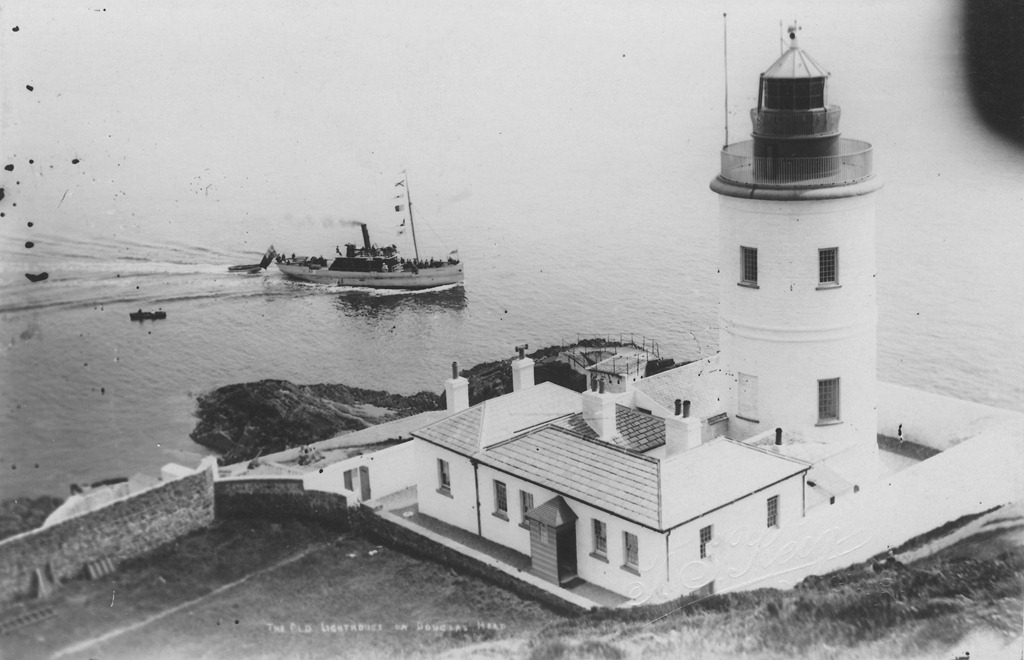
    The lighthouse on Douglas Head:

    IOM0073

    050713-1218-28

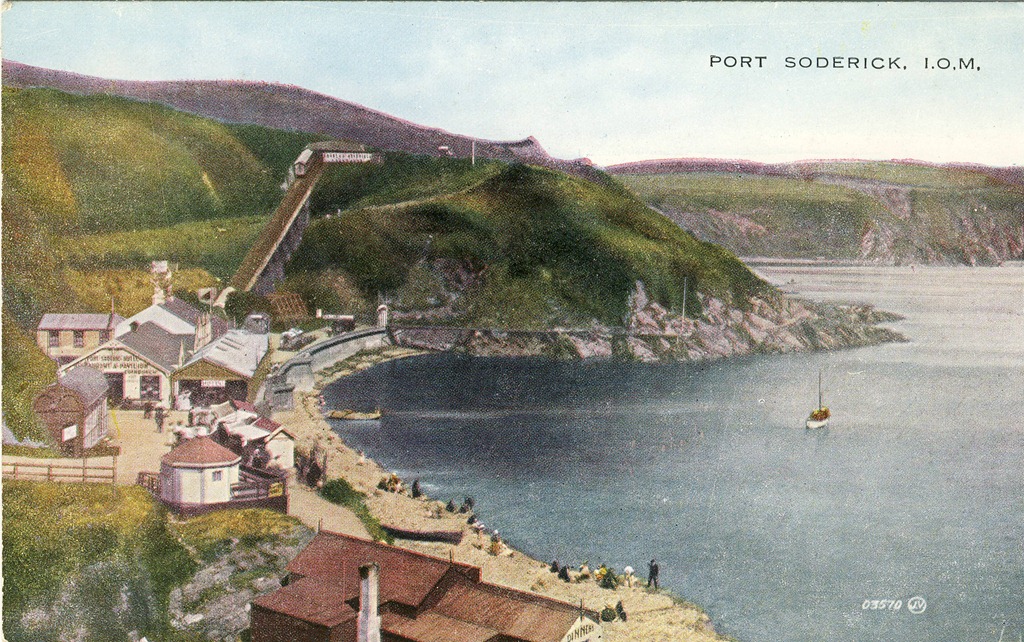
    That little boat steaming past the lighthouse in the picture above is almost certainly the ferry on its way to Port Soderick. Then, it was a little cove filled with cafes, shops, and other attractions. Now it is just a cove.

    Scan10111

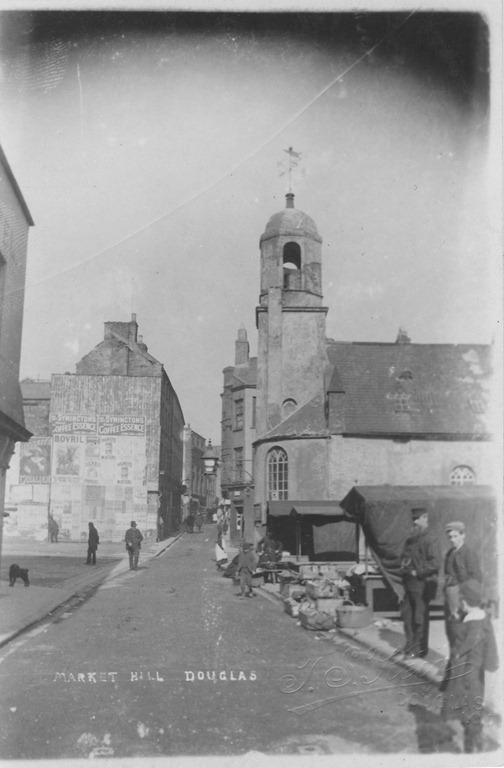
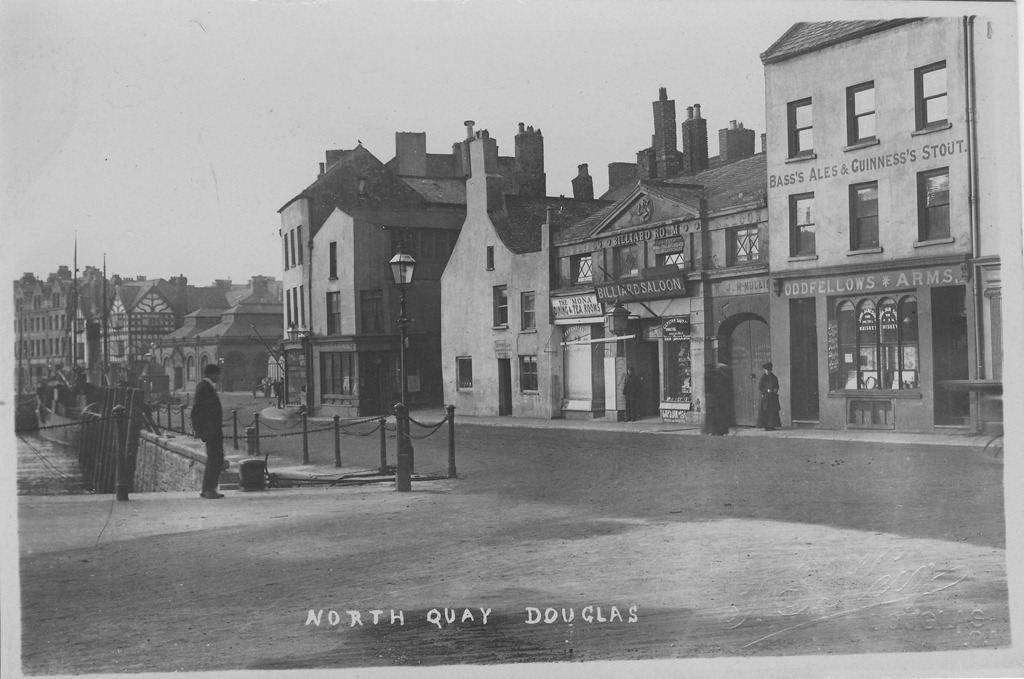
    Douglas harbour has seen great changes. I couldn’t find a series of photos taken from the same viewpoint, but here are some that illustrate something of what has gone on in the last 150 years. The first shows Market Hill, the street leading up from the quay. The old St. Matthew’s church is the focus of the picture, with the old open-air market just shown on the right.

    IOM0058

    Here’s a second view of the church and the open-air market:

    IOM0101

    Note the new commercial building behind the market and to the left of the church. The church itself was demolished in 1898 to make way for the building of a cast-iron market hall. A new church (the new St. Matthew’s) was built a short distance away on the quay itself. As well as the cast iron market hall, a brick-built market hall was also constructed at some point. Here’s a shot from 1912. On the left of the picture, you can seen the brick-built market hall (behind the standing man). All the buildings in the main part of the picture have been demolished.

    IOM0033

    And here is the brick-built market hall today, with the boarded-up cast-iron hall on the right. Note the commercial building behind, which is the same as the one (minus a chimney stack or two) from the earlier (second) photo in the series.

    050713-1255-11

    And, pulling back, you can see the “new” St. Matthew’s church in shot. The harbour is filled with pleasure yachts. In my youth, it was filled with working fishing boats. All gone.

    050713-1154-14

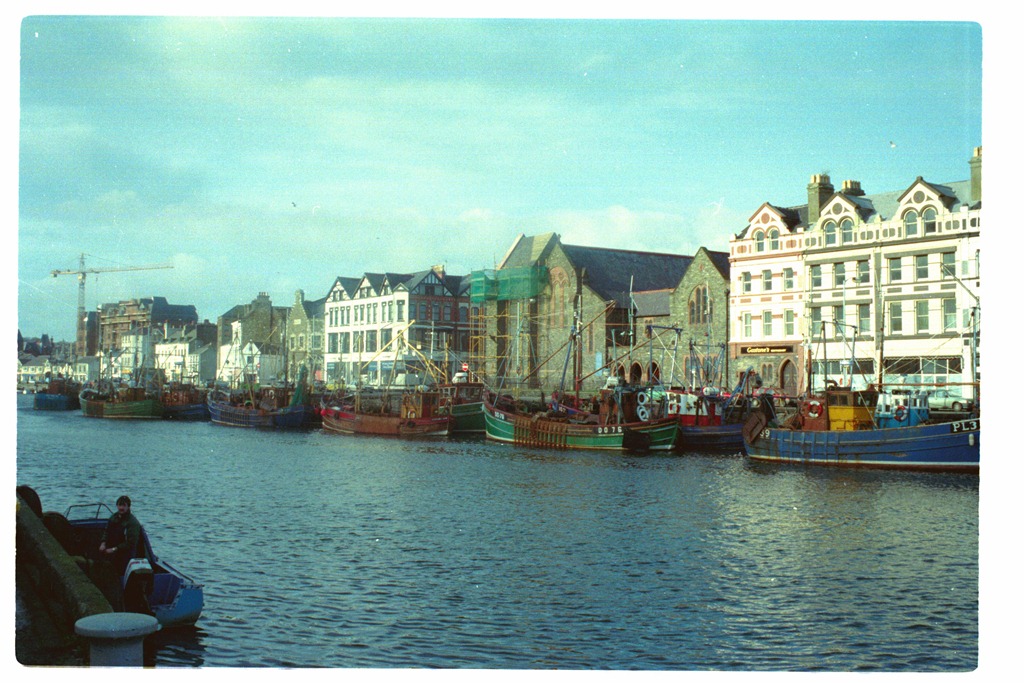
    However, even as late as 1988, there was still something of the fishing fleet remaining:

    img060201-11

    2 responses to “Then and Now”

    1. Robert Dammers Avatar
      Robert Dammers

      Suits, Greatcoats and Hats on the beach. My God, our forefathers were hardy folk! They were going to have some time at the seaside, come what may.

      1. Geoff Coupe Avatar

        Absolutely – and you can see the bathing machines in the background…

    Leave a comment

  • The Wedding Party–A Mystery Solved

    I’ve got a pile of postcards and old photos that I inherited from my father. Many of the postcards he collected from places that he visited around the world, when he was a merchant seaman in the 1920s and 1930s. There are also lots of postcards of places in the Isle of Man, where he and I were born. As well as reproductions of 18th century engravings, there are photos; the earliest of which date from 1860. Here’s an example of one of these, showing Douglas Bay:

    IOM0070

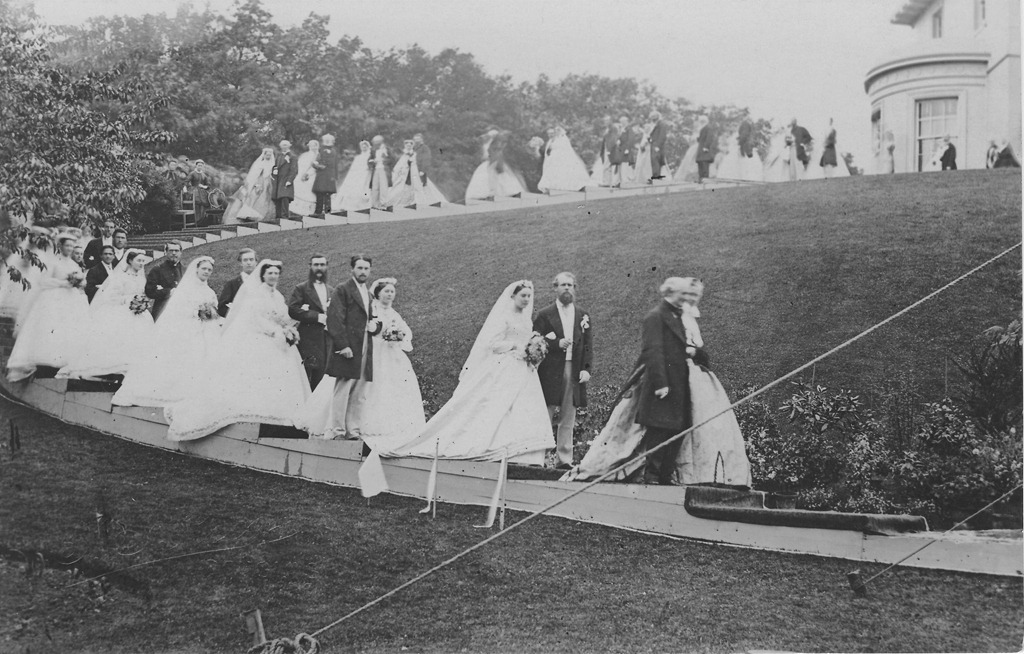
    But there is one photo that has always intrigued me. It shows a wedding party, in the grounds of what could be a rather grand house. Other than the fact that it certainly couldn’t be any of our family, I had no idea who these people were, or where the photo was taken. Until, that is, a couple of days ago…

    Here’s the photo:

    IOM0036

    My brother has finally solved the mystery – he came across the same photo in a book. It is the wedding of Louisa Jane Dumbell and Alfred Charles Elliot on the 23rd June 1866. Louisa was the daughter of a prominent Manx figure of the time, George William Dumbell. He founded his own bank in 1853, and it had a fairly chequered history until its collapse in 1900. However, in 1866, George was riding high, and he made sure his daughter’s wedding was a lavish affair:

    In 1866, on the occasion of the marriage of his daughter, Louisa,to Mr Elliott, of the Indian Civil Service, the most lavish expenditure was indulged in. The SUN columns described the bride’s dress as being of “white satin, trimmed with three rolls of satinround the skirt, bodice trimmed with Bruxelles point lace, with crystal buttons, Bruxelles lace veil, wreath of orange and myrtle,pearl ornaments, etc. She was attended by eight bridesmaids, and the wedding party completely filled the church at Braddan. A troop of workmen had been for weeks employed in erecting a. monster marquee in the grounds at Belmont, which were illuminated and decorated with fairy-like grandeur.” The wedding festivities terminated on the fourth day with a great ball in the Castle Mona Hotel.

    The photo shows the wedding party in the six-acre grounds of “Belmont”, the house that George Dumbell had built in 1835. And now, with the benefit of knowledge, I realise that I should have recognised the house in the photograph, because I played in the house and grounds as a child. One of my schoolboy friends was Michael Crowe, and his family lived in Belmont (which by this time had been split into two semi-detached , but still very grand, houses). We spent many happy hours playing in the very Rhododendron bush that you can see on the left of the photo. By the 1950s, it had grown to gigantic size, and it was our jungle and climbing frame all rolled into one.

    22 responses to “The Wedding Party–A Mystery Solved”

    1. Allerton Delano Marshall Avatar
      Allerton Delano Marshall

      I was so interested to find your blog and the references to Belmont. My mother, the late Sylvia Hitch Marshall, was the daughter of Gertrude Minna Dumbell, who was in turn the daughter of The Rev. George William Dumbell Jr., eldest son of the Manx banker to whom you refer. I grew up seeing that photograph every day, and although Mother knew it show her Great-Grandfather’s house in Douglas, she never knew the details of the wedding celebrated that day. She did, however, acquire some wonderful copper pieces from the house, through what means I know not, which are in my possession today. The story in the family was that when her Grandfather refused to enter the family banking business and was ordained to the priesthood, his father disowned him, causing him to emigrate with his wife and five daughters to Palestine, Texas beginning a life of ministry ending in Staten Island, where he married his daughter to my Grandfather Allerton Delano Hitch.

      1. Geoff Coupe Avatar

        Allerton, I’m very pleased that I was able to give you a little more background on the photo. The internet can be a wonderful resource. Regards, Geoff Coupe

      2. Jonathan Bracken Avatar
        Jonathan Bracken

        Allerton – most interesting. I think you’re my third cousin (once removed)! My great x 2 grandmother was Anne, born 1840, George William Dumbell Jr’s younger sister. It would be interesting to see photos of the copper pieces that came your way. I don’t think anything came our way, except a rather pristine bible, presented to GWD Sr in 1885. I have you down on my tree, your bit shamelessly cribbed from someone else’s work on Ancestry I fear! Rather than sabotage Geoff’s Blog feel free to contact me direct on jrbracken@gmx.co.uk

        Regards
        Jonathan Bracken

      3. Bonnie Murray Simrell Avatar

        Most interesting, Allerton. I have a photo of the seven daughters of Rev. Dumbell, one your grandmother Gertrude and another my grandmother, Henrietta Frances Emily Dumbell (Murray). There also were five brothers. Three other children died as infants. I remember talk of the Hitches. Rev. G. W. Dumbell, Jr.,l established a number of churches en route across the United States (covered wagon and all), including an Episcopal Church in St. Louis. The remains of the family’s homestead in Texas may still exist near Plano. Rev. Dumbell later settled in Goshen, New York, where he was the minister of Saint James Episcopal Church. The photo was taken on the grounds of Lone Oak, the home of my grandmother in Goshen. I will be pleased to send a copy if provided an email address. Wow! All these relatives! Thanks to my brother, John Spencer Simrell, who found this.blog.

        1. Donna Russell Avatar
          Donna Russell

          Hi Bonnie I have been reading your info on the Dumbell family. My husbands great great grandmother was Emily Byne illegitimate daughter of Francis Byne who I believe was in business for a short while with George William Dumbell.I just wonder if you have any information regarding this. I seem to think I have read something regarding the Murray family and the Bynes.

          1. kenneth boyne Avatar
            kenneth boyne

            i just found out my grgrgrandpa was from isle of man and we spell boyne here,there was byne,as i was told one person connected me to a byne, this may be kin ? my gr gr grandpa was william thomas boyne here on stone here died in new orleans,live in new york short time. kb

          2. kenneth boyne Avatar
            kenneth boyne

            i saw boynes/bynes and murrays somewhere in my tree i’am sure, i’am linked to isle of man and ireland michael boyne married jane gale/gell and there were others have some pictures in needed,kboyne

        2. Keith Avatar
          Keith

          First thank you G.C. for your blog, it’s most informative. I became interested in the Dumbell’s while researching my 1st Cousin (4x removed) Ambrose Spencer Murray Jr. (so Bonnie we’re connected that way, lol) and I just received the book, “Seeing the West” by Kate E. M. Dumbell.

          1. Bonnie Simrell Avatar
            Bonnie Simrell

            Where did you find “Seeing the West” and when was it written? So what is relationship of my grandfather’s 1st cousin 4x removed to me? lol!

    2. Gail Rattee Avatar
      Gail Rattee

      Geoff Coupe: I am so interested to read up on all your information re George William Dumbell. My Grandfather was James Henry Dumbell and my Gr. Grandfather was Henry Dumbell (who I believe to be the brother of George William Dumbell) My great grandfather was born in 1846, to a John Dumbell. I don’t know John’s wife’s name. If you can give me any information I would certinly appreciate it.

      1. Geoff Coupe Avatar

        Gail, sorry, but I don’t have any further information on the Dumbell family. Here’s a page with some links to resources that might help you further:
        http://www.bbc.co.uk/history/familyhistory/get_started/get_started.shtml

      2. Jonathan Bracken Avatar
        Jonathan Bracken

        Gail – I don’t think your Henry Dumbell was the brother of the George William Dumbell (GWD) mentioned here. I’ve got a fairly extensive family tree and while there is a Henry Charles Dumbell born in 1846, his father was GWD b 1804 (he also had a brother of the same name b1832 – mentioned in the post from Allerton Marshall above). There is a web article on GWD at http://www.isle-of-man.com/manxnotebook/people/business/gwdumbel.htm
        Mind you I’ve been on the Ancestry website and someone has put a tree together incorporating your Henry, a clockmaker, father John and grandfather Nathaniel! http://trees.ancestry.co.uk/tree/19191953/person/1923809745 you might need to subscribe to view. There may be a connection in the early 1700s between the two trees but more work is required to establish!

        Geoff – Most interested to see this. GWD was my great x 3 grandfather, and your post has drawn out a few potential relatives!

        1. Geoff Coupe Avatar

          Jonathan, glad to see that the post and picture have revealed a few leaves on the family tree! Thanks for your comments.

      3. Donna Russell Avatar
        Donna Russell

        Hi Gail I have ben reading youinfo on the Dumbell Family. My husbands gg gandmother was Emily Byne illegitimate daughter of Francis Byne who I believe was in business for a short while with George William Byne. I was wondering if you know anything about this. Many thanks Donna Russell.

      4. kenneth boyne Avatar
        kenneth boyne

        any body have pictures of the boynes / byne on the island with other familys?

    3. Trish Avatar
      Trish

      I just stumbled across this blog post while looking for something entirely different but I’m fascinated to see how many descendants of the Dumbells it’s dredged up 🙂

      I live on the Isle of Man and I could have told you who was in that wedding party, not because I’m particular well educated in Manx social history but simply because that photo is framed (and labelled) on the wall of The Prospect pub along with a load of old bank notes. The building which is now occupied by the pub was previously the last premises of Dumbells bank – you can see it on street view http://goo.gl/maps/TR62Q – although if you turn around you will see the rather more impressive former premises of their big competitor, the Bank of Mona (the building which looks like a wedding cake).

      Also Geoff linked to the press release on the Chrystals site but the property (or at least half of the original property) is still for sale so you can have a proper snoop inside http://bit.ly/13xXSBw I expect the wallpaper will be familiar to you if you were in the house in the 50s. 😉

      1. Geoff Coupe Avatar

        Hi Trish – thanks for your comment and pointing out the pub that was previously the bank. It’s very odd – I walked up and down Prospect Hill every weekday as a child going to and from school (first Tynwald St., then Demesne Road, and finally, biking to St. Ninians), and I simply can’t recall a pub being there. The Isle of Man Bank on the corner, yes; Prospect House, yes; but not that there was a pub between them. Has it been a pub since the 1950s, or is it a relatively recent incarnation?

        And yes, the wallpaper does look familiar!

        1. Trish Avatar
          Trish

          Hi Geoff,

          Well, first I should admit it turned out I was completely wrong (or at best misled) and that is not the former building of Dumbell’s Bank. The Prospect does have a wall of Dumbell’s memorabilia including a photo of the bank and when you are inside the building you think that the photo and the pub are one and the same (they look vaguely similar). But I found the photo online – http://bit.ly/10TGW9p and it seemed rather dubious that it was the same place. That’s because it isn’t. The former Dumbell’s bank is 1 Prospect Hill on the corner of what is now called Nelson screen but what was, at the time, called St George’s Street (a small matter which confused me no end as St George’s Street is now a good few streets further up Athol Street). It’s now the Natwest Bank – http://goo.gl/maps/N19XD and of course as soon as I realised that, I found the document supporting its entry onto the Protected Buildings register – http://bit.ly/15R7Th0 Certainly much more of a building to challenge “the wedding cake”. So apologies for telling you complete nonsense yesterday.

          As for The Prospect – it’s been around for as long as I can remember and I asked around at work and no-one could remember it not being a pub but that only takes us back as far back as the 80s. It’s officially called “The Prospect Hotel” though which makes me suspect it must have been around for a while as it’s certainly not been a hotel for a long time. I let you know if I find out anything more definite.

          Regards,
          Trish

          1. Geoff Coupe Avatar

            Hi Trish, thanks for the clarification. Yup, the NatWest building is much more the sort of thing old George would have commissioned for his bank 🙂

            As for the Prospect – I’m beginning to think that it must have been there in my youth. I’m recalling faint wisps of memory of beer barrels being lowered down by ropes on a ramp leading into the cellar. The entrance to the cellar was a trapdoor at the front of the Prospect, rather than round at the back, I think…

    4. Julie O'Shea Avatar
      Julie O’Shea

      Just came across this, I now live in Belmont, Douglas, the Dumbells house and am very interested to hear anything about them. I have the famous wedding photo but would be very interested if anyone knew anything about the layout of the house before it was split into two properties.

      1. Trish Avatar
        Trish

        Hi Julie,

        Oh how lovely, I spotted that it was now being run as a B&B! Is that your business?

        I don’t think anyone will have that information on the internet. There must have been original plans but who knows if they’ve survived from 1835. Have you been around all the record places on the island?

        I would try the following:

        Public records office in Spring Valley. https://www.gov.im/about-the-government/departments/economic-development/central-registry/public-record-office/visiting-the-isle-of-man-public-record-office/ Planning permission was introduced in the island in 1921, so if any alterations were made, which required planning permission, between 1921 and the 1950s, it’s possible there is a plan. The public records office holds the plans up to 1982, they are super helpful but best email them ahead of visiting (don’t think they get many visitors, they seemed a bit surprised when I knocked on the door, in the advertised opening times).

        The Land Registry on Bucks Road. https://www.gov.im/categories/home-and-neighbourhood/deeds-probate-and-land-registries/land-registry/ It’s possible (although I wouldn’t say probable) that one of the old deeds contained a floor plan. I find it a little intimidating in there (it’s mainly advocates and they clearly know what they are doing) but the staff are helpful if you ask them.

        The Library in the Manx Museum. https://manxnationalheritage.im/collections/library-and-archives/ They have alsorts in here, Wills etc, you never know what information they may contain.

        The iMusuem behind the Manx Museum. http://www.imuseum.im They have scanned and indexed all the old newspapers, there may have been an estate sale or something that may include a floorplan. You can actually do this online if you subscribe via Government Online Services but it’s free if you go into the building (although check their opening hours as they are about to change). Even
        if you don’t find the plans, I’m sure you’ll dredge up a load of fascinating titbits about the history of Belmont (e.g. adverts for servants).

        Good luck!

        1. Geoff Coupe Avatar

          Trish, thanks for this! Very helpful – I hope that Julie will be able to learn more about the house.

    Leave a comment

  • Soldiering On

    I see that Paul Thurrott, in an article published on his Supersite for Windows, has done a U-turn and is now betting on Windows Home Server 2011. Back in October 2010, when he was first told by the current WHS team that they would be removing the Drive Extender technology from WHS 2011, his first reaction was that:

    “Removing Drive Extender was the equivalent of driving a dagger right through the heart of the product”.

    Indeed, that was my first reaction on hearing the news when it became public a month later, and the reaction of many, if not most, of us who had bought the original version of Windows Home Server.

    Despite the outcry (for example, there are currently 5,581 votes in favour of retaining the DE technology in WHS 2011 versus 73 against over at the Microsoft Connect site – tagline: your feedback improving Microsoft products), the technology will not be put back into the final WHS 2011 product. (Addendum: on the 12 March 2011, Microsoft removed all the suggestions that had been posted by WHS 2011 beta testers in the connect forum, including this one. An act that reminded me of the Soviet’s airbrushing ex-politicos out of photographs. One way of removing embarrassing facts, I suppose)

    So now, Paul Thurrott has put his sense of disappointment behind him, and written that:

    So yes, I’m disappointed about Drive Extender, I really am. And yes, I’ve sweated this decision for months. But when the final version of Windows Home Server 2011 appears in the months ahead, I’m switching. And I’ll let you know how it goes, of course. But I can tell you now that Microsoft’s home server solution is still the best game in town, even with the removal of Drive Extender. And if you could stop crying into your beer, I think you’ll admit the same.

    Well, perhaps. But what I find most telling about this whole debacle has been the way that it has been (mis)handled by Microsoft. It seems clear, from Thurrott’s own account, that the current WHS team did not have a clue, at least in the beginning, that the decision to remove DE would have such a negative reaction.

    In effect, the team had just torn up the guiding principles for the product developed by Charlie Kindel and the original WHS V1 team – but they don’t seem to have appreciated that fact, or the likely reaction from customers who had bought V1 on the strength of those principles.

    The team then soldiered on with the decision – and I have to give them credit for their brass necks – and very probably have weathered the storm. But I really could have done without the disingenous posts on their blog telling us that they were only following feedback from their customers:

    “When weighing up the future direction of storage in the consumer and SMB market, the team felt the Drive Extender technology was not meeting our customer needs”.

    There are some good things remaining in WHS 2011, but the heart of WHS V1 – its provision of consumer-friendly storage – has been surgically removed.

    The die has been cast – we’ll see what happens.

    6 responses to “Soldiering On”

    1. Robert Dammers Avatar
      Robert Dammers

      I’m a bit irritated by Thurrott’s dismissive attitude towards the “silly” third party replacements for DE (which, after all, was the sort of thing Microsoft appeared to be looking for). I agree that one should wait for maturity in that sort of product before adopting, but I still need that functionality: my data pool consists of 3 internal 1TB drives, 3 external 1TB and 1 external 2TB drives. I don’t intend to replace that lot in a hurry.

      1. Geoff Coupe Avatar

        Yes, it was a rather strange comment, at odds with his love of DE, wasn’t it?

        I agree that we should be looking for a solid solution, but if it comes from a third party, then so be it; it’s what we have to live with. After all, others are looking at stuff such as Greyhole and UnRaid as DE replacements, and those are also “add-on” products.

        On a side-note – good to hear from you, Robert. Hope all is well with you and yours.

    2. Robert Dammers Avatar
      Robert Dammers

      >>After all, others are looking at stuff such as Greyhole and UnRaid as DE replacements, and those are also “add-on” products.<<

      Exactly. There's a piece by Sean Daniel, "Senior Program Manager for the Home and Small Business Server Team" which has been posted on the Windows Home Server Facebook page which outlines features and benefits, all very fair and good, but concludes that people who have a lot of data just need to get their damned house in order. Now I get that MS have a strong interest in simplifying the low-end server range, and that it is attractive to take DE out of the base product. So why don't they just either provide it as an optional add-in, or partner with one of the 3rd party developers working on equivalent functionality to provide a certified, thoroughly tested alternative.

      Still, I think eventually there will be a satisfactory outcome. Which is just as well, because I'm very fond of my Windows Home Server 🙂

      Best wishes to you and Martin!
      R.

      1. Geoff Coupe Avatar

        Yes, I saw the Sean Daniel piece – it was also on a Home Server blog page, where I commented on it (using much of the material from my blog post).

        I see that he does the usual trick of claiming that you can access your home PCs remotely via WHS, without pointing out that you need the Professional or Business versions of Windows to be able to do this. This stretching of the truth to hide the small print always annoys me intensely…

    3. […] as a server and media appliance that could be used by the average consumer, and they’ve thrown that chance […]

    4. […] as a server and media appliance that could be used by the average consumer, and they’ve thrown that chance […]

    Leave a comment

  • PVV Absurdities

    I’ve written before that I worry about the popularity of Geert Wilders and his Freedom Party (the PVV) here in the Netherlands. While I find the demagoguery of Wilders extremely disturbing, I take some comfort from the fact that others in the PVV seem to be little more than political clowns.

    We’re about to enter into an election for seats in the provincial governments. So all the candidates are out there and using every opportunity for campaigning. No problem about that. But when one of the PVV candidates for the Gelderland province (where I live) calls for repatriation of Highland cattle back to Scotland and Polish ponies back to Poland, then I have to wonder why anyone should take clowns like this seriously?

    Since some people have commented that surely no-one could be that stupid; I give you PVV candidate Olov Wullink, in person, uttering his inanities (from 1:10 in the second video linked on this page here). Sorry, the full absurdity is only intelligible to those of us who understand Dutch.

    However, I think it’s worthwhile to remember that, while events like this have their humorous side, the politics, and subsequent impact on all of us, are deadly serious. The rise of Wilders continues to concern me. I don’t think it is good for us.

    One response to “PVV Absurdities”

    1. Francis Sedgemore Avatar

      Bleedin’ Scottish cows, coming over here and polluting our pristine Dutch atmosphere with their noxious emissions! Shouldn’t be allowed.

    Leave a comment

  • What’s Sauce for the Goose…

    The serious assault on a CBS journalist, Lara Logan, in Tahrir Square has rightfully drawn widespread condemnation from many quarters, including women’s rights activists and pro-change protesters in Eygpt.

    Of course, there were some commentators, such as Debbie Schlussel, who got into the “blame the victim” game, saying that the attack was partly Logan’s fault. That deserves the contempt that Schlussel got for her comments.

    However, there was a reaction from Heather Blake, of Reporters Without Borders, reported in the Guardian’s story that I found rather interesting. She said:

    “At the moment, female and male journalists have the same training. The truth is that female journalists need to be taught about different cultures and the ways in which men behave in those cultures. They need to know about gender-specific expectations in different countries, from what they wear to how they interact with those they met.”

    I’m not sure that I agree with that. I think that both men and women journalists need to be taught about different cultures and the ways in which men behave in those cultures. It seems to me that consciousness-raising is just as important, perhaps even more so, to members of the male gender, who are often blithely unaware of, or complicit in, the various forms that oppression of women can take.

    Leave a comment

  • Someone Like You

    I wrote a couple of months ago that I was looking forward to the release of Adele’s next album: 21. We got it a couple of weeks ago, and have been playing it frequently ever since. It’s very, very good.

    Here she is performing “Someone Like You” at the BRIT Awards recently; just her voice and a piano – but what a depth in that performance:

    4 responses to “Someone Like You”

    1. JL Avatar

      Hmmm. Makes me glad not to be 20-something anymore.

      Still reading you and still enjoying your writing.

      1. Geoff Coupe Avatar

        Yep, although love can give pleasure or pain at any age, I think. But perhaps you’re right that age dulls the worst excesses (in either direction)…

        1. JL Avatar

          I’ve since become another hopeless/helpless Adele addict. Thanks. I now have ‘Take It All’ on a continuous loop from morning til night.

          1. Geoff Coupe Avatar

            Glad you’ve fallen – she also seems to be a down-to-earth person; not an airhead celebrity (at least, not yet). See:
            http://www.guardian.co.uk/music/2011/mar/27/adele-21-letterman-no1-interview

    Leave a comment

  • Being Economical with the Truth

    I know I’ve said it before, but I do loathe and detest marketing-speak. The last time my distaste was directed at Google; this time it’s Microsoft’s turn.

    This year’s Mobile World Congress is currently underway in Barcelona. So naturally, Microsoft is there publicising Windows Phone 7. The Marketing arm of Microsoft is running full tilt to supply the hungry maw of the news media, so we get this piece from Microsoft’s News Center. It includes the following quote attributed to Andy Lees, president of Microsoft’s Mobile Communications Business:

    Microsoft sold 2 million phone licenses in Windows Phone 7’s first two months, and the phone is now available from 60 mobile operators in 30 countries around the world, Lees said. As phone availability and sales grow, so too does the app marketplace – there are now more than 8,000 apps in the marketplace and 28,000 registered developers.

    Now, right there, is a prime example of why I loathe and detest marketing-speak. On the face of it, Mr. Lees’ statements are perfectly true. However, they are not the whole story. While Windows Phone 7 handsets are indeed available in 30 countries around the world, the applications marketplace is not. At my last reckoning, it was only available in 16 countries. So those “more than 8,000 apps in the marketplace” are not actually available to customers living in countries such as India, Norway, Sweden and the Netherlands.

    So customers buying phones in these, and similar countries, are then finding that instead of a smartphone they have little more than a premium-priced dumbphone.

    That does not make for happy customers.

    In that light, I find it very ironic that the Microsoft News Center puff piece ends with this quote from JP Wollersheim, a Windows Phone 7 product manager:

    “You don’t sell phones if people aren’t happy. That’s the leading indicator of where we’re at, and it’s predictive as to how many we’re going to eventually sell,” Wollersheim said. “We want it to sell, and we want customers to be super happy, and we want them to tell their friends and family. That’s the best recommendation you could have.”

    Be careful what you wish for.

    One response to “Being Economical with the Truth”

    1. […] Microsoft management keep trumpeting about the thousands of applications available for WP7, it is somewhat irritating when they aren’t […]

    Leave a comment

  • The Story of Wind and Mr. Ug

    Vi Hart describes herself as a recreational mathematician. She’s also a pretty good storyteller, as evinced by this little tale set on a topologically challenging world.

    Leave a comment

  • In Praise of the Dumbphone

    The leaking of Stephen Elop’s memo to his troops at Nokia has certainly focused the attention of business and technical analysts on the company.

    However, in all the excitement, Francis Sedgemore has picked up on something that he thinks is in danger of being forgotten, and I think he is right to do so. He has written to Elop reminding him that not everyone is enamoured of Smartphones with touchscreens. Some of us still find that mobile phones, with real buttons, that just make and receive phone calls and SMS messages are sufficient. He has a point. And, as he says, some attention should be paid to the poor quality software that Nokia (like most mobile phone manufacturers) provide to synchronise contacts and content with the user’s PC or Mac.

    Leave a comment

  • The Survivor

    Good heavens, Jonathan Grimshaw is still alive and kicking. He contracted HIV way back in 1984, so must be one of the longest-surviving people with HIV in the UK.

    While I have never actually met him, for a time he was working closely with my best friend, who was a psychologist and epidemiologist working in the Home Office. Len was instrumental in the development of policy on HIV/AIDS in the UK’s prisons. By his account, Grimshaw was a charming and intelligent man, doing a lot of good work. So it’s good to hear that he’s still with us.

    Leave a comment

  • Michael Moorcock, At Home In Texas

    Somehow, the words “Michael Moorcock” and “Texas” seem strange bedfellows. But this interview, by Hari Kunzru of the author Michael Moorcock starts to make some sense of it.

    Moorcock is a brilliant author. Whether he’s producing pulp or great literature, or both simultaneously, doesn’t really matter. His voice is worth harking to. To me, his name is a bell that instantly starts my soul ringing to a certain time, place and ethos in my mind. A place that is dear to me, but one that causes frissons as well. It’s the shiver of fear that runs up your back mixed with eroticism at the same time.

    2 responses to “Michael Moorcock, At Home In Texas”

    1. Mike Avatar

      Well, “Texas” may seem odd until you realize they mean “just outside Austin”. Then it all comes together.

      (I don’t know that I’ve actually read any of M.M.’s work, although I’ve known of him for a long time. Must rectify that.)

    2. Geoff Coupe Avatar

      Hi Mike. Well, you really should try some of his stuff, but I wonder whether it will have the same impact on you. Something like “Mother London” reached into my cultural genes with an ease like a warm knife slipping into butter. That may be a tad more difficult for someone from the Colonies, shall we say… 🙂 Nonetheless, I’m curious as to what you will find.

    Leave a comment

  • Making a Silk Purse out of a Sow’s Ear – Not

    Oh dearie me, Microsoft has just unleashed the Release Candidate of Windows Home Server 2011 upon the world. And as they had promised, they have surgically removed the one unique selling point that WHS version 1 had – the drive extender technology.

    Frankly, this confirms to me that Microsoft has totally lost the plot when it comes to crafting consumer technology that ordinary people – as opposed to IT experts – actually feel comfortable about having.

    They are, of course, putting their spin on how WHS 2011 will be wonderful, but it all has the air of them trying to make a silk purse out of a sow’s ear, and failing miserably. Take, for example, this YouTube video that they put up to show us how to manage our storage in WHS 2011. With WHS version 1, when your storage was getting full, you could just add another drive and carry on. Now, as this video painfully points out, you have to worry about whether you need to move your folders around to rebalance your storage across your discs.

    Hello, Microsoft, wake up – Mr or Ms average consumer doesn’t want to think like an IT support person.

    I, for one, will be carrying on with WHS version 1 for as long as I possibly can. WHS 2011, with the removal of Drive Extender, has nothing to offer.

    5 responses to “Making a Silk Purse out of a Sow’s Ear – Not”

    1. […] major difference is of course the removal of the Drive Extender technology. Now, this has been done to death (but that doesn’t mean that it’s not important), however, let’s look beyond […]

    2. […] a server and media appliance that could be used by the average consumer, and they’ve thrown that chance […]

    3. […] I know that I had said that I would be sticking with WHS V1 as long as possible, but those who really know me are aware that I am often unable to resist poking new technology to […]

    4. […] already, I’m interested. I thought that Drive Extender was a unique selling point for WHS v1, and bemoaned its removal in WHS 2011. I never wanted to take on the task of managing a RAID configuration in my home server. […]

    5. […] a server and media appliance that could be used by the average consumer, and they’ve thrown that chance […]

    Leave a comment

  • A Tale of Two Markets

    Following on from the previous post on Android 3.0 (Honeycomb), I see that Google also announced, and have opened, a web presence for Android applications: the Android Market.

    I found it quite instructive to compare using Google’s Android Market with the Microsoft equivalent, the Zune Marketplace.

    The first thing to note is that, in the Android Market, it is possible to browse and purchase applications for your Android devices directly via the web site. The Zune web site, on the other hand, does not allow you to browse applications for your Windows Phone directly. Instead, when you click on the “Browse Zune Marketplace” link, it fires up the Zune client application on your PC, which accesses the applications for Windows Phone 7 available in your location. And there’s the rub: the Android Market seems to be a single global marketplace, accessible to everyone, while the Zune Marketplace is heavily fragmented, and not open in all countries. I’ve written about this Microsoft Marketplace disaster before, but to see it laid bare by comparing the user experience with Android Market is very revealing.

    Microsoft really should open up a web site to allow global access to WP7 applications along the same lines as Google’s Android Market. If they don’t, then they will continue to be on the back foot in the Smartphone market.

    2 responses to “A Tale of Two Markets”

    1. […] Inching Closer? Posted on April 4, 2011 by Geoff Coupe Back in January, I wrote about the fact that even though the Zune Marketplace was operational here in the Netherlands, it wasn’t offering any Apps for Windows Phone 7. The only thing that the Marketplace was offering here was videos to rent. Globally, Microsoft’s Marketplace is heavily fragmented or non-existent in most countries, in glaring contrast to the Android Market. […]

    2. […] Back in January, I wrote about the fact that even though the Zune Marketplace was operational here in the Netherlands, it wasn’t offering any Apps for Windows Phone 7. The only thing that the Marketplace was offering here was videos to rent. Globally, Microsoft’s Marketplace is heavily fragmented or non-existent in most countries, in glaring contrast to the Android Market. […]

    Leave a comment

  • Honeycomb Looks Sweet

    Google presented the latest version of their Android operating system yesterday, which is codenamed Honeycomb. The presentation has been posted on YouTube.

    I must admit that there were some nice touches in the User Interface of Android 3.0, particularly the use of hardware accelerated graphics. The UI is finger-driven, of course, and watching the demo really drives home the point that a Windows Tablet just isn’t designed for fingers. If Microsoft still haven’t grasped that fundamental point, and continue to insist that Windows Tablets, in their current form, can compete against Android and iPad tablets, then they will fail miserably.

    Watching the presentation also drove home another couple of points to me. First, how much I loathe and detest marketing-speak. I’m afraid watching people with false smiles saying how excited they are to be here today to tell you all about their “cool” and “awesome” products has never been one of my favourite pastimes. Secondly, I am so clearly not in the target markets. I might just as well be from another planet. I think that was exemplified by the gentleman from Disney Mobile gushing excitedly about something called Tap Tap Revenge, which has probably earned the Disney Corporation more money than the GDP of most small countries.

    And then there was the team from CNN showing their news application for the Android tablets. Quite apart from the fact that quality journalism is already a threatened species, CNN seem to be wanting to drive it further into extinction by introducing something called iReport. Essentially, CNN want to fool us into submitting news reports to them, for free, and my bet is that the rights subsequently belong to CNN, and not to the originator. I suspect that the quality of the majority of the stories will merely underline the veracity of Sturgeon’s Law. For example, on the page of news stories being demonstrated was one concerned with the fact that the iReporter’s miniature dachshund was caught in a recent snowfall. 

    I was left with the feeling that if Sturgeon were to redefine his Law today, he would probably revise the estimate of 90% (of everything being crud) to a number that would be considerably higher.

    Still, looking beyond the fact that I am an old curmudgeon, it will be interesting to see how the Tablet market develops. This challenge from Google with Android 3.0 looks to be a good one.

    One response to “Honeycomb Looks Sweet”

    1. […] Coupe I know I’ve said it before, but I do loathe and detest marketing-speak. The last time my distaste was directed at Google; this time it’s Microsoft’s […]

    Leave a comment