Reflections on life at “De Witte Wand”…

  • Rise Like a Phoenix…

    Well, of course, as soon as I read of the controversy surrounding Conchita Wurst, I couldn’t help but cheer her on in the Eurovision Song Festival. A drag queen, with a beard? It brings back fond memories of the Sisters of Perpetual Indulgence

    And then when I saw her in the second semi-final, I was even more pleased to realise that not only had she a damn good belter of a song with strong lyrics – Rise Like a Phoenix – but she could deliver it with style and panache.

    And now she’s won Eurovision 2014. Well done her!

    Martin and I watched the final last Saturday – Eurovision is a guilty pleasure. It is so over-the-top and almost the definition of camp. Every year it has more than its fair share of cringeworthy moments. This year, the French entry scored highly, and I’m still trying to get the image of the butter-churning Polish lady out of my mind.

    But there were some good songs. The Dutch entry, although I didn’t much care for it, did far better than we all hoped, coming second. If it hadn’t have been for the phenomenon of Conchita, it would have swept the board.

    I see that the UK public displayed their usual good taste by awarding the Polish girls the full douze points. It was only the UK jury voting them down that balanced it out. We Dutch were almost as bad – the public put them in 2nd place, while the jury put them in 25th place.

    At least we redeemed ourselves over Conchita – both public and jury placed her in 1st place.

    Also, while the Russian jury followed the party line and put Austria in 11th place, the Russian public actually ranked Conchita in 3rd place… We live in interesting times.

    Leave a comment

  • OneDrive – Still No Proper Support For Tags

    Update 23 January 2015: OneDrive now searches Tags – at last! So please treat what follows as a historical post illustrating the situation as it was up until January 2015…

    Update 8 October 2015: And now Tags added to photos via OneDrive online will get added to the photos’ metadata, and thus also be synced back down to the photos held in OneDrive on your PCs.

    Update 5 October 2024: And now Microsoft has removed the ability to search tags in photos stored in OneDrive. They have rendered OneDrive useless for managing photos.

    Microsoft has recently added some new features to OneDrive, listed in the OneDrive Blog: Updating OneDrive: Five New Features You Asked For.

    Unfortunately, the five do not include one that I (and others) have been requesting for the past three years: proper support for tags in photo metadata.

    Interestingly, one thing has changed, there is now a “Tags” heading displayed along with the “People tags” heading in the information pane for a photo. This returns a feature that was removed in June 2011. However, this does not yet seem to be fully working. Let me try and illustrate this.

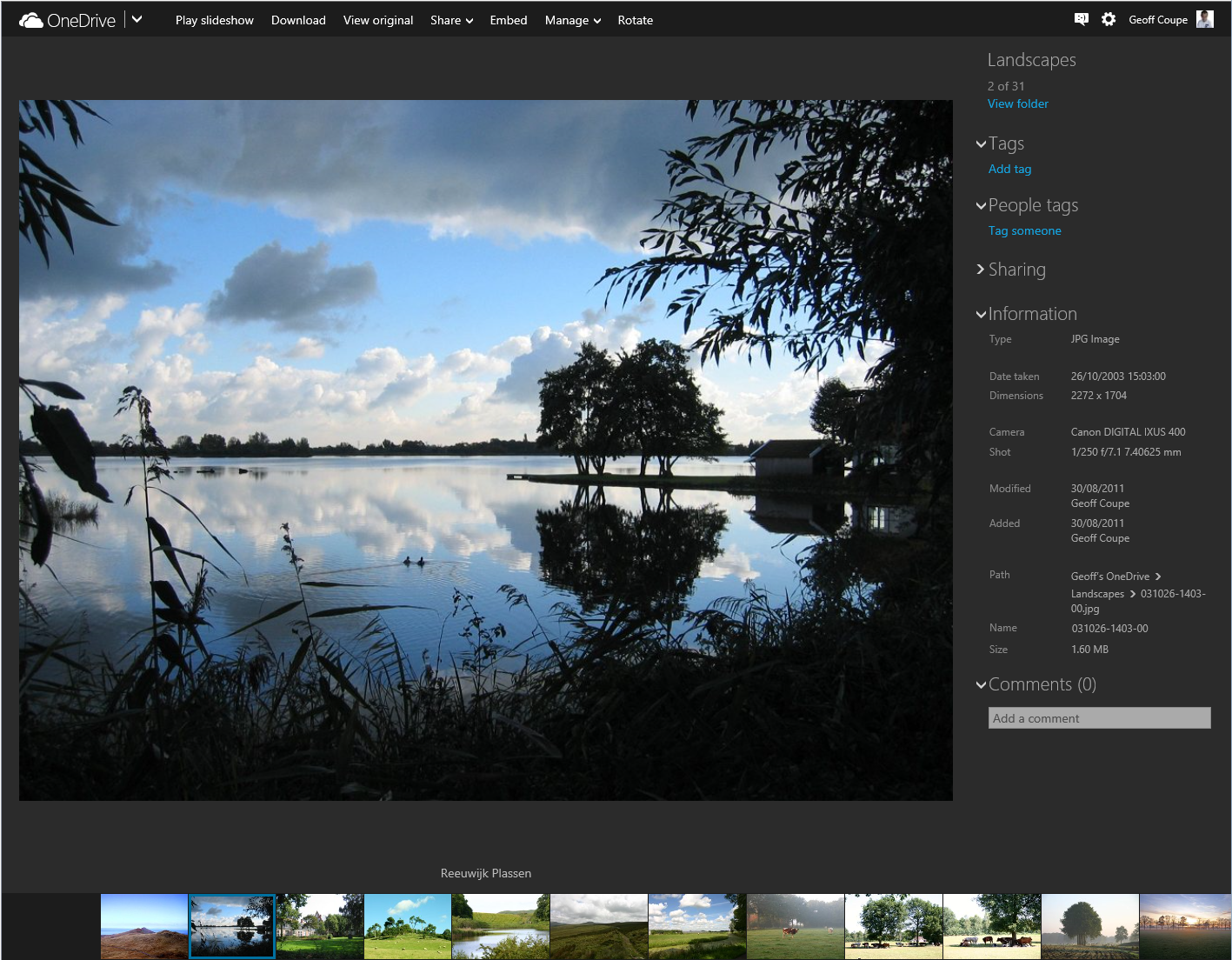
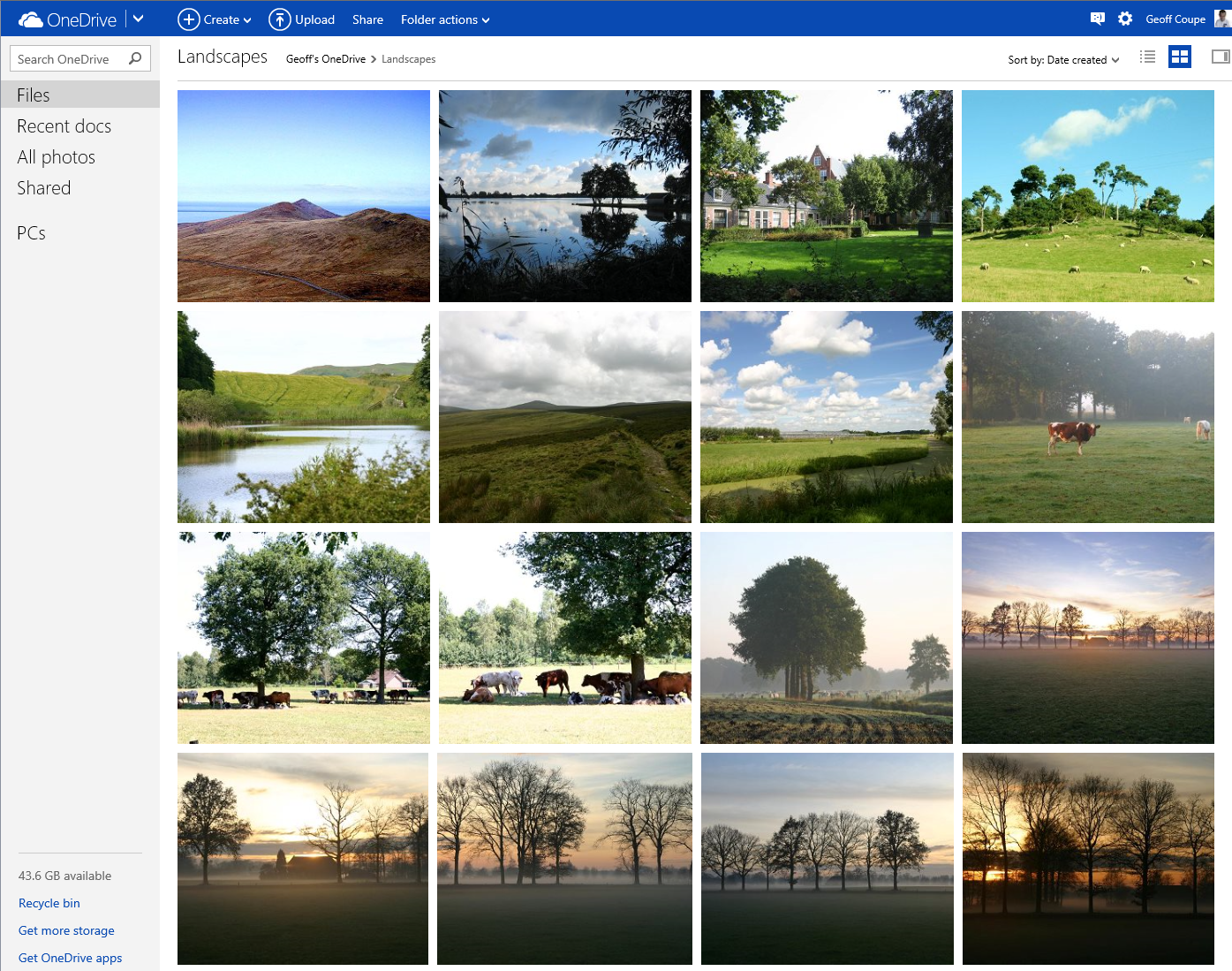
    First, here’s the new view of a folder of photos on OneDrive; it has larger thumbnails than the previous version:
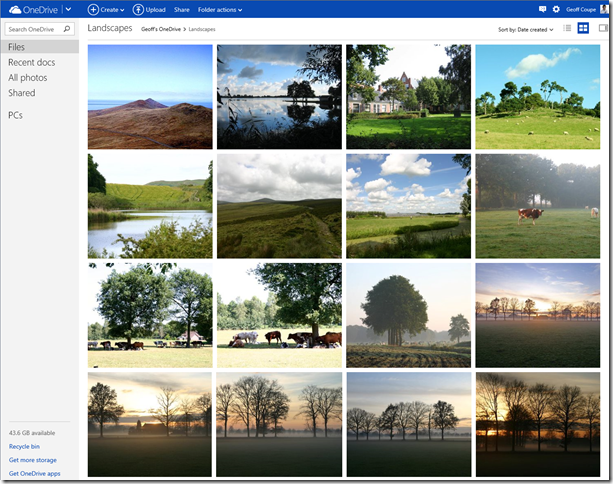
    Onedrive 01

    Now let’s look at an individual photo using OneDrive, and show the metadata stored in the photo displayed in the information panel on the right:

    Onedrive 02

    Notice how OneDrive claims there are no descriptive tags in this photo, by the fact that under the “Tags” heading, there is only the link to add a tag.

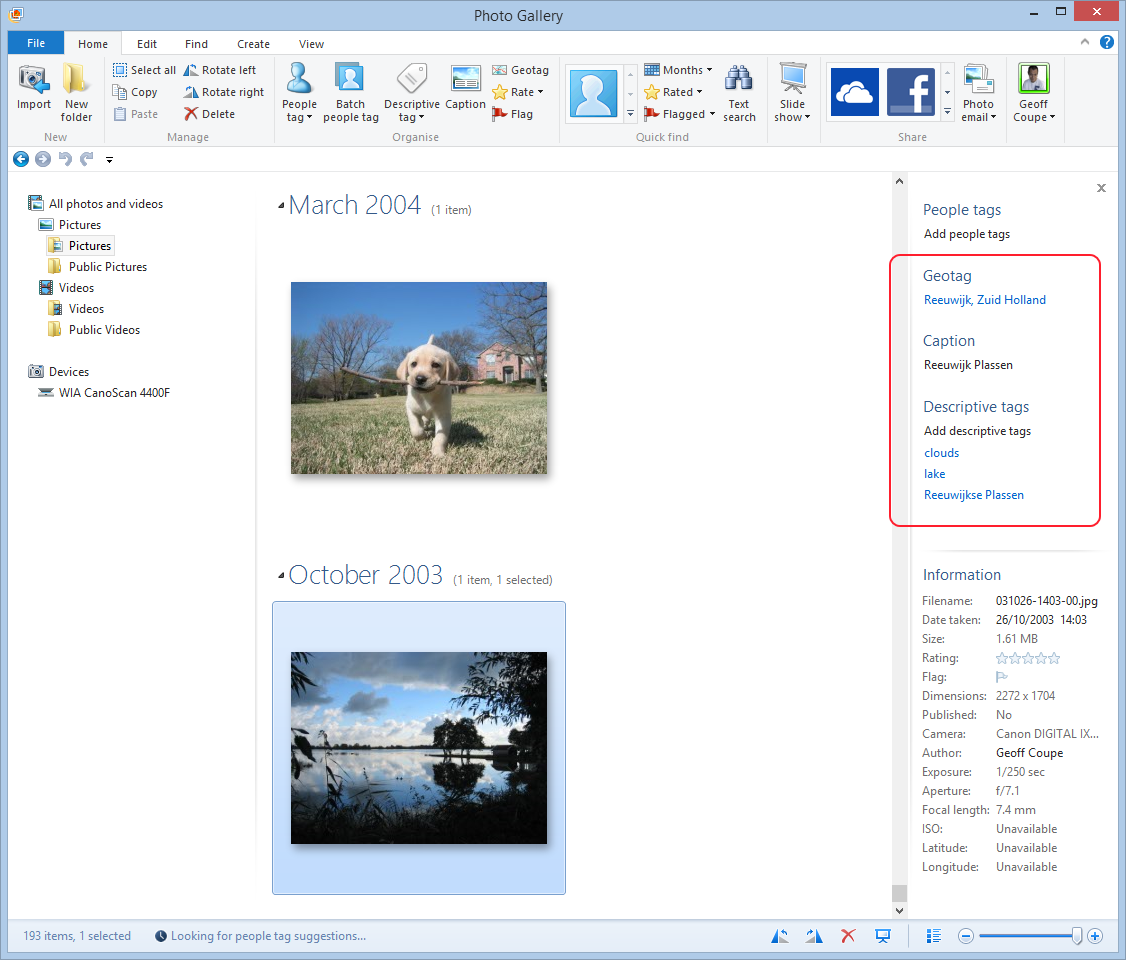
    However, this photo (like all the photos I have on OneDrive) has been tagged. I can show this by downloading a copy of this photo to my PC (by clicking on the “Download” link shown at the top of the OneDrive window), and then using Microsoft’s Photo Gallery to display the metadata in its information panel:
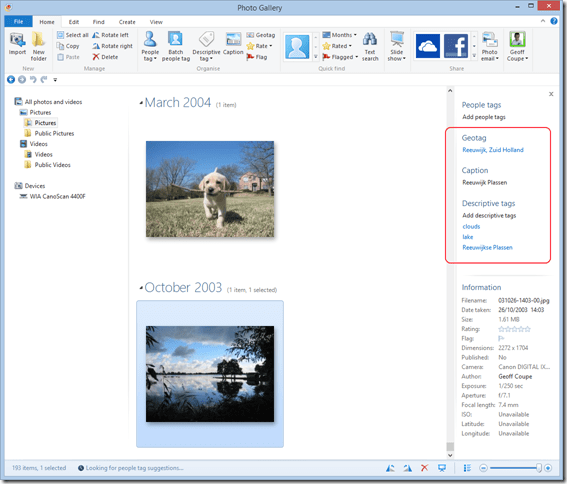
    Onedrive 03

    You can see that there are both Descriptive tags (clouds, lake, Reeuwijkse Plassen) and Location metadata (Reeuwijk, Zuid Holland – what Microsoft wrongly calls geotags; they are in fact more properly called geocodes) in this photo, and they were not being displayed in OneDrive.

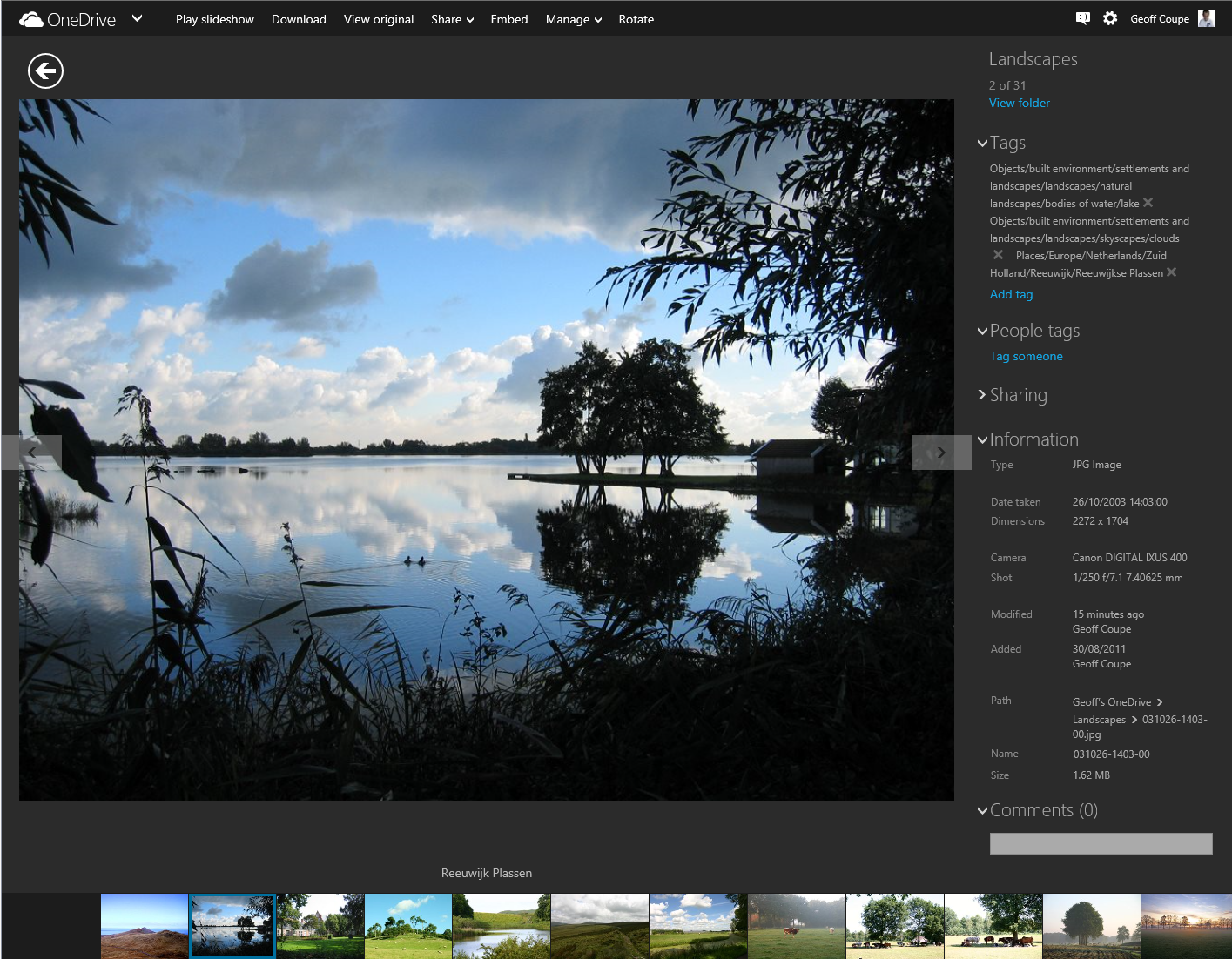
    And then I discovered something really interesting. When I went back to displaying this photo in OneDrive, suddenly the Descriptive tags were showing up:

    Onedrive 05

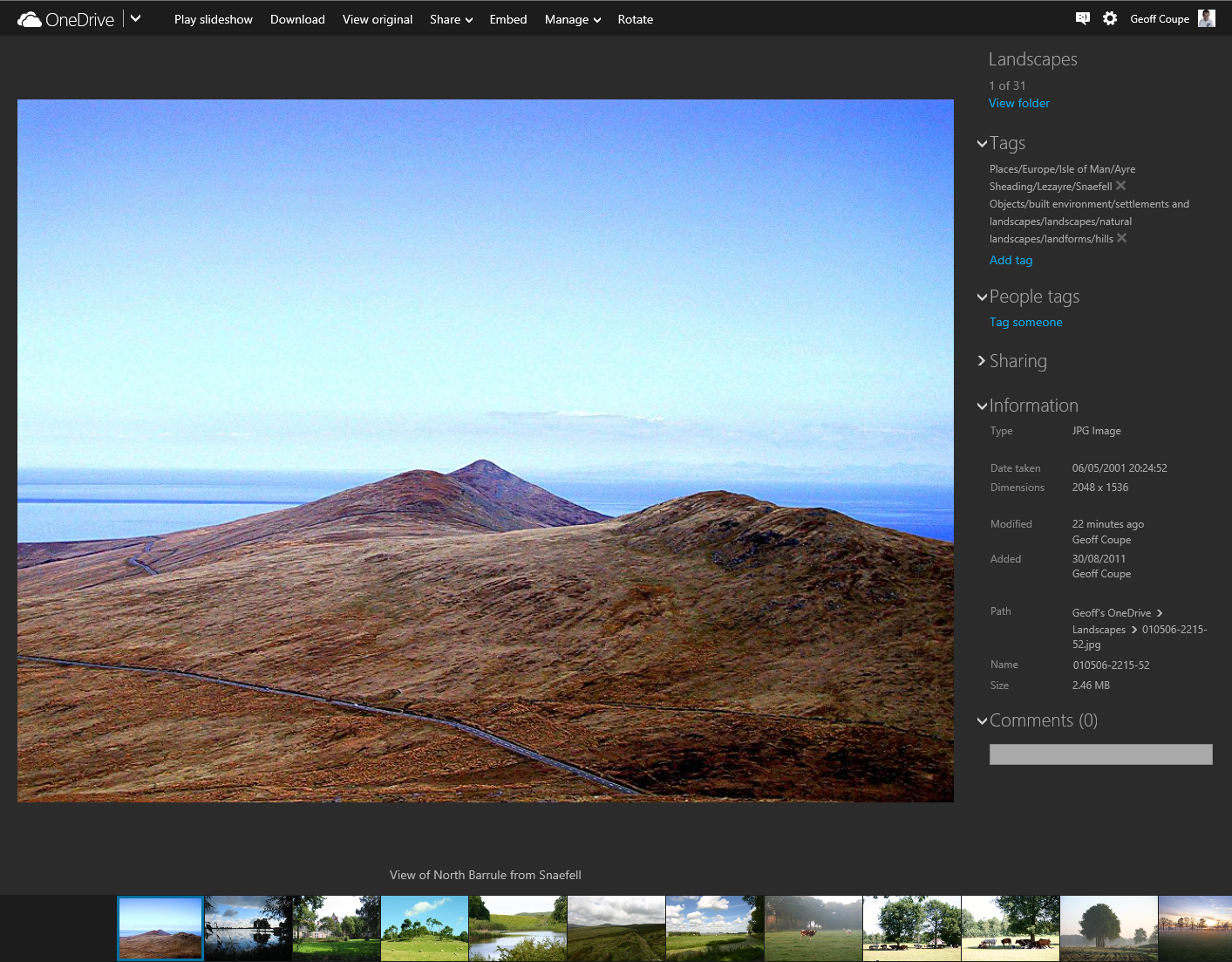
    I can only conclude that the act of downloading the file has triggered a process in OneDrive to start displaying the tags in this file. All the other photos in the folder did not have any tags being displayed. As a further test, I downloaded another photo in the folder, and then went back to look at the photo in OneDrive. Lo and behold, that photo now had its descriptive tags displayed:

    Onedrive 06

    This is clearly a step forward, but it’s still a broken experience. We should not have to download every file in order to get the descriptive tags to display.

    And descriptive tags are still not being searched in OneDrive. That first sample photo has a descriptive tag “clouds” in it (to be strictly correct, it has a hierarchical tag Objects/built environment/settlements and landscapes/skyscapes/clouds), but doing a search for it in OneDrive produces no results:
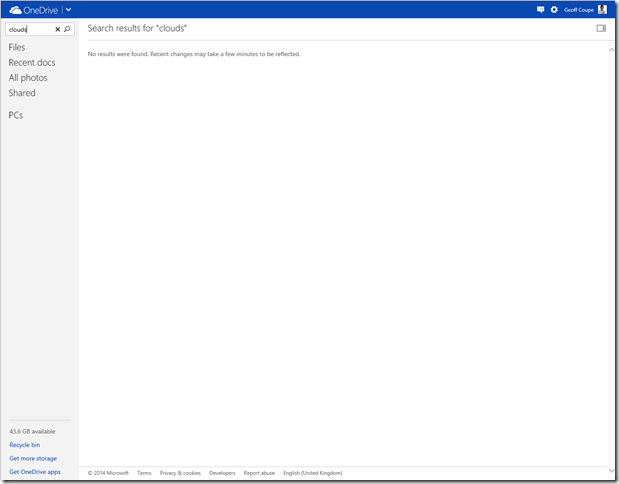
    Onedrive 04

    According to Microsoft’s Omar Shahine: “this work just ranks lower on the priority list than some other things we are doing right now”.

    I just hope that the work remains on the list of things to do, and that this broken experience doesn’t last for too long.

    Addendum: A word of warning. Do not use the “Add tag” feature in OneDrive, if you want your photo metadata to remain consistent. Any tags added to photos using OneDrive do not get added to the metadata of the photos. You end up with a tag list displayed by OneDrive that does not reflect the tag list contained in the photo metadata.

    As of October 2015, this has now seems to have been fixed. Tags added in OneDrive will now get synced back to your photo metadata.

    51 responses to “OneDrive – Still No Proper Support For Tags”

    1. […] 10 May 2014: The support for tags in the OneDrive service itself is still pretty much broken. Microsoft seem to have forgotten their one-time goal that “the truth is in the […]

    2. […] Update 10th May 2014: Microsoft has introduced some new features into OneDrive, but unfortunately, the support for Tags is still very much broken. […]

    3. Ludwig Avatar

      It can’t possibly be that difficult to complete what they have started. Showing the tags is a fine step, but if they lead nowhere why on earth would you enable the links? Oh, Microsoft, why must you wander in the wilderness!?

    4. Rob Halligan (@RobHalligan) Avatar

      Thanks for your work on this issue. I went in deep for photo tags in Windows Live Photo Gallery and feel abandoned. My additional frustration is that the OneDrive and Photos apps in Windows Phone and Windows 8 (last I looked) don’t support tags. My scenario on Windows goes: show me “Black and White” photos of my grandmother taken in San Diego, California. That scenario doesn’t work in Window Phone so I can’t readily find what I’m looking for.

      1. Geoff Coupe Avatar

        Rob, you’re right, neither the Windows 8.1 nor the Windows Phone 8 Photo Apps are able to search embedded tag metadata. The Apps are dumbed-down to the point of imbecility, unfortunately. At least the Windows 8.1 Search function does search the photo tags, but you can’t do complex searches of the form that you mention using the built-in Search function.

    5. Jose Avatar

      I started organizing my photos with Microsoft Digital Image Suite and for quite some time I rely on Windows Photo Gallery to manage more than 100,000 photos. I really would like to see a day in which the metadata could seamlessly sync. I really like Windows Photo Gallery’s feature in which photos uploaded to Facebook and tagged faces would sync back to the original photo on the PC. I was hopeful Skydrive (err Onedrive) would do the same, so that I would be able to allow my close friends and family to help out in adding face tag metadata to my photos, but this inconsistent experience with regards to the captions, descriptive tags, people tags and geotags across WPG and Onedrive is horrible.

      1. Geoff Coupe Avatar

        José, I suspect a lot of the issues are because of the fact that Microsoft still has many fiefdoms, and that teams simply do not talk to each other. I believe that it is better than it once was, but clearly there’s a long way to go.

    6. Rod Avatar

      Would it solve problems if Microsoft included photo gallery as one of its online apps just like Word and Excel, etc.

      1. Geoff Coupe Avatar

        I’m not sure. Perhaps it would, but I think the real solution is to have a search service in OneDrive that indexes metadata, not just filenames as at present.

    7. Rod Avatar

      Just been trying different things and not sure if this would work for all situations, but forget about tags and change the name of the picture. It then is searchable in Onedrive and after you download it to Photo Gallery it is still searchable by the same name.

      1. Geoff Coupe Avatar

        That’s a pretty drastic workaround, and one that rapidly becomes unworkable for me. At present, all my photos use a single naming convention – the date/timestamp – in the form yyyymmdd-hhmmssnn, which is automatically created. If I were to rename my files with keywords, then (a) it’s a manual process and (b) becomes very unwieldy, considering that many photos have up to ten keywords, all of which are hierarchical with up to nine levels.

        Actually, you don’t have to do this. If you have a OneDrive folder hierarchy on your PC (which you get by default in Windows 8/8.1), then all the placeholder files now include metadata, including photo metadata. Microsoft added that after we complained that it was missing. So all your keywords are searchable locally in Windows File Explorer and in Photo Gallery. However, because the photos are NOT searchable in OneDrive itself, it means that people, to whom you have given access to your folders (e.g. friends and relations), cannot search your photos using keywords/tags.
    8. jmoliver Avatar

      Microsoft opened a Uservoice page for taking suggestions for Windows 10 improvements. You can vote, add suggestions and comment existing ones on
      https://windows.uservoice.com/forums/265757-windows-feature-suggestions/category/87207-music-photos-and-video

      There is also a Uservoice page for OneDrive:
      https://onedrive.uservoice.com/forums/262982-general

      1. Geoff Coupe Avatar

        Thanks José, I hadn’t realized that there was a Uservoice page for OneDrive. I’ll go and take a look, and probably make some comments…

    9. […] spotlight of scorn is back on the OneDrive team, again. After generating lots of goodwill over the recent announcement that Office365 subscribers will get […]

    10. Jiyong Yi Avatar

      Geoff, I read your comment in WinSupersite.com.

      There’s a possibility that WPG has an independent database for file metadata. You know, if a user adds some tags to a photo using Windows Explorer, they go to the photo’s data stream without a doubt. However, tags added using WPG could go to WPG’s own database. Have you ever check this?

      Anyway, thanks to you, I found unlimited storage itself is not enough to solve my or our storage problem. Have a nice day!

      1. Geoff Coupe Avatar

        WPG does indeed have an independent database for the file metadata. It uses this local database for performance reasons. However, it also ensures that for image formats that can store metadata (e.g. JPEG files), that metadata is also written out to the images as well. That includes Descriptive tags, People tags (using a Microsoft-defined XMP schema, rather than the Metadata Working Group schema used by Picasa), captions, ratings and geotags. These will all be stored as metadata in the files themselves, so that information travels with the files.

        However, if your photos are in RAW format, then WPG will NOT store any of this information as metadata in the files, but only in its local database on the computer where you added the tags and/or captions.

        WPG also has the ability to mark photos with “Flags”. These Flags are never stored as metadata in any image files, but only in the local database.

    11. James Smith Avatar
      James Smith

      Geoff, thanks for this article, which answered all my questions about tag searching on OneDrive. I thought I was doing something wrong, but the answer is that OneDrive is broken for tags! Unfortunately the main competitors (Google Drive and Amazon Cloud Photos) are worse, and do not display tag information at all. PictureLife displays tags, but you can do nothing with them using the iPhone app. I am a patient man and will try again in 3 months time. I am sure that eventually I will be able to use my iPhone to search and tag photos on a cloud drive!

    12. Julie Avatar
      Julie

      Awesome article! Question: if I cannot use the “Add tag” feature in OneDrive, is there any way to update the metadata without downloading, updating metadata, and re-uploading all of the files?

      1. Geoff Coupe Avatar

        Unfortunately, there doesn’t seem to be a foolproof way at the moment. If you’re running Windows 8.1, with your OneDrive folders synced to your PC, there’s a workaround, but it doesn’t seem to be 100% foolproof.

        What you do is ensure that the files that you want to tag are marked as “Available off-line” in the File Explorer. Then tag them using either the File Explorer, or Windows Photo Gallery, or a third-party application for tagging. These will then be automatically synced back to OneDrive.

        I’ve found that, for existing files, this often works, and the tags start showing up in OneDrive online. But some of my older files refuse to have new tags displayed in OneDrive online. New files being added to OneDrive seem to work much more reliably.

        The OneDrive experience is still broken in many ways, and I’m not convinced that it will be fixed by Windows 10 either

    13. theorichel Avatar
      theorichel

      Thank you for an informative piece. There is clearly nothing on the horizon for OneDrive, but how about OneDrive For Business? This is an entirely different beast and one gets it together with Office365. There are different plans – affordable imho -, and the plan my family (6 people) uses includes 1 TB op disk space. Office365 offers Sharepoint in which one can install third party programs (‘web parts’). On the web one can find several web parts to support picture libraries (mostly paid afaics). Whether these do support tags I do not know yet, but I am going to find out since there is no alternative.

      1. Geoff Coupe Avatar

        I’m afraid I don’t use OneDrive For Business or Office365, so I can’t comment on whether tag searching is supported or not.

      1. Geoff Coupe Avatar

        This looks promising, but it doesn’t make clear if the tags are implemented using a proprietary mechanism, or using standard XMP metadata, such as IPTC Core (used in Windows itself and by many third-party tools).

    14. […] they had made improvements to the OneDrive service, but proper support for Tags (in photo metadata) still wasn’t there. So searching for a Tag (for example: “Clouds”) in all the photos I have stored in OneDrive […]

    15. Greg Edmiston Avatar
      Greg Edmiston

      https://blog.onedrive.com/introducing-an-all-new-way-to-view-manage-and-share-your-photos-in-onedrive/

      🙂
      Check photos.onedrive.com in about 6 hours; you should be able to play with the new features.

      1. Geoff Coupe Avatar

        Greg, I may be missing something, but I really don’t find it easy to create an Album under your current system. For me, the most obvious way to create an Album is to search on a tag and add the results into an Album. I can’t see how to do this under your current scheme.

      2. José Oliver-Didier Avatar

        This is a very nice update which can improve my photography workflow!

        I did a quick test in adding a Caption to a Photo and can confirm that the Caption sync’ed back to my PC! However, I added some tags, but they did not sync back to the file. Is this “by design”? Also, although I find the automatically added tags cool, I am concerned they may add erroneous metadata to my files.

        Also, I do wish OneDrive would allow users to edit the photo placemark and edit “Geotags” in the same fashion as Windows Photo Gallery, which allows edits to the Location, City, State/Province and Country fields.

        1. Greg Edmiston Avatar
          Greg Edmiston

          We’re still working on tag sync-back (“metadata demotion” in OneDrive-speak – writing EXIF changes). That should be enabled for users in the next 1-4 weeks. Note that we will never sync our automatic tags to image file metadata, only tags that you manually add.

          Thanks for the feedback about geotags. We’re looking at our geotag story overall and looking at ways to improve geotag browsing/editing. For editing, what specifically are you trying to do? Add geotags to a photo that doesn’t have any? Edit inaccurate geotags to make them more accurate?

          1. Geoff Coupe Avatar

            Greg, thanks for the clarification on tag sync-back. I agree with the design decision not to sync automatic tags, only tags added by the user. As for geotagging in general, speaking for myself, I both add geotags to some of my photos that do not have them and also edit geotags that are inaccurate.

            One thing though, I think it’s important to distinguish between geotags and geocodes. In accepted parlance, a geotag is coordinate (Lat/Long) data, while a geocode is textual data (e.g. an address). Unfortunately, Microsoft uses the same term for both, which leads to some confusion, I feel. See https://gcoupe.wordpress.com/2011/12/10/picasa-versus-windows-live-photo-gallery/

          2. José Oliver-Didier Avatar

            Thanks Greg! I agree with Geoff, tag sync-back seems like a good design decision.

            With regards to geotagging- I like to add as much information as possible to my photos consistent with the Metadata Working Group guidelines. I used to carry around a handheld GPS, now I use an iOS app called GeotagPhotos which continuously logs my location when I shoot with my DSLR which I later use to sync location.

            On my PC, I use a freeware app called GeoSetter to add or edit the lat/long, altitude, IPTC Country, IPTC State/Province, IPTC City and IPTC Sublocation values. Among other things which I like about GeoSetter is that you can save “Favorite” locations and it can quickly add the metadata to the photos taken in those locations (Useful for locations I often take photos). When traveling, I also use my Swarm/Foursquare checkins for Geotagging (I wrote a post on this on my blog last year – https://jmoliver.wordpress.com/2014/07/31/geotagging-photos-with-foursquare-swarm-check-ins/)

            Photos taken with devices which automatically add lat/long data (ex. my iPhone, Nkon AW100 with GPS), quite often may have the low degree of accuracy. So I find myself correcting the geolocation using GeoSetter.

            I recognize that most people may not go into such depths with “geotagging” as I do. I do like how Windows Photo Gallery “reverse geocodes” location names using existing lat/long data, but does not write the information back to the file until the user edits the Geotag. The iOS Photo App often matches placenames, however it is a shame that the iOS Photo App does not allow editing of this information like you can do in Windows Photo Gallery.

            As for browsing or visualizing geotagged photos. Windows Photo Gallery’s feature in which you can Group by “Geotag” is quite useful and intuitive. A “map view” which can display all the photos like Flickr is ok, but I would not go to say that it is a “must need feature”.

            What I do find as an area of opportunity in WPG and Onedrive are placenames (IPTC Sublocation / Location in WPG). Placenames only appear in Windows Photo Gallery if you mouse over the Geotag on the “Tag and Caption Pane”. Onedrive ignores the locations field (IPTC Sublocation). Sure, the city name is okay, but when I wish to find that cool photo I took with my friends and a restaurant or photos taken with my family at a nearby park I would like to search for photos taken at that “place”. I find that Instagram does a good job with this leveraging Facebook’s Places data.

            Geotags could also enhance automatic tagging – Example: You add a location for “Magic Kingdom” and you could infer tags such as “Park”, “Walt Disney World”, etc. Another scenario could tie a photo’s location+timestamp. Say you tag photos at a particular sporting venue – automatic tags could appear indicating the type of sport, event, teams.

            Overall, I like where OneDrive is going with facilitating organizing and managing photo metadata. Keep it up!

            1. José Oliver-Didier Avatar

              Just a quick correction:

              Photos taken with devices which automatically add lat/long data (ex. my iPhone, Nikon AW100 with GPS), may have some degree of inaccuracy. So I find myself correcting the geolocation using GeoSetter.

              *Smartphones with GPS and WiFi Geo-location are quite accurate. My Nikon AW100 camera is a bit less accurate because it takes some time to acquire the GPS signal.

    16. José Avatar

      Uh oh… Tags and Captions have ceased to sync from Onedrive web and mobile clients to the photo files on my PC. Is this happening to someone else or is it just me? Did something break?

      1. Geoff Coupe Avatar

        José, I’ve just done a very quick test here, and it seems OK. On my desktop PC (running Windows 8.1), I used Photo Supreme V3 to add a couple of tags to a test image that already existed in OneDrive. The metadata got synced to the OneDrive web version (and I saw the tags there via a web browser). That file then got synced to the OneDrive folder sitting on my Surface 3, and I saw the tags appear on the local file when I used File Explorer to look at it.

        1. José Oliver-Didier Avatar

          Geoff, Have you tried adding a caption and tags using the OneDrive web version and checking with Windows File Explorer if that information gets “demoted” back to the file on the PC?

          1. Greg Edmiston Avatar
            Greg Edmiston

            It doesn’t work in the other direction yet. That feature (tag demotion) very recently hit internal beta, and we’re going to release it to production soon. Sorry that it’s taking longer than anticipated.

            1. José Avatar

              Thanks Greg. I am looking forward to trying it out!

              Also, would like to mention that automatic tags are quire impressive. It would be interesting also if a way could be provided to “review and confirm” the automatic tags, so that they be written back to the file metadata.

              1. Greg Edmiston Avatar
                Greg Edmiston

                At least for right now, we have no plans to write the *automatic tags* to the file metadata – only user-added tags. OneDrive tries to preserve the integrity of your uploads, bit for bit, unless you explicitly ask us to change a file; writing tags automatically would break that trust. Even if we asked you to confirm every automatic tag before writing to the file (sounds tedious!), there are some localization problems with writing our automatic tags. OneDrive supports 100+ languages, and automatic tags are translated into all of those languages. If we wrote automatic tags into the files, the file would contain the tag in your *current language*. If you ever change languages, all of the existing tags would get broken. So, we might revisit that in the future, but we’re currently focusing on file sync support for manual tags only.

                1. Geoff Coupe Avatar

                  Greg, thanks for taking the time to contribute to the discussion here. I’m glad that Microsoft are sticking to the “the truth is in the file” mantra – I believe in it strongly. Please don’t write the automatic tags to the file metadata!

    17. theorichel Avatar
      theorichel

      Let me know if I am the only one, but in my version of OneDrive the peoples tags are not available, contrary to what one sees in screenshots here and elsewhere. Creating new tags (as an alternative for the thousands of people tags I’d created in Photo Gallery) seems simple, but has no effect and the same goes for the creation of albums. Very disappointing.

      1. Geoff Coupe Avatar

        Theo, you’re right – the current version of OneDrive no longer displays the People Tag option; it only displays Descriptive Tags. I think that has been the case since January 2015, when the new version was first introduced.

        And, as I wrote in the blog post above, if you add new tags to a photo in OneDrive, these do not get added into the photo metadata. It’s still a broken experience.
        Even the experience of adding tags is broken. a) it takes a long time to load the list of existing tags (too long), and b) the tags are ordered, not alphabetically, which would make sense, but by frequency of use. Good luck in finding the tag you want in a long list.

        1. José Avatar

          Oh no! Geotags are ignored and now People Tags!? I have devoted quite some time in organizing my photos using Windows Photo Gallery. WPG has been abandoned.

          1. José Avatar

            People tags is something which is displayed on Windows Explorer properties. I only hope the functionality will come back better in OneDrive (cautious optimism).

            1. theorichel Avatar

              Well I wouldnt hold my breath.
              I was thinking: People tags are nothing but fields, its a database isnt it? Couldnt one merge the people tag field with the descriptive tag field (and the ‘geo-fields’for that matter)? Wit other databases I know how to do that, but I do not know about the format here. The EXIF-tool comes to mind.It is supposed to edit metadata, but I have no experience with it.

              1. José Avatar

                People Tags and Geo Tags are saved as XMP Metadata (within the file), which is great since the data travels with the photo. People Tags use a Microsoft defined schema (https://msdn.microsoft.com/en-us/library/windows/desktop/ee719905%28v=vs.85%29.aspx?f=255&MSPPError=-2147217396#_schema_mp). EXIF tool is a great tool for reading and manipulating data.

                1. Geoff Coupe Avatar

                  Yeah – it’s a Microsoft-proprietary schema used for defining face regions in an image. It’s a pity that Microsoft still hasn’t adopted the Metadata Working Group’s schema for face regions. That’s already been adopted by Google’s Picasa, Adobe’s Lightroom and Photo Supreme. The latter will even read in Microsoft People Tags and use them to add the MWG equivalents into the metadata, as well as add the IPTC Extension “Person in Image” tags…

          2. Geoff Coupe Avatar

            José, geotags aren’t ignored in OneDrive – if an image has them, then OneDrive will show the coordinates on a map. But OneDrive doesn’t have the means to edit and manipulate them.

            I suspect you are right that WPG has been abandoned. Our only hope is to use the Feedback mechanism in OneDrive to voice our requirements.

    18. José Oliver-Didier Avatar

      A OneDrive UserVoice post on tags was updated indicating that tags and captions added by the user in OneDrive are now synced back to the file. I gave it a quick try and it worked.

      http://onedrive.uservoice.com/forums/262982-onedrive/suggestions/7554963-sync-pictures-metadata-tags-and-titles-both-ways?tracking_code=d693673a2ab1d259d681d376cf977482

      1. Geoff Coupe Avatar

        Thanks for letting us know, José…

    19. Ted Avatar
      Ted

      Now some half year later, I tried to keep the geotags from my smartphone in the automatic upload to Onedrive. No problem there. Then, I backupped the pictures to my harddrive (so, actually an active version of the Onedrive app). Gone are all the Geotags! Editing reverses this in some cases, as Geoff said: geotags sometimes became visible again.
      No consistency however…. Photogallery used for editing info.

    20. David Avatar

      Helpful article. Thank you. This explains the awkward behaviour I’m experiencing.

      Specifically: On my local computer’s hard drive, I have tagged a bunch of photos. I expect those tags to sync and show up at OneDrive.com but they do not. It appears that updating tags (which I thought was like ‘modifying a file’) does not trigger a sync action. But should.

      1. Geoff Coupe Avatar

        Hi David – are you storing those photos in the OneDrive folders held on your computer, and which will be synced to the OneDrive folders in the cloud? Those should indeed then be synced automatically to the cloud. Check that tagging a photo does indeed change the date/timestamp of the photo file. If this is occurring, then the photo should be synced to the online copy.

    Leave a comment

  • The UN Goes Bollywood

    The UN Human Rights Office has made the first ever Bollywood music video for gay rights as part of their Free & Equal initiative:

    With my Indian ancestry, I thought it rather charming and sweet…

    Leave a comment

  • Note To Self…

    …wait until after the 7th September 2014 before visiting the Rijksmuseum. Why? Because until then, my least-favourite philosopher, Alain de Botton, has apparently filled the Rijksmuseum with giant Post-it notes of his own. It doesn’t sound promising:

    De Botton’s evangelising and his huckster’s sincerity make him the least congenial gallery guide imaginable. He has no eye, and no ear for language. With their smarmy sermons and symptomology of human failings, their aphorisms about art leading us to better parts of ourselves, De Botton’s texts feel like being doorstepped.

    Pity, I still haven’t managed to get back to visit the Rijksmuseum since its grand reopening following a ten-year refurbishment. I want to see L’Amour Menaçant by Etienne-Maurice Falconet again. However, I really don’t want to wade through de Botton’s golden shower of musings during my visit.

    Addendum: whilst I don’t like to kick a man while he’s down, this piece of invective from the Spectator contains some choice morsels:

    All this would be easy to ignore, except that his latest book Art as Therapy, co-written with art historian John Armstrong, now has a wretched afterlife in a museum. And it’s not just any old provincial museum, but the Rijksmuseum. This important and scholarly institution should frankly be embarrassed. From April to September this year we’ll be able to visit its world-class collection of medieval art, Dutch Golden Age paintings and 20th-century artefacts and find de Botton’s anodyne thoughts, in their utterly uninsightful, depressingly reductionist therapeutic guise, accompanying not only the works on display, but items in the shop, the café, the cloakroom and the entrance.

    Well, quite.

    Leave a comment

  • Microsoft’s Keyboard for Giants

    Microsoft have been in the hardware business since 1982. The majority of their hardware designs are for mice and keyboards, and I’ve owned a few over the years. The last set that I bought was the Arc Keyboard and Arc Mouse for our HTPC. I liked the minimalist design and small dimensions of the Arc Keyboard, and the Arc Mouse is neat, but I need to put the mouse down onto a flat surface to use it.

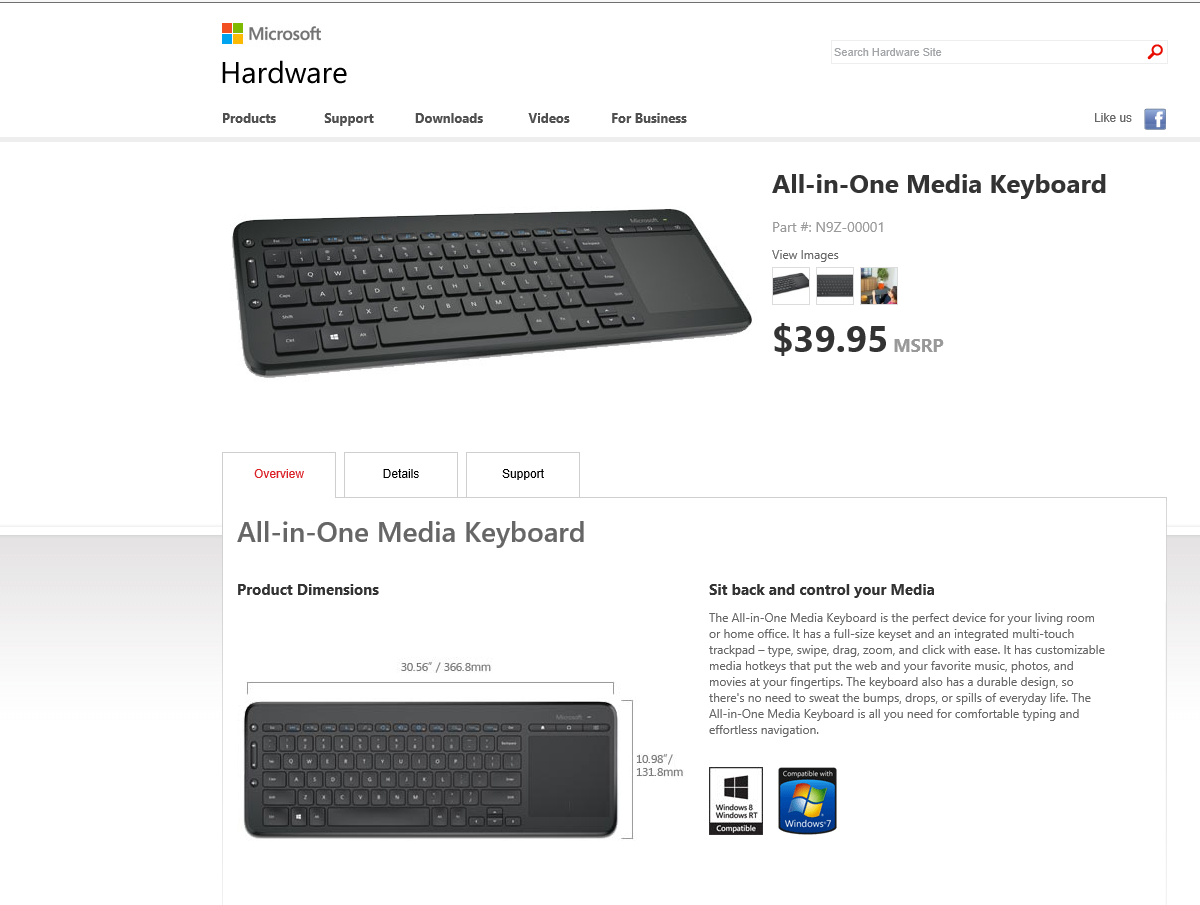
    Now, Microsoft has announced a new All-in-One Media keyboard. It combines a keyboard and an integrated multi-touch trackpad in one, with dedicated keys for Windows 8.1 and media controls. Sounds like an ideal device as an upgrade for our HTPC. I’m already often using the Arc Keyboard with my ThinkPad Tablet 2 when I want to type long documents.

    I’m just a bit surprised that the A-i-O Media Keyboard is not backlit. I would have thought that this would be a natural design feature for a keyboard intended to be used with HPTCs in a darkened room.

    I also notice that Microsoft have apparently built this keyboard for giants. According to the current product page, the keyboard is huge: 30.56 inches wide by 10.98 inches deep. This must be an error; the metric measurements are a much more reasonable 36.68 cms. by 13.18 cms.

    Keyboard 01

    Addendum 6 June 2014: The keyboard is now available here in the Netherlands. I purchase one a couple of weeks back for use with our HTPC. The all-in-one design is much more convenient than having to juggle a keyboard and mouse. Thumbs-up.

    6 responses to “Microsoft’s Keyboard for Giants”

    1. Ludwig Avatar

      When I share my old laptop with a friend, maybe to typing in a response or an address, I usually get laughed at because the printed key identifications have been worn off on most of the keys. I am a rotten typist and need such help, so for my desktop use I switched to back-lit keyboards long ago. Not only can I find the keys in the dark, but the double-molding makes the legends permanent. I won’t buy amy other kind, no matter the other features.

      1. Geoff Coupe Avatar

        The Logitech K830, which does have backlighting, seems to be a close equivalent to the Microsoft A-I-O. However, it’s more than twice the price of the Microsoft keyboard, and the touchpad seems to be simply a mouse replacement – it doesn’t seem to support multitouch gestures such as pinch-zoom…

        1. Geoff Coupe Avatar

          Ian Dixon now has a review of the Logitech keyboard up on his site, and it appears as though the trackpad does support gestures. So that’s good…

    2. Matt Healy Avatar
      Matt Healy

      I like Logitech keyboards and trackballs myself. For my Android tablet, I use a Naztech N1000 Universal Bluetooth Keyboard, which is pretty good — somewhat small for extended typing, but a bigger keyboard would negate the portability advantage of the tablet! The Naztech keyboard has a nifty adjustable slot for the tablet device, and a sort of outrigger that folds out to prevent the weight of the tablet device tipping it backwards.

      Very handy for taking notes at meetings and the like.

    3. Matt Healy Avatar
      Matt Healy

      PS: Microsoft has apparently fixed the error in the dimensions; when I looked at the product page just now it says 14.4″/367mm x 5.20″/132mm.

      1. Geoff Coupe Avatar

        Yes, someone clearly kicked the web/marketing team awake… Microsoft sometimes drop the ball, but they are far better than Lenovo – new stuff on their web site is often riddled with errors. Often they seem to just cut and paste from older collateral and introduce errors that way.

    Leave a comment

  • Music and Windows Phone

    Back in the days of Windows Phone 7, Microsoft’s Zune application was used to copy or synchronise media (music, photos, videos and podcasts) between your PC’s media libraries and your Windows Phone. When I had a Nokia Lumia 800 (which used Windows Phone 7.8), it was wonderfully easy to transfer music and podcasts from my libraries to my phone and to manage them on my phone with it.

    Then I upgraded to a Nokia Lumia 1020, which uses Windows Phone 8, and found that I’d need to change the media management software, because Zune doesn’t work with Windows Phone 8. Microsoft has released a new generation of media management software for use with Windows Phone 8.

    Microsoft make two versions of this media management software for Windows, a desktop application and a Modern UI App.

    I have tried both of them, and I’m here to tell you that they are both absolutely abysmal. Microsoft should really be embarrassed at how bad they are.

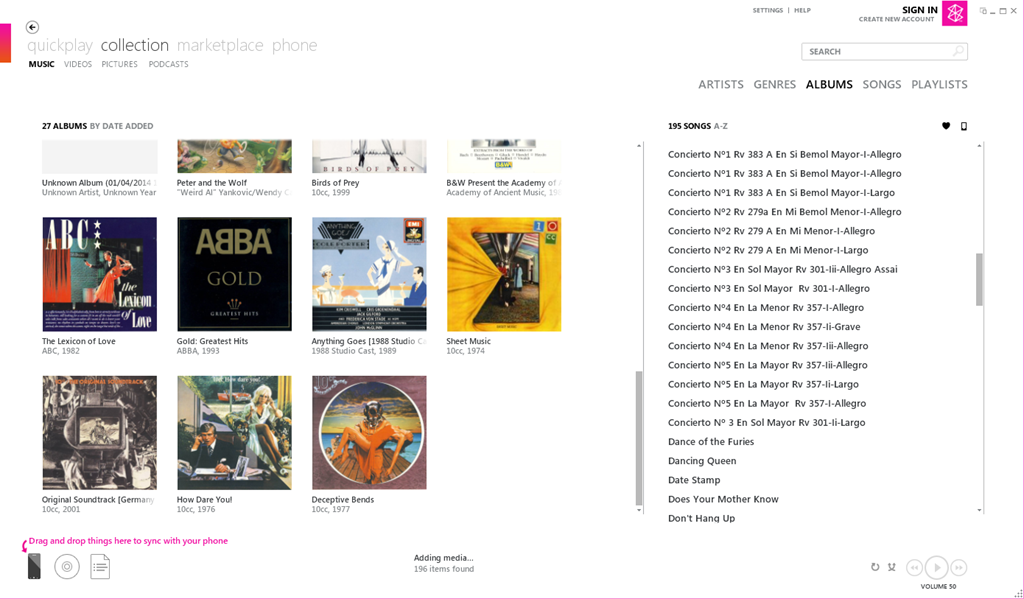
    Here’s a screenshot of Zune displaying some of my music albums. To copy an album across to the phone, I simply drag and drop the albums onto the icon of the phone:

    Zune 04

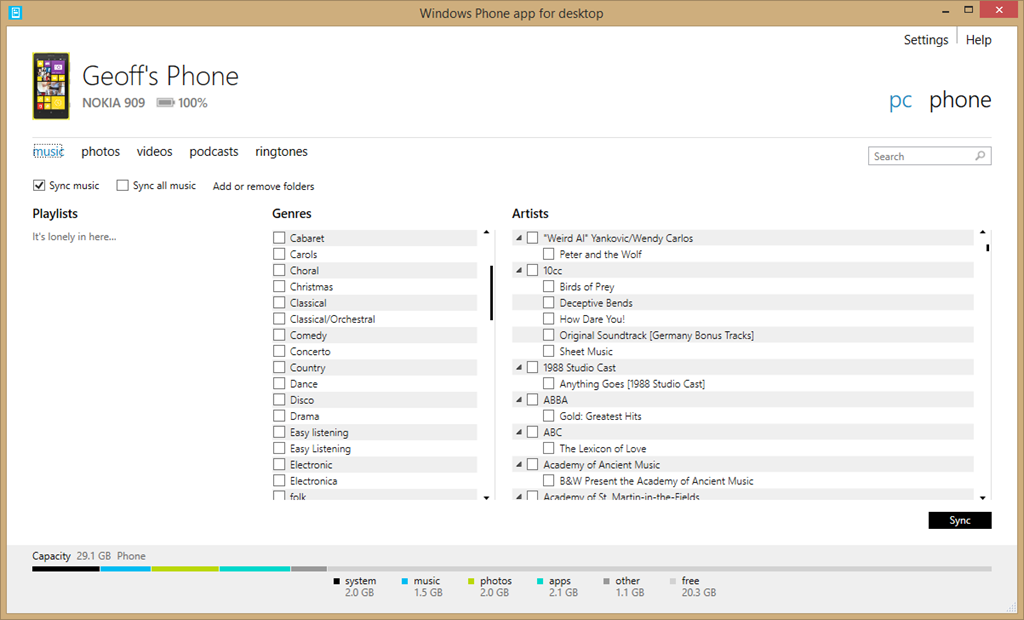
    Here’s the equivalent screen of the new desktop application:

    Zune 06

    For a start, there’s no way of displaying albums; only a list of genres and artists. Secondly, there’s no display of Album Art, which I find gives me useful visual cues. Thirdly, if I select a genre, then the list displayed under Artists does not change to display only those items (songs) that are tagged with the relevant genre, so I have no way of knowing the specifics of what I am about to sync. Also, I have no way of knowing how much space will be required on my phone.

    If you think this is bad, here’s the equivalent opening screenshot of the Modern UI App when adding music to your phone:

    Zune 07

    The problem is that Microsoft has focused on its subscription-based cloud service for music – Xbox Music – and forgotten about those of us who have our own music collections or have no interest in paying a monthly subscription fee. If you are a subscriber to the Xbox Music service, then you can download music from the service directly to your Windows Phone 8 device. But if you are not a subscriber, Microsoft will point you in the direction of one of their media management software applications to transfer music to your phone, and using them is a horribly painful process.

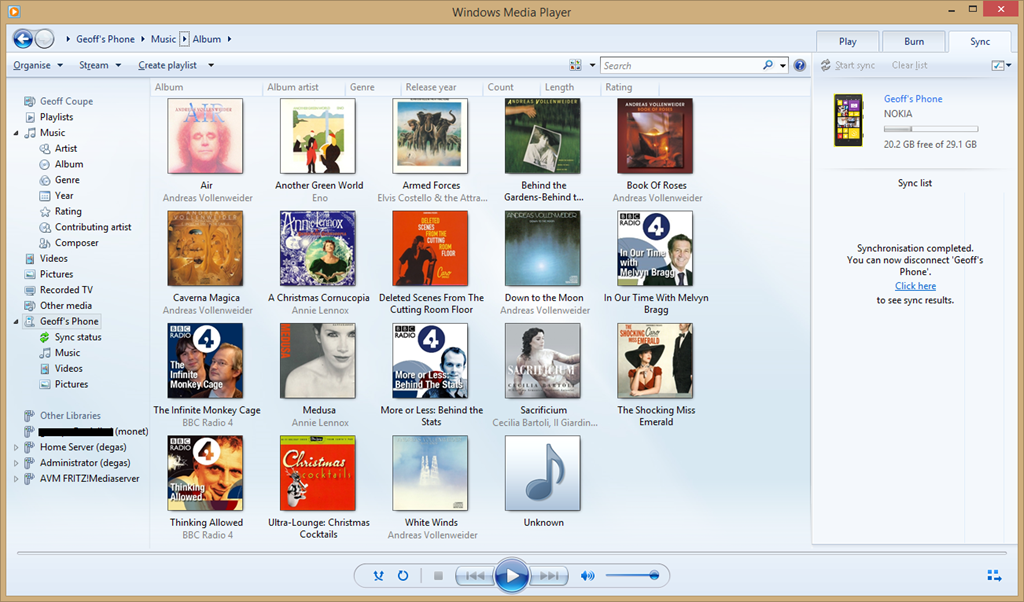
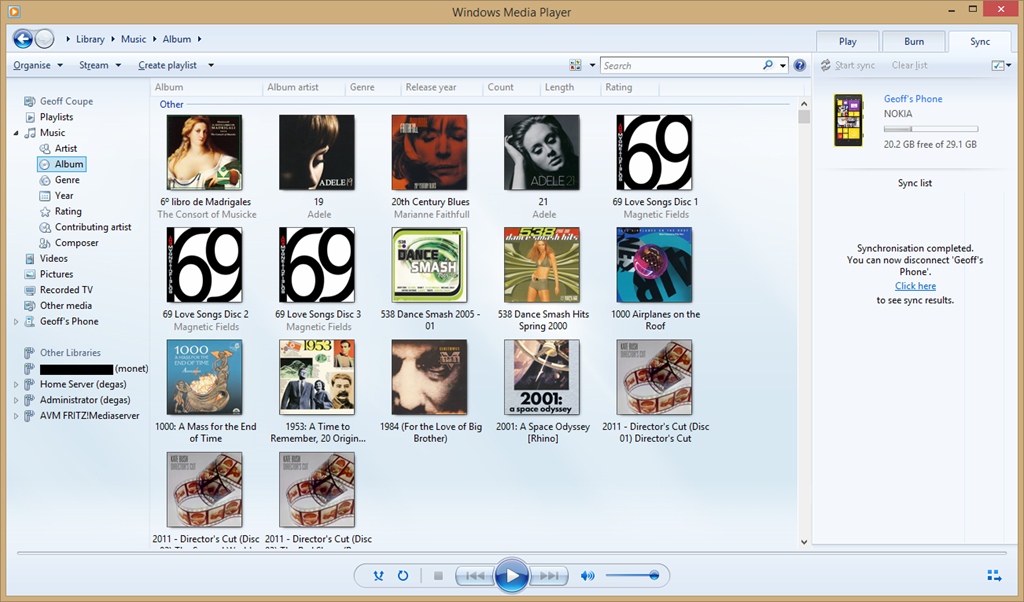
    Fortunately, I have discovered that there is another alternative; and that is Microsoft’s good old Windows Media Player. It knows about Windows Phone 8 devices, and can sync to them with ease. I can display my music collection by Album, Artist, Genre, Rating, even by Composer (none of the other Microsoft applications can do this), and sync my selection to my phone with ease.

    Zune 08

    You can also use it to browse the content of your Windows Phone and manage your media on the phone if you so wish. Here’s the Album view:

    Zune 09

    And here’s the photos on my phone:

    Zune 11

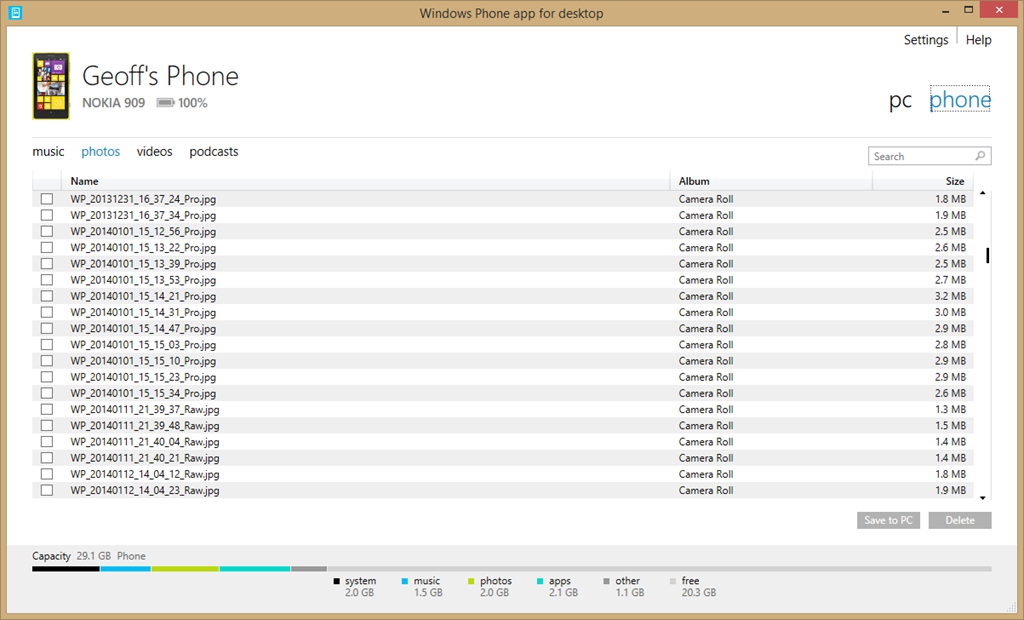
    By way of contrast, here’s what you see when you use Microsoft’s brand spanking new desktop application for Windows Phone to browse your photos:

    Zune 12

    Yup, it can’t even display thumbnails of your photos… As I say, Microsoft should be thoroughly ashamed of this rubbish.

    I’ll be sticking to Windows Media Player for managing the music media on my phone from now on.

    There’s a sting in the tail I’m afraid for those of you who are using a Windows device running Windows RT, such as the Surface 2. Windows Media Player isn’t available for Windows RT. I’m afraid you are stuck with Microsoft’s abysmal Windows Phone App.

    4 responses to “Music and Windows Phone”

    1. boma23 Avatar

      Thanks for the tip on WMP being of use!
      I was momentarily excited to see that Zune had a replacement, but now a little deflated – I don’t think I’ll even try the new app looking at that. I’ve been using Windows Explorer since moving to WP8, which itself appears infinitely better than the new utility looking at this…

      1. Geoff Coupe Avatar

        Yes, I still use the Windows Explorer for management of my photos. It exposes the high-resolution DNG files on my Nokia 1020, which WMP does not. However, for management of music media, WMP is streets ahead…

    2. gargamel Avatar
      gargamel

      A naive question: why do you use WP? Is it only because of the Nokia HW or am I missing something?

      1. Geoff Coupe Avatar

        Two reasons why I use Windows Phone. First, because I use Windows on other devices, and the Microsoft ecosystem is developing nicely, across a range of form factors and devices, all connected by cloud services. It meets my needs. And second, because my current Windows Phone is a Nokia 1020, which I invested in precisely because of the camera.

    Leave a comment

  • First Day Out

    Our neighbour has a herd of dairy cattle. During the winter, they are kept indoors, but come the spring, they are let out to graze in his fields. Today was the first time they were let out this year, and you can see from the videos that they are pleased to be out in the fields. In the second video, near the start, if you watch it fullscreen, you can just see a couple of hares running to avoid getting trampled on by a cow weighing 500 kg.

    WP_20140330_11_14_53_Raw__highres 

    WP_20140330_11_04_17_Raw__highres

    Leave a comment

  • Welcome, England and Wales…

    …you finally made it. At midnight on Saturday 29 March 2014, same-sex couples in England and Wales will be able to legally tie the knot. It’s been a long, hard battle for them to get equality, but the day has finally come. England and Wales join the other fifteen countries that recognise same-sex marriage.

    It’s also refreshing to see that the Church of England has thrown in the towel, and that the current Archbishop of Canterbury has publicly signalled the end of the Church of England’s resistance to same-sex marriage. Mind you, the global Anglican Church still has plenty of spleen and venom to vent on the issue, so now the fight moves elsewhere.

    In the meantime, congratulations to those who are preparing to get married. Sandi Toksvig has an excellent article on what it means to her.

    Leave a comment

  • Sleeping Beauty and Maleficent

    Back in 1959, when I was ten years old, I went to our local cinema and saw Walt Disney’s Sleeping Beauty. I was utterly mesmerised by it. Two things gripped me, and never let me go: the look of the film, and the music. Well, the music was by Tchaikovsky, after all, and it merely confirmed to me that classical music was worth listening to.

    The look of the film was extraordinary. The backgrounds were styled after the illustrations in medieval Books of Hours. For Sleeping Beauty, although Disney’s regular production designer was in charge of the film’s overall look, the film’s colour stylist and chief background designer was Eyvind Earle. His work was detailed, heavily stylised, and brought a real sense of landscape into the film.

    Sleeping Beauty 01

    There was a terrific villainess as well – the bad fairy, and in Disney’s version, she had a name: Maleficent. And now, she’s back – there’s a new Disney live-action film coming out in May this year, with Angelina Jolie as the eponymous villainess. I must admit that the film’s trailer looks as though it may actually give the old film a run for its money.

    3 responses to “Sleeping Beauty and Maleficent”

    1. TomT Avatar
      TomT

      It does look rather promising!

    2. Matt Healy Avatar
      Matt Healy

      Also looks like its visual style has been influenced by the LOTR & Hobbit films.

    3. […] Sleeping Beauty and Maleficent from Geoff Coupe’s Blog […]

    Leave a comment

  • Geert and Gedogen

    Gedogen is one of those (many?) Dutch words that is somewhat difficult to translate. On the face of it, it means to tolerate, permit, suffer and allow. However, there is something lurking behind those straightforward definitions; an additional layer of meaning that indicates that the tolerance, the permission and so forth are granted, well, perhaps not grudgingly per se, but perhaps almost in spite of the thing that is being tolerated. There’s a sense of turning a blind eye to behaviour that, strictly speaking, is illegal, or should not be condoned, but which one tolerates out of a sense of liberalism and of a sense of “live and let live”.

    Someone who has been the beneficiary of much gedogen is the Dutch populist politician Geert Wilders. He, on the other hand, exhibits near zero gedogen for his targets: immigrants, Muslims and Moroccans.

    We’ve just had elections here in the Netherlands for the town councils (the Gemeenten), and Wilders’ party fielded candidates in just two places: The Hague and Almere. During the campaign, Wilders went on record as saying that voters in The Hague should vote for a city with lower taxes and, if possible, fewer Moroccans. As a result, one Labour candidate (Fouad Sidhali) tweeted a comparison of Wilders to Hitler, a statement he later withdrew after criticism from senior Labour officials, saying the comparison had been unjustified.

    I found it fascinating to observe the media and politicians exhibiting gedogen towards Wilders by focusing on Sidhali’s tweet, rather than the initial remark by Wilders. It was as though Wilders was the injured party, rather than Sidhali, who had probably responded with understandable exasperation over yet more of Wilders’ xenophobic rhetoric.

    Wilders then (oh so predictably) responded by saying Fouad Sidali’s rethink was sensible but that ‘it would have been more sensible to leave for Morocco’.

    And so it goes. Geert grins under the grace of gedogen.

    But perhaps a line has now been crossed. During last night’s after-election celebrations in the Hague, Wilder asked his supporters ‘and do you want more or fewer Moroccans in your city and in the Netherlands?’ To which the crowd chanted ‘fewer, fewer, fewer’. ‘ We’ll arrange that,’ Wilders said with a faint smile (or was it a smirk?) when the chanting died down.

    I would like to think that people are beginning to think that enough is enough, and that the emperor has no clothes, other than rags of xenophobia and racism. We will see what happens during the European elections in May.

    Leave a comment

  • RIP, Clarissa

    Clarissa Dickson Wright has died. The phrases: “larger than life” and “a true British eccentric” fitted her like gloves. It was almost 20 years ago that she, together with Jennifer Paterson (also, alas, dead) roared onto British TV with an unlikely cookery programme called Two Fat Ladies. It was an instant hit, and I have all their cookery books lined up on the shelf in the kitchen for occasional reference.

    Dickson Wright had an appalling childhood caused by an alcoholic and violent father. Her full name, as befitting the larger than life moniker, was Clarissa Theresa Philomena Aileen Mary Josephine Agnes Elsie Trilby Louise Esmerelda Dickson Wright.

    Whilst I did not agree with her on certain issues, she was undoubtedly a formidable woman, and life will be duller without her.

    Leave a comment

  • Lawrence of Arabia

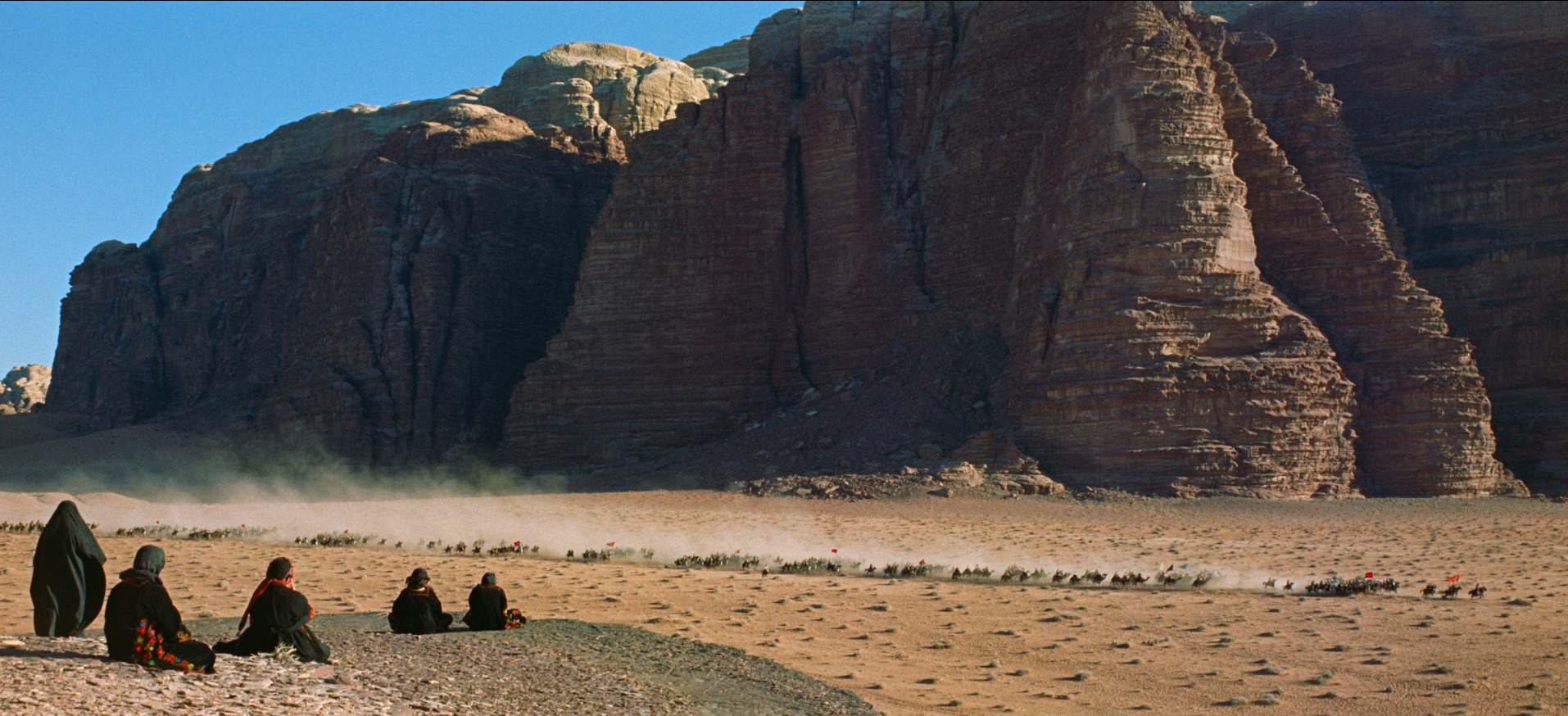
    David Lean’s film Lawrence of Arabia was first released in 1962. Until a few days ago, I had never seen it, but last week I bought the Bluray version of the restored and remastered 50th Anniversary Edition. I watched it on Saturday evening, and it was a revelation. Made in the days long before CGI, the spectacles created by Lean and his crew are simply breathtaking.

    The first entrance of Sherif Ali, riding out of a mirage on his camel, is stunningly done; while the subsequent brief exchange between him and Lawrence encapsulates the vast cultural difference between the Arab and the Englishman.

    LoA 01

    The actors, without exception, are excellent, and Peter O’Toole creates a believable portrait of T. E. Lawrence. How accurate it is, I cannot say, but his character is fully realised.

    The film, of course, totally fails the Bechdel Test. Indeed, there is not a single speaking role for a woman in the whole film, which runs to 216 minutes. The only women we ever glimpse are veiled (or dead).

    LoA 04

    It clearly is a story about the deeds of men, in politics and war, and it’s not a pretty story, despite the stunning backdrops. It is, however, a very great film. I will be watching it again.

    Leave a comment

  • RIP, Tony

    Tony Benn has died. One of the few politicians, it seems to me, who combined honesty, integrity and compassion. I never met him, but news of his death has saddened me as much as the loss of a good friend. Of the many tributes gathered here, the one that stands out for me is from Shami Chakrabati, director of Liberty, in particular her final summation:

    In an age of spin, he was solid, a signpost and not a weather-vane.

    Leave a comment

  • Going Up In The World

    Observation Towers have a long history. One has just been officially opened in a nature reserve nearby. It gives views over the Vennebulten woods and the Zwarte Veen fields. I went along yesterday to take a look. I willingly concede that it offers a new perspective on the surroundings, but a little bit of me thinks that it has the air of a modern day folly about it.

    20140101-1512-55

    And the views:

    20140101-1512-55

    20140101-1512-55

    20140101-1512-55

    20140101-1512-55

    One response to “Going Up In The World”

    1. Matt Healy Avatar
      Matt Healy

      “There’s a lady who’s sure all that glitters is gold
      And she’s buying a stairway to heaven.”

    Leave a comment

  • Presidential? – I Think Not

    Reading President Museveni’s speech at his signing of Uganda’s Anti-homosexuality bill is depressing. Not so much because of his clear bigotry, ignorance, and politicking – that’s only to be expected – but because of my realisation of what this means for gay people – and people who have gay brothers, sisters, parents, relations and friends – in Uganda. They have just been thrown to the wolves. And it hasn’t taken long for the wolves to start howling. A Ugandan newspaper has published a list of what it called “the country’s 200 top homosexuals”, outing some who previously had not identified themselves as gay.

    I was heartened, but not surprised, by Desmond Tutu’s condemnation of the new law. I fear, however, that his voice will be drowned by a new wave of witchhunts in Uganda.

    Leave a comment

  • Essential? – I Think Not

    I received an email today from Nokia which had the strapline:

    Essential Apps for your Lumia: Facebook, WhatsApp and Instagram

    Perhaps it’s just me, what with my hardening arteries, old age and all that, but “Essential”? – I think not. In fact, I refuse to touch any of them with a bargepole.

    I’ve long thought that Facebook is the spawn of the devil, and its recent acquisition of WhatsApp for the absurd sum of $19 billion merely confirms it. WhatsApp is a proprietary, cross-platform instant messaging subscription service for smartphones. It also has the nasty habit of harvesting all telephone numbers that are in a subscribers contact list, whether their owners are subscribers or not. Dutch newspapers are carrying the story today that the Dutch Data Protection Authority (the CBP) are saying that WhatsApp is breaking Dutch Law. The newspapers are a bit late, the CBP published its report on WhatsApp over a year ago, and it concluded:

    People who want to use the app must grant WhatsApp access to their entire electronic address book, including the mobile phone numbers of contacts that are not using the app (except in the latest app version on an iPhone with iOS 6). Because WhatsApp does not obtain unambiguous consent from non-users to process their personal data and does not have any other legal ground for processing that data, WhatsApp is acting in breach of the provisions of Article 8 of the Wbp [the Dutch Data Protection Act].

    I think I’ll stick to the good old-fashioned (non-proprietary) SMS for my Smartphone messaging needs, thank you very much.

    As Jeff Atwood puts it:

    Nothing terrifies me more than an app with no moral conscience in the desperate pursuit of revenue that has full access to everything on my phone: contacts, address book, pictures, email, auth tokens, you name it. I’m not excited by the prospect of installing an app on my phone these days. It’s more like a vague sense of impending dread, with my finger shakily hovering over the uninstall button the whole time. All I can think is what shitty thing is this “free” app going to do to me so they can satisfy their investors?

    Leave a comment

  • Intel’s Obstacles

    I’ve been using Microsoft’s Windows Home Server since 2007. In the years that it’s been installed, it’s been doing sterling work, acting as our server for digital media around the house, and also being responsible for taking nightly backups of our other computers. Unfortunately, the motherboard in our homebuilt server developed a fault, so that was all the excuse I needed to replace the old motherboard with a modern Intel Haswell-based design. I chose an ASUS H87I-Plus board, since it had six SATA ports and also came with an Intel controller for the Ethernet LAN interface to the network. The previous board had a RealTek LAN controller, and while it worked, I kept reading that the Intel design was better. So I decided to switch.

    That decision caused a few hours of cursing.

    Replacing the old motherboard with the new one was straightforward, and being a mini-ITX form factor, it is smaller than the old board, gives more room in the case and should be more energy-efficient. After booting it up into the BIOS to check that the hardware was all working as expected, I began to install Windows Home Server 2011. At first, everything went as expected, but then the installation process halted with an error – there was no driver installed for the Ethernet LAN controller.

    No problem, thought I, I have all the necessary software on the CD that ASUS supply with the motherboard. I quickly located the folder for the LAN drivers, and started the setup procedure. First of all, the ASUS setup software refused to run because it discovered that it was on a machine running WHS 2011 instead of Windows 7 or Windows 8. So I dug down a bit and located the Intel setup software and started that running directly. After accepting the license agreement and a few screens marking the progress, everything came to a grinding halt when the setup stated that it wasn’t going to install the necessary drivers on this machine.

    Fighting a rising sense of panic, I went to Intel’s download site, and downloaded the necessary drivers straight from there. Trying to install these produced the same result – no network drivers were installed.

    A search on the internet produced the reason why.

    Intel have decided that consumers should not be running a “server” operating system on a chipset that Intel deem to be for the consumer market. Intel have the i217-V (desktop) and i217-LM (server) versions of their gigabit Ethernet chip. They are in fact the same chip. The only difference is that the –V variant has support for Windows 7 and Windows 8 (desktop operating systems) while the -LM variant has support for Windows Server 2008 and Windows Server 2012, i.e. server operating systems. Unfortunately, Microsoft built WHS 2011 (which is intended for the consumer market) on top of Windows Server 2008. So when the driver installation software detected  that it was running on a “server” operating system, and the motherboard had the consumer variant of the Ethernet chip, then it simply refused to install the driver.

    Fortunately, the same search produced a solution. Ivo Beerens has a post on his blog describing this situation, and giving a solution – a few simple edits to an Intel configuration file. I was able to follow his instructions and have successfully installed the driver. WHS 2011 has now been able to connect to the network and complete its installation. It’s now downloading and installing a further 120 updates to itself. Hopefully, I will have been able to complete the rebuild of the server by the end of the weekend…

    Thanks to Ivo, and no thanks at all to Intel.

    One response to “Intel’s Obstacles”

    1. Tim Makins Avatar

      Well done – glad that you found a fix, and have posted it to help others.

    Leave a comment

  • The Streisand Effect in Action

    In 2009, Wendy Doniger’s book The Hindus: An Alternative History was published by Penguin. It seems to have attracted the wrath of Hindu (male) chauvinists; to the extent that a lawsuit from the Hindu group Shiksha Bachao Andolan accusing Doniger (a University of Chicago professor) of “hurt[ing] the religious feelings of millions of Hindus”  was instigated in India. As a result, Penguin have withdrawn the book from sale in India and intend to pulp the copies.

    Quite rightly, this decision has resulted in a storm of protest, and propelled the book up the bestseller list. I’ve ordered my own copies (paperback and Kindle) out of interest, in support of Doniger, and against the tiresome president of Shiksha Bachao Andolan, Dinanath Batra. As Ophelia says, Batra is an experienced religious bully.

    One response to “The Streisand Effect in Action”

    1. Matt Healy Avatar
      Matt Healy

      I just bought a copy of the book myself; it happens I’m on vacation this week so will have time to read it

    Leave a comment

  • Be Careful What You Click For

    Scott Hanselman has a terrific post about how most people’s computers seem to end up getting infested with Adware, Malware and Spyware. It’s all true. Whenever I’m asked by a friend, relative or neighbour to take a look at their PC “because it’s not running very well”, I usually find it filled to the gunwales with crap that the owner seems to have no knowledge of how it got there.

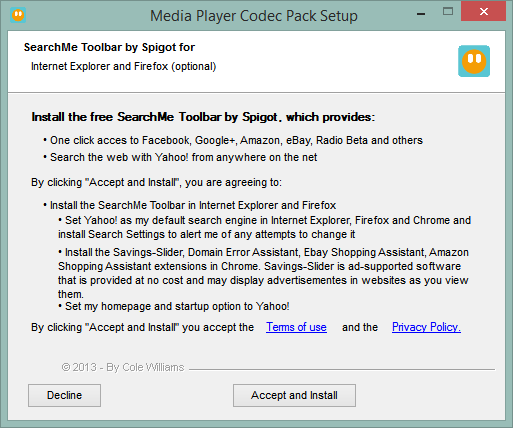
    Even I have to be constantly on my guard that I’m not inadvertently letting something else in along for the ride when downloading and installing software. The latest example is the set of codecs that I use to handle media. I’ve been using the Media Player Codec Pack. The previous version (4.2.9) attempted to persuade me to install some crapware along with the codec pack. Fortunately, the Accept/Decline choice was straightforward.

    MPCP 01

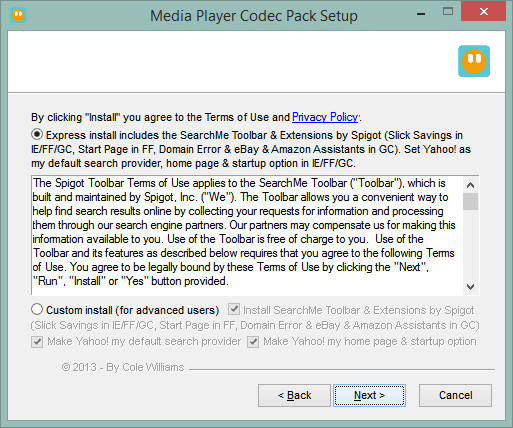
    The latest version (4.3.0) has changed tactics. This time it attempts to sneak in by expecting the user to choose the “express installation” route, as most people invariably do

    MPCP 02

    I’m not sure that I would define an “advanced user” as someone who doesn’t want crapware installed on their computer. I would have thought that this would also apply to non-technical users as well. This may well be is the last time I use this particular codec pack. I don’t like this sort of tactic.

    5 responses to “Be Careful What You Click For”

    1. aarondr Avatar

      There are so many codec packs around, I’ve always tried to avoid them as well. But it’s hard to recommend one since they all seem to do this. I’m thinking: http://www.cccp-project.net/ might be the next thing I try. Have you seen that one before? It appears to be pretty community oriented and without junk. I found it from a lifehacker article: http://lifehacker.com/5877208/what-are-codec-packs-and-should-i-use-them. I’m just hoping in Soviet Russia codec doesn’t play you.

      1. Geoff Coupe Avatar

        I’m still using Windows Media Center, even though Microsoft have effectively driven a stake through its heart. However, I’m looking around for its successor. At the moment, the Media Browser 3 project is looking good. While it’s early days, they seem to have a clear idea of where they want to go. Their project seems to be recommending the LAV filters.

    2. Mark Avatar
      Mark

      Do you think the new “App store” environments (apple, google, microsoft) solve this problem or is it still early in the curve for them. I can see the automatic “one click to download and install” process installing lots of crap unless it is carefully monitored by the store owners.

      1. Geoff Coupe Avatar

        I don’t think it solves the problem at all. There have already been examples of Apps containing Malware accepted for inclusion in the stores. Note this quote:
        “It’s not uncommon for online criminals to disguise trojans and money-making smartphone malware as popular apps like Instagram and Angry Birds, although typically these things are encountered on the Android platform rather than iOS,” Graham Cluley, an independent security experts, told IT Pro.
        http://www.itpro.co.uk/security/21621/flappy-bird-copycats-prompt-app-store-security-warnings

    Leave a comment

  • RIP Stuart

    Stuart Hall died today. As the Guardian obituary says:

    Hall was always among the first to identify key questions of the age, and routinely sceptical about easy answers. A spellbinding orator and a teacher of enormous influence, he never indulged in academic point-scoring. Hall’s political imagination combined vitality and subtlety; in the field of ideas he was tough, ready to combat positions he believed to be politically dangerous. Yet he was unfailingly courteous, generous towards students, activists, artists and visitors from across the globe, many of whom came to love him. Hall won accolades from universities worldwide, despite never thinking of himself as a scholar. Universities offered him a base from which he could teach – a source of great pleasure for him – and collaborate with others in public debate.

    It’s a great loss. It was only a couple of months ago that I was walking through the woods listening to a podcast of a discussion between him and Laurie Taylor and being impressed anew at his insight.

    For an overview of his work and thought, this article, also in today’s Guardian, is a good start.

    Leave a comment