Reflections on life at “De Witte Wand”…

  • Watch Anytime, Anywhere…

    I notice that some DVDs are now advertised as including a digital copy of the film, intended for playback on PCs, Smartphones and Tablets. I seem to recall that at one time, the digital copy was physically present on the DVD. These days, it seems as though you have to download it via the web. You go to a web site, type in the redemption code included with the DVD, and the digital copy gets downloaded to your PC.

    Well, that’s the theory, anyway. I’ve just bought a DVD of ParaNorman from Amazon UK. It boasts that this pack includes DVD + Digital Copy™ + Ultraviolet™ so that you can “Watch Anytime, Anywhere”.

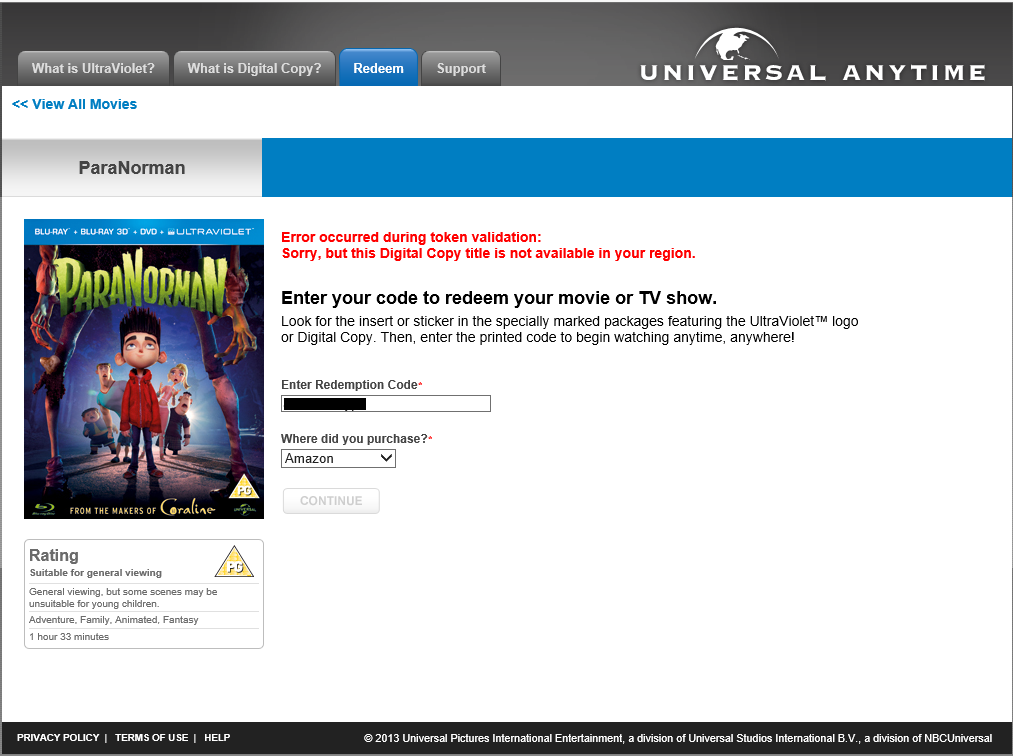
    I thought that I’d download the Digital Copy for my tablet, but when I entered my redemption code on the web site, I was greeted with:

    Ultraviolet

    “Error occurred during token validation: Sorry, but this Digital Copy title is not available in your region”.

    So much for “Watch Anytime, Anywhere”, then… It’s probably against EU law, but I doubt that Universal gives a damn about that. They’ll just carry on making it difficult for their paying customers.

    Update: I tried raising the issue with technical support. They basically gave me the brushoff:

    Hello,

    We are sorry to tell you that the Digital Copy feature for this title is only available inside UK as the webpage is Geo-filtered. We regret the inconvenience caused.

    Thank you.

    Universal Digital Copy Support

    Support Case Info:
    Product: Universal Digital Copy
    Issue: Technical Issues
    Status: Resolved
    Template: DC00045

    I suggested to them that they might consider spelling out this limitation in their terms and conditions on the packaging…

    3 responses to “Watch Anytime, Anywhere…”

    1. Mark Avatar
      Mark

      talk about truth in advertising!

    2. Peter Ferguson Avatar
      Peter Ferguson

      It should say “Watch Anytime, Anywhere within the geograhic Code for this Ultraviolet Copy”

      As of May 1 2013 the number was 9000 movies and TV shows available on UV for the USA region and 1 (one) for the Australian region. – The Hobbit. Don’t know for Europe but obliviously not ParaNormaN.

      1. Geoff Coupe Avatar

        Yeah, but the thing is, this wasn’t the Ultraviolet copy – this was the Digital Copy. They are two separate things. The Ultraviolet service is a streaming service. That is clearly marked as being only available in the UK on the packaging. The Digital Copy has no such restriction shown on the packaging. That’s what pisses me off.

    Leave a comment

  • Xbox Music App and Libraries

    Here’s another episode in my look at Microsoft’s Windows 8.1 Preview. This time I’m looking at the Xbox Music App. I’ve found an inconsistency with how the App handles Libraries.

    I now have two systems on which I am running the Windows 8.1 Preview. The first is my main Desktop PC, where I have set up 8.1 in a dual boot with Windows 8. A few days ago Microsoft released drivers that enabled the 8.1 Preview to be set up on systems using the Clover Trail Atom chipset, such as my Lenovo ThinkPad Tablet 2. So that became the second of my systems. It’s probably of relevance to note that the 8.1 system on the Desktop was a clean install from a DVD, whilst on the tablet, it was an upgrade of the existing Windows 8 system to the 8.1 Preview, using the Installer in the Windows Store.

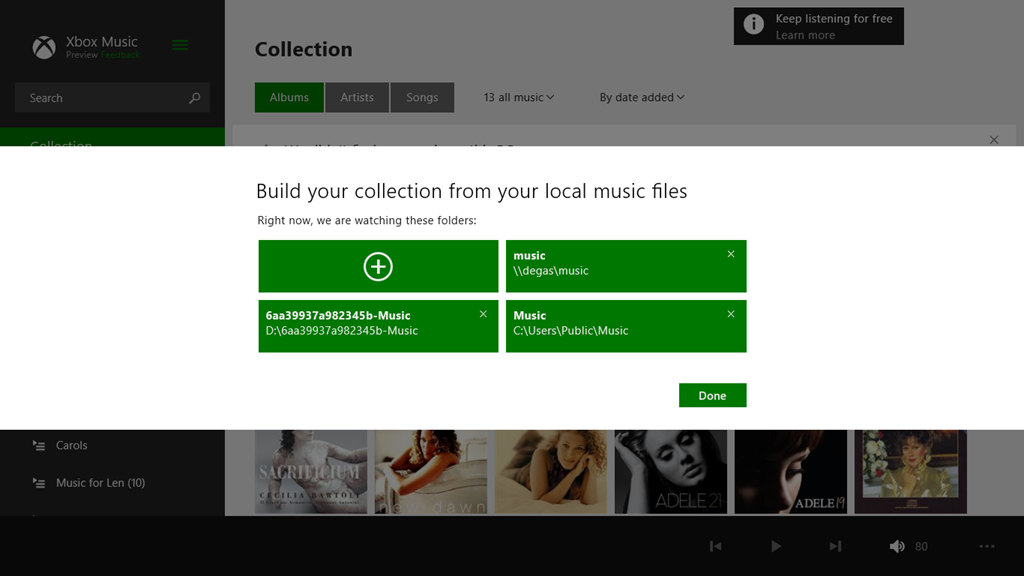
    Both systems are set up to access music files held on my Windows Home Server 2011 system. The problem is, the Xbox Music Apps on the two systems do not see the same content, when by rights, they should.

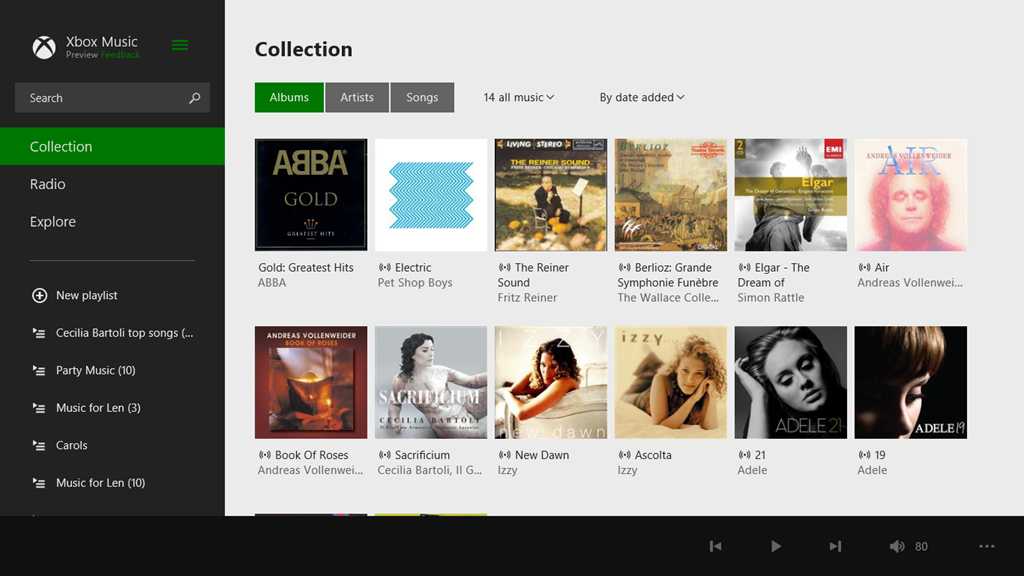
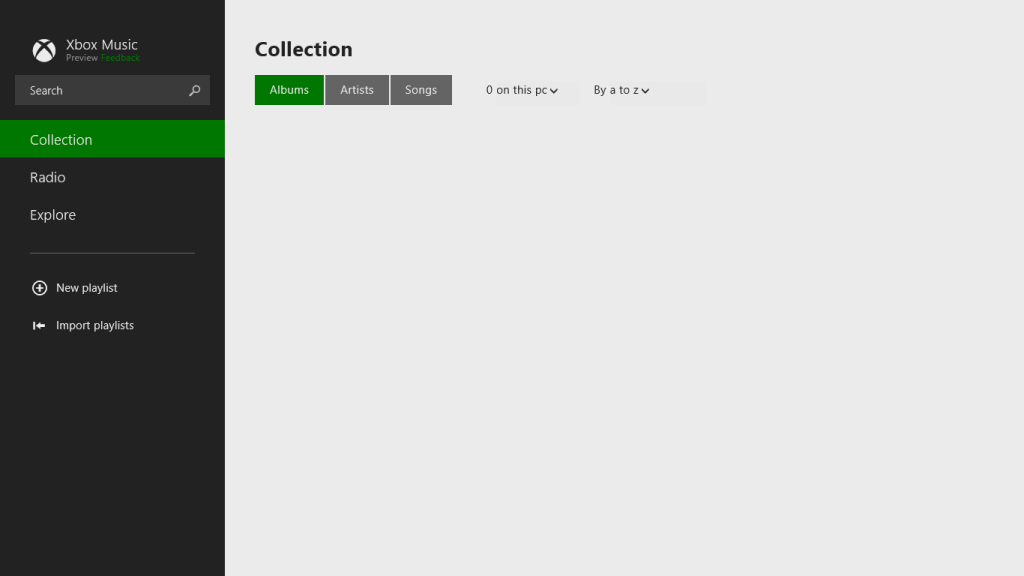
    Here’s a screenshot of the content of the music library as seen by the Xbox Music App on the Desktop PC:

    Xbox Music issue 05

    You will notice that it shows that I have 1,059 Albums in my music collection. Now here’s what I see in the Xbox Music App running on the tablet. Remember, it’s looking at the same music Library on the server:

    Xbox Music issue 07

    No albums at all…

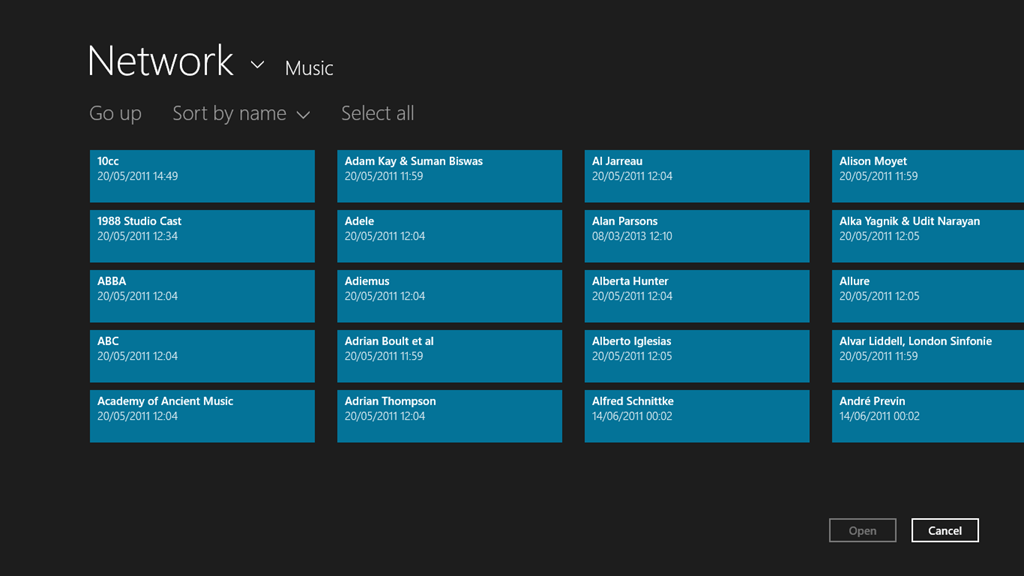
    Note that if I use the “open a file” function of the Xbox Music App, it will see the files and folders on the Windows Home Server:

    Xbox Music issue 09

    It just won’t add these files and folders into the music collection, despite them being linked to by an entry in the Music Library on the tablet.

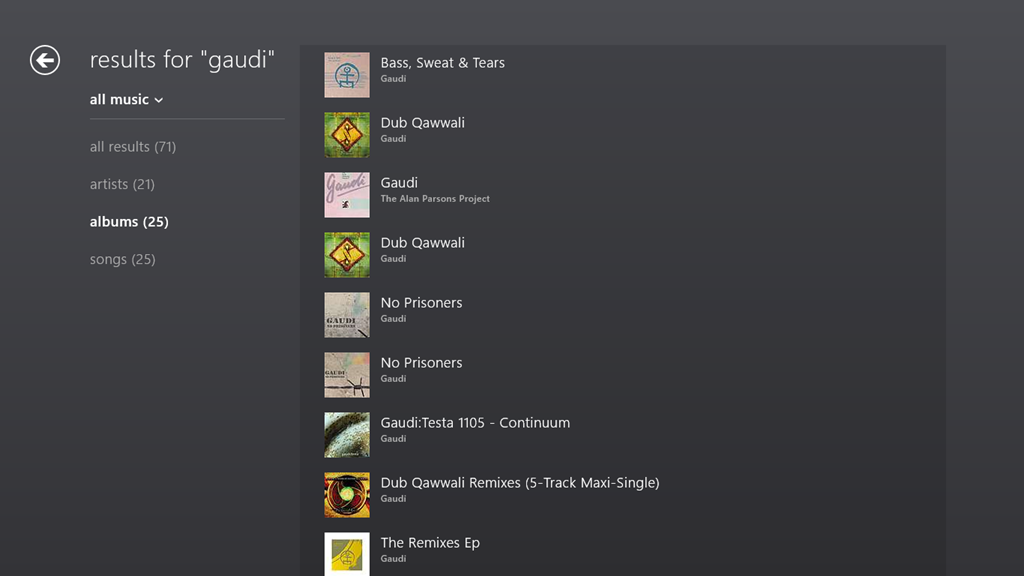
    If I search for an album that I know is in my music collection, then the Music App will only return results from the online music store. Here, for example is the result of a search for the album “Gaudi” by the Alan Parsons Project:

    Xbox Music issue 14

    Notice that here, the album is shown third in the list. This list is entirely made up of results from the online music store.

    If I do the same search using the Search function of Windows 8.1 itself, then I see this:

    Xbox Music issue 13

    Here, you can see that Windows Search has found the tracks from the Gaudi album by searching through my music collection held of the Windows Home Server.

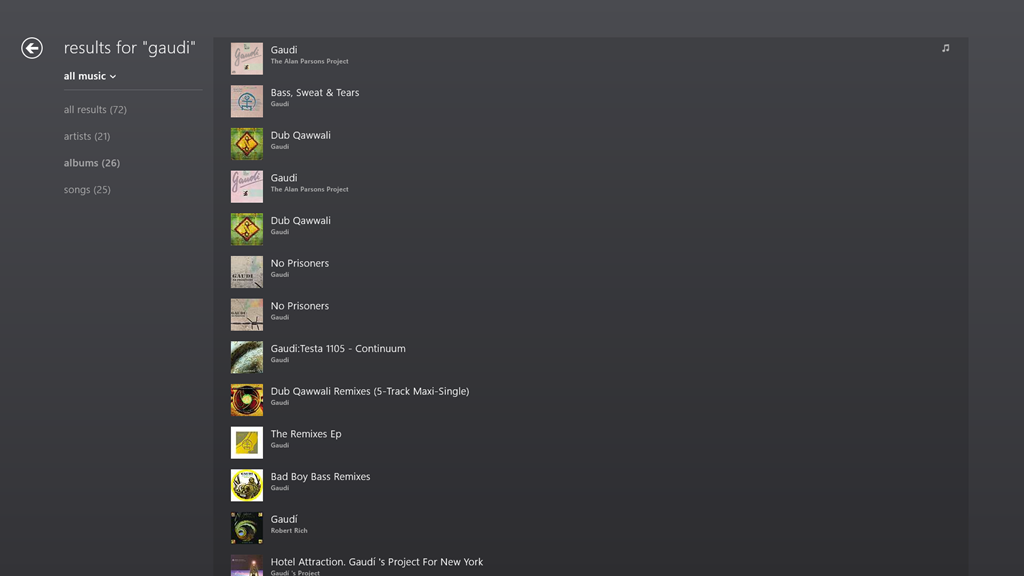
    If I switch to the other Xbox Music App running on the Windows 8.1 on the Desktop PC, then searching within the App for Gaudi gives me this:

    Xbox Music issue 16

    The Gaudi album is now at the top of the list, and is the album contained in my music collection (signified by the musical notes icon on the right of the entry).

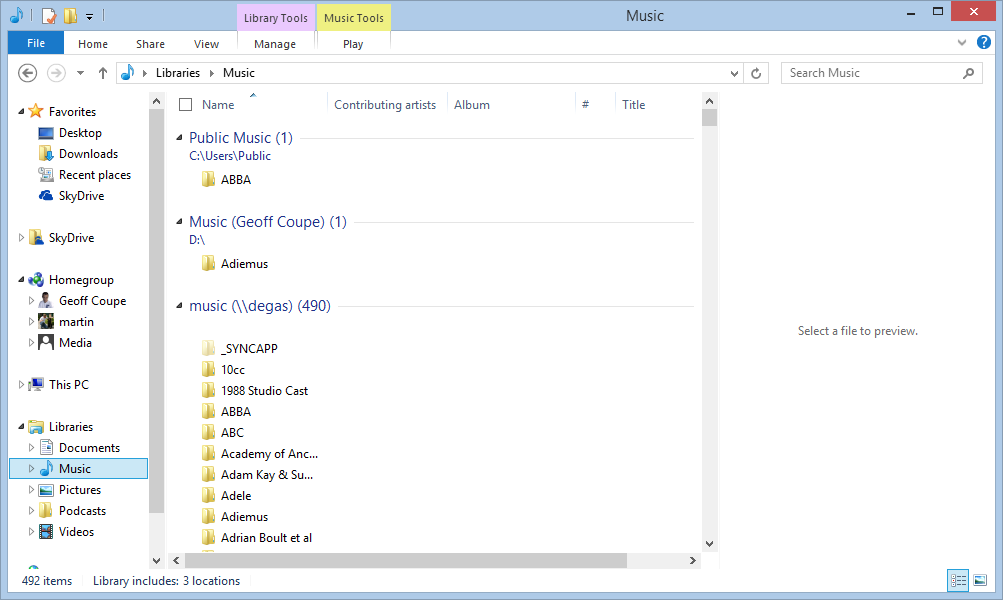
    Here’s the entries of the Music Library on the Desktop PC:

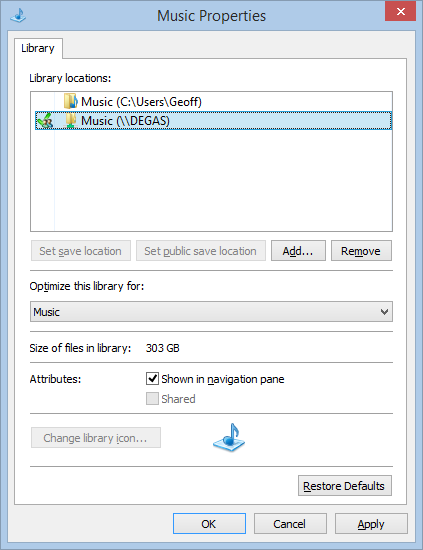
    Xbox Music issue 06

    And here’s the content of the Music Library on the tablet:

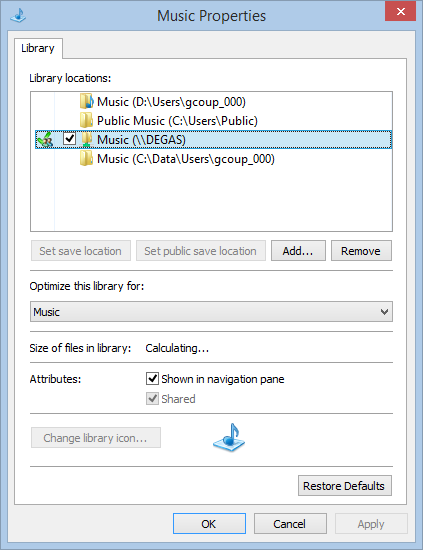
    Xbox Music issue 08

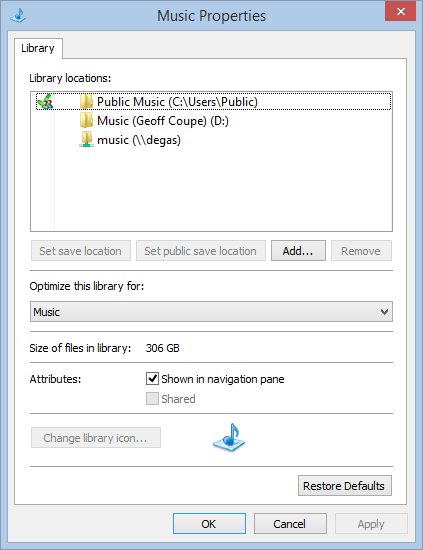
    In both cases, there are entries in the respective music libraries pointing to the music files held in the entry point of Degas, the WHS2011 server.

    The links defined for the Libraries on the tablet are the same as when it was running Windows 8. Then, the Windows 8 Music App happily accessed the music library on Degas. Now that the system has been upgraded to Windows 8.1 Preview, the 8.1 version of the Music App turns a blind eye. However, on the Desktop PC, the 8.1 version of the Music App sees the music library.

    So why does one Music App see everything, and the other see nothing at all?

    I have no idea; neither does Microsoft Support.

    Addendum: Despite a couple of updates to the Xbox Music App, this issue is still present.

    9 responses to “Xbox Music App and Libraries”

    1. Matt Healy Avatar
      Matt Healy

      My Windows 8 experience is very limited, so I have yet to form an opinion of it (I liked XP, hated Vista, like Win7, have mixed feelings about Office 2007/2010, have yet to try Office 2013).

      But wandering off the topic of MS Windows, that snapshot of your music collection looks both interesting and eclectic. My wife and I like some of the same artists.

      1. Geoff Coupe Avatar

        I do like the Windows 8 platform, and 8.1 refines it. However, most of the Modern UI Apps are pretty primitive as yet.

        Re the music, I tend to prefer “classical” (with a wide timespan from the middle ages to 21st century) over “pop”, but that’s about as definite as I get.

    2. Mark Avatar
      Mark

      I tried the xbox music app and gave up on it. I think it has some potential but it is so unwieldy. Cant doubleclick to play a song. Try to skip forward 30 seconds, although you can see the play position at the bottom, you don’t get to change it, instead you have to click on the album picture at the bottom to enter the properties screen before you can do anything, then you get a slowly pulsing picture with strange squares moving around. And if you search for a song, the whole process works differently from that screen. And of course like all new apps you get zero options over how you want it to look

      That said, I do like that its a neutral grey background

      1. Geoff Coupe Avatar

        Yes, it’s pretty poor regarding the playback experience. What really irritates me is that gapless playback is not possible. Many of my albums require zero delay between tracks for a proper listening experience.

          1. Geoff Coupe Avatar

            I use the Desktop version of Media Monkey to do all my metadata edits for my music collection. I am also using the W8 version on my tablet. I try not to use Google stuff. I loathe Google+ with a passion. Social media ain’t my thing.

            1. Ian Dixon Avatar

              You don’t have to use G+ to use Google Music, I like it because I have uploaded all my songs to the service so I can access them from anywhere

    3. Mark Avatar
      Mark

      I have several live albums that require gapless playback…sigh, and I have a lot of playlists, several “smart” playlists (i.e. 80’s music) so it would be difficult to convert from iTunes.

      However, despite the majority of my replies 😉 I am not against the Metro/Modern experience. I find that most of my work is done fullscreen so in that regard it would work and I am confident I could get used to it on my desktop but the apps are just not compelling. Sad really, with the current unhappiness about the iTunes 11 changes, the time is ripe for the move to a great music app. I wish this was it, I wish it would give me smart playlists, auto-install of Amazon and Itunes store music, control over the display and functionality, etc.

      With all of that said, between the Music and Photo app no longer accepting libraries, NAS, etc. Is Microsoft really depreciating local storage?

    4. […] month, I mentioned that I was having difficulty with the Xbox Music App installed on one of my systems. It does not see my music collection, and […]

    Leave a comment

  • Windows 8.1 Photo App

    I’ve been looking a bit more at the Photo App that is currently available as part of the Windows 8.1 Preview. As I mentioned in my last post, Barb Bowman has already mentioned two major strikes against it:

    The Photos App has changed:

    1. No longer includes the ability to show images from Facebook, Flickr, SkyDrive

    2. No longer allows images from other computers or the network –  am guessing that because there is now support for SkyDrive on RT and MS is heavily emphasizing that as the preferred storage location (when you upgrade, one of the questions asked before you even get to the desktop is if you want to use SkyDrive as your default storage area – and that seems to be the default – and MS feels the network, NAS, Homegroup, and other computers are deprecated.

    I’ll add another couple.

    • The editing functions will likely corrupt any Makernotes in the Exif that your camera may put there.
    • If the Exif section in your original image was created by your camera in Little-endian file order, then when the Photo App saves an edited image, it will reverse this to be a Big-endian file order.

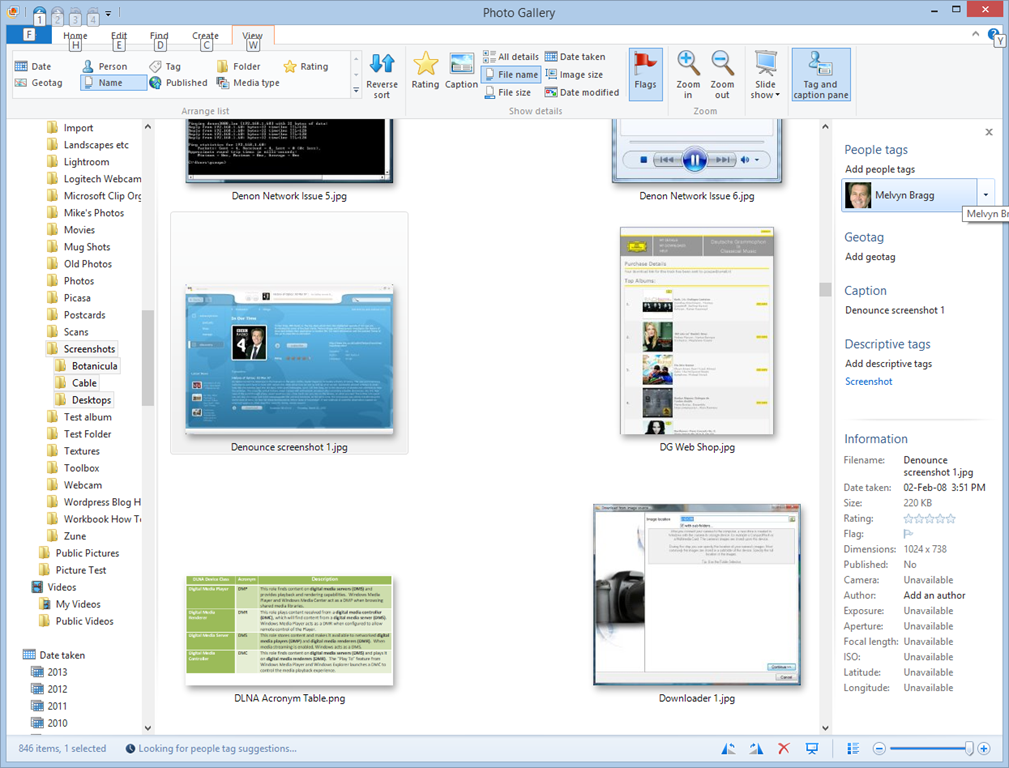
    The Exif corruption is a long-standing issue. It’s been present for years in the Windows Photo Gallery application of Microsoft. They have acknowledged it as a bug, but they still haven’t bothered to do anything about it.

    The Little-endian to Big-endian switch is also a carry-over from the behaviour of Windows Photo Gallery. It’s also highly ironic. The guidance from the Metadata Working Group states that applications that change the contents of an image file should preserve the existing byte order. It’s ironic because Microsoft is one of the founder members of the Metadata Working Group. They can’t even be bothered to follow their own guidance.

    The Photo App as it stands is worse than useless.

    2 responses to “Windows 8.1 Photo App”

    1. […] 8, Microsoft's own Apps (particularly the Photo App) are not a great advert for the platform. See Windows 8.1 Photo App | Geoff Coupe's Blog and Xbox Music App and Libraries | Geoff Coupe's […]

    2. Peter London Avatar
      Peter London

      I agree that the new App is useless, I cannot access my SkyDrive or Flickr images anymore through the app which is a backward step

    Leave a comment

  • Windows 8.1 Preview – Part II

    I’ve now installed the Windows 8.1 Preview on my Desktop PC; I went with the safe and boring option 2.

    With the caveat that this is not the final version of Windows 8.1, I’ve noticed some good things and bad things about the Preview.

    The good things are the tidying up and the further evolution of the Modern UI. So, for example, more of the traditional Desktop’s Control Panel functions are now exposed via the Modern UI, and they are grouped more logically. The sops thrown by Microsoft to the “Bring back the Start Button and the Desktop” crowd may satisfy them, but are of no interest to me – I never missed the Start Button in the first place.

    What does bother me are two things:

    1. The Mail development team still hasn’t got a clue on how to use the Windows 8 printing system.
    2. There are worrying signs that Microsoft may be deprecating the Libraries feature.

    With regard to (1), that’s been there since the very start of Windows 8. You can’t just print the current page, or a selection of pages from the Mail App. Something that’s easily done with the traditional Windows Print dialog, but which is totally impossible with this App. It is also the same with the IE10 App in Windows 8 (but that has been fixed for IE11 in Windows 8.1). They drop the “Pages” setting from the Modern UI Print screen. This is with a newer build (17.3.9431.0) of Mail from the one in Windows 8 (build 17.0.1119.516). Could someone please, please tell the development team how to use the printing system, for heaven’s sake?

    But the more worrying thing for me is that, starting with Windows 8.1, Microsoft seems to be deprecating the Libraries feature, which was first introduced in Windows 7.

    Libraries are the way to aggregate collections of data (e.g. documents, photos, music and videos) from disparate data sources (e.g. on the local PC, out in the network, or even in the cloud). I use them to give seamless access to photos and music that reside both locally and on our Windows Home Server, which serves media to our PCs and to other connected devices that support the DLNA standards.

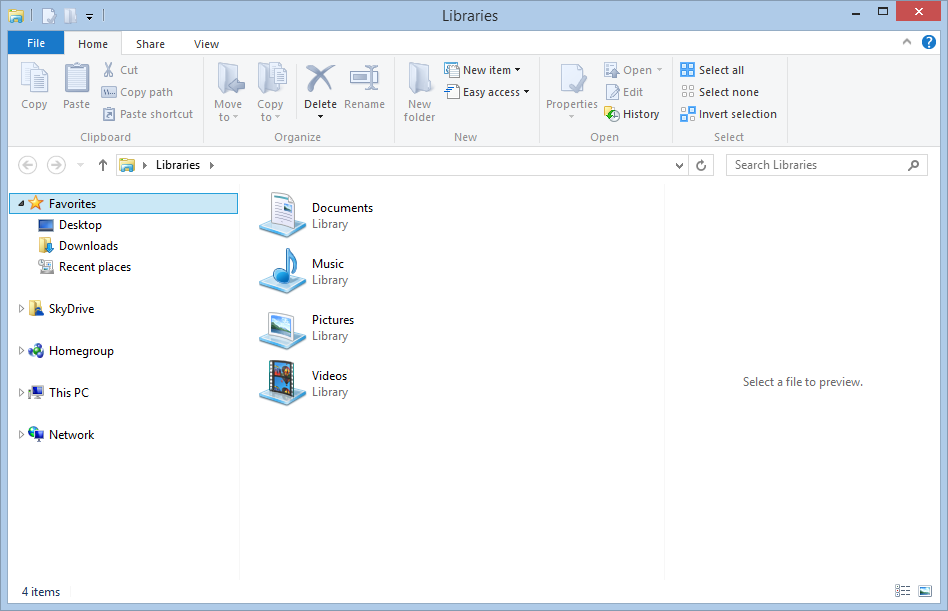
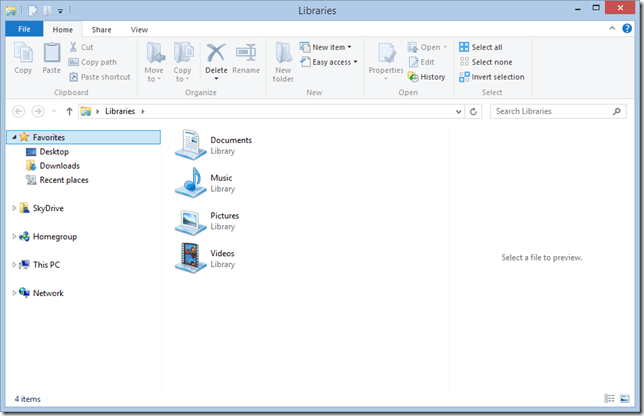
    In Windows 8.1, the emphasis has been put on SkyDrive as the primary storage location. Take a look at the traditional Desktop Windows Explorer in Windows 8.1. Here’s what you see when you first open it up:
    Win81 12

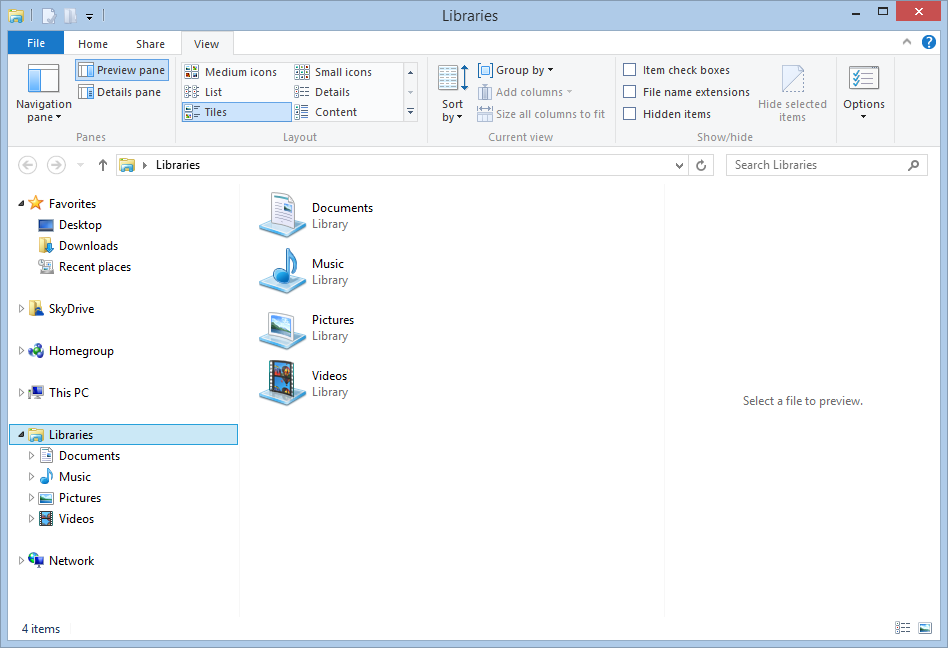
    Look at the Navigation Pane on the left. Note the prominence of SkyDrive, and the fact that what was called “Computer” in Windows 7 and 8 is now called “This PC”. Notice anything else? Yup – there’s no entries for the Libraries in the Navigation Pane. There is an option in the Explorer to turn them on, but it is off by default. Here’s what I wanted to see:
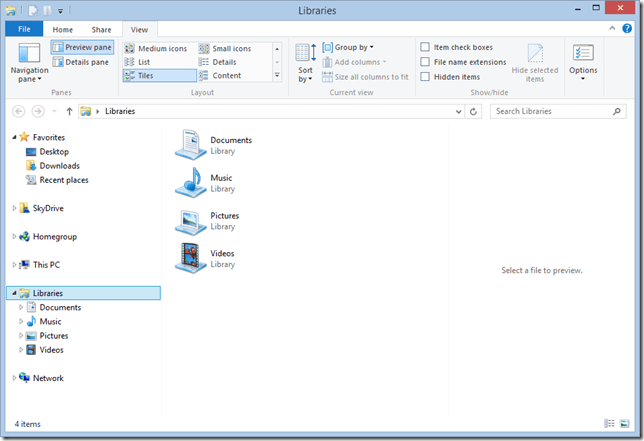
    Win81 13

    The Libraries feature is still there and working in Windows 8.1 – it’s just that not all Microsoft’s Modern UI Apps bother with it.

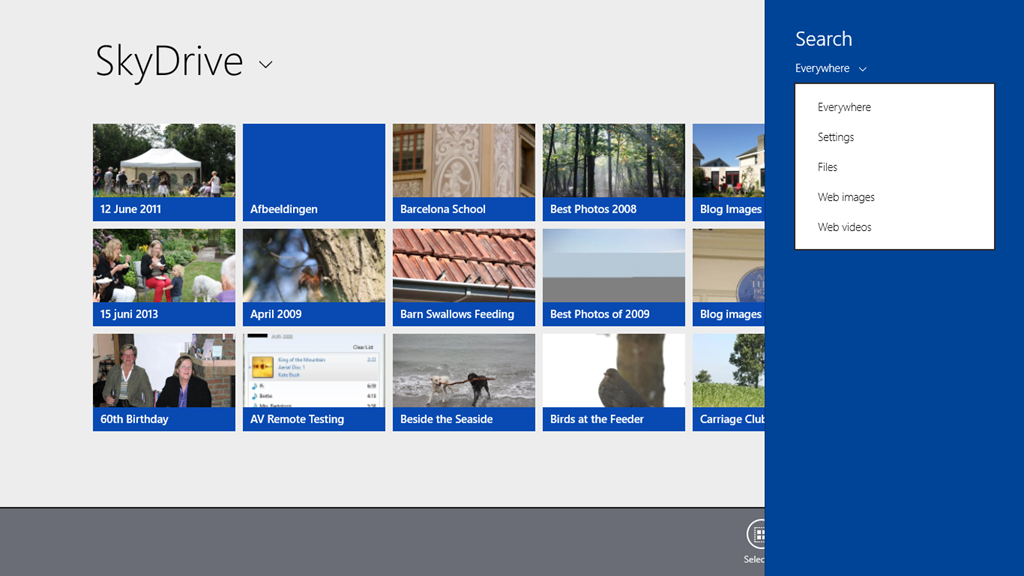
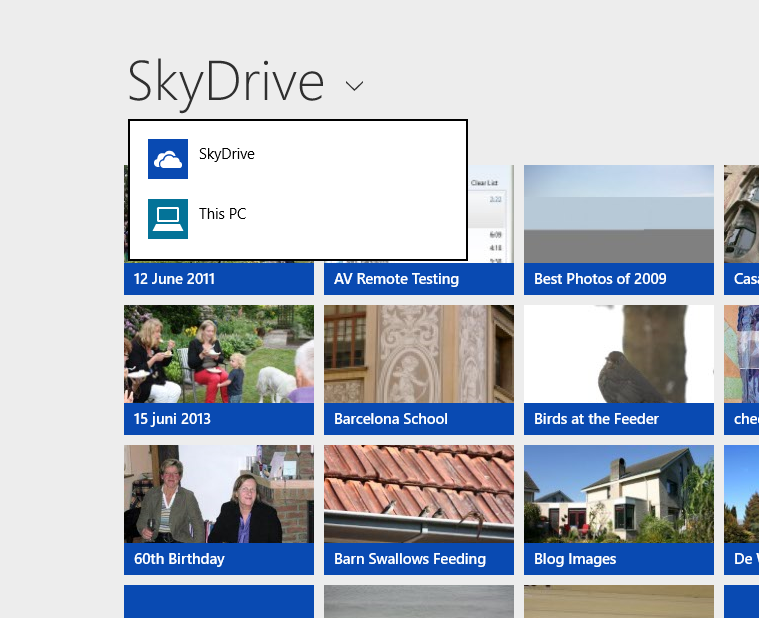
    For example, the SkyDrive App is clearly the first iteration of what is likely to become the Modern UI equivalent of the Windows Explorer, and its top-level entry points for accessing storage are “SkyDrive” and “This PC”; there are no “Libraries”or “Network” entries here:
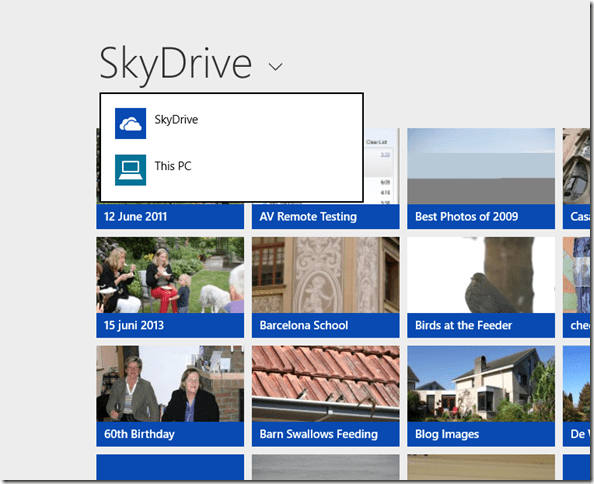
    Win81 02a

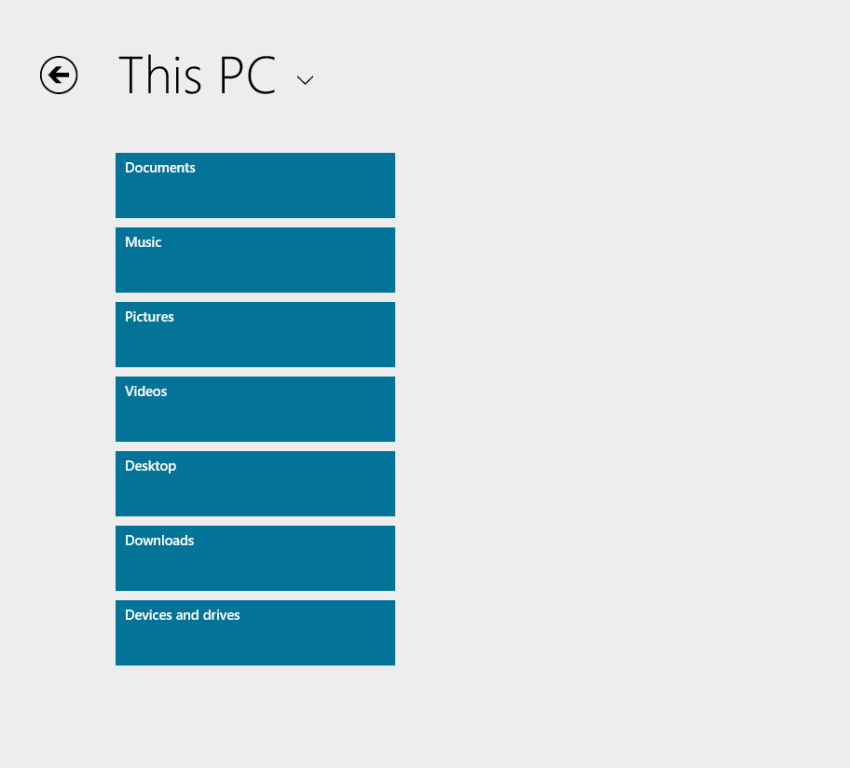
    Choose “This PC”, and you are presented only with the local storage locations; again, no Libraries or Network entries.
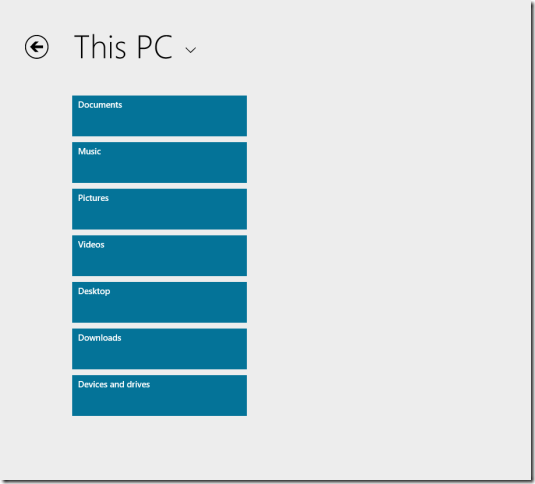
    Win81 03a

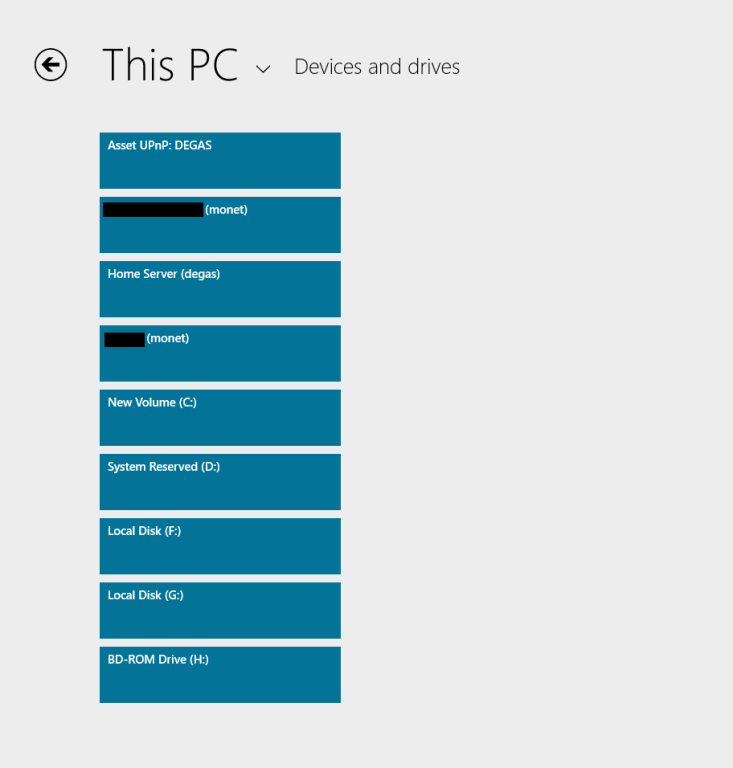
    There is that “Devices and drives” item at the bottom of the list; click (or touch) that, and you see a list of the local drives on the PC, and the media servers present on the local network:
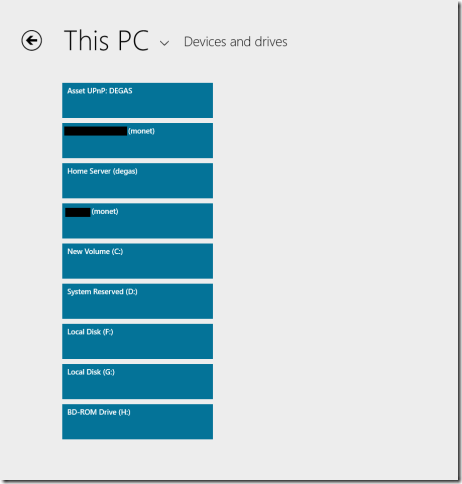
    Win81 10a

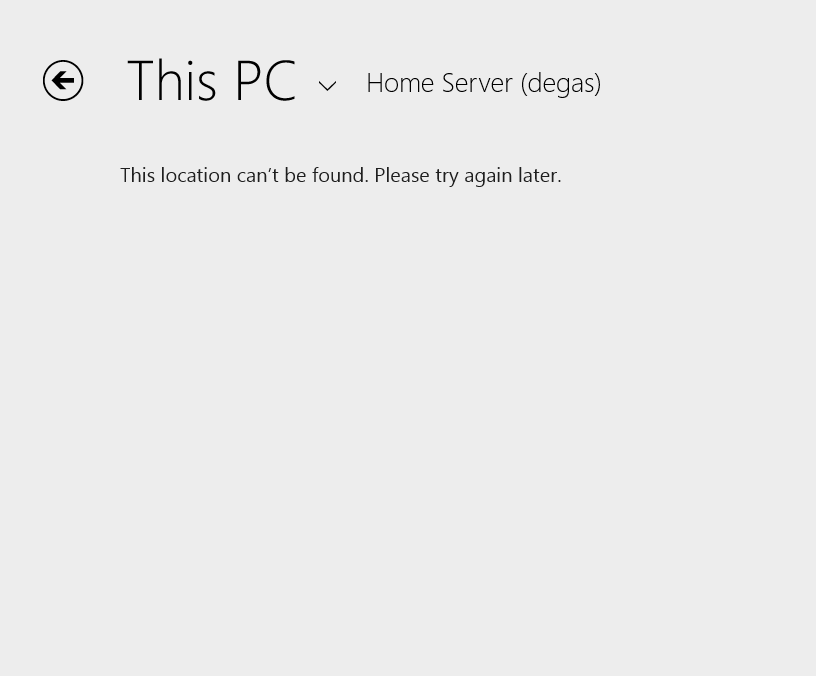
    So, “Libraries” are not exposed at all via this Modern UI Explorer… And we are still not out of the woods, because if I click on the “Home Server (degas)” item, this is what I see:

    Win81 11a

    Sigh. And yes, I’ve tried later, and there’s still no result. The Modern UI Explorer only works with SkyDrive and local storage on your PC – it ignores Libraries and Network Attached Storage – including Microsoft’s own Windows Home Server.

    It’s the same with the Photos App, except that it seems to be even more limited. It will only ever display photos held on the local PC in the C:\Users\Username\Pictures folder.

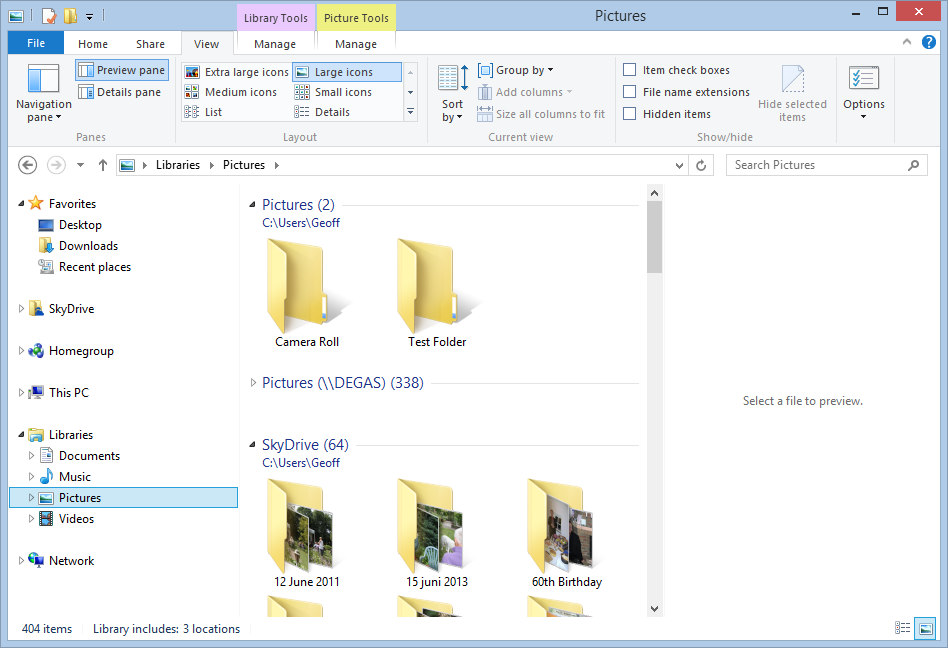
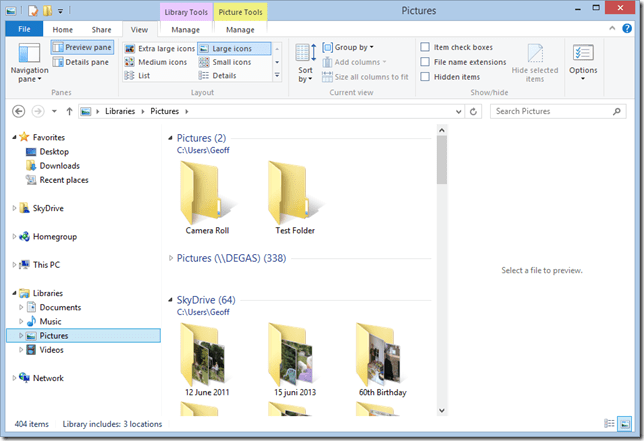
    Whereas the current Windows 8 version of the Photos App will display photos held in Picture Libraries, SkyDrive, Flickr and Facebook, the 8.1 version of Photos App will only display photos and folders held in the C:\Users\Username\Pictures folder. Here, for example, is what I have in my Pictures Library in Windows 8.1:
    Win81 14 

    I have three locations defined for the Pictures Library:

    • C:\Users\Geoff\Pictures (with two folders: Camera Roll and Test Folder)
    • \\Degas\Pictures (with several hundred top-level folders and 50,000+ photos)
    • C:\Users\Geoff\SkyDrive (with 64 folders)

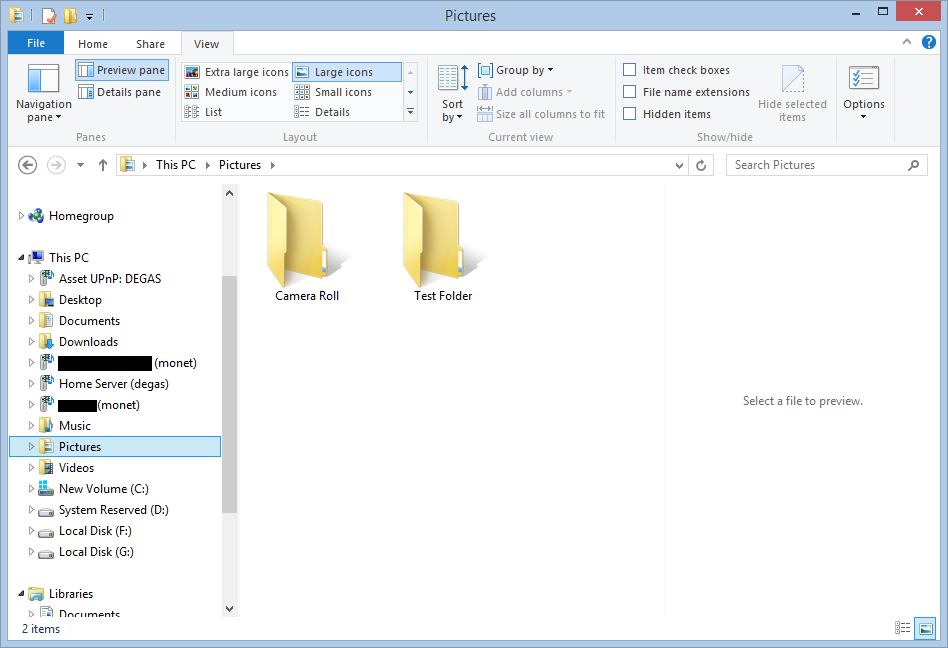
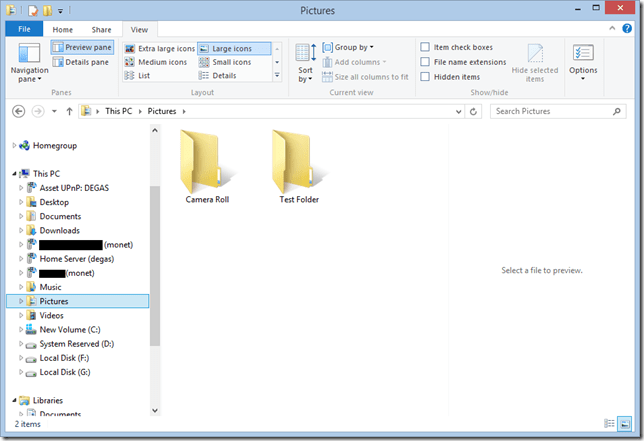
    If I open up the 8.1 Photos App, all I see are the two lonely folders in C:\Users\Geoff\Pictures:

    Win81 19

    So the Photos App is simply looking in the “This PC” hierarchy, and just picking up the local Pictures folder:
    Win81 18

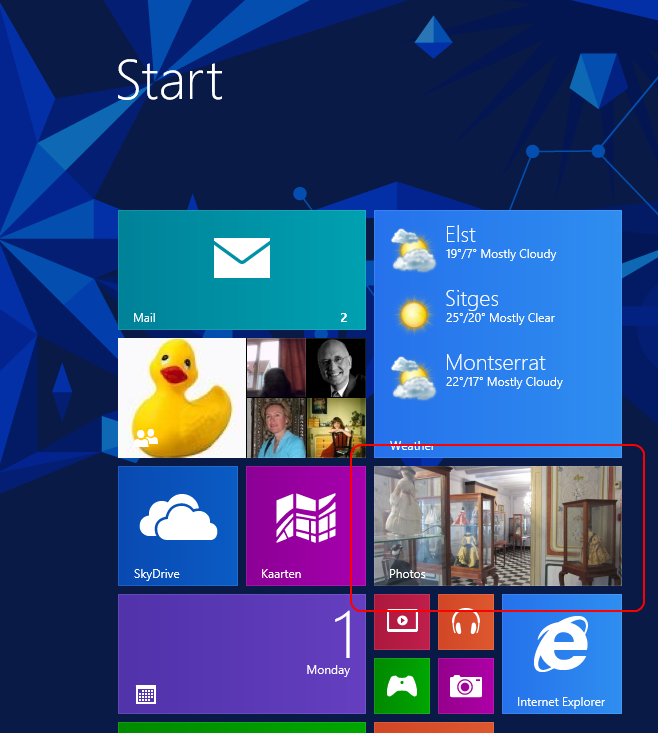
    This is useless. What is bizarre is that the live Tile for the Photos App is showing random photos from the Pictures Library, whilst the Photos App itself cannot:

    Win81 20

    The limitations of the Photos App have been raised by Barb Bowman on the Windows 8.1 Preview forum. Quote:

    The Photos App has changed:

    1. No longer includes the ability to show images from Facebook, Flickr, SkyDrive

    2. No longer allows images from other computers or the network –  am guessing that because there is now support for SkyDrive on RT and MS is heavily emphasizing that as the preferred storage location (when you upgrade, one of the questions asked before you even get to the desktop is if you want to use SkyDrive as your default storage area – and that seems to be the default – and MS feels the network, NAS, Homegroup, and other computers are deprecated.

    This got a response from Carmen Zlateff, a Principal Lead Program Manager on the Photos App team, who said in respect of point 1:

    Thanks for the feedback, everybody.  In Windows 8, we wanted to provide a way for folks to view their photos on other services knowing there would be few (if any) apps in the store at launch that would do so.  Now there are many apps in the store that offer ways to view photos on other services and soon there will even be a Facebook app from Facebook.  We’re confident Facebook will offer great ways to view and engage socially with photos on Facebook.  We welcome Flickr to do the same.  In addition, the People app still offers the ability to socially engage with your friends and even your own photos.

    Needless to say, this reply was treated with the contempt it deserves. Whether it will result in any change on Microsoft’s part, we shall see. I’m not holding my breath. And I fear that Microsoft is going down the path that there is only Cloud storage (i.e. SkyDrive) or local storage (i.e. This PC).

    To summarise:

    • I hold all my media on a Windows Home Server, and expect to be able to access it from devices (including DLNA devices) on my home network.
    • I have too much data for an affordable use of SkyDrive, and besides, internet access is like a piece of wet string in my location.
    • This is a massive jump backwards.

    9 responses to “Windows 8.1 Preview – Part II”

    1. […] ← Windows 8.1 Preview – Part II […]

    2. Nicholas Thompson Avatar

      I’m living in sparsely populated Sweden where many people still don’t have access to fibre-optic broadband or, where it is available in the street, it is prohibitively expensive to connect to from the apartment or house. So mostly we have coax broadband where the maximum upstream speed in 1mb even when we enjoy 25mb or more downstream speeds. So how the f.. can we make use of Skydrive in any meaningful way when we have this kind of upstream speed? Furthermore I have photos and videos of over 150GB’s on my various hard drives at home so I’m into libraries in a big way and for the next few years I’d guess. The assumption MS seems to be making is that we consumers (the little people) all enjoy terrific upstream and downstream broadband speeds and of course this is a long way from the truth. Skydrive prominence is coming far to early for us.

    3. Andrew Macaulay Avatar
      Andrew Macaulay

      Need to get Microsoft to listen about Libraries. If anything the new UI and new explorer to make libraries even more discoverable and usable – rather than hiding them away. Even third party explorer replacements in the store allow them to use libraries.

    4. Toby Avatar
      Toby

      I created a second partition on the main hard drive to hold my data and made it the default location for docs, pics, music, etc. The photos app is so backwards that it can’t access any of my pictures just because they are on a partition other than C, even though they are on a local drive that is the same physical drive as windows. I’m not paying to upgrade Skydrive storage and why would I want to clog up my C drive with photos which I would lose if I had to reinstall Windows from scratch. Putting photos on C would also increase the size for backup images of the C drive. I’m more likely to uninstall or unpin all Modern UI apps and change the settings to boot to the desktop and install a third party app to make start work the way it used to rather than being forced to pay for an upgrade of Skydrive.

      1. Geoff Coupe Avatar

        I’ve now got the final release of Windows 8.1 installed on all my systems, and, like you, I’m finding that Microsoft’s Photos App can’t access pictures held on an SD card – even though it is defined in a Library location. Other Apps have no problem about accessing the same folders. Frankly, the Photos App is a disaster zone.

    5. Toby Avatar
      Toby

      Sorry to double post, but I’ve found almost as much frustration with the Music app. According to Windows Media Player, I have 2,685 songs, 266 artists, and 464 albums in my collection. According the the Music App, I have 2,126 songs, 5 artists, and 7 albums in my collection. Most of the songs that it found are categorized as being from an unknown artist and an unknown album.

      1. Geoff Coupe Avatar

        Make sure that the Music App has the “Automatically retrieve Album art and metadata from the internet” preference switched off. I think that this is why you are seeing incorrect results. Mind you, if it was switched on, then it has probably also screwed up your carefully edited metadata as well…

        1. Toby Avatar
          Toby

          Thanks. I used MusicBrainz Picard to retag all my music and that seemed to work. I will have to turn off “Automatically retrieve Album art and metadata from the internet” before it screws it up again. I also found a solution that seemed to fix my photo app not seeing the D partition of my hard drive. I already had the default Windows 8 pictures pointing to the pictures folder on my D drive. I had to right-click pictures on the D drive and go to the security tab, disable inheritance, make my account on Windows 8.1 the owner, give it full control, add System to the group or usernames, give it full control, and apply the permissions to all the subfolders by checking “Replace all child object permissions with inheritable permissions from this object” and clicking apply. I have no idea if this would work for an SD card and have no idea if setting permissions for a folder in the SD card like this would mess things up when you put it back in your camera.

          1. Geoff Coupe Avatar

            As a result of messing with the display driver on my Tablet, I bricked it, and had to restore the OS files from an earlier restore point. Then I found that the Photos App was able to deal with my pictures stored in the Library location on my SD card… Go figure…

    Leave a comment

  • Postcards From Spain

    We’re just back from a week in sunny Sitges. We were first there 25 years ago, and stayed in the amazing Hotel Romantica. This time, we hired an apartment from SitgesHolidayAccommodation (thanks, Brian and Ryan!), and were equally at home.

    Sitges is a seaside town, outside of Barcelona. It has charm, and it is a holiday destination for both Spanish families, and a high proportion of gay men from all over Europe.


    Twenty-five years ago, and we would have been out on the gay beaches and in the gay bars each and every day and night. This time, we were content to stroll around, enjoying the sights and eating out in the many restaurants. We particularly enjoyed the restaurant by the pool in the gardens of the hotel Xalet, which has been stunningly restored.

    I took a day out to travel to the monastery on the Montserrat mountain (Martin lazed on the beach). I went to see the panoramic views from the mountain and its geology, not to bend the knee at the Black Virgin, I hasten to add.


    Once I’d arrived, via the cable car, I took the funicular further up the mountain. I walked around for a couple of hours, and then walked back down to the monastery. Almost invariably, the people I passed on the way down, were Polish Catholics making a pilgrimage on foot to the peaks.

    When leaving the mountain, I had a l’esprit de l’escalier moment.  I had arrived at the cable car station ahead of time, to ensure a place. In fact, I was the third in the queue. I was joined shortly by a Polish family, a mother and a young boy, accompanied by another woman with children. The mother did not have tickets for the return journey, so she went to the ticket office, which was shut for lunch and waited for it to open.

    Meanwhile, other passengers trickled in and formed a queue to wait for the cable car. The ticket office finally opened just before the departure of the cable car, and the mother purchased her tickets. She then attempted to move to the head of the queue to rejoin her child. She got halfway before she was forcibly stopped by another Polish woman who refused to let her move forward. It was clear that this woman did not approve of what she viewed as queue-jumping. In vain, the mother, and others, attempted to explain that she had been there earlier, but was forced to wait for the ticket office to open.

    In the end she managed to give a ticket to her small child and told him to wait for her to travel on the next cable car.

    I was sorry that I could not point out in Polish to the angry woman that her behaviour toward to the mother was neither Catholic nor Christian. My l’esprit de l’escalier moment came later whilst descending on the cable car. I realised that I should have given up my place in the queue to the mother and caught a later cable car and train. This godless atheist would then have demonstrated to the angry Catholic woman what Christianity should be…

    I returned to Sitges ruminating on how easily we hit out at others, and how easily we fail to offer support to them.

    One response to “Postcards From Spain”

    1. Mark Avatar
      Mark

      Looks like amazing places! Wish I could go sometime

    Leave a comment

  • Windows 8.1 Preview

    Microsoft has released a pre-release version of its next Windows operating system: Windows 8.1. Being a pre-release, it is of course not finished, and comes with all sorts of health warnings. Despite this, I, like thousands of others, am keen to take a look at it.

    When the Customer Preview of Windows 8 came out in February 2012, I installed it as my main operating system on my desktop PC, overwriting the running Windows 7 OS. Microsoft gave similar health warnings back then about using the Customer Preview as the main operating system. Nevertheless, I felt confident enough to go ahead and do just that.

    Fast forward 18 months or so, and I need to make a similar decision, by choosing between one of several options to installing the Windows 8.1 Preview:

    1. Installed as my main operating system on my Desktop PC.
    2. Installed alongside Windows 8 in dual boot mode on my Desktop PC.
    3. Installed in a Virtual Machine on my Desktop PC.
    4. Installed on my Lenovo ThinkPad Tablet 2.

    Option 4 was in fact my first thought, but then when I went to Microsoft’s Download page, I noticed:

    Important: Windows 8.1 Preview isn’t currently supported on some tablets and PCs with newer 32-bit Atom processors.

    Sure enough, that includes the Lenovo ThinkPad Tablet 2. Oh well, that rules option 4 out. As an aside, it is clear that many people don’t bother to read before downloading and installing the 8.1 Preview – I’ve seen many posts from people complaining that the Preview is not working on their Atom-based machines…

    Option 3 is doable, but I’m a simple soul, all this new-fangled stuff of Virtual Machines has never really appealed to me. Which leaves the safe, but boring, option 2 or the high wire act of option 1.

    I know that if I choose option 1, then if anything goes wrong, I can restore my PC using the backups held on my Windows Home Server. However, I also know that when Windows 8.1 is finally released, I will have to do a complete fresh install of the operating system and all my applications and data.

    I’ll think it over for a day or two, monitor the forums for any issues that are emerging and then make my decision.

    Update 30 June 2013: Well, I tried option 3, but I found it a bit limiting. Too many hardware devices couldn’t be added, and the virtual PC could not see my home network, and therefore couldn’t access my home server.

    I didn’t feel comfortable about the risks of option 1, and thus I’ve gone with option 2. I’ll report my findings in a day or two, but one thing stands out: the 8.1 version of the Photos App is an absolute fecking disaster.

    3 responses to “Windows 8.1 Preview”

    1. Peter Ferguson Avatar
      Peter Ferguson

      I will go option 3 when I have read that others have gone down this path with ease. Hyper-V (Client Version) is easily started in Windows 8 and I use it to test programs in both W8 and W7 VM’s. Don’t see why it won’t run W8.1

    2. Ludwig Avatar

      As you have seen on my blog, my choice is option 3 – virtual machine. I have enough memory on my PC so I can run several VMs next to each other and compare, make screen captures, etc.

    3. […] I’ve now installed the Windows 8.1 Preview on my Desktop PC; I went with the safe and boring option 2. […]

    Leave a comment

  • The Last Interview

    I’m returning, once again, to the subject of Iain (M.) Banks and his all-too-soon departure from the world. The reason is this interview – perhaps the last he gave before his death.

    Let it be noted that I stand in awe of this man. His humanity, his wit, his clear-sightedness and his self-deprecation are something that I would wish to emulate, but know that I would fall far short of.

    It’s a good interview of a good man. Go and read it. Some key passages:

    His political zeal burns equally ardently. He confesses that “for half a second”, as he and Adele travelled across the Alps from Venice to Paris on honeymoon, he was “elated” when he heard that Thatcher had died. “Then I realised I was celebrating the death of a human being, no matter how vile she was. And there was nothing symbolic about her death, because her baleful influence on British politics remains undiminished. Squeeze practically any Tory, any Blairite and any Lib Dem of the Orange Book persuasion, and it’s the same poisonous Thatcherite pus that comes oozing out of all of them.”

    We reminisce about other significant turning points. Blair entering Downing Street: “Watching the helicopter shots of his car journeying from Islington to Buck House was like witnessing the liberation of a city … yet almost immediately he was having tea with Thatcher. My injured self-respect can at least fall back on the fact that I never voted for New Labour – Labour yes, and nothing but Labour for as long as it existed and I could vote, but not for a party that embraced privatisation and refused to scrap nuclear weapons; not for a party slightly to the right of Ted Heath’s government.” As for the war on terror, there is palpable fury when he discusses “the great lie that our boys are fighting, killing and dying in Afghanistan to keep us safe. It’s 180 degrees off the truth. They’re dying worse than needlessly; they’re dying to save political face, and for every grieving or just aggrieved Afghan family we create the conditions for further atrocities to be visited on us.”

    I won’t miss waiting for the next financial disaster because we haven’t dealt with the underlying causes of the last one. Nor will I be disappointed not to experience the results of the proto-fascism that’s rearing its grisly head right now. It’s the utter idiocy, the sheer wrong-headedness of the response that beggars belief. I mean, your society’s broken, so who should we blame? Should we blame the rich, powerful people who caused it? No let’s blame the people with no power and no money and these immigrants who don’t even have the vote, yeah it must be their fucking fault.

    Leave a comment

  • Good and Bad Shorts

    I occasionally peruse the io9 web site. Occasionally, because, quite frankly, I find it a bit tiresome. It just seems a bit over the top and too much in love with itself.

    Here, for example, is the piece on R’ha, which exhorts us to watch the short film. Well, I did, and it struck me as the sort of thing a male teenager in the grip of his hormones might do. Portentous, limited, and ultimately something that I would not want to engage with. Technically well-realised; but intellectually, a single note plucked on a well-worn string.

    Then again there’s Mama. This has more meat on its bones. But whether it can be stretched out into a full length feature, I have my doubts. I’ll wait and see.

    2 responses to “Good and Bad Shorts”

    1. Matt Healy Avatar
      Matt Healy

      While the plot was derivative and predictable, the animation was very impressive for one person. In collaboration with good writers, directors, and actors this guy might do great things. There is an interview with him here:
      http://onesmallwindow.com/interviews/interview-with-kaleb-lechowski-the-director-of-rha/

      1. Geoff Coupe Avatar

        Yes, as I said, technically well-realised. Thanks for the link to the interview.

    Leave a comment

  • Thank You, Iain Menzies Banks

    There’s been a slight disturbance in the Force (otherwise known as the internet) the past couple of days.

    A Scottish author, beloved by many – and me – has recently died. Far too soon, and with too many stories yet untold.

    I’ve been reading the many tributes left to him by fans and fellow-writers alike.

    I find it strange and intriguing how much his death has affected me. I never knew the man, never met him, and yet somehow his death has caused tears to spring unbidden to my eyes. God forbid that I’m having a Princess Di moment. I would like to think that my sorrow is caused simply by the fact that he was, by all accounts, a good man, and his voice has been stilled far too early.

    He wrote in both major and minor keys. For the snobs, the major keys were his “mainstream” literary works; such as The Wasp Factory and Complicity.

    But, great though they were, for the rest of us, his so-called “minor”works – his SF novels – were the real thing. He wove an entire civilisation – The Culture – spanning multiple worlds and thousands of years. And he made it real. As Ken MacLeod wrote:

    He likened writing literary fiction to playing a piano, and writing SF to playing a vast church organ. Squandering the “unlimited effects budget” of his imagination on the vast scale of SF was always, by a small edge, the greater joy.

    It’s difficult to choose one passage from all his work that stands for him and what he said to me. But I think it has to be this, from Against A Dark Background:

    Sorrow be damned and all your plans. Fuck the faithful, fuck the committed, the dedicated, the true believers; fuck all the sure and certain people prepared to maim and kill whoever got in their way; fuck every cause that ended in murder and a child screaming.

    Amen.

    3 responses to “Thank You, Iain Menzies Banks”

    1. David Broster Avatar

      I couldn’t agree more. I also shed a tear and decided to load ebooks for my upcoming holiday and will re-read the banksy stuff

      1. Geoff Coupe Avatar

        I’ll be packing a few paperbacks, and leaving the hardcovers at home…

    2. […] another connection with my past or present has gone. Most of the time they are of somebody famous, a well-known author perhaps, whose work has influenced me, but with whom I have had no personal […]

    Leave a comment

  • Damn

    Another inspiration is stilled.

    Leave a comment

  • 18 Arguments Against Gay Marriage

    The New Statesman’s Caroline Crampton lists 18 arguments voiced today in the UK’s House of Lords against same-sex marriage.

    All the usual suspects are there, including the new Archbishop of Canterbury. I can’t say that I’m surprised by his stance. Religion poisons pretty much everything.

    I suspect that very similar arguments were once made against the abolition of slavery.

    Leave a comment

  • The Swapper

    That’s the title of a new game for Windows. It’s a series of puzzles woven around the story of an astronaut who comes into possession of a cloning device.

    It has beautiful visuals, literally hand-crafted from clay and everyday objects, and an intriguing storyline. The idea of cloning, and transference of consciousness between clones, has a long and deep philosophical history. Derek Parfit’s Reasons and Persons, with Daniel Dennett’s and Douglas Hofstadter’s The Mind’s I are excellent places to continue the exploration of self and consciousness.

    Forget first person shooter games, this is the sort of thing that I can engage with. Highly recommended.

    Leave a comment

  • Photo Metadata

    The BBC’s News web site has a video report on photo metadata. It’s a fairly good introduction to the topic, and worth five minutes of your time.

    The reporter, Ian Hardy, makes the point that your grandfather’s photos often had some explanatory text written on the back of them – and that’s the metadata. In today’s digital world, the vast majority of images are being created with technical metadata (camera type, shutter speed, etc.) but often without any information on who is in the picture. The situation is not being helped by the new generation of social media web sites or mobile Apps for smartphones, Tablets or iPads that do not support management of metadata, or even worse, strip it out.

    I’m a firm believer in the value of metadata. Unfortunately, at the moment, it’s a minefield, with competing and conflicting standards and poor, faulty, or non-existent support in applications and online services. Things can only get better, but there’s no guarantee that they will.

    Leave a comment

  • You Say Tomayto…

    …and I say tomahto

    The Beeb has a new series of historical programmes being broadcast under the portmanteau title of Life and Death in the Tudor Court.

    Last Thursday saw the broadcast of The Last Days of Anne Boleyn, and what a rich plum pudding of a programme it was. It had a collection of historians and novelists – big guns, such as David Starkey and Hilary Mantel – battling it out over whose interpretation of the facts – as far as they are known – were the real McCoy. I thought it was absolutely riveting. The programme makers interviewed the experts individually, and then cut between them so that it was very apparent that history is fluid, and the truth is never as clear-cut as some would like to profess. The cut-and-thrust between the experts was excellently done, and pointed up the fact that history is never cut-and-dried.

    The following night, we had professor Diarmaid MacCulloch covering much the same ground with his examination of the rise and fall of Thomas Cromwell.

    Unfortunately for the good professor, having seen how interpretations of the players in the Tudor Court were presented and interpreted by a gallery of experts on the previous night, I was far less ready to go along with his thesis. I kept wondering how his fellow historians might have wanted to present a somewhat different picture.

    And then there was his pronunciation of the name of Anne Boleyn. The previous night, all the assembled experts had said Anne Bowlin, just as I’ve always thought of it. And now here was the good professor calling her Anne Bollin. I’m sorry, but something is not right in the state of Denmark…

    You say potahto, and he says potayto – let’s call the whole thing orff.

    Leave a comment

  • Photo Editor Apps

    My needs are fairly simple when it comes to a tool to edit digital photos. I don’t need all the bells and whistles of an Adobe Photoshop, just something that I can use to crop, resize, or adjust the contrast or colour balance of an image. Very occasionally, I need to to be able to make a cut-out mask of part of an image and paste it into another. For example, in this blog’s header image (which changes with the seasons), you can see our two dogs sitting in front of the house. They are always there, whatever the season, and that’s because their image has been pasted in to each of the seasons’ images.

    The features of Microsoft’s Windows Photo Gallery are the sort of thing that I have in mind (although it doesn’t handle masks), but I found out a long time ago that it corrupts image metadata. In particular, it destroys Canon’s Makernotes, which are stored in the Exif metadata of images made using my Canon cameras. Despite reporting this to Microsoft over two years ago, and Microsoft acknowledging that there is a bug, this still hasn’t been fixed. In fact, the same bug is present in Microsoft’s Photos App, built for Windows 8.

    For this reason, I only use Windows Photo Gallery to stitch together panoramas – it is very good at that – and don’t use any other of its editing tools. I also don’t use it to modify image metadata, because whenever Photo Gallery writes back metadata into the image file, it will corrupt the Makernotes. For editing and metadata work, I use Photo Supreme. It is excellent for metadata, and the image editor is good enough for my simple tasks. When I need to use masking, then I fire up the ancient, and long since withdrawn, Microsoft Digital Image Pro 10. As an aside, I often wonder why on earth Microsoft dropped this product. It certainly outshines any of their current digital imaging products…

    Anyway, I was curious to see whether there was an easy to use photo editor available for the Windows 8 environment. At the moment, there are over 700 Apps listed in the Windows Store under the Photo category.

    Photo Apps 02

    Admittedly, some of those listed are Desktop Apps, designed to run in the Windows 7 Desktop environment, but the vast majority are built as Modern UI Apps for Windows 8.

    Last month, there was a post on Microsoft’s Windows Experience Blog that listed, and recommended, four Modern UI photo editor Apps. These were:

    I took a quick look at three of the suggestions (Fotor, Fhotoroom and Perfect365), and they all seem to strip out all metadata from a saved image, Exif and XMP. This is not useful, and completely contrary to the guidance from the Metadata Working Group, of which Microsoft is one of the founding members. As far as I’m concerned, that rules out any of these applications for me.

    Today, I saw that Adobe has made their Photoshop Express available as a Modern UI App for Windows 8, so I’ve taken a quick look.

    Photo Apps 01

    Well, on the positive side, it preserves metadata, and doesn’t corrupt it, so that’s a step forward from Microsoft’s efforts. However, it is still very limited in what it can do, and it has at least one irritating quirk all of its own. In this list of capabilities, unless otherwise stated, you can take it that Windows Photo Gallery (WPG) and Photo Supreme (PSU) can match the features listed.

    • It can crop and resize the image, with or without ratio guides.
    • It can rotate the image in fixed 90 degree increments (PSU can also handle free rotation, with or without cropping).
    • It can flip the image (WPG cannot).
    • It cannot resize the image resolution (WPG and PSU both can).
    • It can adjust (both manually and auto-fix) contrast, exposure and white balance, and apply preset filters.
    • It can remove Red Eye (PSU cannot).
    • It can heal images (WPG cannot).
    • It cannot handle masks and image layers (neither can WPG or PSU).
    • It cannot handle RAW images (PSU can, while WPG can only display them)

    Interestingly, it looks as though the App is extensible. You can add paid-for filters. So it’s possible that some of the limitations may be overcome in the future.

    And what of the irritation?

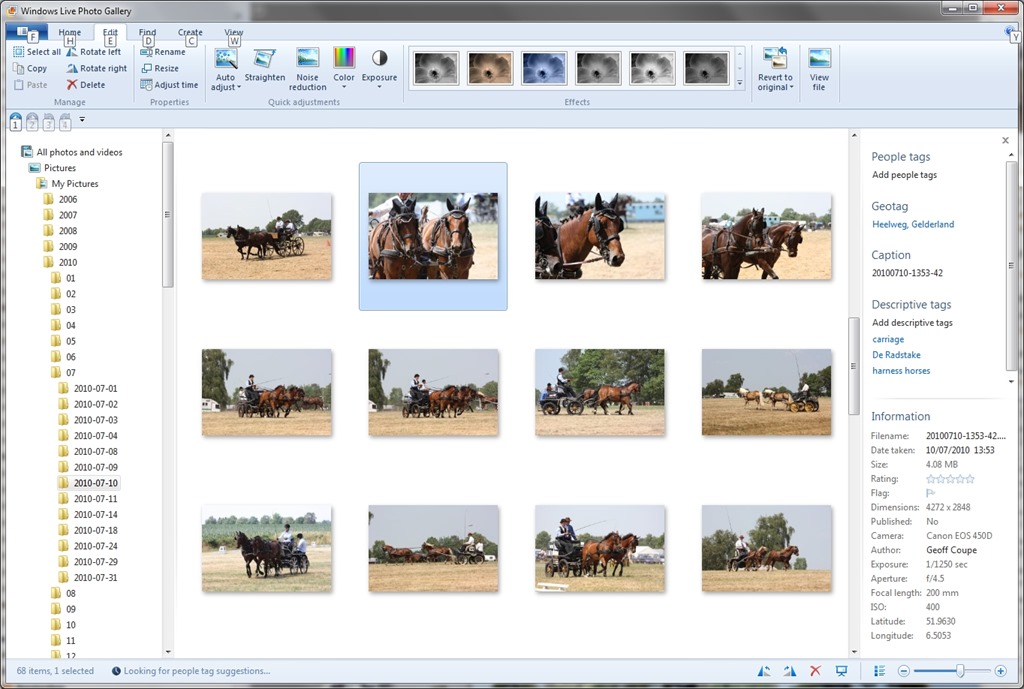
    Well, I don’t know whether the App is saving images at full quality, or whether it is applying compression. As a test, I took an original JPEG image that was 6.82 MB in size, and used the App to save a copy (no changes were made). The resulting copy was 4.08 MB in size. I suspect that some compression has been applied, but I have no way of telling how much, or more importantly, be able to save with no compression. That I do not like in an application.

    I also get slightly irritated by the fact that I can only save to one online Cloud storage service: Adobe’s own Revel. Fine, but I want to use my existing (and free) SkyDrive storage, rather than have yet another service to deal with.

    So in summary, all I can say is that Adobe’s Photoshop Express has promise, but it is not yet at a stage where I will drop my other digital image editor tools in its favour. Ask me again in a year.

    Addendum: I asked on an Adobe forum whether I could stop Photoshop Express from compressing my images. The answer is no, and that’s apparently by design.

    Also, I raised the issue of metadata being stripped out by Fotor with their support people. I had a response in which their programmer confirmed that Fotor does not save all of the Exif metadata in edited images. Unfortunately, he also seemed to be completely unaware that there are other types of image metadata besides Exif – and these are equally important to photographers.

    This link http://www.photometadata.org/META-101-metadata-types has an easy to understand introduction to image metadata.

    As it stands, Fotor is not a suitable tool for any photographer who cares about preservation of image metadata. The same seems to be true for many of the photo Apps currently available.

    10 responses to “Photo Editor Apps”

    1. Mark Avatar
      Mark

      Very interesting post. I’m at the point where I need a new free/low cost editor. My Photoshop CS3 will not run under Win8 (thanks Microsoft) and Adobe says there is no upgrade path from CS3 to 6 (thanks Adobe) except to simply purchase a new copy at full price and I just can’t justify it.

      I don’t really care if its a Modern UI app or not, but I have yet to find ANY ModernUI apps that have a decent feature set so I’m looking at desktop apps. Paint.NET has been recommended by many, any thoughts on it?

      1. Geoff Coupe Avatar

        Mark, I use Paint.NET frequently; but not as an image editor. I use it to adjust resolutions and crops of screenshots, and to add annotations onto screenshots. I find it very good for that, but I’ve not used it as a photo editor tool.

      2. Geoff Coupe Avatar

        Mark, have you tried this to get CS3 to run under Windows 8?

        How to Solve Photoshop CS3 Compatibility Issues with Windows 8

    2. Matt Healy Avatar
      Matt Healy

      For light image editing I still use Microsoft Photo Editor, which came with versions of MS Office through XP (I think they dropped it with Office 2003). Under Windows 7, it crashes whenever I try to open or save a file so I use the kludge of copying from Paint into Photo Editor, editing there, then copying back to Paint and saving there. I suppose it won’t work at all under Windows 8; I shall miss it after two decades of daily use!

      When I need a high powered image editor, I use the Open Source tool Gimp.

    3. […] The reporter, Ian Hardy, makes the point that your grandfather’s photos often had some explanatory text written on the back of them – and that’s the metadata. In today’s digital world, the vast majority of images are being created with technical metadata (camera type, shutter speed, etc.) but often without any information on who is in the picture. The situation is not being helped by the new generation of social media web sites or mobile Apps for smartphones, Tablets or iPads that do not support management of metadata, or even worse, strip it out. […]

    4. michaelfanous Avatar

      Hi Geoff,

      i am very happy that I came across your blog, I recently started trying to organize my photo albums, which are stored across several external devices. (Trying to organize over 50,000 photos). I am not a professional photography by any means. However, I am the “family/event” historian so to speak, so I love documenting and taking pictures of everything. I wanted to know your thoughts are current software out there? Lightroom 5, Photo Gallery (Windows), ACDSee, Picasa 3.9.

      My main concern is that all these files will eventually be stored in 1 central location, and the family can access them at their own over the network. However, I want to make sure that all the tagging is accessible across platforms. i.e. No matter which hardware device, or which software, when a user looks at the picture, they can see the tags.

      I remember in the earlier years (which is what caused me to stop for a bit) I would tag something in Windows PG or in Picasa, but the tags wouldn’t transfer over appropriately. I am not so much concerned with actually editing the individual pictures (I am sure that will come later once I am organized)

      The other requirement is that the metadata is stored in the actual file, and not in some random database. The last thing I need is for that external database to get corrupted and lose out all the information.

      Suggestions?

      1. Geoff Coupe Avatar

        Michael,
        Hmm, lots of thoughts, but to come down to a simple answer is probably not possible. For starters, what do you mean a network – are you talking about a local area network, or (more likely) a network that spans family members connected over the internet?

        The simpler the situation, the easier it would be to come to a fairly simple solution, but I suspect that if you’re looking to serve the needs of a far-flung family in the fullness of time, you’re going to have to make compromises.

        I think that your starting point of wanting to have metadata stored in the files themselves is key, and we can go from there. The issue is that, as you’ve found, different software packages don’t always work together. For core metadata, such as descriptive tags, the chances are pretty good, but for stuff such as people tags, different manufacturers take different approaches. For example, Picasa and Windows Photo Gallery both offer people tags, but they don’t really work together yet. See this (old) post of mine for some of the issues: https://gcoupe.wordpress.com/2011/12/10/picasa-versus-windows-live-photo-gallery/

        Tell you what, let me think about this for a bit, and I’ll put down some suggestions in a blog post in the next day or two.

    5. michaelfanous Avatar

      Thanks for the quick response!

      To answer your question concerning the network aspect. The current NAS I have at home is a Synology device. (I am still trying to centralize all my data, very time-consuming) It has an application called Photo Station (still evaluating the tagging abilities). It allows for local area network, and allows for users that I have assigned to access it over the internet. (it allows to control permissions of albums, visibility, etc)

      I look forward to reading your next blog post. Thanks so much!

    6. […] couple of days ago, one of my posts had the following comment and question from […]

    Leave a comment

  • IDAHo

    Since 2004, May 17 has been marked as the International Day Against Homophobia. The Dutch Government is hosting a three day international conference in The Hague on the subject of homophobia at the moment.

    Today, the EU Fundamental Rights Agency published a report on the experience of LGBT people across the EU and in Croatia. It doesn’t make for very comfortable reading. The survey (of 93,000 people) found:

    • Some 26% of respondents (and 35% of transgender respondents) said they had been attacked or threatened with violence in the past five years
    • Most of the hate attacks reported took place in public and were perpetrated by more than one person, with the attackers predominantly being male
    • More than half of those who said they had been attacked did not report the incident to the authorities, believing no action would be taken
    • Half of respondents said they had felt personally discriminated against in the year before the survey, although 90% did not report the discrimination
    • Some 20% of gay or bisexual respondents and 29% of transgender respondents said they had suffered discrimination at work or when looking for a job
    • Two-thirds of respondents said they had tried to hide or disguise their sexuality at school.

    Full details of the report and its findings are here.

    Yesterday, the Netherlands Institute for Social Research published its own report on the situation of LGBT people in the Netherlands. It makes slightly more comfortable reading than the EU report, but we are also likely to be the target of homophobia from the usual suspects within Dutch society.

    Leave a comment

  • “They Were Not A Family”

    I see that my birthplace, the Isle of Man, is still home to some old and ugly prejudice. Kira Izzard and Laura Cull have been refused a tenancy application because they are a lesbian couple. Their landlord, Keith Price, who is a Methodist Minister, stated:

    “We understood that they were not a family so we said we couldn’t proceed [with the rental agreement].

    “We believe that God has a plan for our lives within the context of marriage, the scripture is quite clear in its teaching on this.”

    In the UK, such a refusal would be illegal; unfortunately, the Isle of Man is a Crown Dependency, and not part of the UK, so it makes its own laws.

    Ms Izzard has started a petition to ask the Manx Parliament to support the UK Equality Act 2010 in the Isle of Man. Naturally, I’ve signed it.

    Leave a comment

  • Rewriting 2001

    The Dreams of Space blog has an entry that shows a children’s comic produced in 1968 that ties-in to the release that year of 2001: A Space Odyssey. It depicts two children, Debbie and Robin, being taken to see the premiere of the film by their parents.

    It’s an interesting piece of ephemera, but it does lie about the story. It states that the “repairman” (actually Dr. Frank Poole), sent out to repair the communications unit on the spaceship Discovery, slips and floats away into space. Er, no he didn’t – he was murdered.

    There’s also the obligatory cringeworthy ending in the final panel when Debbie announces that she wants to be a space stewardess when she grows up, while Robin says he wants to be a space pilot. Gah!

    Leave a comment

  • Music In The Cathedral

    The ISS is one of science’s cathedrals. Scientists can also be musicians. Space Oddity has always been one of my favourite songs.

    Commander Chris Hadfield brings it all together. The special effects were all provided by nature. Wonderful.

    Leave a comment

  • Feynman’s Philosophy

    A good video that nicely summarises the philosophy of Richard Feynman, narrated by Feynman himself.

    A key section:

    “You see, one thing is I can live with doubt and uncertainty and not knowing. I think it’s much more interesting to live not knowing than to have answers which might be wrong. I have approximate answers and possible beliefs and different degrees of certainty about different thing but I’m not absolutely sure of anything and there are many things I don’t know anything about, but I don’t have to know an answer. I don’t feel frightened by not knowing things, by being lost in a mysterious universe without having any purpose, which is the way it really is as far as I can tell, possibly. It doesn’t frighten me.

    And so altogether I can’t believe the special stories that have been made up about our relationship to the universe at large, because they seem to be too simple, too connected, too local, too provincial…”

    Amen to that.

    4 responses to “Feynman’s Philosophy”

    1. Al Feersum Avatar

      Hi Geoff,

      I think you might appreciate Pratchett, Cohen and Stewart’s new SoD: http://www.amazon.co.uk/The-Science-Discworld-Judgement-ebook/dp/B00BFTSZUC/ref=dp_kinw_strp_1

      Gives plenty of ammunition against the requirement for faith and belief in favour of hard facts (i.e. science), and the fact that we know we don’t know stuff, and that we don’t know what we don’t know, but this is cool, because it gives us the impetus to find out….

      1. Geoff Coupe Avatar

        Hi Al, thanks for the tip, I’ll add it to the reading list. I’m an occasional Pratchett reader (I think he’s very good), but I haven’t yet picked up any of the new jointly authored books.

        1. Al Feersum Avatar

          Hah! You’re missing out. All the SoD books are damned good – if you’ve ever read any of Stewart and Cohen’s work, then this is more of the same – incredibly accessible science. Pratchett’s addition gives useful reference points.

          And if you haven’t read The Long Earth, what the hell have you been doing?

          1. Geoff Coupe Avatar

            Trying to finish the other 2,465 books in my library 🙂

    Leave a comment